



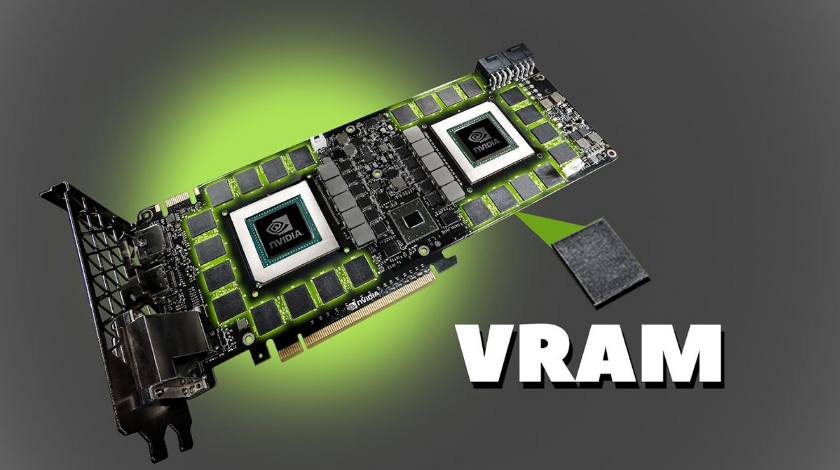
A few years ago, 8GB of VRAM on a gaming GPU was considered generous. 12GB was for enthusiasts. 16GB was overkill unless you were doing professional 3D rendering. That hierarchy made sense at the time and shaped a generation of GPU buying decisions.
It no longer applies.
VRAM requirements have been creeping upward steadily and in 2026 the gap between having enough and not enough has become genuinely consequential in ways it simply was not in 2022 or 2023. If you are buying a GPU now or trying to understand why a perfectly capable graphics card is suddenly struggling in new releases, the VRAM figure is where the answer usually lives.
What VRAM Actually Does
VRAM is the dedicated memory sitting on your graphics card. It is where your GPU stores everything it needs immediate access to while rendering a frame: textures, shadow maps, frame buffers, ray tracing data structures, shader caches, and the geometry of the scene currently being rendered.
The key word is immediate. When your GPU needs something that is in VRAM, it gets it essentially instantly. When it needs something that is not in VRAM and has to fetch it from system RAM instead, everything slows down. The GPU and system RAM communicate over a much slower channel than the GPU uses to access its own memory, and the result is not a clean reduction in frame rate. It is stuttering.
This distinction matters because VRAM problems do not feel like slow performance. They feel like a game that is running at an acceptable average frame rate but lurching every few seconds when moving the camera or entering a new area. You might see 60 frames per second on the counter while the experience feels genuinely unpleasant. The average lies to you. The 1% lows and frame time spikes are where the VRAM problem shows itself.
Why 8GB Is Struggling
The culprit is a combination of factors that have arrived roughly simultaneously.
Modern games are using higher resolution textures than ever before. Unreal Engine 5, which is now the foundation for a significant number of major releases, uses a texture streaming system called Nanite that renders geometry at extremely high detail. Games built on UE5 routinely consume 2 to 4 gigabytes more VRAM than older titles at equivalent visual settings.
Ray tracing adds another layer. When ray tracing is active, the GPU needs to store a data structure called a Bounding Volume Hierarchy, a kind of spatial map that tells rays what objects they might hit as they travel through the scene. This structure alone can add several gigabytes to VRAM usage in complex environments.
Frame generation technologies like DLSS Frame Generation and FSR 4, which create intermediate frames to smooth out motion, require storing multiple frames simultaneously in memory to calculate motion vectors. On a card with 12 or 16 gigabytes this is a non-issue. On an 8GB card, enabling frame generation can push VRAM usage over the limit and produce the very stuttering the technology was supposed to prevent.
The specific titles that have made this visible are not obscure edge cases. Cyberpunk 2077 at 1440p with ultra textures and ray tracing pushes well past 10 gigabytes. Alan Wake 2 at the same settings exceeds that comfortably. Black Myth: Wukong, Starfield, and Hogwarts Legacy all routinely approach or exceed 8GB at 1440p with high-quality settings enabled. These are not unusually demanding games. They are representative of where modern development now sits.
What Running Out Actually Looks Like
There is a misconception that running out of VRAM causes a crash or an error message. Sometimes it does. More often, the game continues running but starts automatically downgrading texture quality to fit within the available memory. You notice blurry textures in areas that should be sharp. The game is compensating without telling you.
When the usage exceeds what the card can handle even after downgrading, the GPU begins accessing system RAM. Performance monitors will show VRAM usage at 100% while the system RAM allocated to the GPU begins climbing. This is when the stuttering becomes severe. What you experience as a gamer is intermittent freezes of a fraction of a second when moving through areas with new geometry or transitioning between zones. It is unmistakable once you know what it is.
Resolution by Resolution: What You Actually Need
At 1080p, 8GB remains workable for 2026 but the headroom is tighter than it used to be. Competitive games and older titles are completely fine. Modern AAA games at high settings are generally fine. Modern AAA games at ultra settings with ray tracing are where you start approaching the limit. If you are gaming at 1080p and intend to stay there for the next two or three years, 12GB is a more comfortable floor that avoids managing settings carefully in every new release.
At 1440p, 12GB is now the practical minimum for playing modern games at high settings. It is enough for the vast majority of current titles without compromise. Enabling ray tracing in the most demanding games will push you toward the edge of that 12GB at ultra settings, and for those scenarios 16GB provides meaningful headroom. If you are buying a GPU for 1440p gaming in 2026 and plan to keep it for several years, 16GB is the genuinely comfortable choice.
At 4K, 16GB is where you need to start. The larger frame buffer required for 4K rendering, combined with higher resolution textures, means 12GB cards begin to struggle in demanding titles at full settings. Path tracing, which some games now offer as an alternative to standard ray tracing, can push VRAM usage past 17GB in titles like Alan Wake 2. For 4K gaming with everything enabled, 24GB is where you have real headroom.
How the GPU Market Has Responded
The GPU manufacturers have largely acknowledged this shift in their 2026 lineups, though not uniformly.
Nvidia's RTX 5070 ships with 12GB, double what the equivalent previous-generation card offered. The RTX 5060 Ti has 16GB variants available. The RTX 5080 comes with 16GB. Nvidia's flagship RTX 5090 offers 32GB for those who need it for 4K content creation or enthusiast gaming.
AMD has been more aggressive. The RX 9060 XT launched with 16GB at mid-range pricing. The RX 9070 XT ships with 20GB. AMD is explicitly betting that memory capacity matters to buyers, and early benchmarks in memory-intensive titles suggest they are right. Cards with 16GB hold frame rates steady in scenarios where comparable 12GB cards stutter.
Intel's Arc B580 offers 12GB at budget pricing, which represents a meaningful shift from the previous generation of budget cards where 8GB was the ceiling.
The pattern across all three manufacturers points the same direction. The era of 8GB as an acceptable mid-range offering is closing.
How to Check Your VRAM Usage
If you want to see whether your current GPU is hitting its limits, the simplest method is to open Task Manager while gaming. Under the Performance tab, select your GPU and look at the Dedicated GPU Memory line. If it is consistently at or near 100% while you are playing, you are either already spilling over into system RAM or very close to it.
MSI Afterburner with the RivaTuner overlay shows VRAM usage in real time as a percentage or in gigabytes, which is more detailed than Task Manager and visible while the game is running. If you see VRAM usage spike to 100% in the moments before a stutter occurs, the connection is confirmed.
The Honest Buying Recommendation
For anyone buying a GPU in 2026 with the intention of using it for three or more years, 12GB is the minimum worth considering and 16GB is the target to aim for if the budget allows it. The difference between a card with enough VRAM and one that is regularly brushing the ceiling is not abstract future-proofing. It is whether new games work properly at your chosen settings today, not just two years from now.
8GB cards still exist and still work for specific use cases, particularly 1080p competitive gaming where the titles being played are intentionally lightweight. For anything beyond that, the compromises are real and will become more frequent with every new major release.
Final Thoughts
VRAM has always mattered but it has rarely been this decisive. The combination of Unreal Engine 5, ray tracing becoming standard, frame generation adding overhead, and texture resolutions increasing across the board has compressed the timeline in which 8GB went from comfortable to limiting. The games making 8GB feel insufficient are not outliers designed to stress test hardware. They are the normal releases of 2025 and 2026.
Buying a GPU with enough VRAM is not about chasing specifications. It is about whether the games you want to play will actually work the way you expect them to without silently degrading the experience to fit within limits you did not know you were hitting.
Frequently Asked Questions
Does VRAM affect frame rate or just stuttering?
Both, but in different ways. Running out of VRAM causes stuttering as the GPU fetches data from system RAM, which is the most obvious symptom. In cases of severe VRAM pressure, average frame rates also drop as the GPU spends time managing memory rather than rendering. The stuttering is usually the first and more disruptive sign.
Can I increase VRAM on my current GPU?
No. VRAM is physical memory soldered onto the GPU. It cannot be upgraded or expanded. The shared GPU memory figure shown in Windows is system RAM being allocated as a fallback, not actual VRAM. Relying on it produces the performance degradation described above.
Does lowering resolution reduce VRAM usage?
Yes, moderately. Resolution affects the size of the frame buffer but not the texture quality, which is the larger driver of VRAM consumption in modern games. Dropping from 1440p to 1080p saves some VRAM but does not resolve the problem if high-resolution texture packs are the primary culprit. Lowering texture quality has a more direct impact on VRAM usage.
Does DLSS reduce VRAM usage?
DLSS reduces the internal rendering resolution, which slightly reduces VRAM usage from the frame buffer. However, if you use the performance headroom from DLSS to enable higher texture quality or ray tracing, VRAM usage tends to stay similar or increase. Enabling DLSS Frame Generation increases VRAM usage because it requires storing multiple frames simultaneously.
Is 8GB VRAM good enough for esports games?
Yes, comfortably. Competitive titles like Counter-Strike 2, Valorant, League of Legends, and similar games are deliberately optimised to run on modest hardware and use a fraction of what modern AAA games consume. 8GB is more than sufficient for competitive gaming at any resolution.



Discussion (0)
Be the first to comment.