




Cat 6 Ethernet cables support up to 10 Gbps, but the actual speed depends on your devices and cable length. For most homes, Cat 6 handles Gigabit internet without difficulty and often shows faster LAN performance when paired with newer multi-gig routers.
This guide breaks down Cat 6 speeds, real-world performance, distance limits, and when you should upgrade to Cat 6a.
1) What Cat 6 Ethernet speed you actually get
Cat 6 supports a maximum bandwidth of 250 MHz, enabling faster signaling and more stable data transfer than Cat 5e. That bandwidth lets Cat 6 handle multi-gigabit speeds when used in the right environment.

Cat 6 maximum rated bandwidth
Cat 6 can reach up to 10 Gbps, but only over shorter distances. Its 250 MHz rating improves crosstalk resistance and reduces interference.
Cat 6 real-world speeds
Most homes see 1 Gbps link speeds when connecting to a router or modem. Multi-gig speeds depend on NIC support, switch compatibility, and cable quality.
2) Cat 6 speed at different distances
Length directly affects Cat 6 performance, especially for 10 Gbps networks. Shorter runs always deliver better reliability.
1 Gbps speed up to 100 meters
Cat 6 carries 1 Gbps signals across the full 100-meter Ethernet standard without issues. This makes it suitable for most residential cabling.

10 Gbps speed up to 55 meters
Cat 6 supports 10GBASE-T up to 55 meters. Beyond that, interference and attenuation reduce stability, so for long 10G runs, Cat 6a becomes a better option.
3) Cat 6 vs Cat 5e vs Cat 6a speeds
Upgrading from older cables improves performance and future-proofs your setup. This section clarifies the differences.
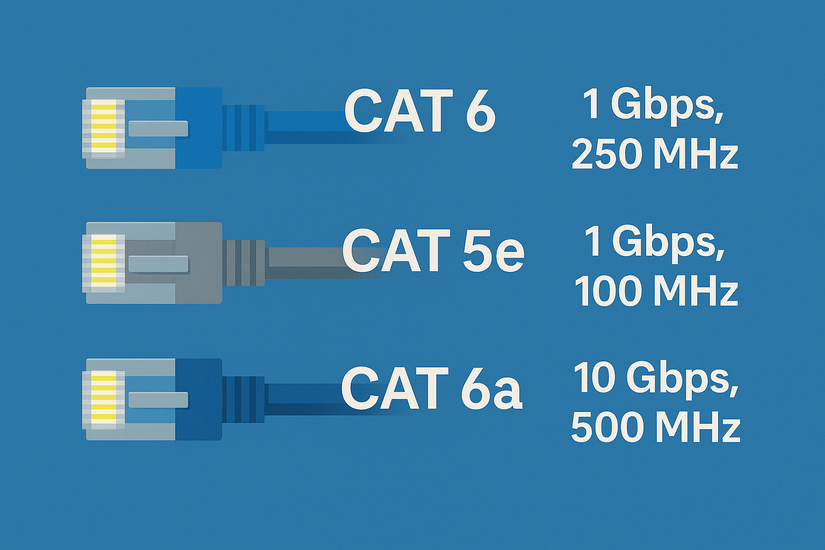
Cat 6 vs Cat 5e
For Cat 6 vs Cat 5 and its variations, Cat 5e caps out at 1 Gbps in most scenarios, while Cat 6 adds short-distance 10G support. Cat 6 also provides stronger noise rejection and better long-term value.
Cat 6 vs Cat 6a
Cat 6a doubles bandwidth to 500 MHz, enabling 10 Gbps up to 100 meters. If you want reliable multi-gig across an entire home, Cat 6a outperforms Cat 6.
4) When Cat 6 is fast enough for your setup
For fiber internet up to 1 Gbps
Cat 6 handles 1 Gbps fiber plans with room to spare. Most routers negotiate Gigabit automatically over Cat 6.
For multi-gig networks (2.5G, 5G, 10G)
Cat 6 supports 2.5G and 5G on full-length runs and supports 10G on shorter distances. This makes it useful for modern routers and NAS devices.
For gaming, streaming, and NAS
Cat 6 reduces latency and improves LAN file transfer rates. Gamers and media streamers benefit from its stability and reduced packet loss.
5) Factors that slow down Cat 6 speeds
If your Cat 6 cable does not deliver expected speeds, another component likely creates the bottleneck.
Old network adapters and routers
Many older routers only support 1 Gbps, even if the cable can do more. Network cards limited to 1 Gbps also cap performance.
Poor terminations and connectors
Loose crimps, low-quality RJ45 plugs, or mixed cable categories can reduce link negotiation and cause drops.
Interference and improper installation
Running Ethernet next to power lines or coiling it too tightly can reduce performance. Unshielded Cat 6 performs worse in noisy environments.
6) How to test your Cat 6 speed
These quick checks help you confirm whether your Cat 6 cable runs at its rated speed.
Use built-in OS tools for quick checks
Open your PC’s network settings to confirm the negotiated link speed. If it reads 100 Mbps, something is limiting performance.
Run a LAN speed test
Testing with tools like iPerf or a NAS file transfer gives accurate throughput numbers. This helps verify multi-gig performance on local networks.
Verify modem/router port speeds
Make sure your router supports multi-gig Ethernet. Some ISP gateways include only one multi-gig port.
7) Should you upgrade from Cat 6?
Cat 6 works for most homes, but certain situations justify switching to Cat 6a. If you need 10G at 100 meters, you can upgrade to Cat 6a. It maintains 10 Gbps over full-length runs, making it suitable for large homes or enterprise spaces.
Also, if your network environment is noisy, you should upgrade. Shielded Cat 6a reduces interference from nearby cables, electronics, and fluorescent lighting.
FAQs
Can Cat 6 support multi-gig internet? Yes. Cat 6 supports 2.5G and 5G on full runs and short-distance 10G.
Does Cat 6 work with older devices? Yes. Ethernet standards are backward-compatible, so Cat 6 works with Fast Ethernet and Gigabit ports.
How long will Cat 6 remain future-proof? Cat 6 remains useful for most home networks for many years, especially for Gigabit and mid-tier multi-gig service plans.
Is Cat 6 good for gaming and streaming? Yes. Cat 6 reduces latency and improves reliability compared to Wi-Fi, especially for competitive gaming.
Summary
- Cat 6 supports up to 10 Gbps, but only for distances up to 55 meters.
- Cat 6 reliably delivers 1 Gbps up to 100 meters, ideal for most homes.
- Cat 6 vs Cat 5e: Cat 6 adds faster speeds and better noise resistance.
- Cat 6 vs Cat 6a: Cat 6a handles full-distance 10G with double the bandwidth.
- Most slowdowns come from routers, NICs, or poor terminations, not the cable itself.
Cat 6 offers enough speed for most homes, especially for Gigabit and mid-tier multi-gig setups. If you rely heavily on 10 Gbps networking or long cable runs, Cat 6a becomes the better choice. Otherwise, Cat 6 provides stable, fast, and future-resistant performance for everyday use.


Discussion (0)
Be the first to comment.