




If you sent something by accident to the wrong person, you’re probably wondering how to delete Skype messages on both sides. Luckily, when you delete a message on Skype, it disappears without a trace for both you and its recipient, whether they already read it or not. However, you can only change or remove the messages you wrote. This tutorial shows how to delete messages from Skype on Windows 10, Android, iPhone, and Mac:
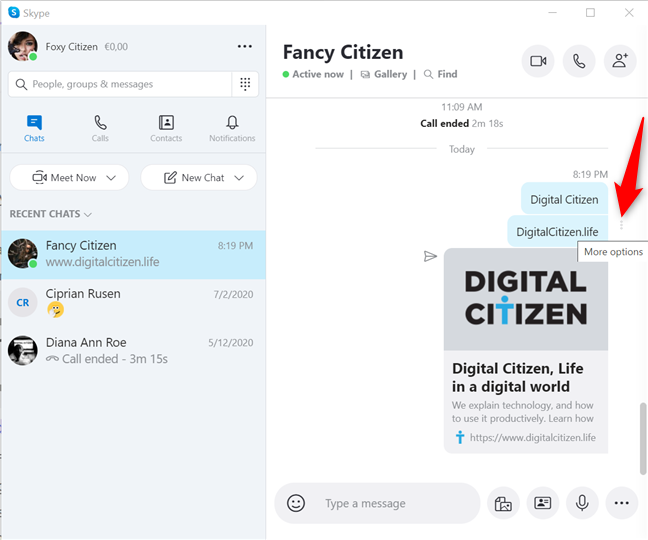
 Access More options to delete messages on Skype
In the menu that opens, click or tap Remove.
TIP: If you only want to make changes to your message, press Edit in this menu. Then, use the “Type a message” field at the bottom to insert any changes.
Access More options to delete messages on Skype
In the menu that opens, click or tap Remove.
TIP: If you only want to make changes to your message, press Edit in this menu. Then, use the “Type a message” field at the bottom to insert any changes.
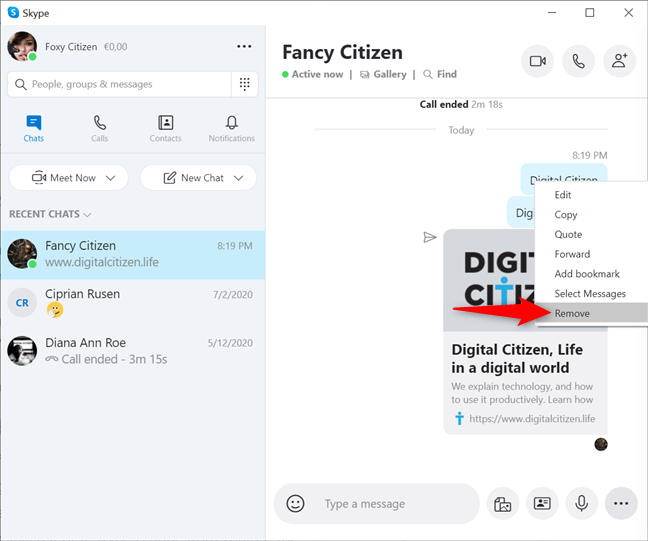
 How to delete Skype messages
Because this action is not reversible, you must confirm deleting messages on Skype by pressing Remove in the pop-up window.
How to delete Skype messages
Because this action is not reversible, you must confirm deleting messages on Skype by pressing Remove in the pop-up window.
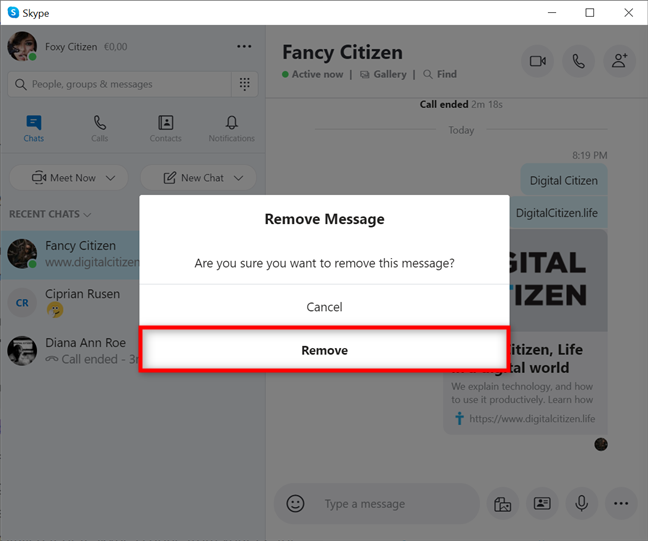 Confirm deleting messages on Skype for Windows and macOS
If you sent several messages you wish you hadn’t, it could take time to remove them all one by one. However, there is an easier way, as shown in the next chapter.
TIP: If you’re not familiar with Skype, our guide on using Skype like a Pro offers more details on the app.
Confirm deleting messages on Skype for Windows and macOS
If you sent several messages you wish you hadn’t, it could take time to remove them all one by one. However, there is an easier way, as shown in the next chapter.
TIP: If you’re not familiar with Skype, our guide on using Skype like a Pro offers more details on the app.
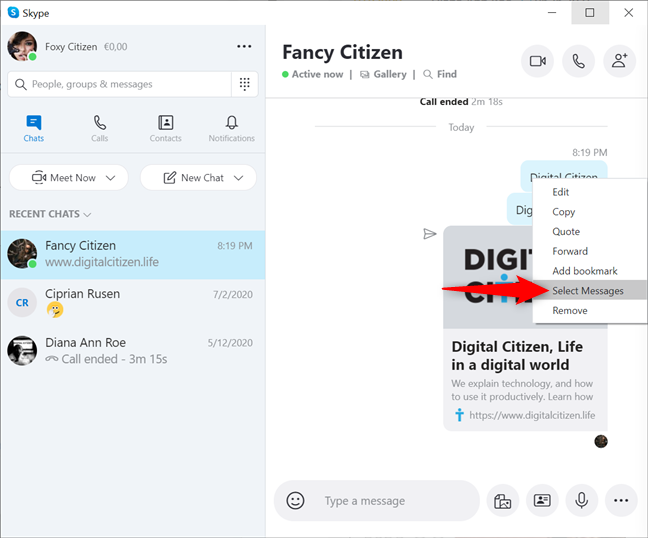
 Press Select Messages from the menu
This puts a check sign next to the message you selected. Click or tap on any other messages you want to delete to select them.
Press Select Messages from the menu
This puts a check sign next to the message you selected. Click or tap on any other messages you want to delete to select them.
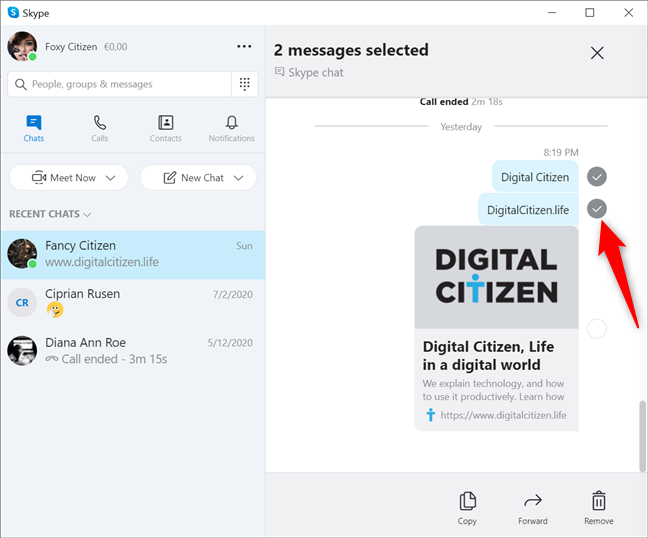 Select any messages you want to delete
The number of selected messages is displayed at the top. When you are done selecting everything you want to delete, press on Remove at the bottom.
Select any messages you want to delete
The number of selected messages is displayed at the top. When you are done selecting everything you want to delete, press on Remove at the bottom.
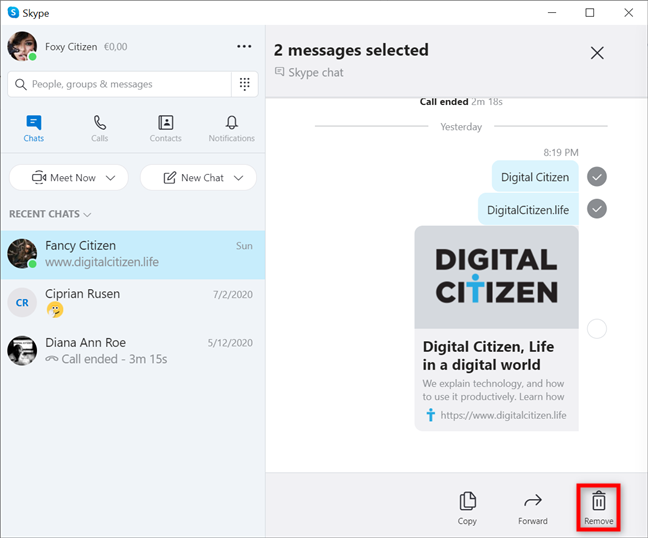 How to delete Skype messages on both sides in Windows and macOS
To confirm deleting the messages on Skype, click or tap on Remove. Keep in mind that this action cannot be undone.
How to delete Skype messages on both sides in Windows and macOS
To confirm deleting the messages on Skype, click or tap on Remove. Keep in mind that this action cannot be undone.
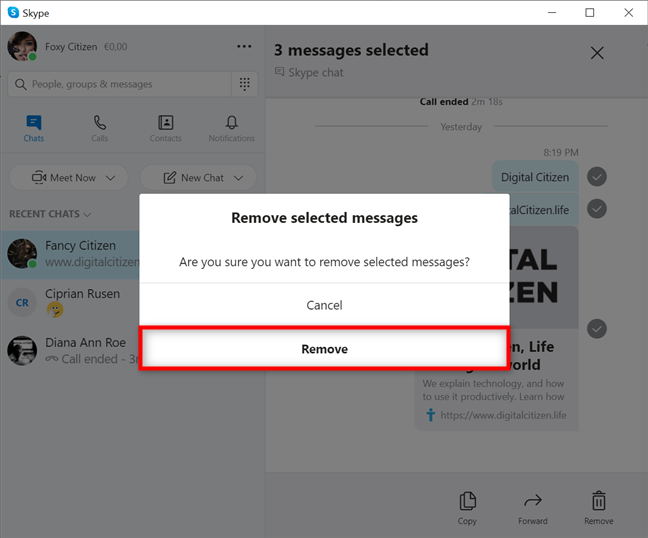 Confirm deleting the selected messages
TIP: No matter the platform you’re using, it’s easier to keep in touch with Skype audio and video group calls.
Confirm deleting the selected messages
TIP: No matter the platform you’re using, it’s easier to keep in touch with Skype audio and video group calls.
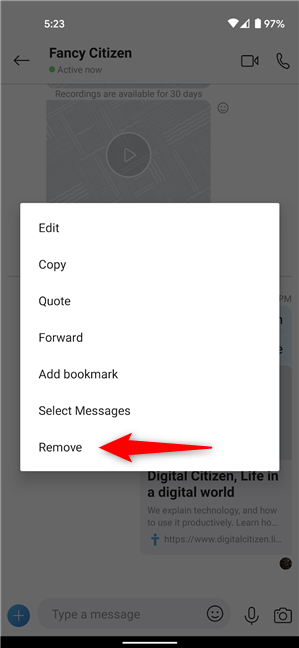
 How to delete Skype messages on Android and iPhone
Skype asks for your confirmation because the deletion is irreversible. Press Remove again if you are sure that you want to delete the message.
How to delete Skype messages on Android and iPhone
Skype asks for your confirmation because the deletion is irreversible. Press Remove again if you are sure that you want to delete the message.
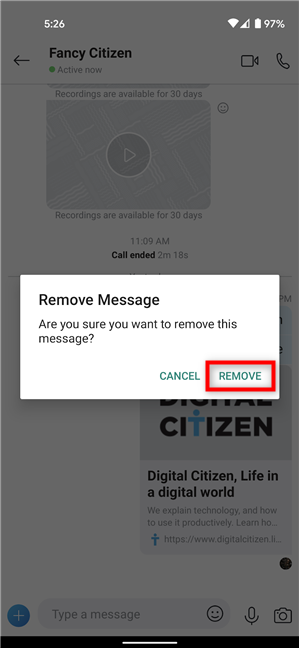 Confirm deleing a message on Android
TIP: Did you know you can easily share the screen on Skype on any platform?
Confirm deleing a message on Android
TIP: Did you know you can easily share the screen on Skype on any platform?
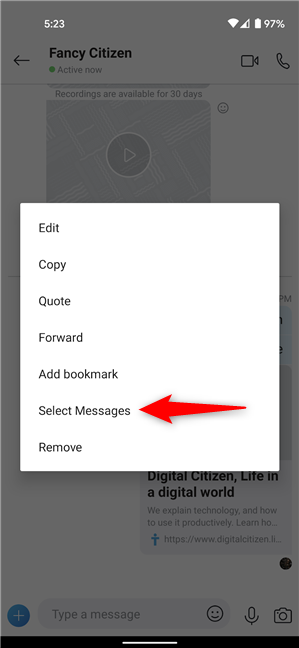 Tap on Select Messages
A checkmark indicates that the message is selected. Next, tap on other Skype messages you want to delete to select them as well. When you are done, press on Remove.
Tap on Select Messages
A checkmark indicates that the message is selected. Next, tap on other Skype messages you want to delete to select them as well. When you are done, press on Remove.
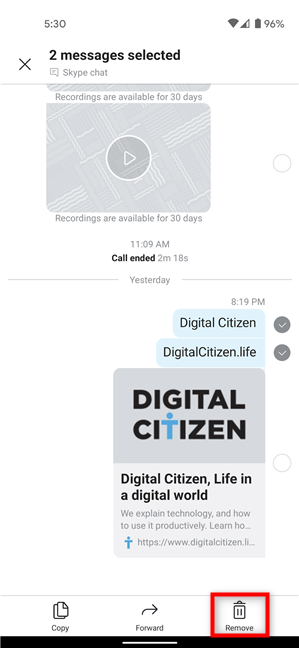 How to delete Skype messages on Android and iOS
Confirm the deletion by tapping Remove, and you are done.
How to delete Skype messages on Android and iOS
Confirm the deletion by tapping Remove, and you are done.
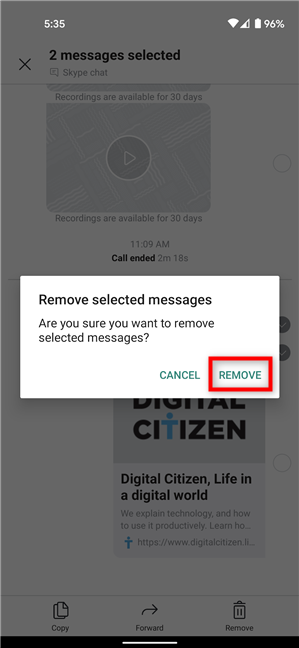 Confirm deleting messages on Android and iOS
TIP: If you prefer calling, you have the option to record Skype calls on Windows, Android, iPhone, and Mac.
Confirm deleting messages on Android and iOS
TIP: If you prefer calling, you have the option to record Skype calls on Windows, Android, iPhone, and Mac.
How to delete a message on Skype for Windows 10 and macOS
If you need to know how to delete individual Skype messages, the process is the same in Windows 10 and on a Mac. The first thing you need to do is start Skype and open the chat where you want to make changes. Right-click or press-and-hold the message you want to delete. Alternatively, hover the cursor over the message until the “More options” button appears, and then click on it.How to delete messages from Skype on Windows 10 and Mac
To delete several messages at once, right-click or press-and-hold on one of them to open the More options menu. Then, click or tap on Select Messages.How to delete Skype messages on Android and iOS
You can intervene on your messages regardless of the platform and Skype client you used to send the messages in the first place. For instance, a message created in Skype for Windows can be edited or removed from Skype for Android and vice versa. On your iPhone or Android smartphone, open Skype and access the chat where you sent the wrong message. Tap and hold on the message that you want to delete, and a menu pops up. Press Remove.How to delete several messages from Skype on Android and iPhone
Deleting multiple messages works the same way on mobile as it does on desktop. First, tap and hold on a message you want to remove to open a menu. Then, press on Select Messages.
Discussion (13)
I found that you can only remove messages that have not been translated. Once your message has been translated, via Skype Translator, you can only remove the untranslated message and not the translated message. So you’re stuck with a message on there that was translated and the person you’re talking to, can still read the original message.
Doesn’t WORK!
What If you don’t have the option to edit or remove your recent messages in Skype when you right click?
Am puzzled that although I can’t edit messages sent three weeks ago, I can remove them. Can anyone enlighten please? Youtube clip claims if able to remove earlier messages, it indicates a contact has blocked you. Thanks.
here we can suggest to most useful features on your skype account check on this link more about: Skype Push-to-Talk
can someone help me? why my does ” edit massage “disappear after 60 mits while ” remove massages” still there? it can be kept for monthes if my contact is not on line, but when my contact is on line, it will disappear. ususlly i can use this to check my contact is on line or not. thank you
Hi, I have accidentally shared a location which I didn’t mean to share to a contact on Skype. Any way to remove or delete that location on Skype? Thanks!
MOIIIIIIIIIIIIIIIIIiiiii
I want to delete all old message
Hello i want to delete all message. HOw to delete it?
This tutorial is very explicit about what you can delete, when and how. Please read it again.
I think it’s less than an hour before you can’t edit your message because it’s only been 45 minutes and I can’t edit mine.
There is no option for Skype to delete message please kept the delete option. Must of the app have delete option but skype does not.
I am recently using windows 7 enterprise N with skype desktop app.
please let me know why this option is removed.