




Many iPhone 11 owners wonder if they can enable 5G through a setting or software update. The short answer is no - Apple’s iPhone 11 lineup lacks the hardware needed for 5G. Still, you can improve LTE speeds and prepare for a future upgrade, as detailed in this guide.
1) Understanding iPhone 11's network capabilities
The iPhone 11 supports 4G LTE Advanced, not 5G. Apple added 5G modems starting with the iPhone 12 series. You won’t find any 5G options in Cellular Data settings, no matter your carrier or region. Setting expectations early saves time.
2) How to maximize LTE performance on iPhone 11
Your iPhone 11 can deliver strong LTE performance. These settings help improve speed and reliability without 5G.
Enable LTE everywhere possible
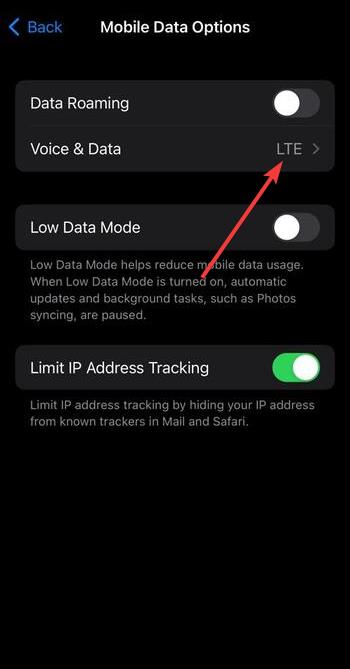
Go to Settings > Cellular > Voice & Data. Next, select LTE to use the fastest available 4G connection.
Reset network settings if data is slow
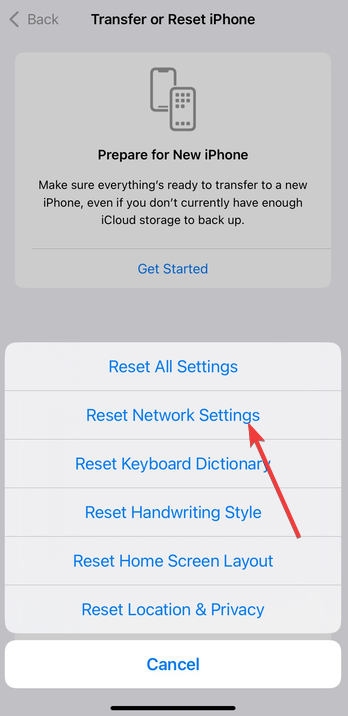
Open Settings > General > Transfer or Reset iPhone. Next, tap Reset > Reset Network Settings. You can reconnect to Wi-Fi and mobile data, as this clears outdated profiles and can boost speeds.
Keep iOS and carrier settings updated
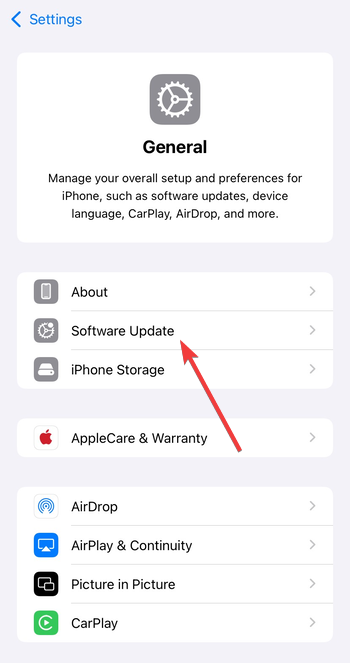
Apple and carriers release updates that improve signal handling. Go to Settings > General > Software Update and install pending updates. Accept carrier updates when prompted.
3) Consider an upgrade if you need 5G
If you rely on faster downloads or work in strong 5G areas, upgrading makes sense. Newer iPhones add better modems, higher efficiency, and wider band support.
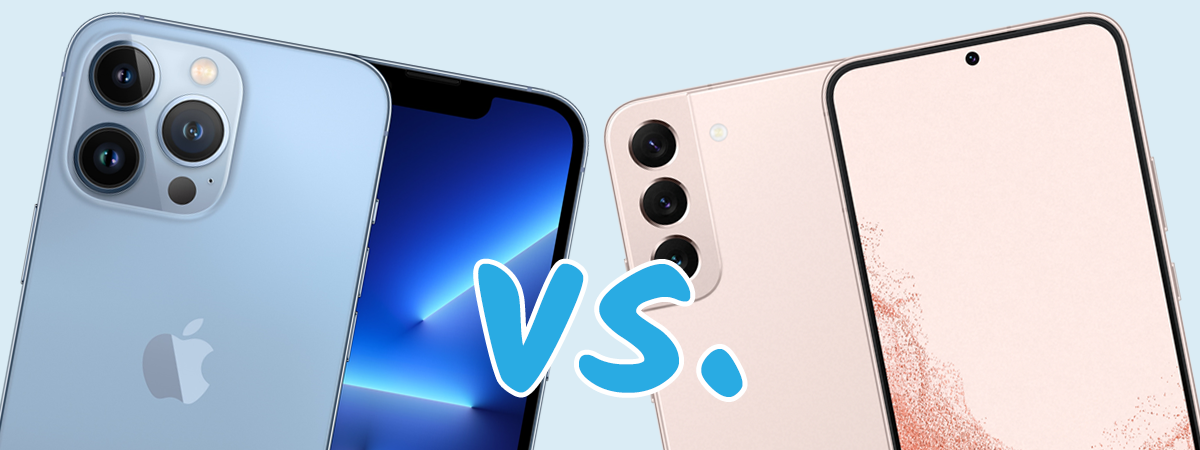
iPhone 11 vs iPhone 12 and newer
The iPhone 12 line introduced 5G with a redesigned antenna system. Newer models also support Smart Data Mode, which switches between LTE and 5G to save battery.
Trade-in and upgrade tips
Check trade-in offers from Apple or your carrier. Many providers give credit toward a 5G model when you turn in an iPhone 11. Upgrading unlocks next-gen networks while you keep your current plan.
4) Troubleshooting connectivity issues
LTE can still feel slow or unstable. Use these quick fixes before assuming hardware problems.
- Check SIM card placement and condition: Eject and inspect the SIM for dust or wear. If it’s older than two years, request a replacement from your carrier. A worn SIM can cause drops or slower speeds.
- Use Wi-Fi calling or personal Hotspot: When mobile data struggles, enable Wi-Fi Calling in Settings > Phone. Share your LTE connection with other devices using Personal Hotspot when needed.
FAQs about 5G and iPhone 11
Can a software update add 5G? No. 5G requires dedicated radio hardware. Software updates improve efficiency but can’t add new frequency support.
Does iPhone 11 Pro or Pro Max have 5G? No. All iPhone 11 models use a 4G LTE modem. Only iPhone 12 and newer support 5G.
Will a 5G SIM improve 4G speeds? Sometimes. A new SIM can include updated profiles that stabilize LTE. It won’t deliver 5G performance on unsupported devices.
Summary
- iPhone 11 doesn’t support 5G hardware.
- Confirm carrier and SIM readiness for an upgrade.
- Enable LTE and update iOS for the best 4G speeds.
- Missing 5G toggles are normal on this model.
- Upgrade to iPhone 12 or newer for true 5G.
Conclusion
The iPhone 11 remains a capable device, but it wasn’t built with 5G hardware. That means no setting, SIM swap, or software update can activate 5G connectivity. Instead, focus on getting the best performance from your LTE connection through updates, resets, and carrier optimizations.
If faster speeds and lower latency are essential for your work or streaming needs, upgrading to an iPhone 12 or newer model is the only way to experience true 5G. Until then, your iPhone 11 can still deliver fast, stable LTE performance when properly optimized.


Discussion (0)
Be the first to comment.