



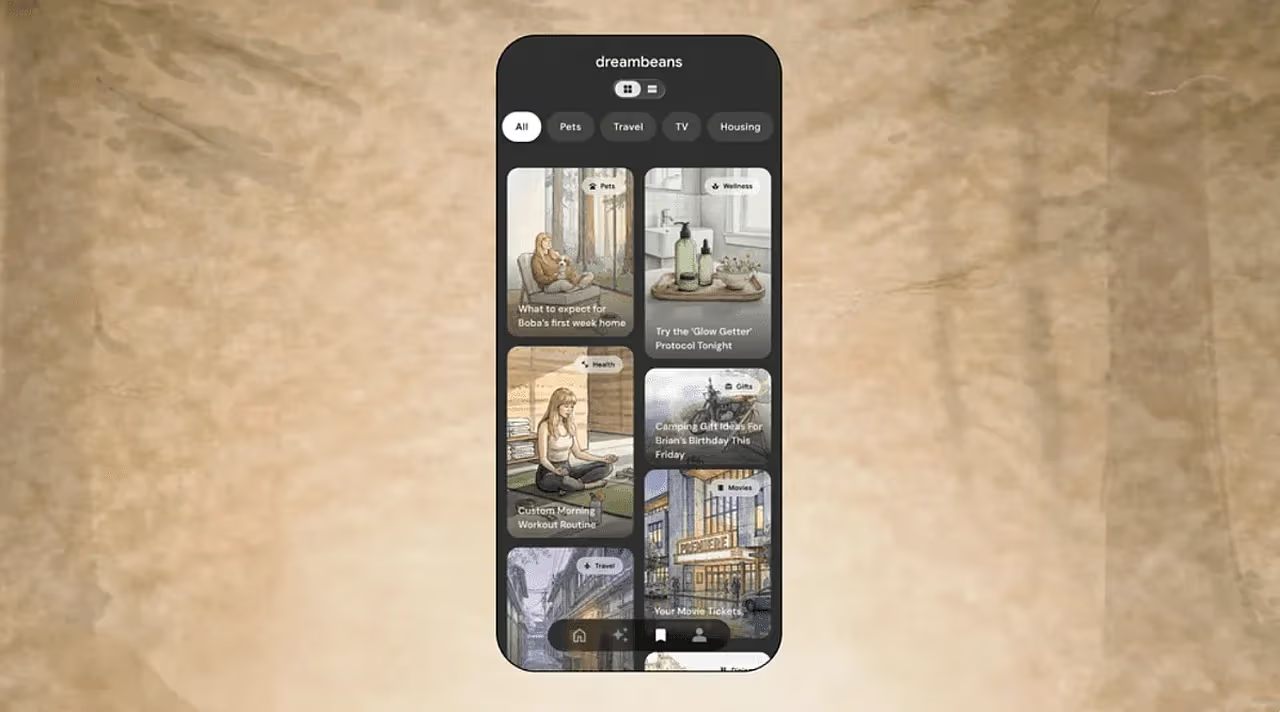
Google Labs has introduced Dreambeans, a new AI experiment that turns parts of your daily life into a small set of personalized story cards. Instead of acting like a normal chatbot or a social media feed, Dreambeans is designed to feel more like a private morning briefing based on your own schedule, interests, photos, emails, searches, and upcoming plans.
The idea is simple. While you sleep, Dreambeans reviews information from connected Google services and creates a limited number of daily cards. Google calls this process “brewing,” and the finished story cards are called “beans.” Each card may suggest a place to visit, a topic to explore, something to try, or an upcoming event you may want to remember.
Google says the goal is to offer a healthier alternative to endless scrolling. Dreambeans usually shows around 10 to 14 cards per day, so it is not meant to become another bottomless feed. It gives you a few useful ideas, then lets you move on with your day.
Dreambeans uses Google services to build a personal daily briefing
Dreambeans runs on Google’s Personal Intelligence framework and the Gemini Nano 2 model. With your permission, it can connect to services such as Gmail, Google Calendar, Google Photos, YouTube, and Search history. The more services you connect, the more context Dreambeans can use to create relevant cards.
For example, if Gmail shows a receipt for puppy treats, Dreambeans may create a card with training tips for a new dog. If your calendar shows that a friend is visiting, it may recommend nearby dog friendly restaurants or activities. The app is trying to connect details across your life, rather than only responding to a direct question.
| Dreambeans feature | What it does |
|---|---|
| Daily story cards | Shows a limited set of personalized suggestions |
| Connected Google apps | Can use Gmail, Calendar, Photos, YouTube, and Search history |
| AI model | Uses Gemini Nano 2 with Personal Intelligence |
| Visual style | Creates watercolor style artwork for each card |
| Photo integration | Can use familiar faces from Google Photos Face Grouping |
| Daily limit | Usually around 10 to 14 cards |
| Availability | Google AI Ultra subscribers in the US, age 18 and older |
Google Photos helps make the cards feel more personal
One of the more unusual parts of Dreambeans is its visual style. The app uses Google Photos and Nano Banana 2 to generate personalized watercolor style artwork for the story cards. If a card involves you, your family, friends, or pets, the artwork can use familiar faces through Google Photos Face Grouping.
That gives Dreambeans a different feel from most AI assistants. It is not only giving text suggestions. It is creating small illustrated moments based on your real life. That could make the cards feel more personal, but it also makes privacy controls more important because the app is working with sensitive personal context.
Each card can also include follow up actions. In the puppy example, you might see options to create a puppy essentials list or find the nearest dog park. You can also save favorite cards to a personal library and tune future suggestions by adding hobbies, correcting mistakes, or telling the app when it got something wrong.
Dreambeans does not update the current batch immediately after every correction. Google says changes apply to future story drops because the system takes about a day to prepare each collection.
Privacy controls will decide how comfortable people feel using it
Dreambeans is built around personal data, so privacy is central to whether people will trust it. Google says you can choose which apps are connected, although at least one connected service is needed for the feature to work.
The important detail is that Dreambeans settings are separate from Personal Intelligence settings in other Google products, including the Gemini app and AI Mode in Search. That separation may help reduce confusion because changing Dreambeans settings will not automatically change how other Google AI tools use personal context.
Still, this kind of AI feature will not appeal to everyone. Some people may like the idea of a daily AI summary that knows their plans and preferences. Others may feel uncomfortable giving an AI tool access to email, photos, calendar entries, and search history, even with controls in place.
Dreambeans is currently available for Google AI Ultra subscribers who are 18 or older and based in the United States. The app works on Android and iOS. People without an Ultra subscription can join a waitlist through a regular Google account and wait for access to open.
Dreambeans shows where Google is taking personal AI. Instead of only answering questions, the company wants AI to quietly connect details across your digital life and turn them into useful suggestions. The concept is creative, but its success will depend on whether people find the cards helpful enough to justify the level of personal access required.



Discussion (0)
Be the first to comment.