




If you spend hours every day working and browsing online, the importance of solid PC security can’t be overstated. With cyber threats evolving rapidly, you need more than just a basic antivirus; you need a robust security suite that protects every part of your digital life. That’s what ESET HOME Security Ultimate wants to offer you. As the flagship offering from ESET, this solution combines top-notch antivirus protection with advanced tools designed to safeguard your online presence, as well as your data. In this review, I share my experience with ESET HOME Security Ultimate, its features, and performance, all in order to help you decide if it’s the right choice for your needs. There’s a lot of ground to cover, so without further ado, let’s begin:
![Verdict]()


 The ESET Live Installer file
Worth noting, the first things the wizard asks you is to select the language you’d like to use, accept the EULA (End-User License Agreement), and whether you want to “Enable ESET LiveGrid feedback system,” “Enable detection of potentially unwanted applications,” and “Participate in Customer Experience Improvement Program.” I recommend turning on the two first options. ESET’s LiveGrid feature lets the company collect data about suspicious items and process it as quickly as possible. That helps ESET’s security products react faster to new threats. Furthermore, it’s a good choice to enable the detection of PUPs (potentially unwanted applications) too. Although they may not be actual viruses, they can be a nuisance.
The ESET Live Installer file
Worth noting, the first things the wizard asks you is to select the language you’d like to use, accept the EULA (End-User License Agreement), and whether you want to “Enable ESET LiveGrid feedback system,” “Enable detection of potentially unwanted applications,” and “Participate in Customer Experience Improvement Program.” I recommend turning on the two first options. ESET’s LiveGrid feature lets the company collect data about suspicious items and process it as quickly as possible. That helps ESET’s security products react faster to new threats. Furthermore, it’s a good choice to enable the detection of PUPs (potentially unwanted applications) too. Although they may not be actual viruses, they can be a nuisance.

 Protection and installation settings
You’re also asked to choose a name for your device, which can be useful if you need to quickly identify it later in your ESET online account. Then, ESET automatically associates your license key to the PC where you’re installing ESET HOME Security Ultimate.
Protection and installation settings
You’re also asked to choose a name for your device, which can be useful if you need to quickly identify it later in your ESET online account. Then, ESET automatically associates your license key to the PC where you’re installing ESET HOME Security Ultimate.
 Reviewing activation details
Having gone through all the mandatory configuration steps, the wizard then starts the actual installation process.
Depending on your internet connection and depending on how fast your computer is, this step might take a while.
Reviewing activation details
Having gone through all the mandatory configuration steps, the wizard then starts the actual installation process.
Depending on your internet connection and depending on how fast your computer is, this step might take a while.
 Installation in progress
Once the installation is done, you’re being greeted by the security solution with a few bits of information regarding its features and protection options. After you’ve gone through the slides presenting the product, ESET HOME Security Ultimate lets you know that it will start an initial scan of your computer. It’s a good thing, as it means that your computer’s health is verified as soon as possible.
Installation in progress
Once the installation is done, you’re being greeted by the security solution with a few bits of information regarding its features and protection options. After you’ve gone through the slides presenting the product, ESET HOME Security Ultimate lets you know that it will start an initial scan of your computer. It’s a good thing, as it means that your computer’s health is verified as soon as possible.

 ESET begins an initial scan of your computer
This initial scan starts immediately after the malware database is updated, and it takes a couple of minutes, depending on how fast your PC is and how much data you have stored on it. On the desktop computer I used for testing, it took about 5 minutes. On the other hand, subsequent scans will be much faster than this first scan.
ESET begins an initial scan of your computer
This initial scan starts immediately after the malware database is updated, and it takes a couple of minutes, depending on how fast your PC is and how much data you have stored on it. On the desktop computer I used for testing, it took about 5 minutes. On the other hand, subsequent scans will be much faster than this first scan.
 The initial computer scan is running and can take a while
Downloading, installing, and activating ESET HOME Security Ultimate on your computer is straightforward and easy. The decisions you have to make during the initial configuration are clearly explained, and it’s excellent that the security suite automatically updates and runs a full system scan as soon as it’s installed.
The initial computer scan is running and can take a while
Downloading, installing, and activating ESET HOME Security Ultimate on your computer is straightforward and easy. The decisions you have to make during the initial configuration are clearly explained, and it’s excellent that the security suite automatically updates and runs a full system scan as soon as it’s installed.

 Windows Security sharing the status of ESET Security
ESET HOME Security Ultimate integrates nicely with Windows and the operating system’s networking features. While using and testing this security solution, I didn’t stumble upon any issues accessing my local network’s shared resources or installing/running apps from the Microsoft Store. Furthermore, it’s worth mentioning that ESET’s firewall module actively monitors the network profile you set in Windows 11 and automatically adjusts its protection accordingly. This is a great approach.
Windows Security sharing the status of ESET Security
ESET HOME Security Ultimate integrates nicely with Windows and the operating system’s networking features. While using and testing this security solution, I didn’t stumble upon any issues accessing my local network’s shared resources or installing/running apps from the Microsoft Store. Furthermore, it’s worth mentioning that ESET’s firewall module actively monitors the network profile you set in Windows 11 and automatically adjusts its protection accordingly. This is a great approach.

 ESET firewall options for the network protection type
In terms of web protection, ESET HOME Security Ultimate scans the entire internet traffic that goes on your PC. That means that you get protection in any web browser, and you don’t need any browser extensions for it.
ESET firewall options for the network protection type
In terms of web protection, ESET HOME Security Ultimate scans the entire internet traffic that goes on your PC. That means that you get protection in any web browser, and you don’t need any browser extensions for it.
 Internet protection features
I checked whether all the processes run by ESET HOME Security Ultimate are protected against unwanted termination. They are, so nasty malware will have a tough time disabling this security suite. If you are worried that ESET might slow down your PC, you can relax: when nothing special in terms of security was happening on my test computer, ESET HOME Security Ultimate used only about 85 MB of RAM. That’s not a lot by any means. Also, the boot times of my laptop (as told by BootRacer) were practically the same before and after installing the suite.
Internet protection features
I checked whether all the processes run by ESET HOME Security Ultimate are protected against unwanted termination. They are, so nasty malware will have a tough time disabling this security suite. If you are worried that ESET might slow down your PC, you can relax: when nothing special in terms of security was happening on my test computer, ESET HOME Security Ultimate used only about 85 MB of RAM. That’s not a lot by any means. Also, the boot times of my laptop (as told by BootRacer) were practically the same before and after installing the suite.

 RAM usage of ESET HOME Security Ultimate in Windows 11
I also checked whether ESET HOME Security Ultimate affects the speed of internet data transfers. For that, I used Speedtest.net, and the good news is that neither the upload speed nor the download speed decreased when using this security product.
ESET HOME Security Ultimate is nicely integrated with Windows 11 and its built-in networking features. I like that the firewall module automatically adjusts its security level according to the Windows 11 network profile. And I also appreciate the practically nonexistent negative effect it has on my test PC, as well as on the network and internet speed.
RAM usage of ESET HOME Security Ultimate in Windows 11
I also checked whether ESET HOME Security Ultimate affects the speed of internet data transfers. For that, I used Speedtest.net, and the good news is that neither the upload speed nor the download speed decreased when using this security product.
ESET HOME Security Ultimate is nicely integrated with Windows 11 and its built-in networking features. I like that the firewall module automatically adjusts its security level according to the Windows 11 network profile. And I also appreciate the practically nonexistent negative effect it has on my test PC, as well as on the network and internet speed.

 The ESET HOME Security Ultimate user interface
ESET’s interface uses many buttons and switches. That’s helpful, as all the essential tools and settings are easy to configure, even on Windows devices with touchscreens.
The ESET HOME Security Ultimate user interface
ESET’s interface uses many buttons and switches. That’s helpful, as all the essential tools and settings are easy to configure, even on Windows devices with touchscreens.

 ESET HOME Security Ultimate setup options
Although most protection modules and tools can be configured by accessing each individually, if you want to access all the advanced settings and configuration options, you can do that with a click on the Advanced Setup button from the bottom right corner of the Setup section. Inside the Advanced setup, you can change the way ESET HOME Security Ultimate works in detail.
ESET HOME Security Ultimate setup options
Although most protection modules and tools can be configured by accessing each individually, if you want to access all the advanced settings and configuration options, you can do that with a click on the Advanced Setup button from the bottom right corner of the Setup section. Inside the Advanced setup, you can change the way ESET HOME Security Ultimate works in detail.
 Advanced settings available in ESET HOME Security Ultimate
Most settings and features of ESET HOME Security Ultimate are well explained in context. Furthermore, if you see something you don’t understand from the first glimpse, there’s a good chance that the small i (info) button on its right side helps. Clicking on it gives you additional tips and details. If that’s still not enough, and you need more advanced support, ESET HOME Security Ultimate also includes plenty of Help information. There’s also a Customer Care section where you can create support tickets, but as far as I could see, you must get through a series of other self-help options before you get to the Contact Customer Care page.
Advanced settings available in ESET HOME Security Ultimate
Most settings and features of ESET HOME Security Ultimate are well explained in context. Furthermore, if you see something you don’t understand from the first glimpse, there’s a good chance that the small i (info) button on its right side helps. Clicking on it gives you additional tips and details. If that’s still not enough, and you need more advanced support, ESET HOME Security Ultimate also includes plenty of Help information. There’s also a Customer Care section where you can create support tickets, but as far as I could see, you must get through a series of other self-help options before you get to the Contact Customer Care page.

 Help and Support options available in ESET HOME Security Ultimate
When ESET thinks you should know something important or your input is required, it displays short and clear notifications on your desktop.
Help and Support options available in ESET HOME Security Ultimate
When ESET thinks you should know something important or your input is required, it displays short and clear notifications on your desktop.

 Notification displayed by ESET HOME Security Ultimate
ESET HOME Security Ultimate also offers other valuable data, like log files, visual protection statistics, lists with processes running on your computer and their reputation, and details about the network connections present on your device.
Notification displayed by ESET HOME Security Ultimate
ESET HOME Security Ultimate also offers other valuable data, like log files, visual protection statistics, lists with processes running on your computer and their reputation, and details about the network connections present on your device.
 Security reports and logs available in ESET HOME Security Ultimate
The ESET HOME Security Ultimate user interface looks good and it’s easy to use and understand. And it also gives you tons of advanced settings and detailed security information. I like how simplicity and the need to configure things in detail intertwine.
On the next page of this review, you can see how ESET HOME Security Ultimate protects your computer from network attacks and malware, and you can also see what additional features are included.
Security reports and logs available in ESET HOME Security Ultimate
The ESET HOME Security Ultimate user interface looks good and it’s easy to use and understand. And it also gives you tons of advanced settings and detailed security information. I like how simplicity and the need to configure things in detail intertwine.
On the next page of this review, you can see how ESET HOME Security Ultimate protects your computer from network attacks and malware, and you can also see what additional features are included.
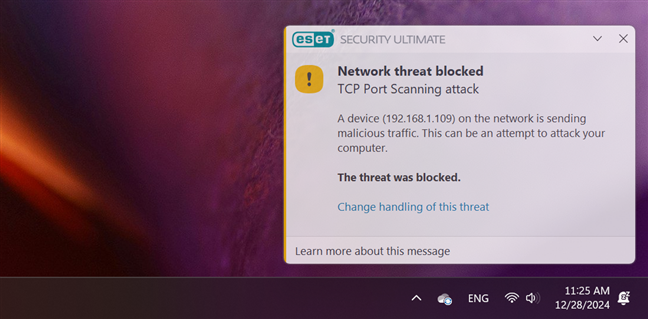
 Firewall notification shown by ESET HOME Security Ultimate
The firewall offered by ESET HOME Security Ultimate is efficient and doesn’t leak information that could be useful to attackers.
Firewall notification shown by ESET HOME Security Ultimate
The firewall offered by ESET HOME Security Ultimate is efficient and doesn’t leak information that could be useful to attackers.
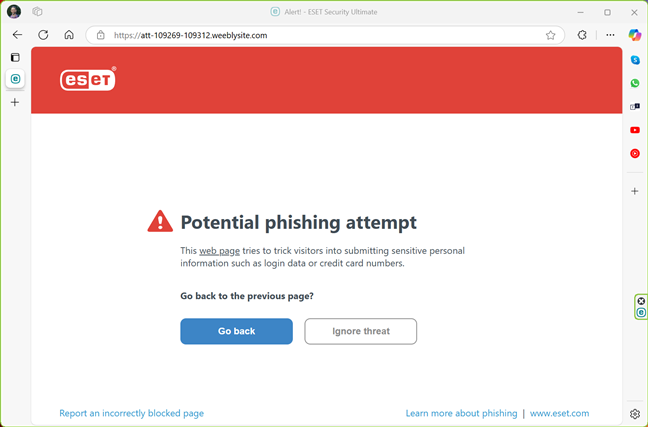
 Phishing website blocked by ESET HOME Security Ultimate
Next, I checked how ESET HOME Security Ultimate reacts to removable drives like USB memory sticks or portable hard drives. I took a memory stick with malware samples and plugged it into a laptop I used for testing. ESET asked what I wanted to do: I chose to scan the external drive, and the security suite immediately started to detect and disinfect the malware files on it. After a short while, it was all clean.
Phishing website blocked by ESET HOME Security Ultimate
Next, I checked how ESET HOME Security Ultimate reacts to removable drives like USB memory sticks or portable hard drives. I took a memory stick with malware samples and plugged it into a laptop I used for testing. ESET asked what I wanted to do: I chose to scan the external drive, and the security suite immediately started to detect and disinfect the malware files on it. After a short while, it was all clean.
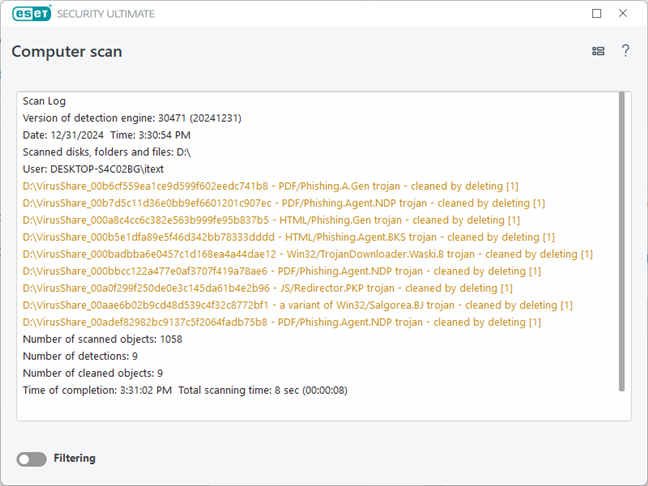
 ESET HOME Security Ultimate cleaning an infected USB memory stick
I installed Windows 11 on my test laptop, and after disabling the built-in Windows Security antimalware solution, I placed a ton of dangerous malware and potentially unwanted apps on it. Then, I asked ESET HOME Security Ultimate to install itself and clean the infection. It immediately began identifying the viruses that were roaming free on the computer, and after a full scan, the PC was usable again. That is an excellent result, one that can only be achieved by a top-notch antivirus engine.
ESET HOME Security Ultimate cleaning an infected USB memory stick
I installed Windows 11 on my test laptop, and after disabling the built-in Windows Security antimalware solution, I placed a ton of dangerous malware and potentially unwanted apps on it. Then, I asked ESET HOME Security Ultimate to install itself and clean the infection. It immediately began identifying the viruses that were roaming free on the computer, and after a full scan, the PC was usable again. That is an excellent result, one that can only be achieved by a top-notch antivirus engine.
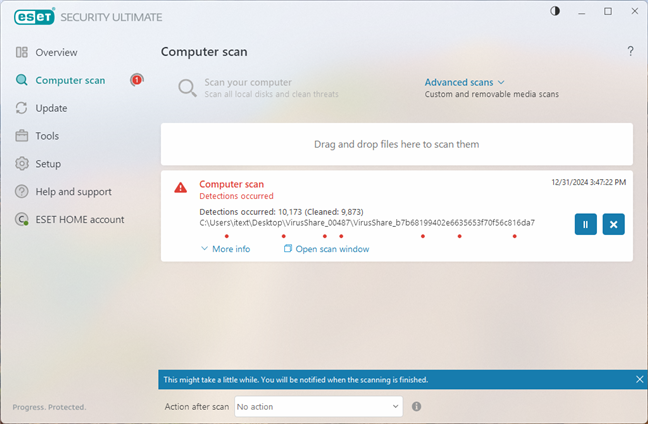 Threats found by ESET HOME Security Ultimate
Another important feature in evaluating an antivirus engine’s performance is its speed when scanning for malware. Therefore, I measured how long it took ESET HOME Security Ultimate to examine my 476 GB SSD, with 43 GB of files on it. It took two minutes and six seconds, which is fast. Last but not least, I also analyzed what other independent security organizations had to say about ESET:
Threats found by ESET HOME Security Ultimate
Another important feature in evaluating an antivirus engine’s performance is its speed when scanning for malware. Therefore, I measured how long it took ESET HOME Security Ultimate to examine my 476 GB SSD, with 43 GB of files on it. It took two minutes and six seconds, which is fast. Last but not least, I also analyzed what other independent security organizations had to say about ESET:
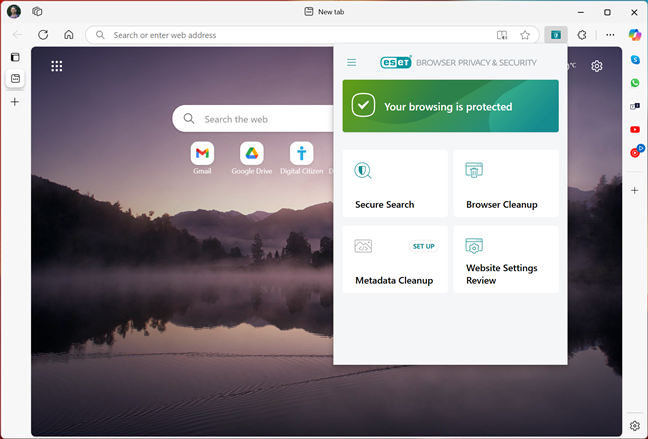
 ESET's Browser Privacy & Security
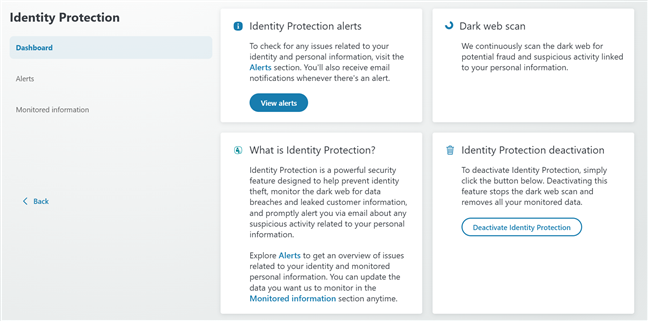
 ESET's Identity Protection tool
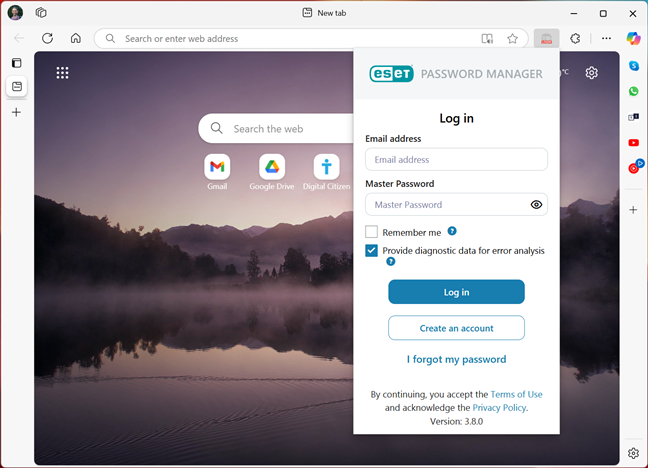
 ESET Password Manager
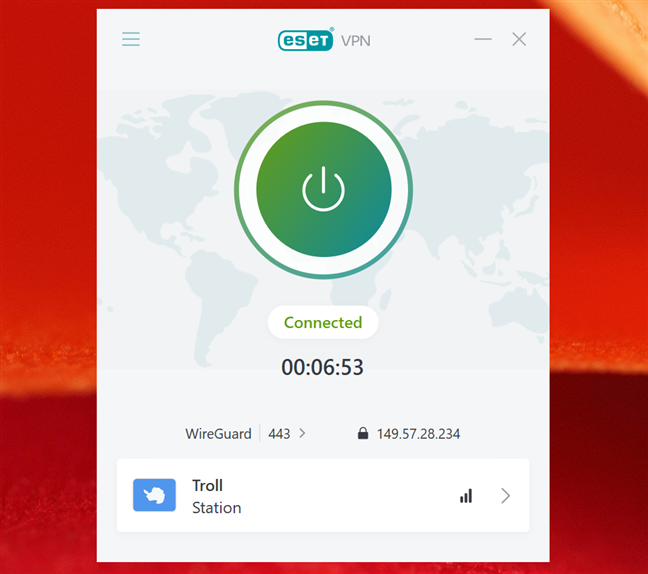
 ESET's VPN tool looks to be powered by Windscribe
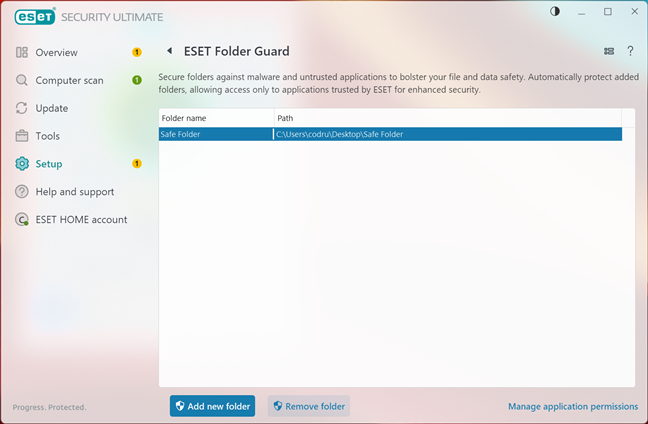 ESET Folder Guard

 ESET Secure Data
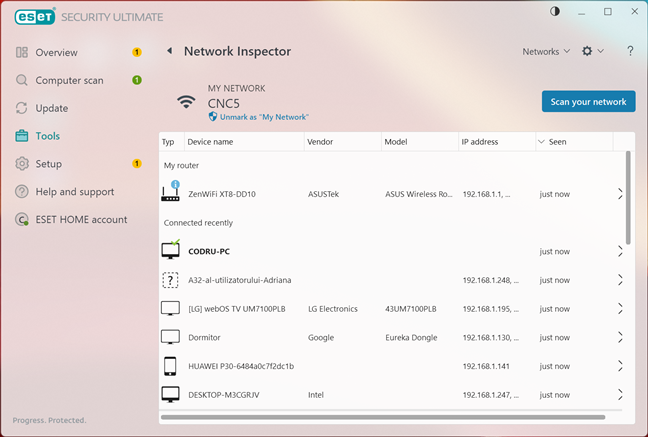
 The Network Inspector in ESET HOME Security Ultimate
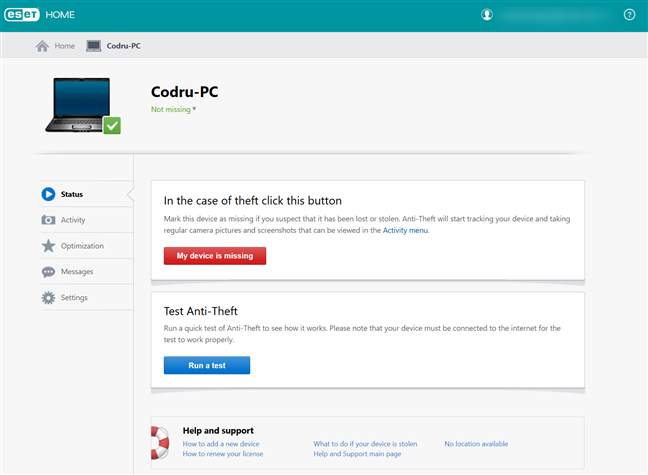
 ESET's Anti-Theft tool
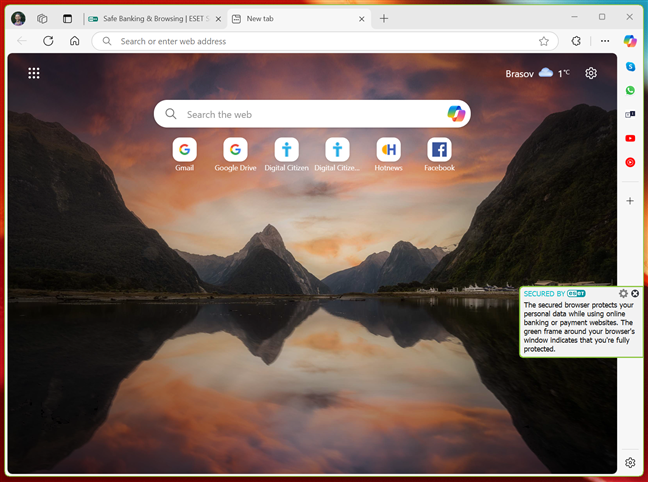
 ESET Safe Banking & Browsing
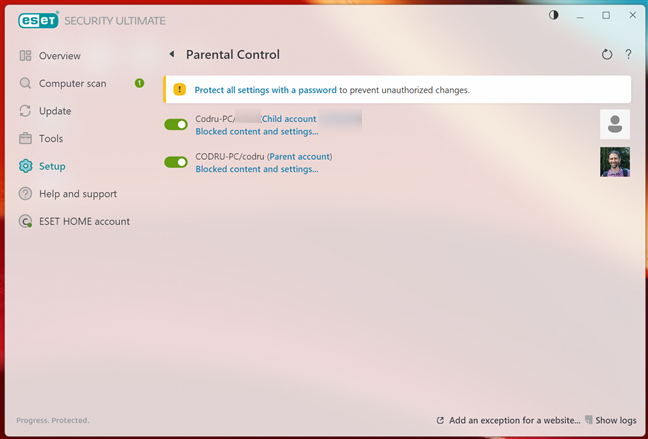 Parental Control in ESET HOME Security Ultimate
ESET HOME Security Ultimate bundles useful tools and can add value to the product. With its VPN service, it also ensures privacy and security while connected to public, unsecured WiFi networks.
Parental Control in ESET HOME Security Ultimate
ESET HOME Security Ultimate bundles useful tools and can add value to the product. With its VPN service, it also ensures privacy and security while connected to public, unsecured WiFi networks.
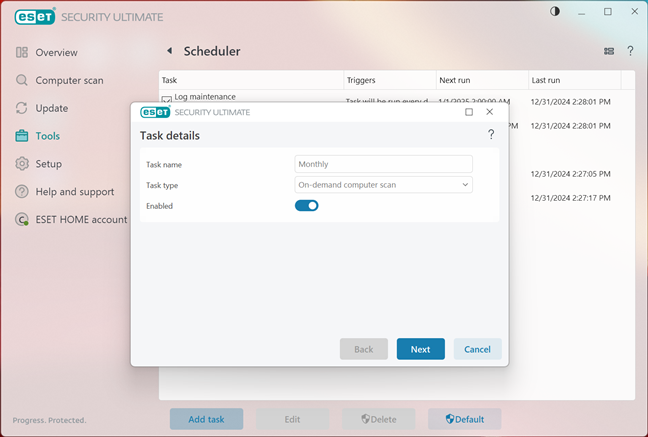 Scheduling a monthly scan in ESET HOME Security Ultimate
ESET HOME Security Ultimate is a well-configured security suite, and there’s only one thing I recommend changing to improve its default settings.
Scheduling a monthly scan in ESET HOME Security Ultimate
ESET HOME Security Ultimate is a well-configured security suite, and there’s only one thing I recommend changing to improve its default settings.
ESET HOME Security Ultimate: Who is it good for?
ESET HOME Security Ultimate is the security solution you should use if you:- Want top-notch protection for your devices against malware and network attacks
- Prefer user-friendly software which also includes detailed, advanced settings
- Need additional security tools like a VPN, password manager, network inspector, and parental controls
Pros and cons
These are the things I appreciate most about ESET HOME Security Ultimate:- Outstanding antivirus protection, capable of detecting and neutralizing all types of malware
- Fast scanning with minimal impact on system performance
- User-friendly interface that’s intuitive and easy to navigate
- Robust firewall with instant reactions to network threats
- Useful additional tools like VPN, parental controls, a password manager, and data encryption
- It’s a pricey product
Verdict
ESET HOME Security Ultimate bundles a powerful antivirus engine with a plethora of security tools that offer comprehensive protection without compromising system performance. It’s more than just an antivirus; it’s a complete security product that counters modern threats and keeps your digital life secure. What I liked most during my time with ESET HOME Security Ultimate is its balance of simplicity and sophistication. Whether you’re a casual user or a tech-savvy one, it has something to offer. Its intuitive interface and customizable settings ensure you’re always in control, while the additional features like the VPN, parental controls, and data encryption add significant value to the package. If you’re serious about keeping your Windows computers and personal data safe, I wholeheartedly recommend ESET HOME Security Ultimate.Downloading and installing ESET HOME Security Ultimate
To start off, you can get ESET HOME Security Ultimate from ESET’s website. However, you must buy a license first, as ESET doesn’t offer a trial option for it, like it does for the Essential or Premium subscriptions. When you buy a subscription to the Ultimate version, ESET sends you an email message with instructions on how to create an account and log in on its website, as well as how to download, install, and activate the security solution you just bought. Do all of the above as instructed by ESET, and you’ll get a small 10.1 MB executable file called eset_security_ultimate_live_installer.exe. This file acts as a downloader and setup wizard, and once you run it, it asks you to make a couple of decisions. Then, it downloads and installs all the files required for the security solution to run on your computer.Integration with Windows, web browsers, and apps
ESET HOME Security Ultimate takes control and replaces both the Windows Defender Firewall and the Microsoft Defender Antivirus during its installation. This approach avoids possible performance issues or software conflicts that can appear when similar security products are running simultaneously.Ease of use and configuration
The user interface of ESET HOME Security Ultimate combines traditional design with modern user interface elements, and the result is pleasant. Its dashboard is generously spaced, with large sections and buttons. You also have switches controlling everything you want. The essential tools and options are arranged into a few main areas on the left side of the window, while the details from the current section are shown on the right. On the main page, a large message informs you about the current state of security. If it is green, everything’s OK, while yellow and red let you know that there are issues that need to be taken care of.Firewall protection
The firewall included in ESET HOME Security Ultimate can automatically detect the network profile you assign in Windows, which simplifies the user experience. I like that this process is entirely automated. To evaluate the quality of the firewall module, I fired up two well-known network vulnerability scanners: Nmap and Nessus. I used both a private and a public network profile on my test computer. Nmap and Nessus failed to find any open ports or any breaches in the firewall, either on the public or the private network profile. The only accurate information I managed to identify during tests was the MAC address of the network card, but that’s not critical security information.Antivirus and antispyware protection
In terms of antimalware efficiency, I first checked how good ESET HOME Security Ultimate is at protecting you while browsing the web. It filters the entire web traffic, so you should be protected no matter what web browser you’re using. I used Google Chrome, Mozilla Firefox, Microsoft Edge, Opera, and Brave in an attempt to visit some phishing websites and some pages known to distribute malicious content. ESET HOME Security Ultimate blocked my access to those dangerous websites each time I tried and in each web browser.- AV-Test tested ESET Security Ultimate 17.2 on Windows 11 in September - October 2024 (I tested version 18.0.12.0 on Windows 11 Pro) and gave it their top verdict of 6.0 points out of 6 on all areas: protection, performance, and usability.
- AV-Comparatives also evaluated ESET Internet Security. In 2024, ESET received the Advanced+ award for Malware Protection, Performance, and Real-World Protection.
Advanced features
ESET HOME Security Ultimate includes a series of extra features and tools, many of which I think will prove useful to you:Browser Privacy & Security
ESET’s Browser Privacy & Security module is actually an extension available for Google Chrome, Mozilla Firefox, Microsoft Edge, and Brave. It includes tools like Secure Search, which scans search results for safety, and Browser Cleanup, which allows for one-time or regular deletion of browsing data while keeping selected websites’ cookies. There’s also a Metadata Cleanup option that can automatically remove privacy data from EXIF metadata in media files, and a Website Settings Review tool that you can use to manage website permissions for sending notifications, accessing location, and using your computer’s webcam.Identity Protection
This feature can be configured and activated from your online ESET account. It provides a shield for your personal and sensitive information, including personal identification numbers, bank account details, and credit card information. By monitoring for data breaches and unauthorized access, Identity Protection helps you secure your private data online. It also alerts you to any suspicious activities or vulnerabilities in your accounts, enabling you to act quickly to prevent thieves from stealing your identity.Password Manager
ESET’s Password Manager protects and stores your passwords and personal data. It can also auto-complete forms, helping you save precious time. In addition to managing and securely storing your passwords, it uses advanced encryption protocols to keep your credentials safe. The tool supports synchronization on different devices, so you can access your secure data from anywhere. It’s available as an app for Android and iOS, as well as an extension for your computer browser (Chrome, Firefox, Safari, Edge).VPN
ESET HOME Security Ultimate includes a VPN service to protect users while connected to public, unsecured WiFi networks. With a VPN, your internet connection is encrypted, ensuring that your online activities and sensitive information remain private, even on networks that aren’t trustworthy. This feature is available for Windows and Mac computers, as well as Android and iOS devices. I appreciate the inclusion of a VPN service in ESET’s subscription, as it’s very useful if you want to safeguard your data and maintain anonymity while browsing. I was surprised to find out that there are servers available almost everywhere in the world, even in Russia. Oh, and there’s even a Troll Station available in Fake Antarctica, although in reality that’s Canada. 🙂 This latter finding made me question what company is truly providing the VPN service in ESET, and it looks like it’s Windscribe, a company based, you guessed, in Canada.ESET Folder Guard
ESET Folder Guard provides an additional layer of security by automatically restricting access to folders you specify. Malware and applications that aren’t found on ESET’s list of trusted software won’t be able to access the protected folders until you manually approve it. This tool is especially useful if you work with software you don’t fully trust.Secure Data
ESET’s Secure Data lets you create encrypted virtual drives on your computer or USB drives to store your important files inside. It can be handy when working with essential documents. By using a military-grade encryption standard (AES algorithm with a 256-bit key), this feature ensures that your sensitive files are safe from unauthorized access, even if the physical drive is lost or stolen. Secure Data is an excellent tool for those who handle confidential information.Network Inspector
Network Inspector can help you identify network vulnerabilities, such as open ports or weak router passwords. It shows a list of connected devices, categorized by type, and helps you identify and address router vulnerabilities. However, it doesn’t reconfigure your router for you; you’ll need to make changes using your router’s interface.Anti-Theft
ESET’s Anti-Theft uses your ESET account to do things like track and locate your stolen devices or keep a watch on thieves using the webcam from your Windows computer or device. This tool provides real-time location tracking and enables remote access to gather information about the thief, such as screenshots and device activity logs. Anti-Theft also allows you to send messages to your stolen device, which can help in negotiating its return.Safe Banking & Browsing
This feature secures your financial transactions online, isolating your financial transactions from potential malware or keyloggers. It opens a web browser window in a protected mode. It works with Microsoft Edge, Google Chrome, Mozilla Firefox, Brave and the old Internet Explorer. Unfortunately, it doesn’t support Opera.Parental Control
ESET’s Parental Control lets you block your children’s access to inappropriate websites. If you don’t want to control your children’s activity in detail, but you’d like some essential protection against inappropriate websites, this tool can be useful to you. The feature includes customizable settings for different age groups, so you can create a safe digital environment for your child(ren).Default settings you may want to adjust
Although ESET HOME Security Ultimate is well configured, there’s one thing you might want to consider adjusting: I recommend scheduling a monthly On-demand computer scan in Tools > More Tools > Scheduler.
Discussion (12)
I believe you missed a very important aspect that only esest smart security has and that is the Proactive Protection mode which scans files before allowing them to be down loaded I believe its approx 10 secs delay. Found in tool section. I believe no other
software has this.
Thank you for pointing it out!
I have been using ESET Internet Security and I like it a lot. It offers great protection, no false positives and no system performance impact. Other than great malware and ransomware protection probably ESET is the best in industry in terms of Network Threat Protection. Other positives are that the user interface is very good, it is very customizable as there are a lot of settings to harden the security further and ESET is not bloated like Avast and Norton and never sends annoying notifications to sell and promote more of its products. Support is also very good. ESET is really perfect product and much better than Windows Defender as Windows Defender slows down PC, offers poorer protection and much worse offline protection unlike ESET which offers great offline protection and Windows Defender can be easily disabled by malware or malware can add itself to exclusion list. Most websites these days are dishonest and they take money from AV companies to sell subpar products like Total AV which are very bad. ESET is the only AV I recommend.
Its amazing how many biased websites give Eset a bad name and says it impacts moderately on system performance which is not true at all. Eset has been wonderful for me for many years and have blocked all malware attempts and it has hardly any impact on my system at all. I have tried the so called best like Bit-defender, Kaspersky and Norton and they have been extremely terrible on system performance despite the biased reviews saying they have no impact at all. It is very nice to see that Digital Citizen has been HONEST and have given it an excellent review which it deserves. Thank-you Digital Citizen FOR YOUR HONESTY!!!!
I’m glad that you appreciate our work. We enjoyed testing ESET products. They are one of the best on the market.
I currently am using Last Pass as my password manager. Can I activate Password Manager in ESET Smart Security Premium without having a conflict with the two programs?
I don’t know. Try it out and see what happens.
I have used Eset Smart Security for several years (5-7yrs?) prior. I had a 2yr gap with no need for any type of AV software. I have just now downloaded the 30day Smart Security Premium 2018 trial version. I remember (from the past) I had issues with configuring/making things work. This is still an issue. For me, and I still consider myself a beginner, Esets “system” is still not idiot(me) proof. I will wait a short while ( and try to iron out some of my bugs), but think I will try Bitdefender (locally $ more expensive) to see if the user interface is any easier/more idiot proof.
https://www.eset.com/us/home/smart-security-premium/download/
Multiple pages to review a product, but apparently not worth the bother of posting a download link?
Thanks digitalcitizen to guide me about ESET Smart Security 9 its very good antivirus tool that help us from many hackers and give full time protection
Yes, it's a very good tool. Thank you for reading our content.