




If you’ve ever used CrystalDiskMark to test a storage drive like a USB memory stick, SSD, or portable hard disk, you’ve probably seen a bunch of numbers next to labels like SEQ1M Q8T1 or RND4K Q1T1. It might look a little technical at first, but once you understand what each test does, you’ll know exactly how fast your solid-state drive (or hard-disk drive) is and when that specific speed matters. In simple terms, CrystalDiskMark shows how quickly your drive can read and write data under different conditions. Some tests measure how fast it moves big files, while others check how it handles lots of small tasks. Here’s what all those labels mean and how to read them:

 What does CrystalDiskMark look like?
Each of these tests shows a different side of your drive’s performance. Some matter more for gamers or video editors, while others are more relevant for people who want their PC to feel fast and responsive. Let’s go through each of them and explain what those numbers really mean.
What does CrystalDiskMark look like?
Each of these tests shows a different side of your drive’s performance. Some matter more for gamers or video editors, while others are more relevant for people who want their PC to feel fast and responsive. Let’s go through each of them and explain what those numbers really mean.
 Sequential read/write with queues
Solid-state drives handle this scenario very well. A high-end PCIe 5.0 NVMe SSD can hit over 14,000 MB/s, a decent PCIe 4.0 NVMe gets over 6,000 MB/s, and SATA SSDs can reach about 500 MB/s.
Sequential read/write with queues
Solid-state drives handle this scenario very well. A high-end PCIe 5.0 NVMe SSD can hit over 14,000 MB/s, a decent PCIe 4.0 NVMe gets over 6,000 MB/s, and SATA SSDs can reach about 500 MB/s.
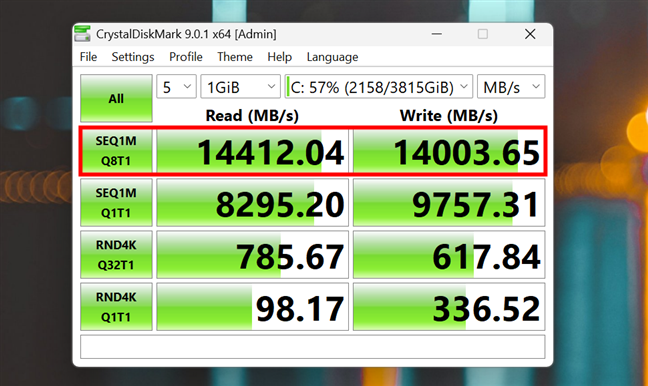
 Sequential read/write with queues for a PCIe 5.0 NVMe SSD
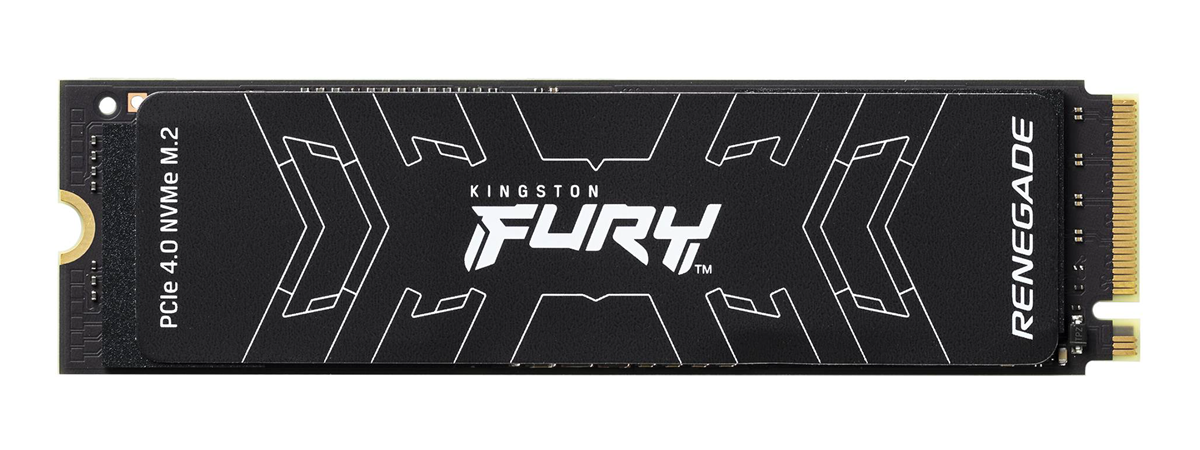
TIP: Curious about what drive I used for the screenshot above? Check out this review.
Hard-disk drives don’t do nearly as well here, as their physical limitations keep them under 200 MB/s.
Sequential read/write with queues for a PCIe 5.0 NVMe SSD
TIP: Curious about what drive I used for the screenshot above? Check out this review.
Hard-disk drives don’t do nearly as well here, as their physical limitations keep them under 200 MB/s.

 Sequential read/write with queues for a hard-disk drive
To conclude, the data read and write speeds you get in SEQ1M Q8T1 are the ones you should look at when you want to understand how fast a drive is for things like large file transfers, disk cloning, video editing, and big game assets. This also tells you the highest transfer speeds achievable by the drive; so, these are the sequential speeds you most often see advertised on SSD and HDD drive packagings.
Sequential read/write with queues for a hard-disk drive
To conclude, the data read and write speeds you get in SEQ1M Q8T1 are the ones you should look at when you want to understand how fast a drive is for things like large file transfers, disk cloning, video editing, and big game assets. This also tells you the highest transfer speeds achievable by the drive; so, these are the sequential speeds you most often see advertised on SSD and HDD drive packagings.
 Sequential read/write (one queue, one thread)
This test gives you a more “basic” sequential speed. It’s what you might see when copying a large file in a system that isn’t multitasking heavily. The results are often a little lower than SEQ1M Q8T1, especially on NVMe SSDs that benefit from parallel operations.
You can use the SEQ1M Q1T1 results to get an idea of how fast your drive is when doing stuff like casual file transfers, playing back a video file, or saving a recording.
Sequential read/write (one queue, one thread)
This test gives you a more “basic” sequential speed. It’s what you might see when copying a large file in a system that isn’t multitasking heavily. The results are often a little lower than SEQ1M Q8T1, especially on NVMe SSDs that benefit from parallel operations.
You can use the SEQ1M Q1T1 results to get an idea of how fast your drive is when doing stuff like casual file transfers, playing back a video file, or saving a recording.
 Random read/write with many queues
Think of this like running an antivirus scan, updating your apps, loading a virtual machine, and compiling large applications during development. All at the same time! For older hard disk drives, this is brutal: the read/write head has to jump around constantly, and speeds drop to almost nothing (0.5 - 2 MB/s).
Random read/write with many queues
Think of this like running an antivirus scan, updating your apps, loading a virtual machine, and compiling large applications during development. All at the same time! For older hard disk drives, this is brutal: the read/write head has to jump around constantly, and speeds drop to almost nothing (0.5 - 2 MB/s).

 Random read/write with many queues for an old hard-disk drive
SSDs, on the other hand, handle this with ease. Even a basic SATA SSD can do 20 - 50 MB/s, and NVMe drives can reach well over 100 MB/s for this kind of operations
Random read/write with many queues for an old hard-disk drive
SSDs, on the other hand, handle this with ease. Even a basic SATA SSD can do 20 - 50 MB/s, and NVMe drives can reach well over 100 MB/s for this kind of operations

 Random read/write with many queues for a fast PCIe 5.0 SSD
You should check the RND4K Q32T1 results in CrystalDiskMark if you want to know how fast your drive is at multitasking, running virtual machines, developing software, or regular workstation tasks.
Random read/write with many queues for a fast PCIe 5.0 SSD
You should check the RND4K Q32T1 results in CrystalDiskMark if you want to know how fast your drive is at multitasking, running virtual machines, developing software, or regular workstation tasks.
 Random read/write (single queue, single thread)
If this score is high, your system will feel fast. A good NVMe SSD can reach over 60 MB/s when performing this task.
Random read/write (single queue, single thread)
If this score is high, your system will feel fast. A good NVMe SSD can reach over 60 MB/s when performing this task.
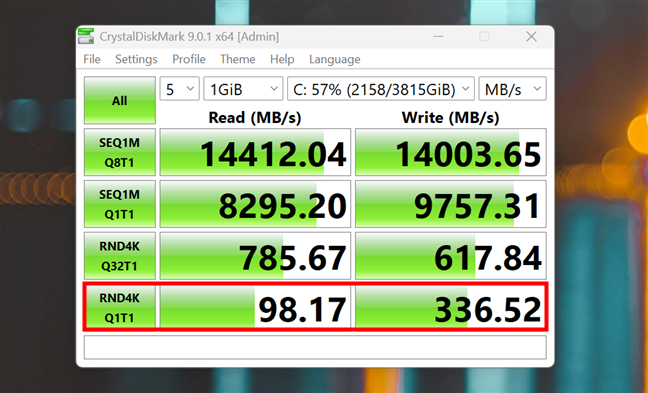
 Random read/write (single queue, single thread) for a modern SSD
SATA SSDs typically manage 30 - 40 MB/s. HDDs? They struggle with less than 1 MB/s.
Random read/write (single queue, single thread) for a modern SSD
SATA SSDs typically manage 30 - 40 MB/s. HDDs? They struggle with less than 1 MB/s.
 Random read/write (single queue, single thread) for a regular HDD
These results let you know what to expect in terms of boot speed, app launch times, desktop responsiveness, and general use.
Random read/write (single queue, single thread) for a regular HDD
These results let you know what to expect in terms of boot speed, app launch times, desktop responsiveness, and general use.
What does CrystalDiskMark show you?
When you run a CrystalDiskMark test, you see a simple table like the one below. Each row tests a different kind of disk activity, and the columns show how fast your drive can read and write data, measured in megabytes per second (MB/s).SEQ1M Q8T1 - Sequential read/write with queues
This test measures how fast your drive can read or write large, continuous blocks of data. Like copying a movie in 4K resolution, installing a big game from Steam, or editing large video files recorded with a professional camera. SEQ stands for sequential. That’s because it processes data that’s stored next to each other, in order, with no skipping around the disk. Here’s how to read the whole label:- 1M means the drive is handling data in 1 MiB (mebibyte, about one megabyte) chunks at a time. It’s a large block size, appropriate for tasks like copying big files, where the system reads or writes a steady stream of data.
- Q8 stands for a queue depth of 8. This means CrystalDiskMark is sending 8 read/write requests to the drive at once, instead of waiting for each one to finish before starting the next. That helps the drive stay busy and efficient.
- T1 means it’s using one thread, meaning one single line of execution. So even though there are 8 requests in the pipeline, they’re all managed one by one, in a thread.
SEQ1M Q1T1 - Sequential read/write (one queue, one thread)
This is similar to the previous test, but instead of eight operations in parallel, it does everything one step at a time: one request, one thread. It’s like moving a big folder using just one hand, slowly and steadily.RND4K Q32T1 - Random read/write with many queues
This is where things get interesting. The RND4K part means the test uses small, scattered 4KB files. These are the kind your system deals with all the time. Q32T1 means it sends 32 requests in parallel using one thread. It’s a stressful multitasking scenario.RND4K Q1T1 - Random read/write (single queue, single thread)
This is probably the most important number for most people. It tests how quickly your drive can read or write many tiny 4KB files, one by one, without multitasking. It’s a single task, with no queuing. This is what happens when you boot up Windows, launch a web browser, or open a game. The system is simply reading and writing tons of little files in sequence.What do your CrystalDiskMark results say about your drive?
So, which CrystalDiskMark metric matters most? Well, the answer depends on what you do:- If you work with large files (video, audio, games), focus on SEQ1M Q8T1.
- If you want your PC to feel fast, boot quickly, and open apps without delay, RND4K Q1T1 is key.
- For multitaskers, virtual machines, or software developers, RND4K Q32T1 matters too.
- SEQ1M Q1T1 gives a more modest baseline, but it can still be useful for basic tasks that involve working with small files
Discussion (0)
Be the first to comment.