




The ASUS ROG Zephyrus G14 (2022) is one of the most interesting gaming laptops I’ve tested in a while. Not only does it offer premium high-end hardware, but it also sweetens the pot with a unique customizable AniMe Matrix on its screen lid and by being a very mobile gaming laptop with a smaller than the average screen size of just 14 inches. Pair that with the latest AMD processors and mobile graphics cards, and you’ll certainly be intrigued. Do you want to know more about this laptop? Read this review and find out what the ASUS ROG Zephyrus G14 has to offer:
![Verdict]()

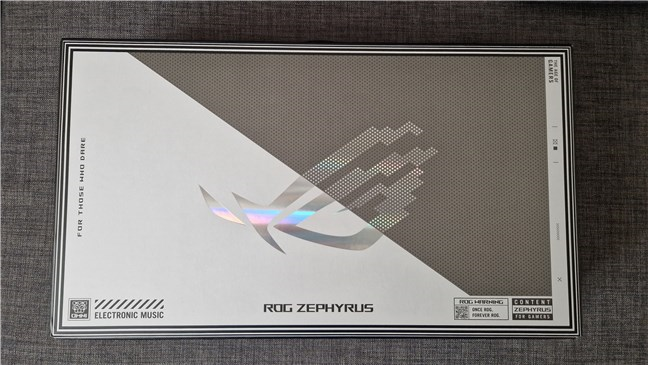
 The box of the ASUS ROG Zephyrus G14
Inside the box, there’s obviously the ASUS ROG Zephyrus G14 notebook, a powerful 240 Watts power adapter, and a couple of documents: user manual, warranty, and a welcome card.
The box of the ASUS ROG Zephyrus G14
Inside the box, there’s obviously the ASUS ROG Zephyrus G14 notebook, a powerful 240 Watts power adapter, and a couple of documents: user manual, warranty, and a welcome card.
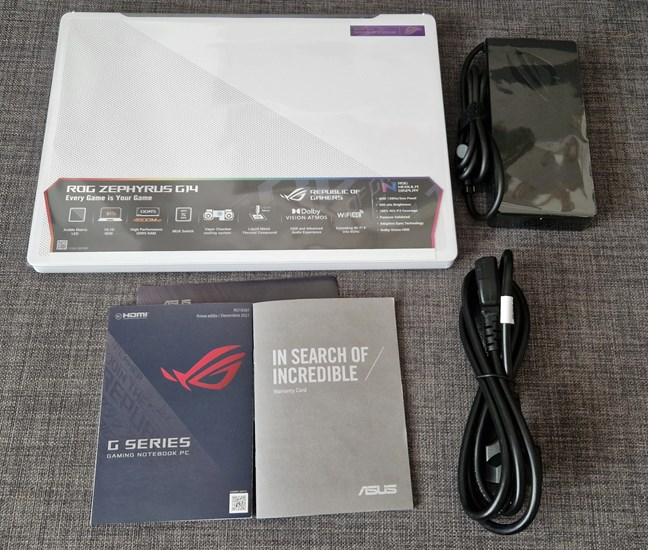
 ASUS ROG Zephyrus G14: What's inside the box
Unboxing the ASUS ROG Zephyrus G14 laptop is a pleasant experience. The packaging is premium, just like the contents. At first glance, the laptop looks beautiful and well built.
TIP: If you're interested, a detailed guide on other modern thin-and-light gaming laptops is also available at UltrabookReview.com.
ASUS ROG Zephyrus G14: What's inside the box
Unboxing the ASUS ROG Zephyrus G14 laptop is a pleasant experience. The packaging is premium, just like the contents. At first glance, the laptop looks beautiful and well built.
TIP: If you're interested, a detailed guide on other modern thin-and-light gaming laptops is also available at UltrabookReview.com.
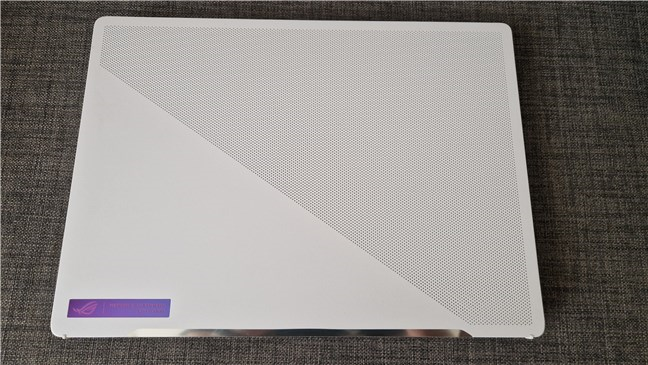 ASUS ROG Zephyrus G14 looks beautiful
The ASUS ROG Zephyrus G14 is a portable gaming laptop considering that its screen has a diagonal of just 14”. That’s something quite rare in the world of gaming laptops.
The model I tested came with a QHD+ (2560 x 1600 WQXGA) anti-glare display with a 16:10 aspect ratio. ASUS says the display uses an IPS-level panel with 100% coverage of the DCI-P3 color gamut. Furthermore, the screen has a refresh rate of 120 Hz, which is great for fast-paced action games. In the real world, both the brightness and the color reproduction seem to be excellent, and the display also has wide viewing angles.
ASUS ROG Zephyrus G14 looks beautiful
The ASUS ROG Zephyrus G14 is a portable gaming laptop considering that its screen has a diagonal of just 14”. That’s something quite rare in the world of gaming laptops.
The model I tested came with a QHD+ (2560 x 1600 WQXGA) anti-glare display with a 16:10 aspect ratio. ASUS says the display uses an IPS-level panel with 100% coverage of the DCI-P3 color gamut. Furthermore, the screen has a refresh rate of 120 Hz, which is great for fast-paced action games. In the real world, both the brightness and the color reproduction seem to be excellent, and the display also has wide viewing angles.
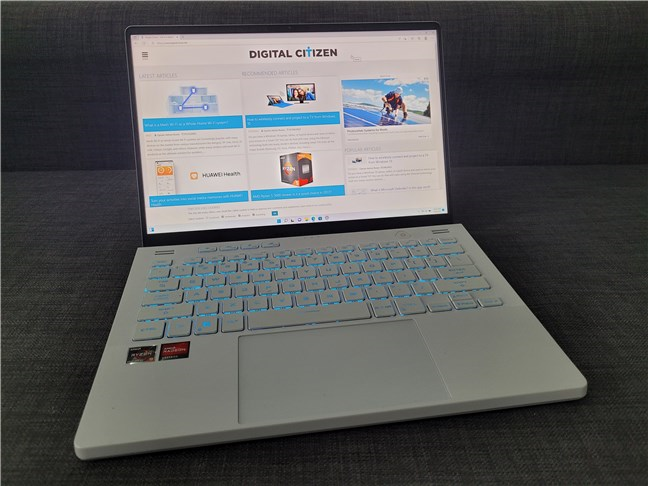
 The screen looks gorgeous
Under the screen, there’s an RGB backlit chiclet keyboard and a large touchpad. The keyboard is not full-size, meaning it lacks a numerical keypad. There’s also no Print Screen key, and I missed having one at hand. 🙂 Otherwise, the keyboard feels great when typing and in games.
The screen looks gorgeous
Under the screen, there’s an RGB backlit chiclet keyboard and a large touchpad. The keyboard is not full-size, meaning it lacks a numerical keypad. There’s also no Print Screen key, and I missed having one at hand. 🙂 Otherwise, the keyboard feels great when typing and in games.
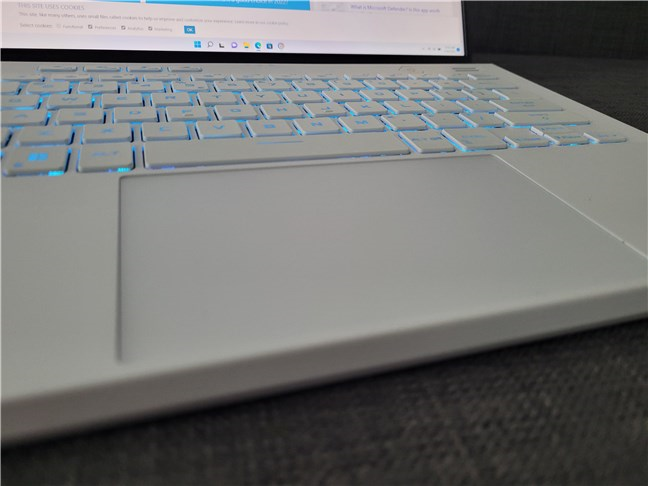 The keypad and touchpad are comfortable to use
On the laptop’s lid, ASUS’s AniMe Matrix will certainly cause some excitement for those who look at the laptop. This matrix is made of many LED lights behind small perforations, and it’s completely customizable: you can make it display any text you want or even animated GIF images.
The keypad and touchpad are comfortable to use
On the laptop’s lid, ASUS’s AniMe Matrix will certainly cause some excitement for those who look at the laptop. This matrix is made of many LED lights behind small perforations, and it’s completely customizable: you can make it display any text you want or even animated GIF images.
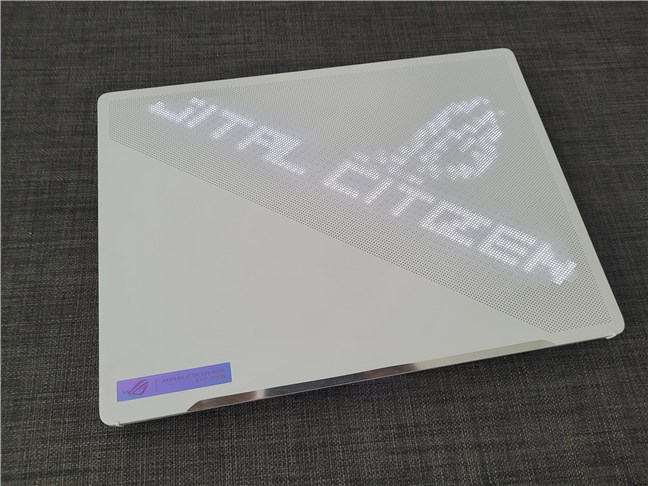 AniMe Matrix is something else
The lid connects to the body of the laptop via two sturdy hinges, and when opening it, the lid also slightly raises the back of the laptop from the surface you use it on. That’s a nice touch, considering how useful a few additional millimeters of air under the notebook are in cooling its components. The slight angle of the laptop, when opened, also makes typing and playing more comfortable.
AniMe Matrix is something else
The lid connects to the body of the laptop via two sturdy hinges, and when opening it, the lid also slightly raises the back of the laptop from the surface you use it on. That’s a nice touch, considering how useful a few additional millimeters of air under the notebook are in cooling its components. The slight angle of the laptop, when opened, also makes typing and playing more comfortable.
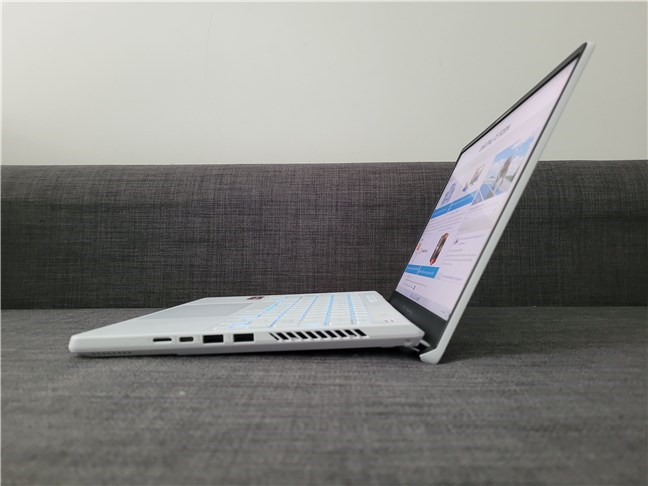 When opening it, the lid slightly raises the back of the laptop
The bottom of the ASUS ROG Zephyrus G14 is relatively simple, filled with small air cooling holes.
When opening it, the lid slightly raises the back of the laptop
The bottom of the ASUS ROG Zephyrus G14 is relatively simple, filled with small air cooling holes.
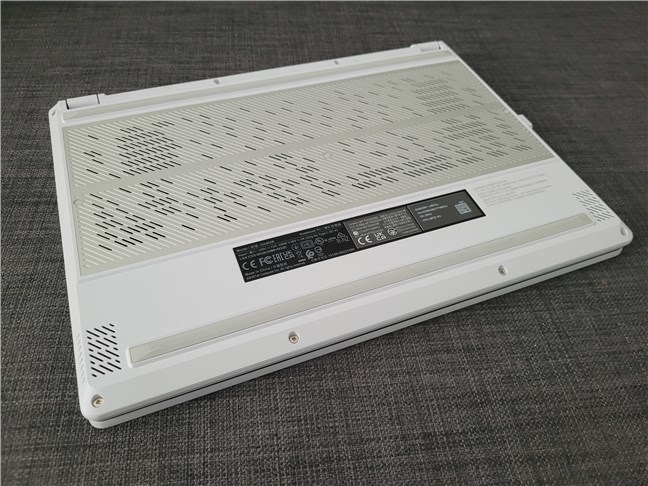 ASUS ROG Zephyrus G14 has many ventilation holes on its bottom
In terms of ports, the ASUS ROG Zephyrus G14 is quite generous. On the left side, there’s the power jack, followed by an HDMI port, a USB 3.2 Gen 2 Type-C that supports DisplayPort and power delivery, and a 3.5 mm combo audio jack (headphones plus microphone).
ASUS ROG Zephyrus G14 has many ventilation holes on its bottom
In terms of ports, the ASUS ROG Zephyrus G14 is quite generous. On the left side, there’s the power jack, followed by an HDMI port, a USB 3.2 Gen 2 Type-C that supports DisplayPort and power delivery, and a 3.5 mm combo audio jack (headphones plus microphone).
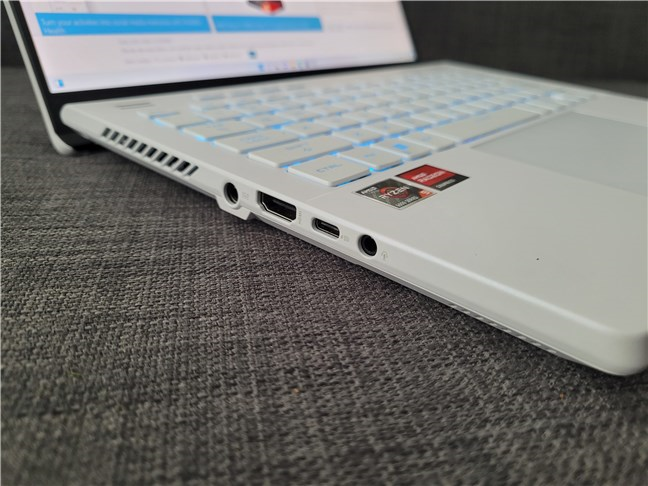 The ports on the left side of the laptop
On the laptop's right side, you get two USB 3.2 Gen 2 Type-A ports, one USB 3.2 Gen 2 Type-C that supports display, and a microSD card reader. The only thing missing on the ASUS ROG Zephyrus G14 is an RJ45 LAN port.
The ports on the left side of the laptop
On the laptop's right side, you get two USB 3.2 Gen 2 Type-A ports, one USB 3.2 Gen 2 Type-C that supports display, and a microSD card reader. The only thing missing on the ASUS ROG Zephyrus G14 is an RJ45 LAN port.
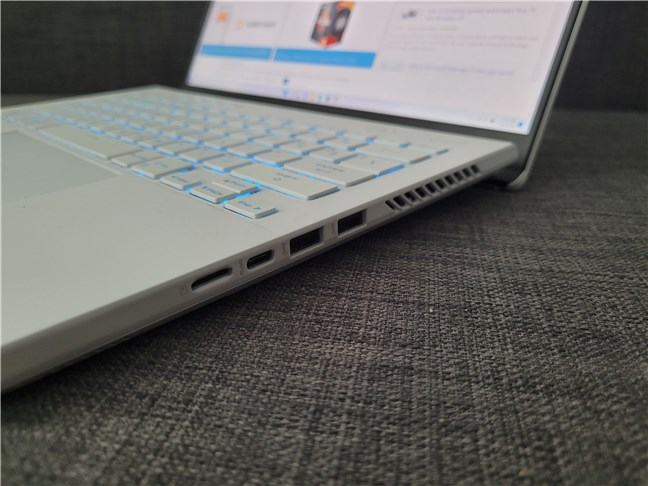 The ports on the right side of the laptop
Under the hood, the ASUS ROG Zephyrus G14 can be equipped with an AMD Ryzen 7 6800HS or a Ryzen 9 6900HS processor.
The sample I tested came with the most powerful one, the Ryzen 9 6900HS. It has eight cores and sixteen threads and can reach a maximum frequency of 4.90 GHz. In addition, the CPU features 16 MB of Level 3 cache memory, has a default TDP of just 35 Watts, and can operate at a maximum temperature of 95 degrees Celsius.
The ports on the right side of the laptop
Under the hood, the ASUS ROG Zephyrus G14 can be equipped with an AMD Ryzen 7 6800HS or a Ryzen 9 6900HS processor.
The sample I tested came with the most powerful one, the Ryzen 9 6900HS. It has eight cores and sixteen threads and can reach a maximum frequency of 4.90 GHz. In addition, the CPU features 16 MB of Level 3 cache memory, has a default TDP of just 35 Watts, and can operate at a maximum temperature of 95 degrees Celsius.
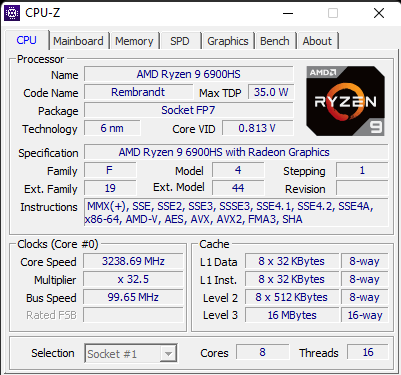
 Processor details shown by CPU-Z
In terms of memory, the laptop comes with 16 GB of DDR5 RAM soldered on the motherboard, but it also has a DIMM slot available, which you can use to add another 16 GB of DDR5-4800 RAM.
Processor details shown by CPU-Z
In terms of memory, the laptop comes with 16 GB of DDR5 RAM soldered on the motherboard, but it also has a DIMM slot available, which you can use to add another 16 GB of DDR5-4800 RAM.
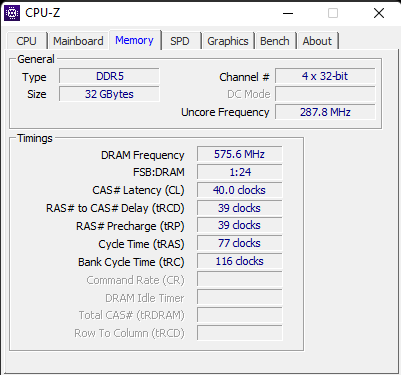 Memory information shown by CPU-Z
As it’s a machine targeted to gamers, the laptop also comes with a dedicated video card inside: AMD Radeon RX 6800S with 8 GB of GDDR6.
Memory information shown by CPU-Z
As it’s a machine targeted to gamers, the laptop also comes with a dedicated video card inside: AMD Radeon RX 6800S with 8 GB of GDDR6.
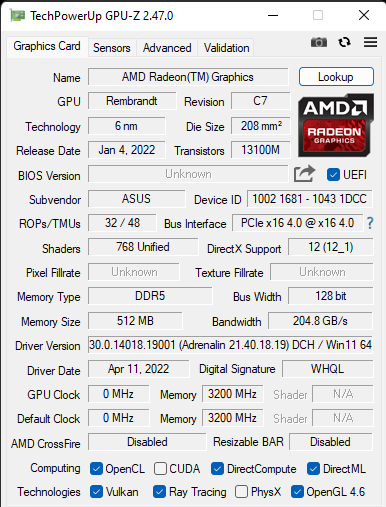
 Graphics card details shown by GPU-Z
As for storage, the ASUS ROG Zephyrus G14 gives you a fast and large 1 TB NVMe M.2 solid-state drive running on PCI Express 4.0.
Graphics card details shown by GPU-Z
As for storage, the ASUS ROG Zephyrus G14 gives you a fast and large 1 TB NVMe M.2 solid-state drive running on PCI Express 4.0.
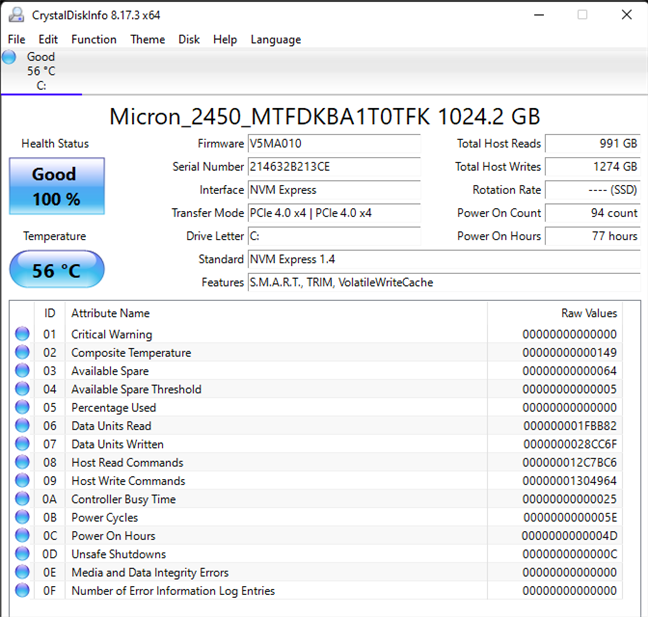
 Information about the solid-state drive
The wireless connectivity offered by the ASUS ROG Zephyrus G14 is excellent too. You get Wi-Fi 6E (802.11ax, dual-band) with 2×2 MU-MIMO and Bluetooth 5.2. Regarding audio, the ASUS ROG Zephyrus G14 has a set of not two, but four built-in speakers found on both its bottom and top sides. Plus, you also get Dolby Atmos, Hi-Res certification, and AI noise-canceling for the microphones (there are three of them).
Information about the solid-state drive
The wireless connectivity offered by the ASUS ROG Zephyrus G14 is excellent too. You get Wi-Fi 6E (802.11ax, dual-band) with 2×2 MU-MIMO and Bluetooth 5.2. Regarding audio, the ASUS ROG Zephyrus G14 has a set of not two, but four built-in speakers found on both its bottom and top sides. Plus, you also get Dolby Atmos, Hi-Res certification, and AI noise-canceling for the microphones (there are three of them).
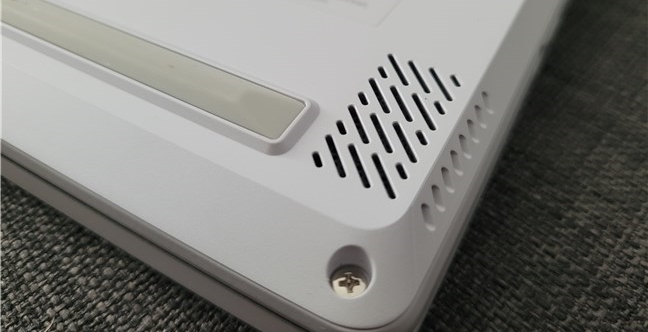
 There are four speakers on the laptop
The laptop’s autonomy is sustained by a large 76 Watt-hours Li-ion battery with four cells. And last but not least, you should know that the Zephyrus G14 comes with Windows 11 Home preinstalled.
The ASUS ROG Zephyrus G14 is a beautiful gaming laptop that, according to its specs, should deliver a lot of performance.
On the next page of this review, I share the laptop’s results in benchmarks, as well as details about the user experience, software, and apps offered by the ASUS ROG Zephyrus G14.
There are four speakers on the laptop
The laptop’s autonomy is sustained by a large 76 Watt-hours Li-ion battery with four cells. And last but not least, you should know that the Zephyrus G14 comes with Windows 11 Home preinstalled.
The ASUS ROG Zephyrus G14 is a beautiful gaming laptop that, according to its specs, should deliver a lot of performance.
On the next page of this review, I share the laptop’s results in benchmarks, as well as details about the user experience, software, and apps offered by the ASUS ROG Zephyrus G14.
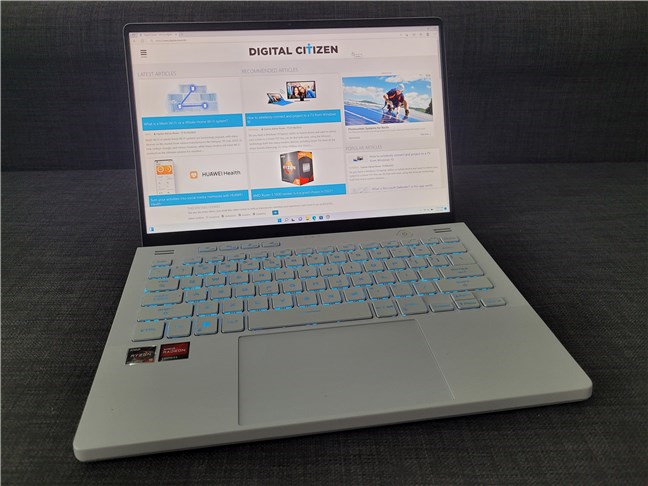 ASUS ROG Zephyrus G14 is great for everyday work and gaming
It also performed great in gaming. I’ve played a couple of hours of Horizon Zero Dawn, Assassin’s Creed Valhalla, and more than just a few matches of League of Legends. Everything was smooth, and the laptop’s graphics card had no issues in delivering high numbers of frames per second, ensuring an excellent gaming experience. But more on that in the benchmarks section of this review. 🙂
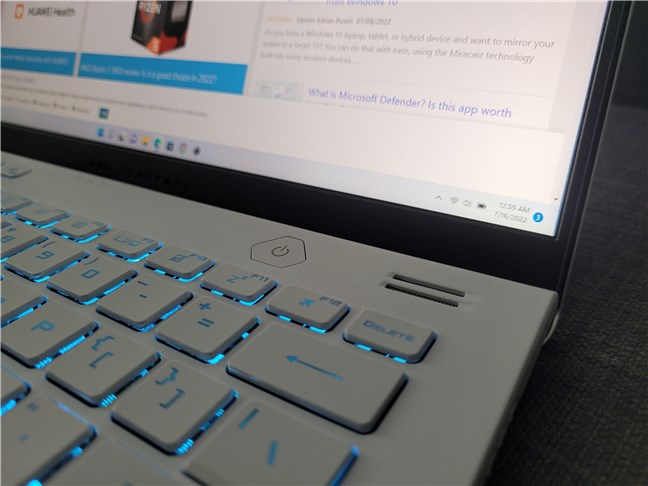
The keyboard and the touchpad are also of good quality and satisfying to use. I like the font used for the key characters and the fact that the keys are well distanced to avoid pressing two keys at once by accident. I also appreciate the RGB backlighting, as it makes it easier to see the keys in the dark, which is usually when I have time to play my favorite games. What’s missing, though, is a numerical keypad and a Print Screen key, but I understand this omission: this is a 14” gaming laptop, after all, so its size doesn’t allow for too much. As for the touchpad, I can say that it’s pretty good: large and slightly below the laptop's surface, making it easy to find and use. Also, the travel distance of the two left-click and right-click buttons (hidden under the touchpad) is relatively short and offers good feedback.
ASUS ROG Zephyrus G14 is great for everyday work and gaming
It also performed great in gaming. I’ve played a couple of hours of Horizon Zero Dawn, Assassin’s Creed Valhalla, and more than just a few matches of League of Legends. Everything was smooth, and the laptop’s graphics card had no issues in delivering high numbers of frames per second, ensuring an excellent gaming experience. But more on that in the benchmarks section of this review. 🙂
The keyboard and the touchpad are also of good quality and satisfying to use. I like the font used for the key characters and the fact that the keys are well distanced to avoid pressing two keys at once by accident. I also appreciate the RGB backlighting, as it makes it easier to see the keys in the dark, which is usually when I have time to play my favorite games. What’s missing, though, is a numerical keypad and a Print Screen key, but I understand this omission: this is a 14” gaming laptop, after all, so its size doesn’t allow for too much. As for the touchpad, I can say that it’s pretty good: large and slightly below the laptop's surface, making it easy to find and use. Also, the travel distance of the two left-click and right-click buttons (hidden under the touchpad) is relatively short and offers good feedback.
 The keypad is nice to type on
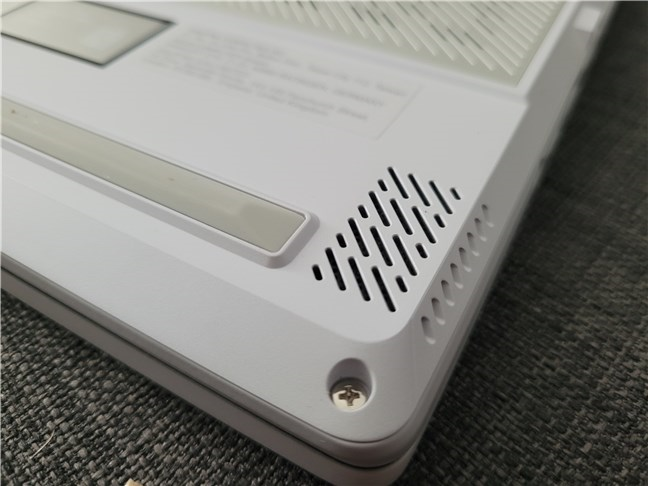
The audio quality of the built-in speakers is quite amazing for a laptop. They offer excellent and powerful sound. Even lower frequencies sound great, which is not something common on laptops due to the limited space available for the drivers.
The keypad is nice to type on
The audio quality of the built-in speakers is quite amazing for a laptop. They offer excellent and powerful sound. Even lower frequencies sound great, which is not something common on laptops due to the limited space available for the drivers.
 Sound quality is excellent
The webcam is also of good quality. It’s a 720p HD camera that’s good not just for chatting online but also for locking or unlocking the laptop. That’s because it also has infrared, which means you can use it for face unlocking with Windows Hello.
The user experience offered by the ASUS ROG Zephyrus G14 is excellent both for work and gaming. It’s comfortable to type on, it has great sound quality, more power than you’ll ever need for common computing activities, and excellent performance in gaming.
Sound quality is excellent
The webcam is also of good quality. It’s a 720p HD camera that’s good not just for chatting online but also for locking or unlocking the laptop. That’s because it also has infrared, which means you can use it for face unlocking with Windows Hello.
The user experience offered by the ASUS ROG Zephyrus G14 is excellent both for work and gaming. It’s comfortable to type on, it has great sound quality, more power than you’ll ever need for common computing activities, and excellent performance in gaming.
 Boot time in Windows 11
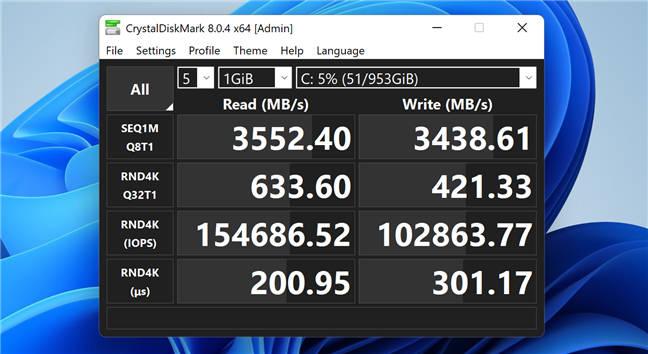
Next, I used CrystalDiskMark to test the laptop’s 1 TB NVMe PCIe 4.0 solid-state drive. The reading and writing speeds were top-notch. Both the random IOPS (input-output operations per second) and sequential read and write speeds were fast.
Boot time in Windows 11
Next, I used CrystalDiskMark to test the laptop’s 1 TB NVMe PCIe 4.0 solid-state drive. The reading and writing speeds were top-notch. Both the random IOPS (input-output operations per second) and sequential read and write speeds were fast.
 SSD benchmark result
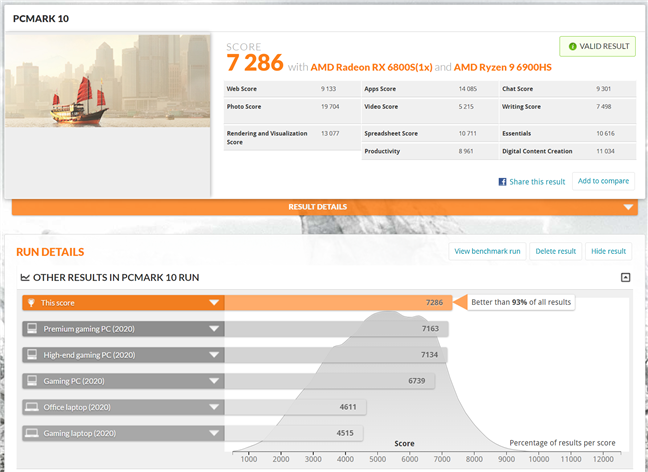
Next, I ran PCMark 10 on the ASUS ROG Zephyrus G14. This is a battery of tests designed to measure performance in regular productivity tasks such as working with Office apps, videoconferencing, browsing the internet, and creating digital content. As you can see below, the laptop managed a huge score of 7286 points. That puts it in the top 7% best computers and laptops tested with PCMark 10!
SSD benchmark result
Next, I ran PCMark 10 on the ASUS ROG Zephyrus G14. This is a battery of tests designed to measure performance in regular productivity tasks such as working with Office apps, videoconferencing, browsing the internet, and creating digital content. As you can see below, the laptop managed a huge score of 7286 points. That puts it in the top 7% best computers and laptops tested with PCMark 10!
 Benchmark result in PCMark 10
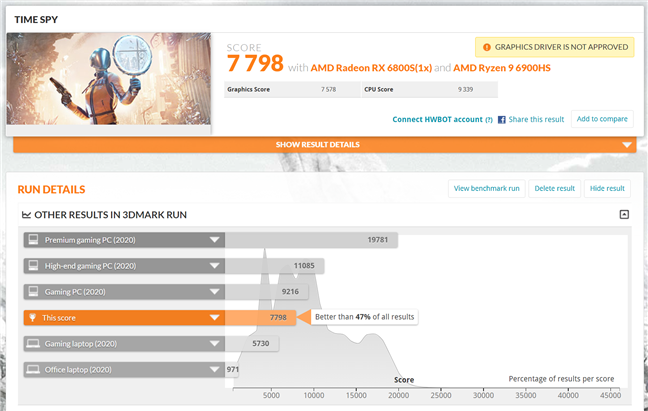
Next are the gaming benchmarks. I started with 3DMark's Time Spy Extreme, where the laptop got a high score of 7798 points. That’s better than 47% of all results, which is great for a laptop.
Benchmark result in PCMark 10
Next are the gaming benchmarks. I started with 3DMark's Time Spy Extreme, where the laptop got a high score of 7798 points. That’s better than 47% of all results, which is great for a laptop.
 Benchmark result in 3DMark Time Spy
I also ran a few benchmarks in a couple of demanding games: Horizon Zero Dawn, Metro Exodus, and Assassin’s Creed Valhalla. All the benchmarks were run in Full HD resolution.
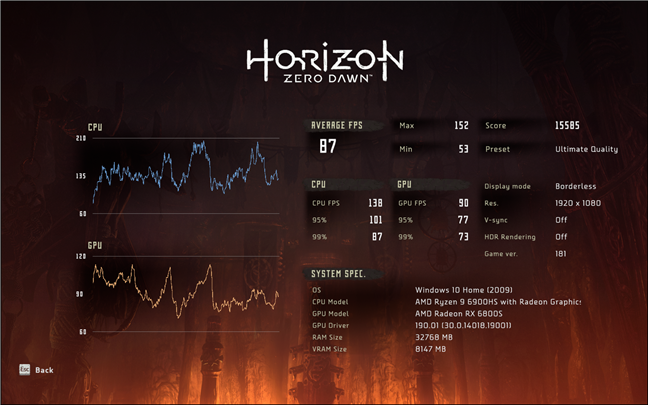
In Horizon Zero Dawn, on the Ultimate Quality graphics quality, I got an excellent result: a minimum frame rate of 53, an average of 87, and a maximum of 152 fps.
Benchmark result in 3DMark Time Spy
I also ran a few benchmarks in a couple of demanding games: Horizon Zero Dawn, Metro Exodus, and Assassin’s Creed Valhalla. All the benchmarks were run in Full HD resolution.
In Horizon Zero Dawn, on the Ultimate Quality graphics quality, I got an excellent result: a minimum frame rate of 53, an average of 87, and a maximum of 152 fps.
 Benchmark result in Horizon Zero Dawn
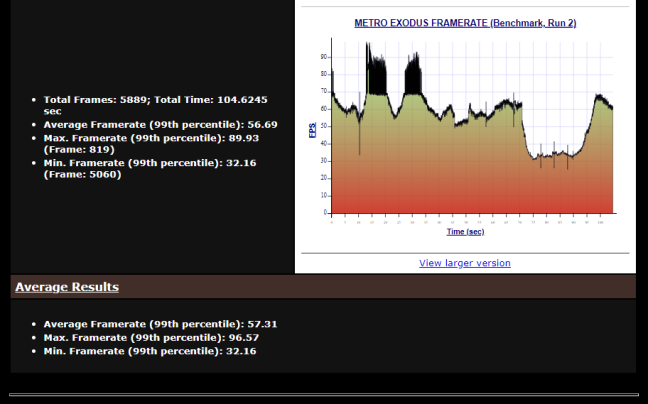
In Metro Exodus, I used the Ultra preset for the graphics quality. I got a minimum of 32 frames per second, an average of 57 fps, and a maximum of 96. These are top-notch results!
Benchmark result in Horizon Zero Dawn
In Metro Exodus, I used the Ultra preset for the graphics quality. I got a minimum of 32 frames per second, an average of 57 fps, and a maximum of 96. These are top-notch results!
 Benchmark result in Metro Exodus
For Assassin’s Creed Valhalla, I used the Very High graphics settings, and I got a minimum frame rate of 33, an average of 77 fps, and a maximum of 198 frames per second. These are excellent results considering the chosen image quality!
Benchmark result in Metro Exodus
For Assassin’s Creed Valhalla, I used the Very High graphics settings, and I got a minimum frame rate of 33, an average of 77 fps, and a maximum of 198 frames per second. These are excellent results considering the chosen image quality!
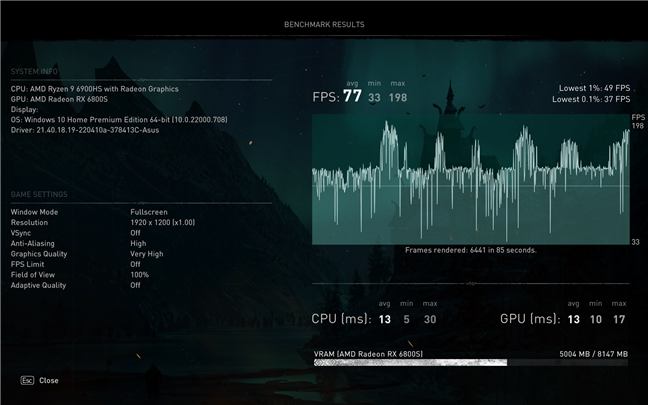 Benchmark result in Assassin's Creed Valhalla
To see how well the laptop’s cooling system fares in demanding situations, I ran AIDA64’s stability tests for the processor (CPU, FPU, and cache stress tests). The processor reached a maximum of 93 degrees Celsius in full load. It seems a bit high, but that was just a spike. When it got to that temperature, the coolers started spinning faster and decreased the CPU temperature down to 87 degrees.
Benchmark result in Assassin's Creed Valhalla
To see how well the laptop’s cooling system fares in demanding situations, I ran AIDA64’s stability tests for the processor (CPU, FPU, and cache stress tests). The processor reached a maximum of 93 degrees Celsius in full load. It seems a bit high, but that was just a spike. When it got to that temperature, the coolers started spinning faster and decreased the CPU temperature down to 87 degrees.
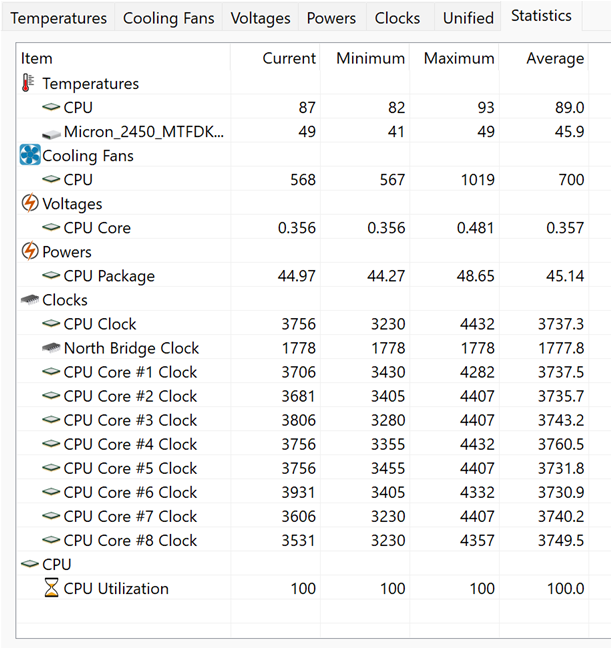
 Processor temperatures in very demanding situations
In the end, I ran PCMark 10 once more, but this time I used its Modern Office battery tests. That’s to see how much the laptop can run on batteries alone while browsing the internet, chatting, and writing. The ASUS ROG Zephyrus G14 kept on going for six hours and five minutes, which is unexpectedly good for a gaming laptop. Great job, ASUS!
Processor temperatures in very demanding situations
In the end, I ran PCMark 10 once more, but this time I used its Modern Office battery tests. That’s to see how much the laptop can run on batteries alone while browsing the internet, chatting, and writing. The ASUS ROG Zephyrus G14 kept on going for six hours and five minutes, which is unexpectedly good for a gaming laptop. Great job, ASUS!

 ASUS ROG Zephyrus G14: Battery life
The results I got in the benchmarks tell us that the ASUS ROG Zephyrus G14 is a high-performer in both gaming and productivity tasks. There’s no game it can’t run very well and at high framerates.
ASUS ROG Zephyrus G14: Battery life
The results I got in the benchmarks tell us that the ASUS ROG Zephyrus G14 is a high-performer in both gaming and productivity tasks. There’s no game it can’t run very well and at high framerates.
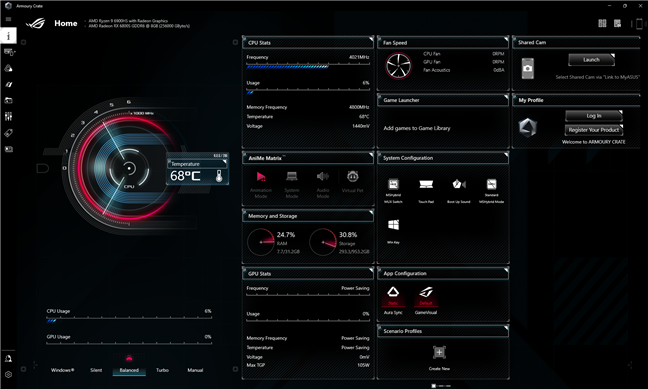
 The Armoury Crate app
I appreciate the fact that the ASUS ROG Zephyrus G14 is a lightweight device in terms of bundled software. And the two apps you do get, of course, only if you want them, are genuinely useful for managing your laptop.
The Armoury Crate app
I appreciate the fact that the ASUS ROG Zephyrus G14 is a lightweight device in terms of bundled software. And the two apps you do get, of course, only if you want them, are genuinely useful for managing your laptop.
ASUS ROG Zephyrus G14: Who is it good for?
The ASUS ROG Zephyrus G14 is an excellent choice for:- Gamers who want a powerful laptop for their favorite games
- Anyone looking for a mobile gaming laptop with a 14” screen
- Whoever wants a laptop that stands out
Pros and cons
There are a lot of good things to say about the ASUS ROG Zephyrus G14:
- It comes with the latest and most powerful AMD mobile processors to date
- Plenty of RAM, and there’s also a SO-DIMM slot available to add more
- Very fast and generous storage
- A display with excellent image quality
- The keyboard is comfortable for typing, and the touchpad is large
- It looks great, and the AniMe Matrix makes it stand out in a fun way
- Excellent connectivity options, including support for Wi-Fi 6E
- The battery life is impressive for a gaming machine
- The bundled software is useful
- There’s no Numpad and no Print Screen key on the keyboard
Verdict
Testing and using the ASUS ROG Zephyrus G14 (2022) made me want this laptop for myself. And I don’t think there’s a higher compliment I can give it. Not only does it look great, especially with its AniMe Matrix customizable LEDs, but it’s also well built, very mobile, and powerful. It’s a great choice for anyone who wants to have excellent gaming performance but also for people looking for a productivity device on the go. I warmly recommend it to all our readers.Unboxing the ASUS ROG Zephyrus G14
The ASUS ROG Zephyrus G14 notebook arrives in a relatively large box made of premium cardboard and with a beautiful design. Along with various gray and silver shining patterns announcing that it belongs to the Republic of Gamers family, the top cover of the box also explicitly tells you that the laptop inside is a Zephyrus.Design and hardware specifications
The ASUS ROG Zephyrus G14 (2022) is a very powerful 14-inch gaming laptop that doesn’t compromise in terms of hardware quality and excels in terms of design. Its white body might be small, but it’s stylish and feels robust, while the AniMe Matrix - a customizable LED grid on the laptop’s lid - looks awesome. However, don’t let any of that fool you, as this is still a gaming machine, not an ultrabook. You can immediately sense that when holding it as it weighs 1.71 kg or 3.79 pounds. The Zephyrus G14 is 19.5 mm (~0.77 inches) thick, and it has a length of 312 mm (~12.28 inches) and a depth of 227 mm (8.94 inches).Using the ASUS ROG Zephyrus G14
The ASUS ROG Zephyrus G14 doesn’t compromise when it comes to its hardware. However, even if it was designed for gaming first and foremost, I also used it for my daily work activities. And that means, in my case, browsing the web, looking for and gathering information for the tutorials and articles I write. I also used it for running virtual machines and actually writing articles in Microsoft Office and Google Docs. For the two weeks or so I had this laptop, it performed great in such daily activities. I’ve never encountered lags, nor did I see it slowing down.Performance in benchmarks
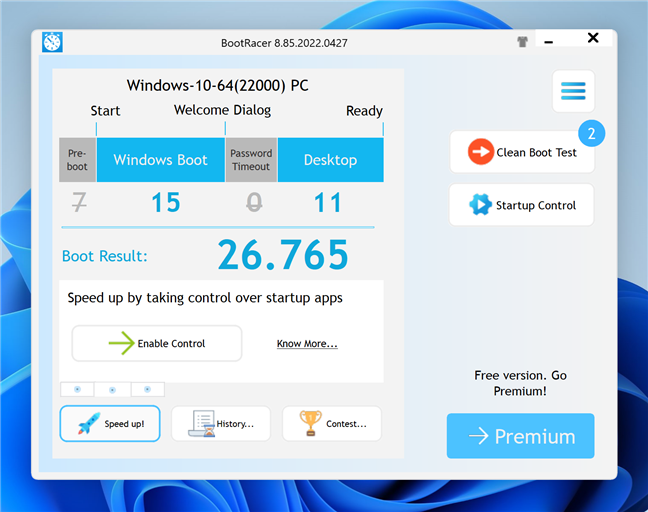
To get a clearer view of how good the ASUS ROG Zephyrus G14 is in terms of hardware performance, I’ve also run a couple of benchmarks. Here’s the story they tell: I started by measuring the time needed by the laptop to start using BootRacer. As you can see in the next screenshot, the ASUS ROG Zephyrus G14 required about 26 seconds to boot Windows 11.Apps bundled with the ASUS ROG Zephyrus G14 (2022)
The ASUS ROG Zephyrus G14 notebook bundles just a few additional apps, two to be more exact, and both of them are useful:- MyASUS: useful if you want to download drivers and BIOS automatically, register your laptop with ASUS, diagnose problems, contact customer support, link your laptop to your smartphone, manage how the laptop’s battery is charged, etc.
- Armoury Crate is ASUS’ go-to app for information about your computer or laptop, letting you configure your laptop’s gaming settings, performance modes, manage RGB lighting effects, create game scenarios, and so on.

Discussion (0)
Comments are closed.