




If Cash App charged you a fee for receiving money, it usually comes down to account type. Personal accounts receive money for free, while business accounts pay processing fees similar to card-merchant services.
This guide explains every fee scenario, why those fees exist, and practical ways to avoid them.
1) When Cash App charges a fee for receiving money
Receiving fees appears only in specific conditions. Understanding these triggers helps you avoid unnecessary deductions.
Cash App personal accounts are free for standard transfers
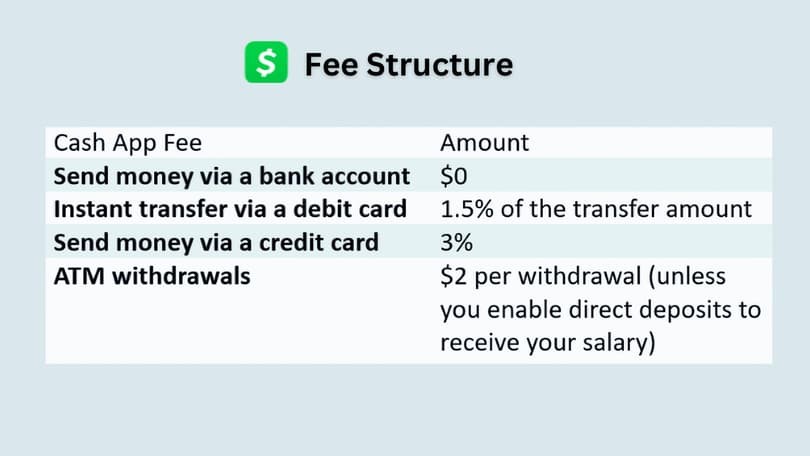
Personal accounts do not pay to receive money. You only pay if you choose Instant Deposit instead of standard deposits.
Business accounts pay processing fees for incoming payments
Business accounts pay a percentage-based processing fee for every incoming payment. Cash App treats business transfers like commercial transactions, which fall under merchant-processing rules.
2) Why Cash App charge a fee for business payments
Cash App applies business receiving fees to cover payment-network costs and merchant-level protections.
Payment-processing network costs
Business payments run through card and ACH networks that charge interchange and processing fees. Cash App passes part of those costs to business users.
Fraud prevention and risk management costs
Business accounts carry higher chargeback and fraud-risk exposure. Receiving fees help cover compliance, monitoring, and dispute-resolution expenses.
Cash App business tools and merchant features
Business accounts get dashboards, payment links, analytics, and tax support. Fees help maintain and support these expanded features.
3) Difference between personal and business accounts
Understanding account roles explains why one pays fees and the other does not.
Personal accounts are meant for friend-to-friend use
These accounts support casual, non-commercial transfers. Cash App expects personal accounts to handle peer-to-peer payments only.
Business accounts are treated as merchants
Business accounts fall under merchant regulations. Processing fees match what small businesses pay when accepting digital payments.

4) How much does Cash App charge for receiving money
Fees stay consistent and predictable across business transfers.
Standard business receiving fees
Cash App applies a percentage fee to each payment you receive with a business account. For example, receiving $1,000 may result in a small deduction based on the processing rate.
Additional fees if users choose Instant Deposit
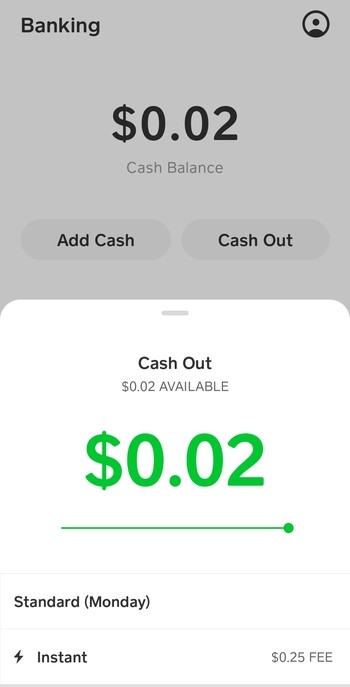
Instant Deposit adds another small fee on top of standard processing charges. Choosing Standard Deposit avoids this extra cost.
5) Why you might see a fee on a personal account
Sender used a business account
If a business account sends you money, the fee may appear on that transaction even though your account is personal.
Cash App flagged commercial activity
Cash App may detect repeated selling, service payments, or patterns resembling business activity. The system may reclassify payments and trigger standard merchant fees.
6) How to avoid Cash App receiving fees
These steps help you prevent unnecessary deductions.
Use a personal account for non-business transfers
Switch to or maintain a personal account if you never sell goods or services. This keeps incoming transfers free.
Avoid Instant Deposit when possible
Instant Deposit adds a separate fee unrelated to receiving money. Standard Deposit keeps the transfer free.
Review your account type and settings
Check your profile to confirm whether your account is Personal or Business. Switch if you are not charging customers or accepting commercial transfers.
7) Alternatives if you want to receive money with no fees
You can avoid processing fees by choosing the right account type or comparing options.
Use fee-free personal transfers
Sticking with personal transfers ensures incoming money stays free. Personal accounts keep peer-to-peer payments simple and cost-free.
Compare business fees across platforms
Some services offer lower business processing rates. If you accept customer payments regularly, comparing fee structures may save money long-term.
FAQs
Does Cash App charge a fee to receive money? Yes, but only for business payments. Personal accounts do not pay receiving fees.
Why did I get charged for receiving money on Cash App? The fee typically appears because the payment involves a business account, detected commercial activity, or Instant Deposit.
How do I remove Cash App receiving fees? Use a personal account, avoid sending invoices from a business profile, and choose Standard Deposit.
Does the IRS require Cash App to charge fees? No. Fees fund payment processing and business tools, not tax requirements.
Summary
- Cash App charges receiving fees only for business payments.
- Personal accounts receive money for free.
- Fees come from processing-network costs and merchant protections.
- Instant Deposit adds an extra optional fee.
- You can avoid fees by using personal transfers.
- Review account type if fees appear unexpectedly.
Conclusion
Cash App fees for receiving money apply only in business contexts. Most users can avoid them by creating Cash App accounts for personal use and choosing standard transfer speeds.
If a fee appears unexpectedly, check your account classification and recent activity to confirm how Cash App handled the transaction.


Discussion (0)
Be the first to comment.