




Minecraft on Xbox exists in two different forms: the modern Bedrock Edition and the older Legacy Console Edition. Most players run Bedrock today, but some still see Legacy in their library and wonder which version is active.
This guide shows you the exact version Minecraft uses on Xbox, how to check it, and how to tell Bedrock and Legacy Console Edition apart.
1) Which Minecraft version do Xbox consoles use today?
Current Xbox consoles run Minecraft (Bedrock Edition). This version receives frequent updates, supports cross-play, and stays aligned with the broader Bedrock platform used on Windows, Android, iOS, and Nintendo Switch.
Current Minecraft Bedrock version on Xbox
Xbox automatically installs the latest Bedrock update. You will see the active version number in the bottom-right corner of the title screen. This number matches the current global Bedrock release across other platforms.
Bedrock vs Legacy Console Edition: key differences
Bedrock uses unified updates, cross-play, and a built-in marketplace, making it the long-term supported version. Legacy Console Edition has stopped receiving new features and remains frozen at its final release.
2) How to check your Minecraft version on Xbox
Minecraft displays its active version number in multiple locations. You can check the version from the Minecraft title screen. The version appears as a small text in the bottom-right corner of the main menu. This is the fastest way to confirm your build number.

You can also check the version number in the system menu. Just highlight Minecraft on your dashboard and press Menu on your controller. Next, select Manage game and add-ons and open File info to view the installed version.
3) How to confirm whether you're running Bedrock or Legacy Console Edition
Some players still have both versions installed. The easiest way to avoid confusion is to check the icon and title screen.
Identify Bedrock Edition by icon and title screen
If the game launches with the plain Minecraft name and shows the marketplace, you are using Bedrock Edition. The interface supports cross-play and matches other Bedrock-enabled devices.

Identify Legacy Console Edition by branding
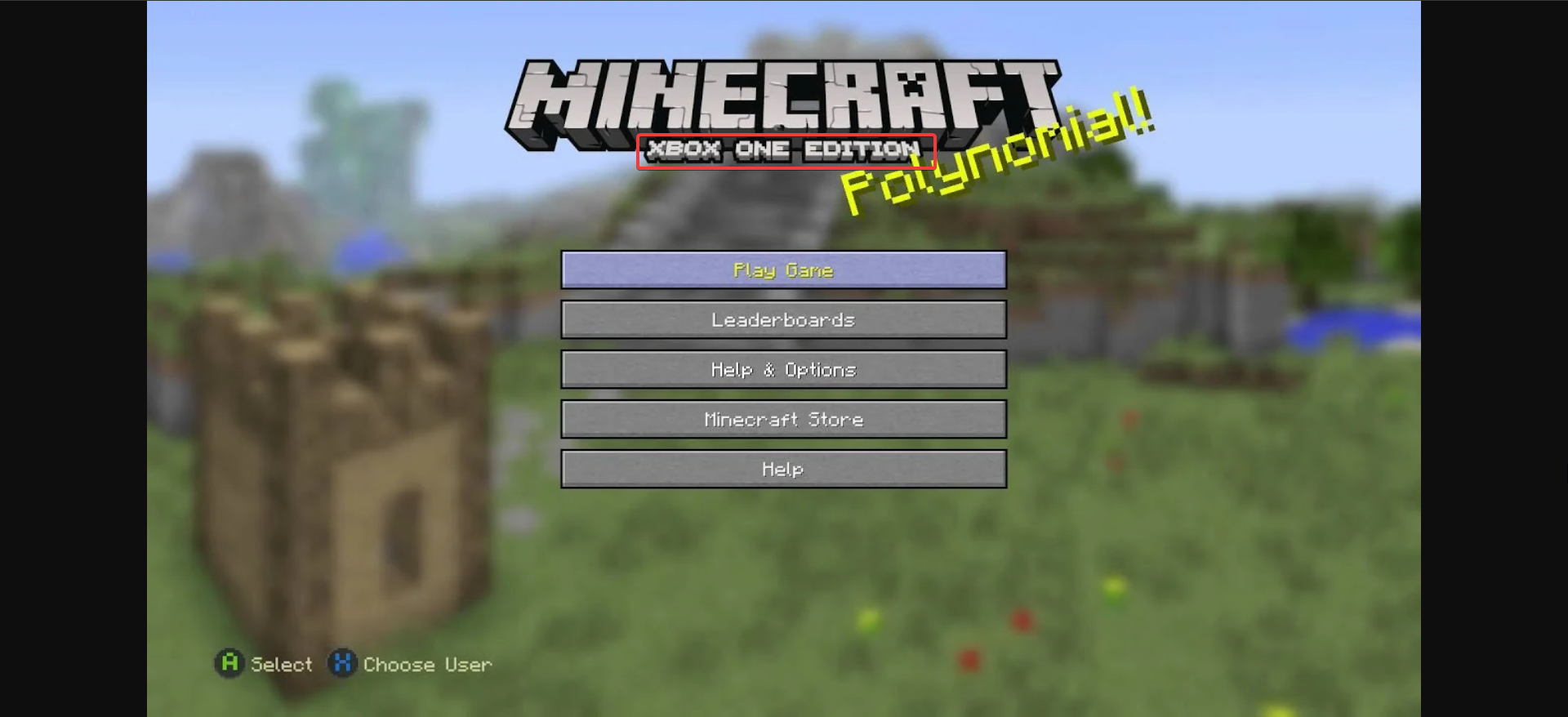
Legacy Console Edition shows Minecraft: Xbox One Edition on the title screen. This version no longer receives updates and has different menus compared to Bedrock.
4) Update history for Minecraft on Xbox
Understanding the update history helps players who see different edition names or older version numbers.
Timeline of Bedrock adoption on Xbox
Bedrock Edition launched on Xbox One as a major upgrade, replacing the Legacy Console Edition for active support. This transition unified updates with other Bedrock platforms.
Last update for Legacy Console Edition
Legacy Console Edition reached its final update before development stopped. Version numbers on this edition will never change again, even if the game installs on newer Xbox consoles.
5) Minecraft edition comparison for Xbox players
A quick comparison makes it easier to see which version you are running and why it matters.
Bedrock vs Legacy Console Edition table
| Feature | Bedrock Edition (Xbox One / Series X|S) | Legacy Console Edition |
|---|---|---|
| Active updates | Yes | No |
| Cross-play | Yes | No |
| Marketplace access | Yes | No |
| World size | Much larger | Limited |
| Servers and Realms | Supported | Not supported |
| Version numbers | Regular unified updates | Final version only |
6) Troubleshooting common version-related issues
- My Xbox shows an older version number: Xbox may delay updates if automatic downloads are paused or if the console has not rebooted recently. Checking the Updates section in Manage game and add-ons usually resolves this.
- I can’t join my friend’s world: Cross-play requires that all players use the same Bedrock version. If one device is behind, updating Minecraft on that device typically solves the issue.
- My game says Xbox One Edition instead of Minecraft: You likely opened the Legacy Console Edition from your library. Launch the Bedrock Edition instead to access new features, servers, and cross-play support.
FAQs
Do Xbox Series X|S use the same version as Xbox One? Yes. All modern Xbox consoles use the same Bedrock version and update track.
Can I still play Xbox One Edition? Yes, but it no longer receives updates or new content. Most players switch to Bedrock for cross-play and ongoing features.
Why doesn’t my version match what I see on YouTube? Creators often use Java Edition or preview builds, which follow different versioning systems. Bedrock version numbers remain unified across supported platforms.
Can I install mods on Minecraft for Xbox One? No, you cannot generally install mods on Minecraft for Xbox. But you can use add-ons that give you a lot of options
Summary
- Xbox consoles run Minecraft (Bedrock Edition) today.
- The active version appears in the bottom-right corner of the main menu.
- Legacy Console Edition shows Minecraft: Xbox One Edition and is no longer updated.
- All modern Xbox consoles share the same Bedrock update channel.
- Updating Minecraft fixes most version mismatch problems.
Conclusion
Minecraft on Xbox uses the Bedrock Edition, updated on a unified release track with other platforms. Checking your version helps you troubleshoot issues, confirm cross-play compatibility, and ensure you launch the supported edition. With Bedrock active on all new Xbox models, version management stays simple and automatic.


Discussion (0)
Be the first to comment.