Windows 8.1 Public Preview is now available for download and it brings many changes to Windows 8. There's lots of new stuff coming in this update and all of it is good. While many of you would think that Windows 8.1 is mostly about touch and tablets, you would be very wrong to think so. Windows 8.1 packs lots of upgrades for traditional PC users. I tested the latest version available and here's what I have learned:
Slightly Different Installation & Setup Process
Windows 8.1 has a slightly different setup process that includes some new steps about activating the operating system and setting up the level of integration with SkyDrive.
Windows 8.1, Public Preview, Windows Blue, Features, Improvements
Also, the tutorial shown after the first login is slightly different.
A New Start Screen with Many Usability Improvements
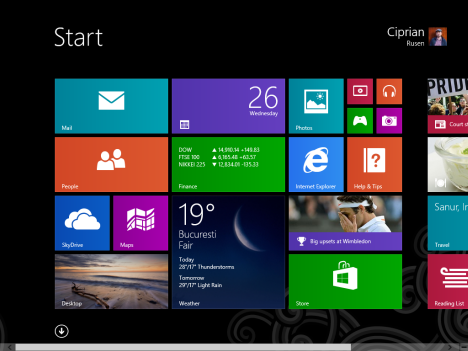
The Start screen looks better and it is easier to use, especially for PC users without touch screens. There are more tile sizes available, quicker & more intuitive ways to access the list with applications, easier searching for apps, easier grouping and naming of tiles and shortcuts, plus more visual customisations available.
Windows 8.1, Public Preview, Windows Blue, Features, Improvements
You can also set your Desktop wallpaper as the background for the Start screen, thus making the transition between the two smoother than it used to be.
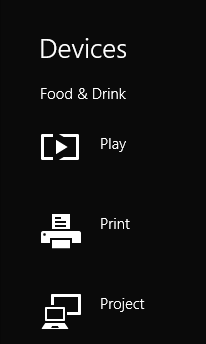
The Charms have been improved and they now provide more interactivity. For example, the Devices charm allows you to play multimedia content from the devices connected to your PC or your network.
Windows 8.1, Public Preview, Windows Blue, Features, Improvements
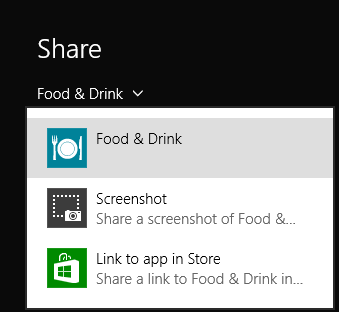
The Share charm offers new options like easy screenshot taking, or the sharing of the Windows Store link for the app you are using.
Windows 8.1, Public Preview, Windows Blue, Features, Improvements
This enhances the level of interactivity between Windows 8 apps.
Improved Desktop & Desktop Applications
The Start button is back to the Windows taskbar. When you click it, it takes you to the Start screen and it remains available for a couple of seconds. This is just in case you want to quickly switch back to the Desktop - a small touch that makes a huge difference in usability, especially to PC users.
Windows 8.1, Public Preview, Windows Blue, Features, Improvements
One of the biggest complaints PC users had was that they could easily trigger the display of the Charms, even when they did not want them displayed. Windows 8.1 is configured by default so that, on traditional PCs, the Charms and the Recent Apps list are displayed only when going to the upper-right or upper-left corners. You can also disable the hot-corners that trigger them. Goodbye triggering the Charms by accident!
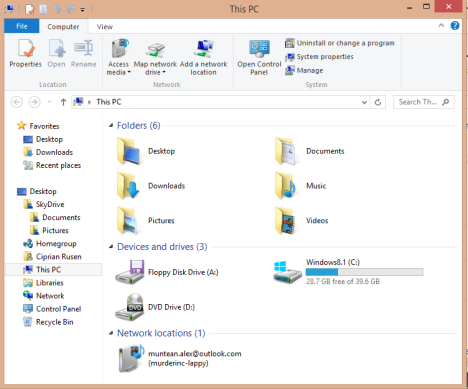
The File Explorer has a new and useful "Startup folder". The Computer section has been renamed to This PC and it now displays shortcuts to standard user folders and libraries (Desktop, Documents, Downloads, Music, Pictures and Videos), as well as the partitions and drives available, plus the network devices it detects. A welcome change, if you ask me.
Windows 8.1, Public Preview, Windows Blue, Features, Improvements
Some bloggers said that Libraries will be gone from Windows 8.1. That's not true! They are here to stay. Only the way File Explorer is organized has been changed.
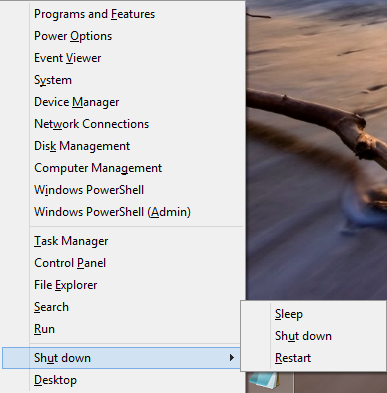
The hidden Power User menu (Windows + X) has been further enhanced. It includes more shortcuts including shortcuts for Shut Down or Restart. Many geeks and IT professionals will love this.
Windows 8.1, Public Preview, Windows Blue, Features, Improvements
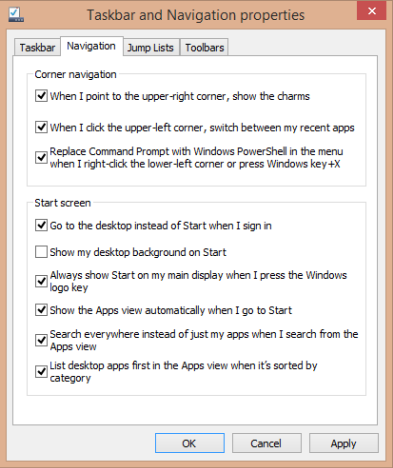
You wanted to boot to the Desktop? Now you can. But, you can also do a LOT more. Just look at the configuration window below. The list of enhancements to the desktop experience is great: you can customize the Start screen to show the Apps list and emulate the old Start Menu. You can set Windows 8.1 to prioritize desktop applications in the Apps list and many other useful things.
Windows 8.1, Public Preview, Windows Blue, Features, Improvements
The Apps list also has more filters that can be used to sort apps - a usability improvement that will be welcomed by many.
Next, PowerShell is being prepared as the successor to the Command Prompt. Most probably, the Command Prompt will no longer be available in Windows 9.
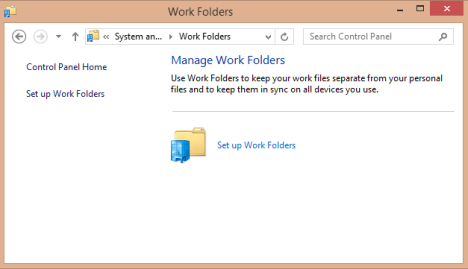
A new feature is being prepared for enterprise PC users: Work Folders - it keeps your work files separate from your personal files and keeps them in sync across all your devices.
Windows 8.1, Public Preview, Windows Blue, Features, Improvements
Internet Explorer 11 received updates in terms of standards compliance, speed, performance and developer tools. However, the interface remains mostly unchanged. Also, it now supports unlimited tabs, instead of just 10 tabs as it was in Internet Explorer 10. The Modern version of Internet Explorer 11 can also display tabs side by side, which was possible only when using the desktop version.
Snapping windows side by side works even better. Now windows can be arranged in a multitude of positions, especially when you have multiple displays available. Windows 8.1 also scales better at higher resolutions and it provides support for Retina displays. It can also extend the image wirelessly to a Miracast-compatible display - a standard that is growing in popularity with the expansion of SmartTVs.
New Windows 8 Apps & A Great Store
There are more apps available. Windows 8.1 now includes: Bing Food & Drink, Bing Health & Fitness, Calendar, Camera, Help & Tips, Internet Explorer, People, Photos, Reader, Weather, Windows Alarms, Windows Calculator, Windows Reading List , Windows Scan, Windows Sound Recorder, Finance, Games, Mail, Maps, Music, News, Sports, SkyDrive, Travel and Video.
The old Windows 8 apps have been improved. They are more usable both on the tablet and the PC. They provide more features and more customisation options. New updates are coming also to the Xbox SmartGlass app which is still not bundled with the operating system and must be installed from the Store.
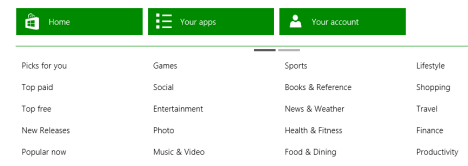
Speaking of the Store - it has been greatly improved: there's a lot more focus on providing customized recommendations for apps, based on those you have used in the past. Also, the discovery of new apps is simpler. You can easily identify what's new in the store as well as what's popular.
Apps are displayed in a better way: accessing reviews and viewing apps from the same developer is now very easy. The contextual menu shown by the Store is so much better. It includes many more options that make the app discovery process faster.
Windows 8.1, Public Preview, Windows Blue, Features, Improvements
You can also manage your Microsoft account from the Store, add payment methods, gift cards, promotional codes and do many other useful activities that used to require using a web browser. This is what the Store should have been in the first place.
Seriously Improved PC Settings
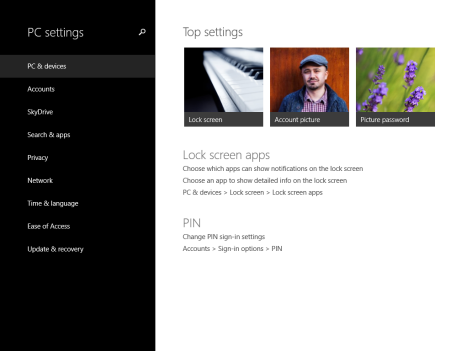
PC Settings is now a strong alternative to the Control Panel. If you are using Windows 8.1 on a tablet, you will no longer have to use the Control Panel as often as you did in the past.
When you open it, PC Settings displays a list with your top settings, those you access most often. This small but useful usability improvement that will please many users.
Windows 8.1, Public Preview, Windows Blue, Features, Improvements
Then, in PC Settings, you can now configure many new things: from the resolution of the display, to the SkyDrive or the way File History works.
It's not yet a full-blown alternative to the Control Panel, as some really advanced settings are not available, but it is definitely getting there.
Better Search
Searching is easier, especially in Windows 8.1 apps, but also when you are using the Start screen. In apps, the search box is easier to find, as you no longer have to use the Search charm.
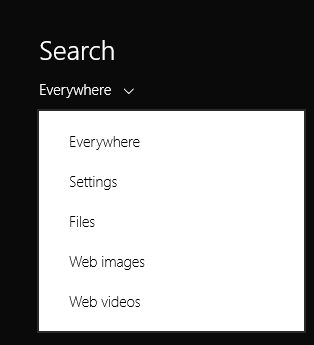
Then, when performing searches from the Start screen, you have more sources available, including web information, images and videos, provided by Bing.
Windows 8.1, Public Preview, Windows Blue, Features, Improvements
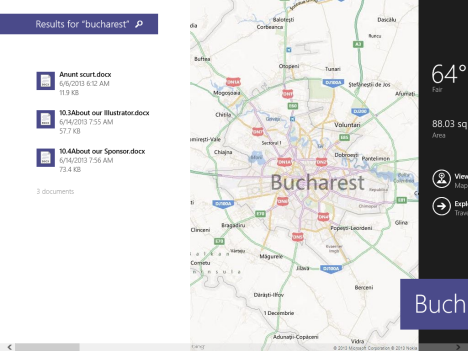
In the search results page, Windows 8.1 displays both local files and apps, as well as data from the web, in one big screen.
Windows 8.1, Public Preview, Windows Blue, Features, Improvements
Even though the experience is a big buggy at the moment, this is a definite step in the right direction on Microsoft's part.
Obviously, if you don't want Windows 8.1 to search the web and display results from Bing, this integration can be disabled and you will be able to perform only local searches.
Tighter SkyDrive Integration
SkyDrive integration is better and follows the model set by Office 365. Windows 8.1 bundles both a modern app and the SkyDrive desktop application. Also, SkyDrive now has its own section in File Explorer.
Windows 8.1, Public Preview, Windows Blue, Features, Improvements
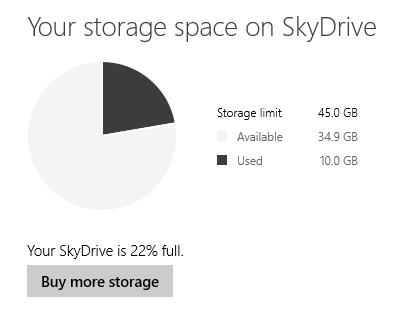
In Windows 8.1, you can better manage how SkyDrive syncs your data, what data it syncs, the space available on your SkyDrive and other aspects. All, directly from the operating system. You no longer have to use a web browser for these tasks.
What's not included in Windows 8.1
There are still a few things that I expected to see in Windows 8.1 but are not there yet. At least not in the public preview version:
There is no easy way to shutdown or restart Windows 8.1 from the Start screen. Yes, the hidden power-user menu makes it easier but accessing it is not intuitive. Users need to use a new keyboard shortcut to access it: Windows+X.
There is no time and date information being displayed on the Start screen. This is another problem that hasn't been handled so far by Microsoft. Many users, including myself, like to have the time displayed directly on the Start screen. It's really useful information.
Conclusion
After testing the Windows 8.1 Public Preview for a couple of hours, I am very pleased by what I am seeing. Yes, there are still a few things that need to be ironed out but Microsoft has really listened to feedback. They have addressed almost everything users complained about in Windows 8. This definitely feels like a great update, one which will quiet many critics and will surely improve adoption. To put it simply: Windows 8.1 is a great step forward for Microsoft and their customers.
to me the only real problem with windows 8 was the lack of the start button which you can buy from stardock other than that learning new things is fun its not that hard to reinstall win 7 if that’s what you want!
Mike Chambers ·
“After testing the Windows 8.1 Public Preview for a couple of hours, I am very pleased by what I am seeing. Yes, there are still a few things that need to be ironed out but Microsoft has really listened to feedback. They have addressed almost everything users complained about in Windows 8.”
How much did Microsoft pay the guy who wrote this article? The only things they changed after listening to Windows 8 feedback are the minor complaints. The only thing stopping 95% of the folks who hate Windows 8 is the total removal of the Start menu!
All they did is add a boot-to-desktop option and bring back the Start BUTTON!! The button does nothing but bring up the same **** Metro Start screen that we hated in Windows 8. This is a sad joke, and the fact that MS keeps talking about the “return of the Start button” is kind of an insult to our intelligence. Do they think that the button alone will shut everybody up? Keep dreaming.
The technical improvements in the Windows 8 kernel are actually really nice. The whole system just works more smoothly and is lighter on system resources. If only they just let me have the Start menu back, I would switch to 8 in a heartbeat. That’s all I ask!
Yes there are programs like Start8 to bring it back, but IMO this is unacceptable. I shouldn’t have to rely on third-party software to give me back what never should have been removed to begin with. I urge everybody else to not accept it either. Microsoft needs to fix this!
All future Windows releases will be failures until they decide to give us the option for the real Start MENU. I hate to say it, as I’ve always defended Windows against Mac/Linux users, but it’s getting tougher to do so when they keep churning out crap like this.
I think we are witnessing the beginning of Microsoft’s empire crumbling into rubble, and if they don’t get their *** together soon and really listen to their users it may be too late to turn things around. I miss Bill Gates. Say what you will about him, but he knew how to run a business.
Ciprian Adrian Rusen ·
Before you make stupid accusations again please take a moment to think. Next time I won’t bother to reply and I will just remove flaming posts and ban people who have the tendency to pick on someone else’s honest work. The internet is full of haters. We don’t need yet another one.
Nik Rolls ·
No one took anything away from you. Has the Start menu been removed from your computer? No. Want to keep it? Don’t upgrade. It’s that simple really.
Windows 7 is still well supported, so I don’t see what you’re missing by not upgrading, if you hate the changes so much.
I don’t have a problem with the change myself. Windows 8 has super fast search as you type, much faster than Windows 7 had in its menu. If I want something, I press the Start key, type the first few letters and press Enter. Done in a second. On Windows 7 I had to wait 3-5 seconds for the results to show up. On Windows 8 I can do the same for the control panel using Start + W, then type. It’s much faster, so I’m happy with the change.
So stop going on like the world is ending and Microsoft is a failure for sticking to their guns and changing how people think about computing. They’re on the up, and you’re just bringing us down.
SBaker ·
I find it strangle that the author does not mention that if you install the Preview that you cannot simply uninstall it nor can you directly upgrade to the full Win 8.1 package when it is released.
Ciprian Adrian Rusen ·
This is a presentation of what’s new and interesting not a spec-sheet, nor a tutorial about how to install it, etc. Such materials will be published soon and they will mention the shortcoming you just shared.
sbaker ·
I appreciate the clarification, but I think the warnings should have come first. The media in general (by no means just you) has publicized the Public Preview without mentioning the drawbacks. Being an IT consultant I love the extra work. However, in the past two days have had to explain to approximately 20 clients why they don’t want the update.
Ciprian Adrian Rusen ·
We are working on an article just like that right now. It will be published tomorrow. Please consider the fact that very little time has passed since it was made available to the public. It’s less than 24 hours. We need some time to test, experiment, learn, etc. This is coming very soon. 😉
Mike Chambers ·
Why in the world would you expect to be able to uninstall it?? It’s an entire OS, not an application. Implementing an uninstall for it would be a colossal waste of hard drive space. There is a reason that MS keeps emphasizing that you should NOT install the preview on your main workstation, and says it’s only meant for experienced user who enjoy testing new stuff.
sbaker ·
You have completely missed my point. I wasn’t suggesting MS should have included an uninstall but rather the media (blogs, fanboy sites, network news, etc) should take more care to emphasize the fact that this Preview is not for amateurs.
Nik ·
Instead of Windows + X you can also right click on the new start button (or the Start menu preview tile on Windows 8). Windows + X also works on Windows 8.
kkcdns ·
—- You know what?
*** What?
—- Nothing!.
*** Zer0 Kill 0.K.
mmmm win95, it is new one or something i missed because slept so long
Bob ·
That ‘hidden’ menu that you claim requires the winkey+X.. try just right clicking the lower left corner. Easy-Peasy!!
The lack of shutdown/restart in start.. confusing at first, but makes total sense. Keep your apps in the ‘apps’ menu, settings in the ‘settings’ menu. Not like it can’t be accessed from the lock screen also.
And if that’s not good enough.. create a shortcut to the shutdown shell cmd, and pin it to the start menu! *facepalm*
“PC Settings is being developed into a solid alternative to the Control Panel. First of all, it is searchable. On the top right corner it has a search box you can use to quickly find what you are looking for.”
Searchable CP is nothing new, the CP has been searchable since Vista. Now lets take a look at the other “updates” in this SP. OK, I’m seeing tablet, phone, M$ $tore, nothing about the PC! Apparently M$ d*** is feeling a little short in the IE dept, they need to copy every other browser and come out with a new version every 4 months. *rolls eyes* “Better integration with SkyDrive”, wow never saw that coming (sarcasm). M$ using their system again to drive out the competition, it’s IE and netscape all over again, history repeats it’s self.
BillB ·
The old saying goes: “He who controls the information controls the world”, is what this is all about. Beware Google and its googlebit systems. As the man said, the last sound you will hear when BB takes over is ‘CLICK’!
Glenn ·
Cut the crap and bring back the desktop and Start button to access programs. You’re going to find more people switching to Mac and other OS’s. Whose idea was this modified smart phone?? Should be fired!!
john3347 ·
“Whose idea was this modified smart phone?? Should be fired!!”
I don’t know if he was fired, asked to leave, or made his own decision to leave, but thankfully he is gone. I am afraid that the woman who replaced him will be no better because she was the authority behind the beginning of the !@#$%^ ribbon that began with Office 2007.
GLENN SAHLI ·
Do you want the ribbon above or below??
Makes sense to me….. 🙁
Why make everything more difficult for the people who have been using this whole system for almost 20 years?? Should at least give the option to run in “Classic Mode” or something similar.
I guess it is all about the $$$$$$. It’s a sad world.
TheBigOldDog ·
Responsibility lies at the feet of Ballmer and Ballmer alone. Windows is (was) their whole franchise – their monopoly. It was the golden goose. Now in the span of six years he has managed to nearly kill that goose. How he keeps his job after playing footsie with Yahoo while Vista was being shoveled out and now repeating that mistake with Win 8 is totally beyond my ability to comprehend.
PCezar ·
Who the f*** would want a 22.5″ monitor (or a bigger one) half divided like the picture in the article ?
That picture alone speak volumes and would be enough for a sane person to avoid win8.
Maybe Win8 is twice as fast as Win7, maybe not.
Boot time is not THAT important to me.
Both systems control the machine and that is OK, but presentation is important today.
I wouldn’t use something that I don’t like.
I find these primary colored tiles very ugly and distasteful.
If you like them then use them, I’m fine with that. Just don’t try to force them on me, that’s not gonna work.
GLENN SAHLI ·
Couldn’t have said it any better myself!!!!
Now how do we get them to change it back???
That is the $64,000 question.
TrickTickler99 ·
TheBigOldDog is right it’s not just America It’s all over Europe as well I miss DOS my programming never failed once I got it right.
TheBigOldDog ·
Don’t miss DOS per se but do miss the days when people knew how to use a command line because they had a better understanding of how computers worked. And, it is true that this country has lost people who knew how to build and fix things. Today, they buy and throw away. Things work by PFM (Pure Flipping Magic) This dumbing down of America leads to bad walled garden OS designs that we thoroughly rejected decades ago.
TheBigOldDog ·
Punxsutawney Puppy came out, saw Blue and predicted another year of Windows 7
BillB ·
Well said and keeps it legal! Dog, I miss MSDOS, when the world was young and smart and worked for a living. Ask any young person what a WRENCH is and they will say a Bad Back from carrying their over size iPad. We are not going to make it!!
BillB ·
FORGET W8, it is for the inept and never will take the place of a real working desktop OS. It is for toys and those that use toys, not for the real world. I will never buy it or use it.

















Discussion (27)
to me the only real problem with windows 8 was the lack of the start button which you can buy from stardock other than that learning new things is fun its not that hard to reinstall win 7 if that’s what you want!
“After testing the Windows 8.1 Public Preview for a couple of hours, I am very pleased by what I am seeing. Yes, there are still a few things that need to be ironed out but Microsoft has really listened to feedback. They have addressed almost everything users complained about in Windows 8.”
How much did Microsoft pay the guy who wrote this article? The only things they changed after listening to Windows 8 feedback are the minor complaints. The only thing stopping 95% of the folks who hate Windows 8 is the total removal of the Start menu!
All they did is add a boot-to-desktop option and bring back the Start BUTTON!! The button does nothing but bring up the same **** Metro Start screen that we hated in Windows 8. This is a sad joke, and the fact that MS keeps talking about the “return of the Start button” is kind of an insult to our intelligence. Do they think that the button alone will shut everybody up? Keep dreaming.
The technical improvements in the Windows 8 kernel are actually really nice. The whole system just works more smoothly and is lighter on system resources. If only they just let me have the Start menu back, I would switch to 8 in a heartbeat. That’s all I ask!
Yes there are programs like Start8 to bring it back, but IMO this is unacceptable. I shouldn’t have to rely on third-party software to give me back what never should have been removed to begin with. I urge everybody else to not accept it either. Microsoft needs to fix this!
All future Windows releases will be failures until they decide to give us the option for the real Start MENU. I hate to say it, as I’ve always defended Windows against Mac/Linux users, but it’s getting tougher to do so when they keep churning out crap like this.
I think we are witnessing the beginning of Microsoft’s empire crumbling into rubble, and if they don’t get their *** together soon and really listen to their users it may be too late to turn things around. I miss Bill Gates. Say what you will about him, but he knew how to run a business.
Before you make stupid accusations again please take a moment to think. Next time I won’t bother to reply and I will just remove flaming posts and ban people who have the tendency to pick on someone else’s honest work. The internet is full of haters. We don’t need yet another one.
No one took anything away from you. Has the Start menu been removed from your computer? No. Want to keep it? Don’t upgrade. It’s that simple really.
Windows 7 is still well supported, so I don’t see what you’re missing by not upgrading, if you hate the changes so much.
I don’t have a problem with the change myself. Windows 8 has super fast search as you type, much faster than Windows 7 had in its menu. If I want something, I press the Start key, type the first few letters and press Enter. Done in a second. On Windows 7 I had to wait 3-5 seconds for the results to show up. On Windows 8 I can do the same for the control panel using Start + W, then type. It’s much faster, so I’m happy with the change.
So stop going on like the world is ending and Microsoft is a failure for sticking to their guns and changing how people think about computing. They’re on the up, and you’re just bringing us down.
I find it strangle that the author does not mention that if you install the Preview that you cannot simply uninstall it nor can you directly upgrade to the full Win 8.1 package when it is released.
This is a presentation of what’s new and interesting not a spec-sheet, nor a tutorial about how to install it, etc. Such materials will be published soon and they will mention the shortcoming you just shared.
I appreciate the clarification, but I think the warnings should have come first. The media in general (by no means just you) has publicized the Public Preview without mentioning the drawbacks. Being an IT consultant I love the extra work. However, in the past two days have had to explain to approximately 20 clients why they don’t want the update.
We are working on an article just like that right now. It will be published tomorrow. Please consider the fact that very little time has passed since it was made available to the public. It’s less than 24 hours. We need some time to test, experiment, learn, etc. This is coming very soon. 😉
Why in the world would you expect to be able to uninstall it?? It’s an entire OS, not an application. Implementing an uninstall for it would be a colossal waste of hard drive space. There is a reason that MS keeps emphasizing that you should NOT install the preview on your main workstation, and says it’s only meant for experienced user who enjoy testing new stuff.
You have completely missed my point. I wasn’t suggesting MS should have included an uninstall but rather the media (blogs, fanboy sites, network news, etc) should take more care to emphasize the fact that this Preview is not for amateurs.
Instead of Windows + X you can also right click on the new start button (or the Start menu preview tile on Windows 8). Windows + X also works on Windows 8.
—- You know what?
*** What?
—- Nothing!.
*** Zer0 Kill 0.K.
mmmm win95, it is new one or something i missed because slept so long
That ‘hidden’ menu that you claim requires the winkey+X.. try just right clicking the lower left corner. Easy-Peasy!!
The lack of shutdown/restart in start.. confusing at first, but makes total sense. Keep your apps in the ‘apps’ menu, settings in the ‘settings’ menu. Not like it can’t be accessed from the lock screen also.
And if that’s not good enough.. create a shortcut to the shutdown shell cmd, and pin it to the start menu! *facepalm*
I can’t help thinking of this photo every time I see a windows 8 ad
https://2.bp.blogspot.com/-RSsN9UkBbh8/UGz_dFomTkI/AAAAAAAAANQ/5xETKBKTmX4/s1600/windows+teletubbies.jpg
“PC Settings is being developed into a solid alternative to the Control Panel. First of all, it is searchable. On the top right corner it has a search box you can use to quickly find what you are looking for.”
Searchable CP is nothing new, the CP has been searchable since Vista. Now lets take a look at the other “updates” in this SP. OK, I’m seeing tablet, phone, M$ $tore, nothing about the PC! Apparently M$ d*** is feeling a little short in the IE dept, they need to copy every other browser and come out with a new version every 4 months. *rolls eyes* “Better integration with SkyDrive”, wow never saw that coming (sarcasm). M$ using their system again to drive out the competition, it’s IE and netscape all over again, history repeats it’s self.
The old saying goes: “He who controls the information controls the world”, is what this is all about. Beware Google and its googlebit systems. As the man said, the last sound you will hear when BB takes over is ‘CLICK’!
Cut the crap and bring back the desktop and Start button to access programs. You’re going to find more people switching to Mac and other OS’s. Whose idea was this modified smart phone?? Should be fired!!
“Whose idea was this modified smart phone?? Should be fired!!”
I don’t know if he was fired, asked to leave, or made his own decision to leave, but thankfully he is gone. I am afraid that the woman who replaced him will be no better because she was the authority behind the beginning of the !@#$%^ ribbon that began with Office 2007.
Do you want the ribbon above or below??
Makes sense to me….. 🙁
Why make everything more difficult for the people who have been using this whole system for almost 20 years?? Should at least give the option to run in “Classic Mode” or something similar.
I guess it is all about the $$$$$$. It’s a sad world.
Responsibility lies at the feet of Ballmer and Ballmer alone. Windows is (was) their whole franchise – their monopoly. It was the golden goose. Now in the span of six years he has managed to nearly kill that goose. How he keeps his job after playing footsie with Yahoo while Vista was being shoveled out and now repeating that mistake with Win 8 is totally beyond my ability to comprehend.
Who the f*** would want a 22.5″ monitor (or a bigger one) half divided like the picture in the article ?
That picture alone speak volumes and would be enough for a sane person to avoid win8.
Maybe Win8 is twice as fast as Win7, maybe not.
Boot time is not THAT important to me.
Both systems control the machine and that is OK, but presentation is important today.
I wouldn’t use something that I don’t like.
I find these primary colored tiles very ugly and distasteful.
If you like them then use them, I’m fine with that. Just don’t try to force them on me, that’s not gonna work.
Couldn’t have said it any better myself!!!!
Now how do we get them to change it back???
That is the $64,000 question.
TheBigOldDog is right it’s not just America It’s all over Europe as well I miss DOS my programming never failed once I got it right.
Don’t miss DOS per se but do miss the days when people knew how to use a command line because they had a better understanding of how computers worked. And, it is true that this country has lost people who knew how to build and fix things. Today, they buy and throw away. Things work by PFM (Pure Flipping Magic) This dumbing down of America leads to bad walled garden OS designs that we thoroughly rejected decades ago.
Punxsutawney Puppy came out, saw Blue and predicted another year of Windows 7
Well said and keeps it legal! Dog, I miss MSDOS, when the world was young and smart and worked for a living. Ask any young person what a WRENCH is and they will say a Bad Back from carrying their over size iPad. We are not going to make it!!
FORGET W8, it is for the inept and never will take the place of a real working desktop OS. It is for toys and those that use toys, not for the real world. I will never buy it or use it.