




A power supply unit keeps every component in your PC running with clean, stable power. It converts the electricity from your wall outlet into voltages that each part can use. A solid PSU prevents shutdowns, protects your hardware, and supports higher-end upgrades. This guide explains everything you need to know about the power supply unit and how to choose the right one for your needs.
1) Overview of the power supply unit
A PSU takes AC power from the outlet and converts it into a regulated DC output. Every part of your PC depends on this conversion. A reliable power supply lowers instability and protects your system during high loads.

2) Core functions of a power supply unit
Converting AC power to stable DC
Your system needs low-voltage DC power, not wall-level AC. The PSU handles this conversion, so each component receives the correct voltage.
Delivering multiple voltage rails
Modern PSUs send power across three rails: +12 V, +5 V, and +3.3 V. The +12 V rail supports CPU and GPU loads, while the lower rails power drives, USB ports, and motherboard logic.
Regulating and stabilizing power
PSUs regulate voltage so your hardware receives a consistent flow of power. Better regulation reduces crashes and keeps sensitive parts stable during heavy use.
Protecting components from electrical faults
Overvoltage, short circuits, overheating, or power surges can destroy components. PSUs include hardware-level protections that shut down the system when they detect unsafe conditions.
3) Why the PSU matters in a modern PC
Current GPUs and CPUs draw much more power than older generations. A weak or outdated PSU fails to handle sudden spikes and causes random shutdowns. A good PSU improves stability and supports future upgrades.

Handling transient power spikes
Modern components create fast load changes that cheaper PSUs cannot handle. Units that meet ATX 3.0 or PCIe 5.0 standards absorb those spikes safely and protect your hardware.
Efficient operation and heat reduction
High-efficiency PSUs waste less electricity as heat. This lowers fan noise, reduces power bills, and keeps other components cooler.
4) Types of power supply units
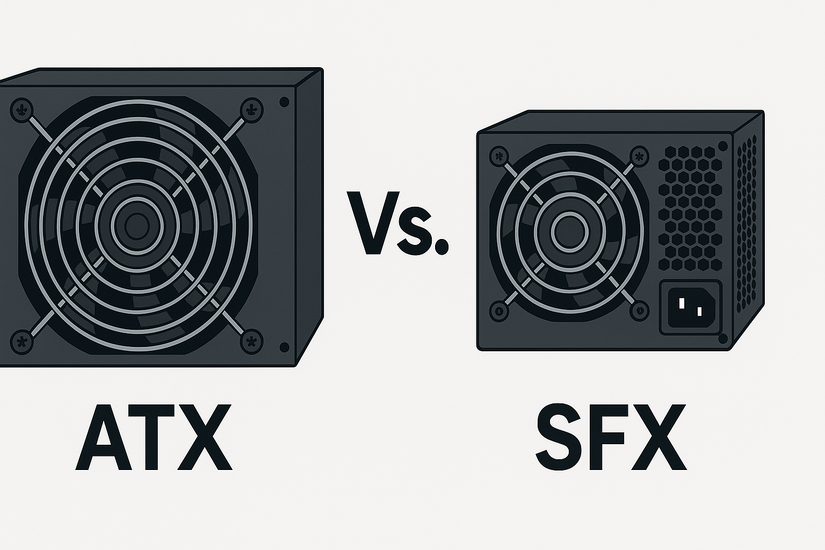
ATX vs SFX and other form factors
ATX PSUs fit standard mid-tower and full-tower cases. SFX and SFX-L models fit compact builds while keeping strong wattage support.
Modular, semi-modular, and non-modular
Modular PSUs let you attach only the cables you need, which improves airflow. Semi-modular units include fixed essential cables, while non-modular units attach every cable by default.
5) How to choose the right PSU
The right PSU keeps your system stable and gives you room for upgrades. Use the checklist below to pick the best match for your build.
Determine required wattage
Follow these steps:
- Add up your CPU, GPU, and storage power needs.
- Add a 20–30 percent safety buffer to support future upgrades.
- Choose a wattage tier that handles gaming or heavy workloads without hitting its limit.
Check connector support
Make sure your power supply includes the right connectors:
- A CPU EPS cable for the motherboard
- A PCIe cable or 12VHPWR plug for your GPU
- SATA and Molex cables for drives and accessories
Look for safety and efficiency certifications
Choose a PSU with a trusted efficiency rating and built-in protections. Higher efficiency lowers heat, lowers noise, and increases reliability.
6) Signs of PSU problems
- Random shutdowns and reboots: A failing PSU cannot hold voltage during load spikes, so your PC shuts off unexpectedly. Frequent restarts signal that the unit can’t meet demand.
- Coil whine, overheating, or burnt smell: If your PSU whines loudly or overheats, replace it immediately. Burning odors point to internal failure and risk damaging other components.
FAQs about PSU functions
Does a PSU affect gaming performance? A PSU doesn’t boost FPS, but it keeps your GPU and CPU stable. Stronger power delivery helps your system maintain peak performance without crashes.
What happens if a PSU is too weak? A weak PSU causes shutdowns, boot loops, or freezes. It also forces your GPU or CPU to throttle under load.
Can a PSU improve power efficiency? Yes. High-efficiency models reduce heat and electricity waste. They run cooler and last longer under everyday use.
Summary
- A PSU converts AC to stable DC power.
- It delivers multiple voltage rails to every component.
- It stabilizes power to avoid crashes.
- It protects hardware from electrical faults.
- It handles load spikes from modern CPUs and GPUs.
- It improves overall efficiency and reliability.
Conclusion
A power supply unit sits at the center of system stability. It powers every component, protects your hardware, and keeps your PC running smoothly under load. Choose a PSU with strong rails, modern standards, and enough wattage to support your upgrades.

Discussion (0)
Be the first to comment.