




f you use a VPN regularly, you may want to understand what split tunneling is and how to enable it in Proton VPN. Split tunneling is a feature that lets you choose which apps use the VPN connection and which use your normal internet.
This gives you more control over your traffic and can improve performance for certain tasks.
What Is Split Tunneling?
Split tunneling is a VPN feature that allows some apps or websites to bypass the VPN while others stay protected through it.
Normally, when a VPN is active, all your internet traffic goes through the VPN. With split tunneling, you can divide that traffic.
For example:
- Your browser uses the VPN
- Your game or streaming app uses your normal connection
This makes your setup more flexible.
Why Use Split Tunneling?
Split tunneling is useful in many real-world situations.
Some common benefits include:
- Better performance for apps that do not need VPN
- Access to local services while using VPN
- Avoiding issues with apps that do not work well with VPN
- Reducing bandwidth usage on the VPN
It helps you balance privacy and speed.
How Split Tunneling Works
Split tunneling works by letting you choose which apps or IP addresses bypass the VPN.
There are two main approaches:
- Include mode – only selected apps use the VPN
- Exclude mode – selected apps bypass the VPN
Proton VPN uses an exclude-based system on Windows.
How to Enable Split Tunneling in Proton VPN
Follow these steps to enable split tunneling.
1: Open Proton VPN
- Launch the Proton VPN app
- Log in to your account
2: Go to Settings
- Click the Settings icon
- Open the Advanced or Split Tunneling section
3: Enable Split Tunneling
- Turn on Split Tunneling
- Choose the mode (exclude or include)
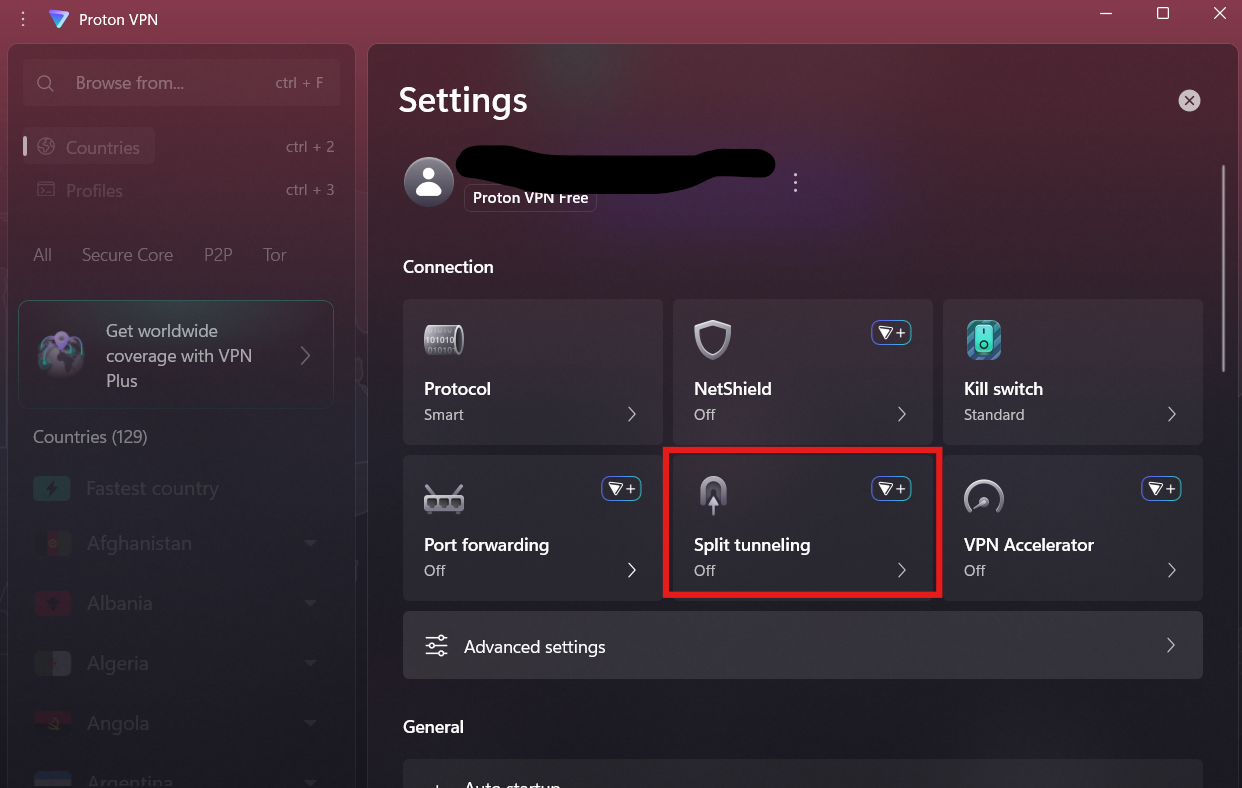
4: Connect to VPN
Once configured:
- Connect to a VPN server
- Selected apps will bypass the VPN
All other traffic will go through the VPN.
When to Use Split Tunneling
Split tunneling is especially helpful in these situations.
Streaming and Gaming
Some services work better without a VPN. You can exclude them for better performance.
Work and Local Apps
Access local network devices like printers while using VPN for browsing.
Speed Optimization
Reduce load on VPN for apps that do not require encryption.
Things to Keep in Mind
While useful, split tunneling has some trade-offs.
- Apps outside the VPN are not protected
- Misconfiguration can expose data
- Not all platforms support split tunneling
Use it carefully depending on your needs.
Final Thoughts
Understanding what split tunneling is and how to enable it in Proton VPN helps you get more control over your internet traffic. It allows you to choose where you need privacy and where you need speed.
When used properly, split tunneling can improve performance without completely giving up VPN protection.
FAQs
What is split tunneling?
It allows some apps to use VPN while others use a normal internet connection.
Is split tunneling safe?
Yes, but apps outside the VPN are not protected.
Does Proton VPN support split tunneling?
Yes. It is available on Windows and some other platforms.
Why use split tunneling in Proton VPN?
To improve performance and avoid issues with apps that do not work well with VPN.


Discussion (0)
Be the first to comment.