




If you want to enable ad and tracker blocker in NordVPN, you can use the built-in Threat Protection feature. This tool blocks ads, trackers, and malicious websites while you browse, improving both privacy and browsing speed.
NordVPN includes this feature directly in its app, so you do not need any extra extensions or software. This guide shows how to enable it on Windows.
What Is Ad and Tracker Blocker in NordVPN?
The ad and tracker blocker in NordVPN is part of its Threat Protection feature. It works in the background to block unwanted content before it loads.
When enabled, it can:
- Block ads on websites
- Prevent tracking scripts
- Stop access to malicious domains
- Improve page loading speed
It is designed to enhance privacy and reduce distractions.
Why You Should Enable It
Before turning it on, it helps to understand why it is useful.
Some key benefits include:
- Cleaner browsing experience with fewer ads
- Better privacy by stopping trackers
- Reduced risk from harmful websites
- Faster page loading in many cases
It is especially useful if you browse frequently or use public networks.
How to Enable Ad and Tracker Blocker in NordVPN
Follow these steps to enable the feature in NordVPN.
1: Open NordVPN App
- Launch the NordVPN app on your PC.
- Log in to your account if required.
2: Go to Settings
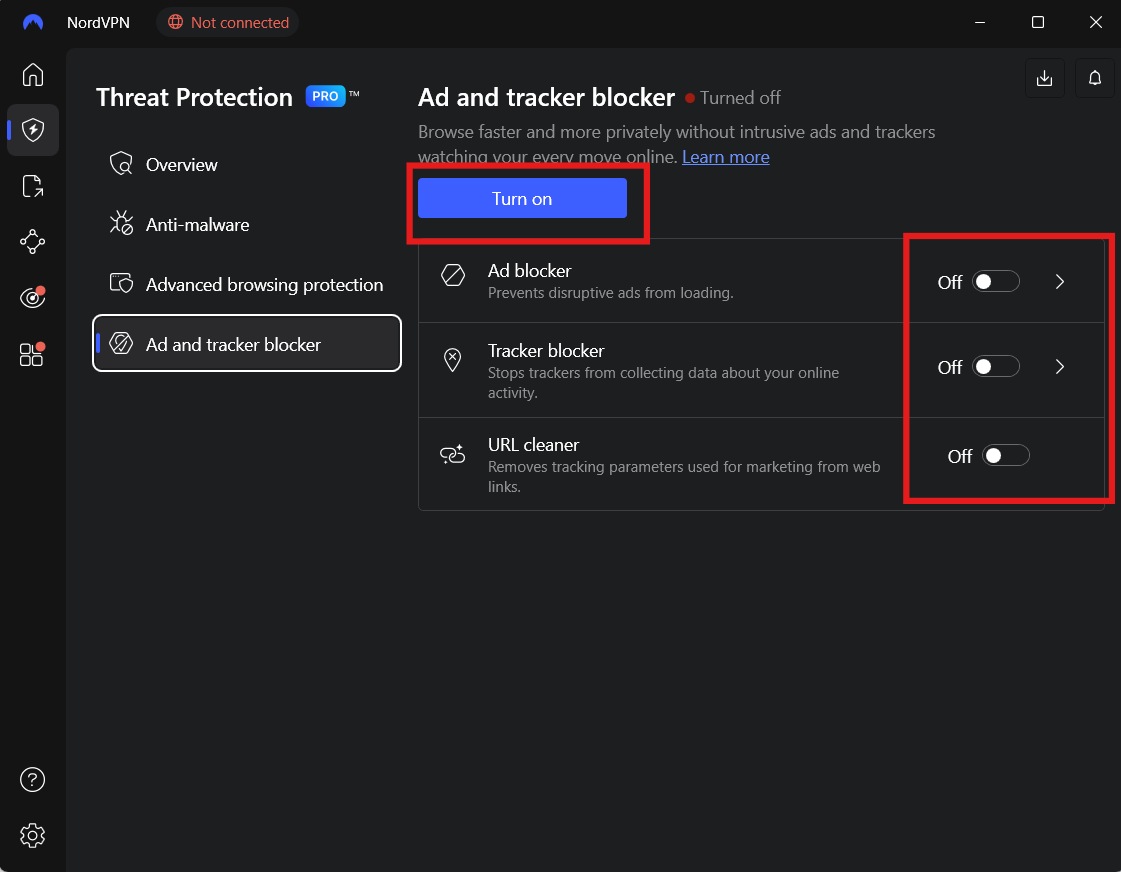
- Click the Settings icon (gear icon).
- Open the Threat Protection section.
3: Enable Threat Protection
- Toggle Threat Protection to On.
This will activate ad and tracker blocking.
4: Enable Additional Protection (Optional)
Depending on your version, you may see extra options:
- Block ads and trackers
- Block malicious websites
- Scan downloads for malware
Turn on the options you want.
Threat Protection vs Threat Protection Lite
NordVPN may show two versions of this feature.
Threat Protection
- Works even when VPN is disconnected
- Provides full protection features
Threat Protection Lite
- Works only when connected to VPN
- Focuses mainly on blocking ads and malicious domains
Choose based on your plan and needs.
How to Check If It Is Working
After enabling the feature, you can verify it easily.
You may notice:
- Fewer ads on websites
- Faster page loading
- Blocked pop-ups or trackers
Some websites may also display fewer tracking requests.
Things to Keep in Mind
While the feature is useful, there are a few things to consider:
- Some websites may not load correctly if trackers are blocked
- You may need to disable it temporarily for certain sites
- It does not replace a full antivirus solution
It works best as an added layer of protection.
Final Thoughts
Enabling the ad and tracker blocker in NordVPN is a simple way to improve privacy and browsing experience. With just a few clicks, you can block ads, reduce tracking, and protect yourself from harmful websites.
For most users, keeping Threat Protection enabled is a good choice for safer and cleaner browsing.
FAQs
What is NordVPN Threat Protection?
It is a feature that blocks ads, trackers, and malicious websites.
Does it work without VPN connection?
Yes, the full version works even without an active VPN connection.
Will it block all ads?
It blocks most ads, but some may still appear depending on the website.
Can I turn it off anytime?
Yes. You can disable it from NordVPN settings whenever needed.

Discussion (0)
Be the first to comment.