




SLAT (Second Level Address Translation) is a processor feature that improves virtualization performance in Windows 11. It allows virtual machines to run more efficiently by reducing the overhead involved in memory management.
If you use Hyper-V, Windows Subsystem for Android, or other virtualization tools in Windows 11, SLAT plays an important role. This guide explains what SLAT is, why it matters, and how to check if your PC supports it.
What Is SLAT (Second Level Address Translation)?
SLAT is a hardware-based virtualization technology built into modern CPUs. It improves how virtual machines translate memory addresses between the guest operating system and the host system.
Different CPU manufacturers use different names:
- Intel calls it Extended Page Tables (EPT)
- AMD calls it Rapid Virtualization Indexing (RVI) or Nested Page Tables (NPT)
Although the names differ, the purpose is the same: improve virtualization performance and reduce CPU workload.
Why Is SLAT Important in Windows 11?
Windows 11 relies heavily on virtualization for several features.
SLAT is required for:
- Hyper-V
- Windows Subsystem for Android (WSA)
- Windows Sandbox
- Virtual Machine Platform
- Core isolation and memory integrity features
Without SLAT support, some of these features may not work or may run poorly.
SLAT improves performance by:
- Reducing memory translation overhead
- Lowering CPU usage
- Improving efficiency in virtual environments
In short, it makes virtualization smoother and more stable.
How SLAT Works in Simple Terms
When a virtual machine runs, it must translate memory addresses between:
- The virtual system (guest OS)
- The physical system (host OS)
Without SLAT, this translation requires extra processing steps. With SLAT, the CPU handles this translation more efficiently using hardware support.
As a result:
- Virtual machines launch faster
- Memory management becomes more efficient
- Overall system performance improves
How to Check If Your PC Supports SLAT in Windows 11
You can verify SLAT support using built-in tools.
Method 1: Use Windows Features Information
- Right-click the Start button.
- Select Windows Terminal (Admin).
- Type: systeminfo
- Press Enter.
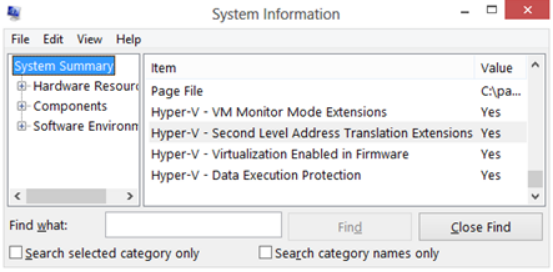
Scroll down to the Hyper-V Requirements section.
Look for:
- Second Level Address Translation: Yes
If it says Yes, your CPU supports SLAT.
Method 2: Use Task Manager
- Press Ctrl + Shift + Esc.
- Go to the Performance tab.
- Click CPU.
If virtualization is supported and enabled, it will show in the details panel. However, this does not explicitly mention SLAT, so the systeminfo command is more reliable.
Does Windows 11 Require SLAT?
Yes, for certain features.
Windows 11 itself does not require SLAT just to run. However, many advanced features such as Hyper-V and Windows Sandbox require SLAT-enabled processors.
Most modern Intel and AMD processors support SLAT, especially CPUs released in the last decade.
Can You Enable SLAT If It Is Disabled?
SLAT cannot be enabled manually if the CPU does not support it. It is a hardware feature.
However, you should ensure that:
- Virtualization is enabled in BIOS/UEFI
- Intel VT-x or AMD-V is turned on
To check BIOS settings:
- Restart your PC.
- Enter BIOS/UEFI setup.
- Look for virtualization settings.
- Enable them if disabled.
Save changes and restart.
Final Thoughts
SLAT (Second Level Address Translation) is an important CPU feature that improves virtualization performance in Windows 11. It reduces memory management overhead and enables advanced features like Hyper-V and Windows Sandbox.
If you plan to use virtualization tools, checking for SLAT support is essential. Most modern systems already support it, making Windows 11 virtualization smoother and more efficient.
FAQs
What is SLAT in Windows 11?
SLAT is a processor feature that improves virtualization performance by optimizing memory address translation.
Is SLAT required for Windows 11?
It is not required to run Windows 11, but it is required for Hyper-V and certain virtualization features.
How do I know if my CPU supports SLAT?
Open Windows Terminal and run the systeminfo command. Check the Hyper-V Requirements section.
Can I enable SLAT in BIOS?
No. SLAT is a hardware feature. You can only enable virtualization support if your CPU already includes SLAT.

Discussion (0)
Be the first to comment.