



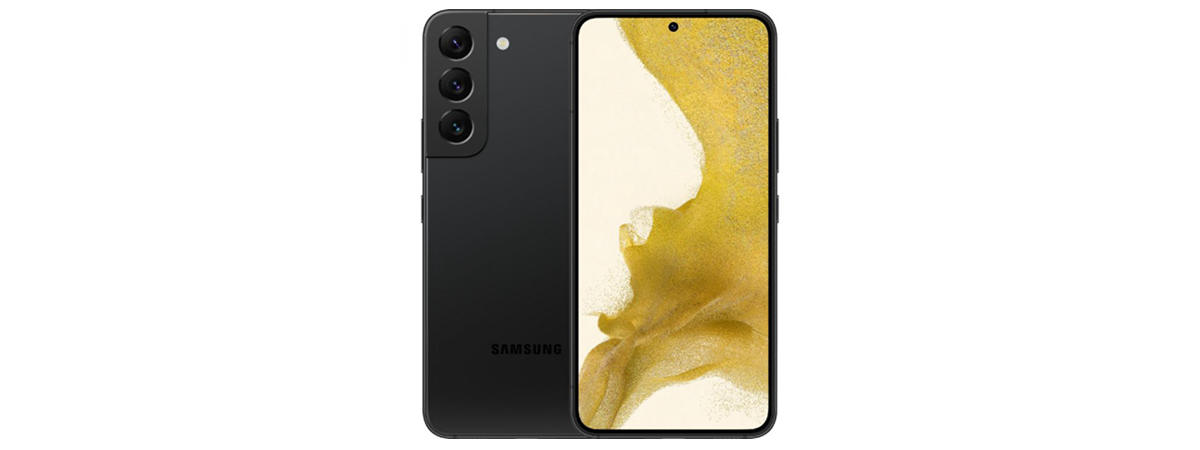
Finally, a compact Android flagship smartphone from Samsung. Ever since the Galaxy S7, Samsung’s top-of-the-range smartphones have only gotten larger and heavier. Not anymore! While the Samsung Galaxy S22 is by no means tiny, it’s still smaller and thinner than its Android competitors. Does this mean that Samsung made compromises in regards to build quality of the device or its specs? I tested it thoroughly, benchmarked it, and used it daily for two weeks, and the conclusion is, spoiler alert, no, almost no corners have been cut. Samsung has taken the S21 and refined it in every aspect. Read this review to find out more about my experience with the Samsung Galaxy S22:
![Verdict]()

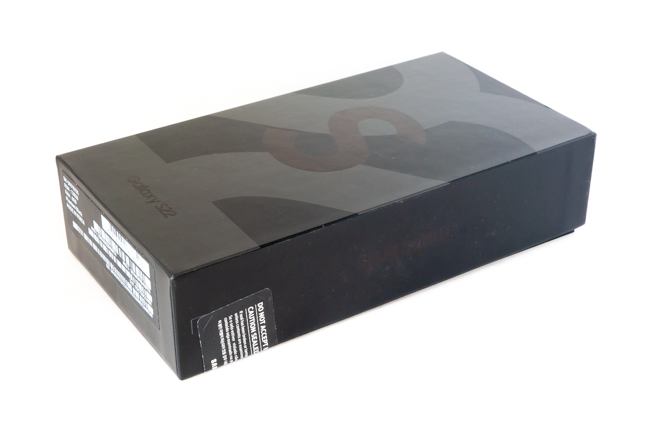
 The box the Samsung Galaxy S22 comes in
On the back of the box, you get the same notice you got on the previous generation of Samsung’s flagships, that the box doesn’t include a charger. This, as well as the fact that the package is made out of recycled materials and is printed with soy ink, is consistent with Samsung’s goal to lessen the impact its devices have on the environment.
The box the Samsung Galaxy S22 comes in
On the back of the box, you get the same notice you got on the previous generation of Samsung’s flagships, that the box doesn’t include a charger. This, as well as the fact that the package is made out of recycled materials and is printed with soy ink, is consistent with Samsung’s goal to lessen the impact its devices have on the environment.
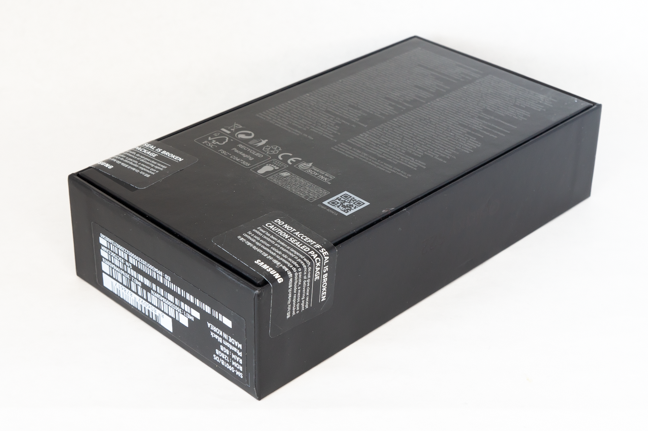 The back of the Samsung Galaxy S22 box
The minimalistic approach is continued inside the box. Here, you only find the usual leaflets, the SIM ejection tool, a 3.3 feet long (1 meter) USB-C to USB-C cable, and, of course, the smartphone.
The back of the Samsung Galaxy S22 box
The minimalistic approach is continued inside the box. Here, you only find the usual leaflets, the SIM ejection tool, a 3.3 feet long (1 meter) USB-C to USB-C cable, and, of course, the smartphone.
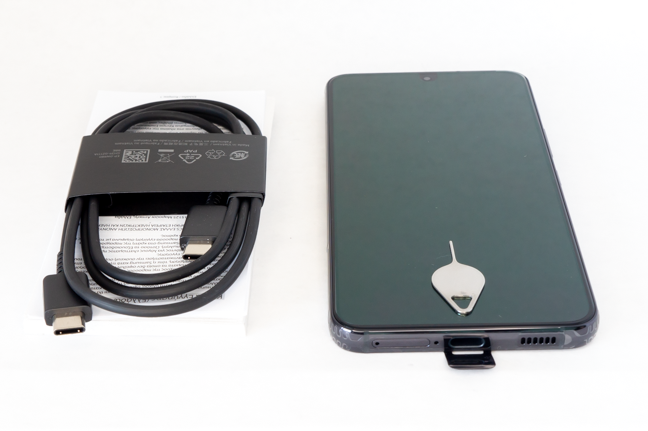 Samsung Galaxy S22: package contents
Unboxing the Samsung Galaxy S22 is, as expected, nothing out of the ordinary. Apart from the bare minimum, there are no accessories in the box. The package is sturdy, eco-friendly, and has attractive embossed graphics.
Samsung Galaxy S22: package contents
Unboxing the Samsung Galaxy S22 is, as expected, nothing out of the ordinary. Apart from the bare minimum, there are no accessories in the box. The package is sturdy, eco-friendly, and has attractive embossed graphics.
 The front of the Samsung Galaxy S22
The back of the smartphone features the triple-camera system, slightly raised from the rest of the phone, and an LED flash. The design is very similar to the one of the Galaxy S21, with the main differences being the back cover material (frosted glass, in this case) and the fact that on the Galaxy S22, the back isn’t curved towards the edges.
The front of the Samsung Galaxy S22
The back of the smartphone features the triple-camera system, slightly raised from the rest of the phone, and an LED flash. The design is very similar to the one of the Galaxy S21, with the main differences being the back cover material (frosted glass, in this case) and the fact that on the Galaxy S22, the back isn’t curved towards the edges.
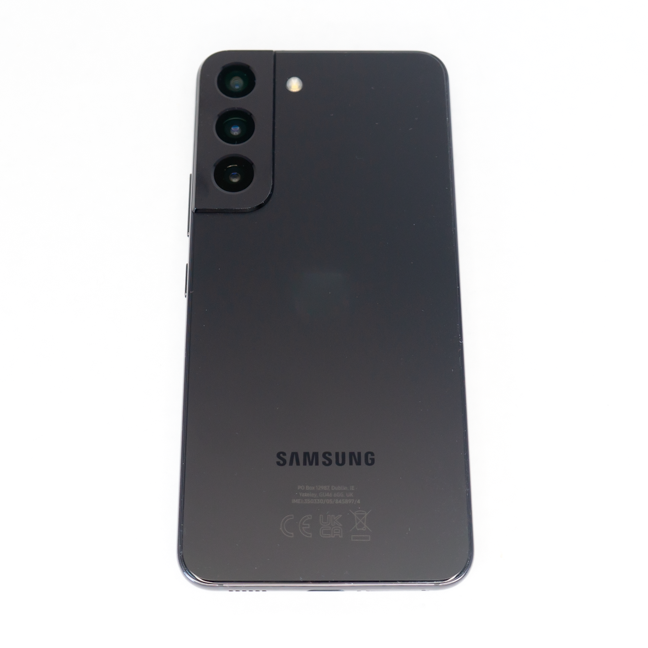
 The back of the Samsung Galaxy S22
The left side of the phone has no ports or buttons, only two plastic inserts which facilitate signal reception.
The back of the Samsung Galaxy S22
The left side of the phone has no ports or buttons, only two plastic inserts which facilitate signal reception.
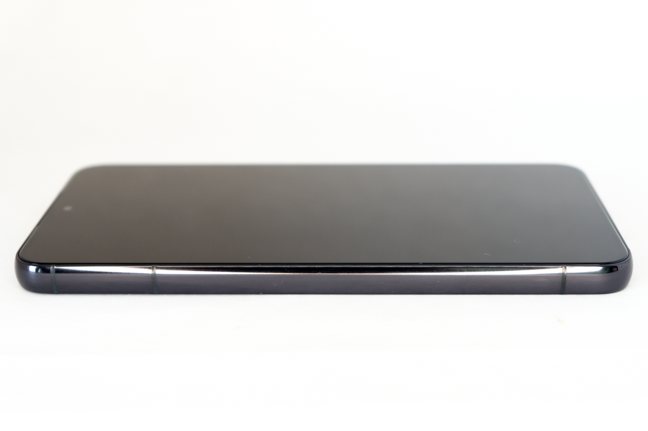 The left side of the Samsung Galaxy S22
The right side contains all the buttons (the volume rocker and the power buttons). Pressing them provides good feedback.
The left side of the Samsung Galaxy S22
The right side contains all the buttons (the volume rocker and the power buttons). Pressing them provides good feedback.
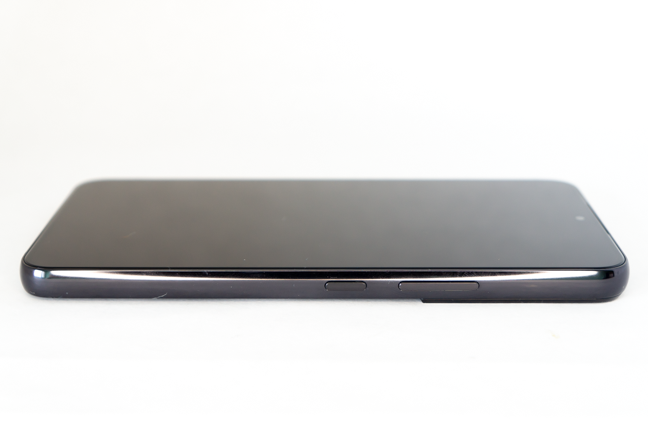 The right side of the Samsung Galaxy S22
The top of the smartphone has a hole for one of the microphones and a plastic insert, again for the GSM antenna.
The right side of the Samsung Galaxy S22
The top of the smartphone has a hole for one of the microphones and a plastic insert, again for the GSM antenna.
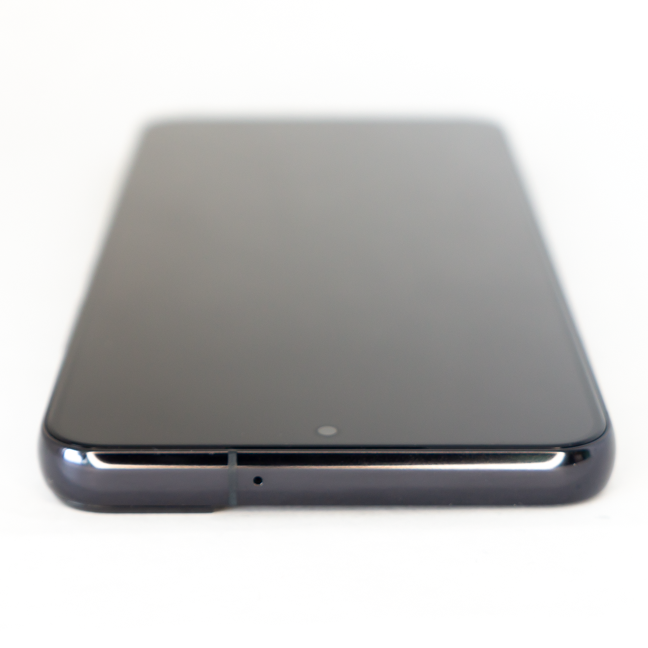 The top of the Samsung Galaxy S22
The bottom of the Samsung Galaxy S22 houses the USB-C charging port, the main microphone, the SIM tray, and the second speaker.
The top of the Samsung Galaxy S22
The bottom of the Samsung Galaxy S22 houses the USB-C charging port, the main microphone, the SIM tray, and the second speaker.
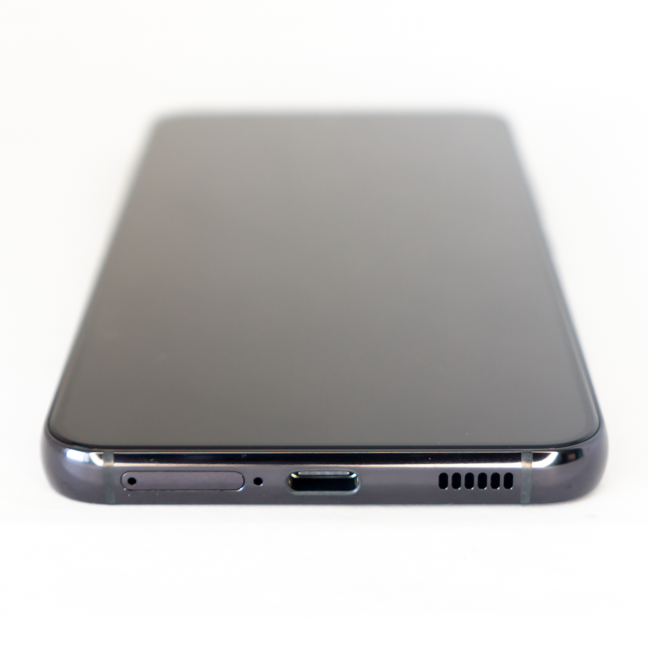 The bottom of the Samsung Galaxy S22
The Samsung Galaxy S22 5G has an IP68 rating for dust and water protection, so it’s highly resistant to dust and can withstand being submerged for 30 minutes in up to 1.5m of water. There are no less than eight colors you can choose from for your Galaxy S22. Phantom Black, Phantom White, Green, and Pink Gold are the “standard” ones:
The bottom of the Samsung Galaxy S22
The Samsung Galaxy S22 5G has an IP68 rating for dust and water protection, so it’s highly resistant to dust and can withstand being submerged for 30 minutes in up to 1.5m of water. There are no less than eight colors you can choose from for your Galaxy S22. Phantom Black, Phantom White, Green, and Pink Gold are the “standard” ones:
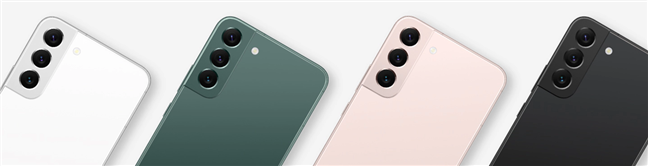
 The colors available for all customers
Then, there are the Graphite, Cream, Sky Blue, and Violet, which are exclusive to the Samsung online store.
The colors available for all customers
Then, there are the Graphite, Cream, Sky Blue, and Violet, which are exclusive to the Samsung online store.
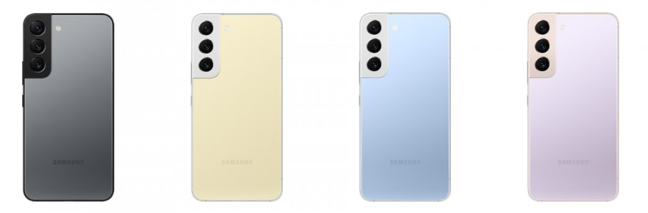
 These colors are available exclusively on the Samsung online store
Overall, the design and build quality of the Samsung Galaxy S22 are excellent. The smartphone feels very sturdy and is just the right size for people with average hands. The design follows the same general theme as its predecessor, but it gives up the rounded edges in favor of a more blocky, iPhone-like design.
These colors are available exclusively on the Samsung online store
Overall, the design and build quality of the Samsung Galaxy S22 are excellent. The smartphone feels very sturdy and is just the right size for people with average hands. The design follows the same general theme as its predecessor, but it gives up the rounded edges in favor of a more blocky, iPhone-like design.
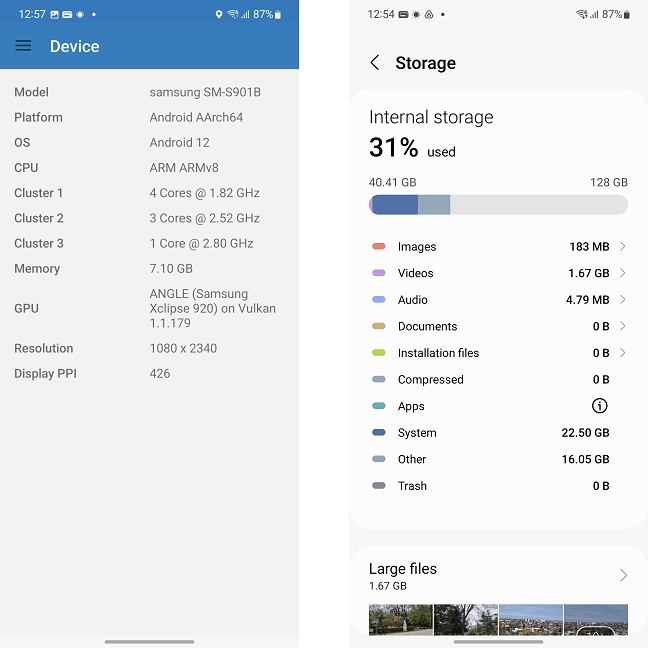 The chipset specs (left) and the space available (right) for the Samsung Galaxy S22
The device I used for this review is the Exynos variant with 128 GB of storage. Its performance in synthetic benchmarks is generally lower than that of the Snapdragon variant, but I’ll discuss this more in the corresponding section on the next page of this review.
The screen of the Samsung Galaxy S22 has a diagonal of 6.1 inches and a resolution of 1080 x 2340. The pixel density is thus excellent, at over 425 PPI. The Dynamic AMOLED 2X display is slightly smaller than the one on the Galaxy S21 but retains the same specs: 1300 nits maximum brightness, 120 Hz refresh rate, capable of displaying HDR10+ images.
The cameras are the most significant upgrade from the last generation. Here are the specs for each camera:
The chipset specs (left) and the space available (right) for the Samsung Galaxy S22
The device I used for this review is the Exynos variant with 128 GB of storage. Its performance in synthetic benchmarks is generally lower than that of the Snapdragon variant, but I’ll discuss this more in the corresponding section on the next page of this review.
The screen of the Samsung Galaxy S22 has a diagonal of 6.1 inches and a resolution of 1080 x 2340. The pixel density is thus excellent, at over 425 PPI. The Dynamic AMOLED 2X display is slightly smaller than the one on the Galaxy S21 but retains the same specs: 1300 nits maximum brightness, 120 Hz refresh rate, capable of displaying HDR10+ images.
The cameras are the most significant upgrade from the last generation. Here are the specs for each camera:
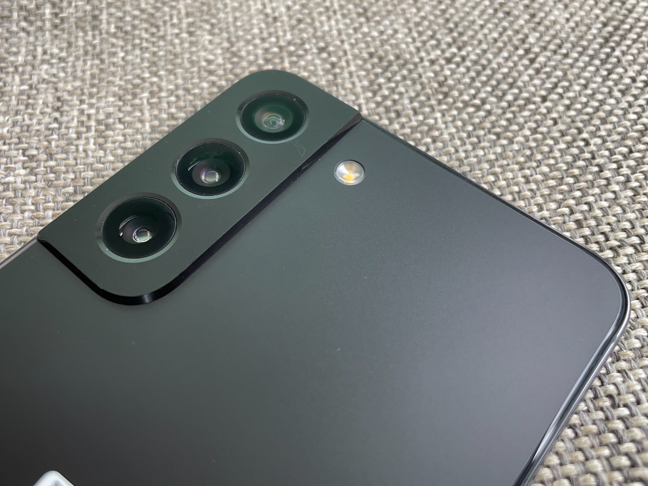
 The main cameras of the Samsung Galaxy S22
Samsung Galaxy S22 has excellent connectivity: 5G Dual-SIM (only some versions), Wi-Fi 6, Bluetooth 5.2, NFC, GPS with A-GPS, GLONASS, BDS, and GALILEO compatibility. It also has a full array of sensors: light sensor, accelerometer, gyro, proximity sensor, compass, and barometer.
The main cameras of the Samsung Galaxy S22
Samsung Galaxy S22 has excellent connectivity: 5G Dual-SIM (only some versions), Wi-Fi 6, Bluetooth 5.2, NFC, GPS with A-GPS, GLONASS, BDS, and GALILEO compatibility. It also has a full array of sensors: light sensor, accelerometer, gyro, proximity sensor, compass, and barometer.
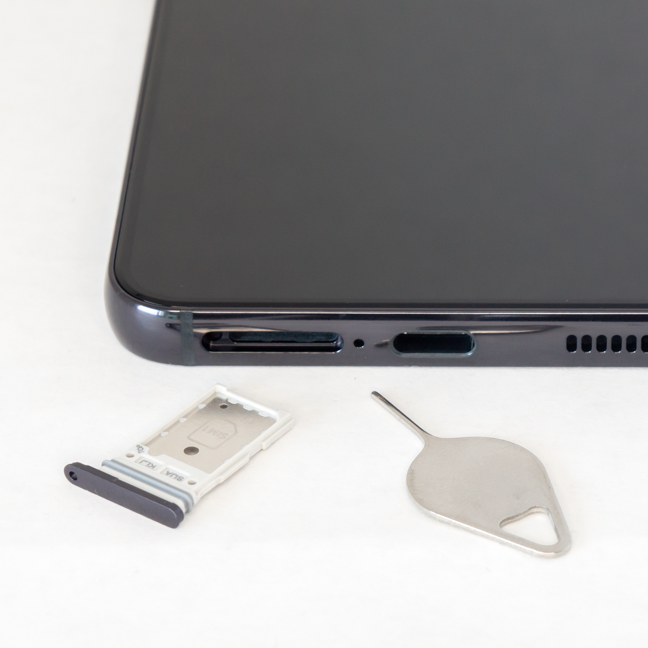 Samsung could have easily fitted a MicroSD card reader inside the S22, but they didn't
The battery is, sadly, smaller than the one on the Galaxy S21. It has 3700 mAh (down from 4000 mAh), and it can be charged at 25W. The Samsung S22 Ultra, in contrast, has a 5000 mAh battery capable of fast charging at 45W. The smartphone can be charged wirelessly and can also provide wireless power to other devices.
For a complete list of technical specifications, as well as the price, you can visit the product webpage: Samsung Galaxy S22.
Now that I showered you with all sorts of geeky specs, it’s time I get to the actual testing. On the next page, you can find the benchmark tests, as well as the real-life experience. Want to know what it’s like to live with the Samsung Galaxy S22? Read on.
Samsung could have easily fitted a MicroSD card reader inside the S22, but they didn't
The battery is, sadly, smaller than the one on the Galaxy S21. It has 3700 mAh (down from 4000 mAh), and it can be charged at 25W. The Samsung S22 Ultra, in contrast, has a 5000 mAh battery capable of fast charging at 45W. The smartphone can be charged wirelessly and can also provide wireless power to other devices.
For a complete list of technical specifications, as well as the price, you can visit the product webpage: Samsung Galaxy S22.
Now that I showered you with all sorts of geeky specs, it’s time I get to the actual testing. On the next page, you can find the benchmark tests, as well as the real-life experience. Want to know what it’s like to live with the Samsung Galaxy S22? Read on.
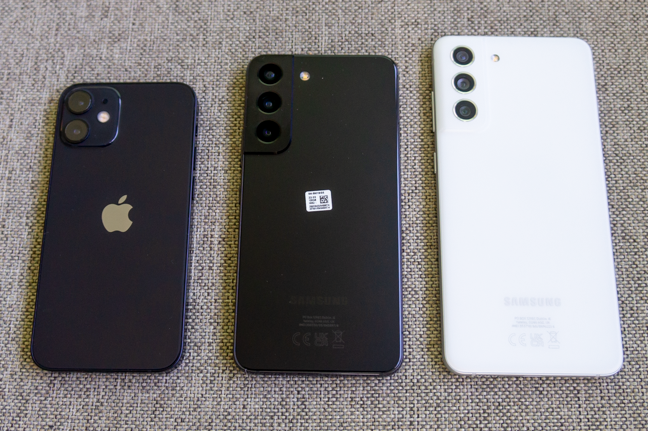 The Samsung Galaxy S22 (middle), compared to the iPhone 12 Mini (left) and the Samsung Galaxy S21 FE 5G (right)
The Samsung Galaxy S22 is built like a tank. A posh tank. Its aluminum frame protects both the screen and the back, and the phone feels very sturdy. It also feels premium, although the glass back cover can easily be mistaken for plastic.
The screen is extremely bright, and if you activate the adaptive refresh rate (it’s on by default, by the way), you get butter-smooth animations and video playback. The refresh rate varies, depending on the content on the screen. It goes as high as 120 Hz when needed (mostly when gaming) and as low as 24 Hz. The powerful chipset and the well-designed user interface contribute to the experience. Also, you won’t have an issue reading the screen in direct sunlight. This is mostly thanks to the high brightness of the panel, but also because the Galaxy S22 uses its sensors to detect the lighting conditions and then adjusts other image parameters like contrast and color temperature in order to provide the best viewing experience. One little omission that could have had a big impact is the lack of a pre-applied screen protector. It’s cheap to manufacture and apply, and many competitors provide this accessory.
The fingerprint sensor is reasonably fast and very accurate. It’s situated a bit higher on the screen than the one on the Samsung Galaxy S21 FE (which is optical instead of ultrasonic), and it feels more natural to reach.
Just like the ones on the S21 and the S21 FE, the speakers on the Galaxy S22 are loud, and the sound is clear and crisp. The Galaxy S21 FE is a bit louder, but it’s also larger. The bass is less present than on an iPhone 12 or a Xiaomi 11T, the mids and the highs are similar. Make sure you activate Dolby Atmos in the Settings app for the best experience.
The ONE UI user interface is very polished and has excellent animations for transitions. I experienced no slowdowns or bugs, and the performance was stellar in games and apps. The device does get hot, but not excessively. You can game for hours without issues.
The Samsung Galaxy S22 (middle), compared to the iPhone 12 Mini (left) and the Samsung Galaxy S21 FE 5G (right)
The Samsung Galaxy S22 is built like a tank. A posh tank. Its aluminum frame protects both the screen and the back, and the phone feels very sturdy. It also feels premium, although the glass back cover can easily be mistaken for plastic.
The screen is extremely bright, and if you activate the adaptive refresh rate (it’s on by default, by the way), you get butter-smooth animations and video playback. The refresh rate varies, depending on the content on the screen. It goes as high as 120 Hz when needed (mostly when gaming) and as low as 24 Hz. The powerful chipset and the well-designed user interface contribute to the experience. Also, you won’t have an issue reading the screen in direct sunlight. This is mostly thanks to the high brightness of the panel, but also because the Galaxy S22 uses its sensors to detect the lighting conditions and then adjusts other image parameters like contrast and color temperature in order to provide the best viewing experience. One little omission that could have had a big impact is the lack of a pre-applied screen protector. It’s cheap to manufacture and apply, and many competitors provide this accessory.
The fingerprint sensor is reasonably fast and very accurate. It’s situated a bit higher on the screen than the one on the Samsung Galaxy S21 FE (which is optical instead of ultrasonic), and it feels more natural to reach.
Just like the ones on the S21 and the S21 FE, the speakers on the Galaxy S22 are loud, and the sound is clear and crisp. The Galaxy S21 FE is a bit louder, but it’s also larger. The bass is less present than on an iPhone 12 or a Xiaomi 11T, the mids and the highs are similar. Make sure you activate Dolby Atmos in the Settings app for the best experience.
The ONE UI user interface is very polished and has excellent animations for transitions. I experienced no slowdowns or bugs, and the performance was stellar in games and apps. The device does get hot, but not excessively. You can game for hours without issues.
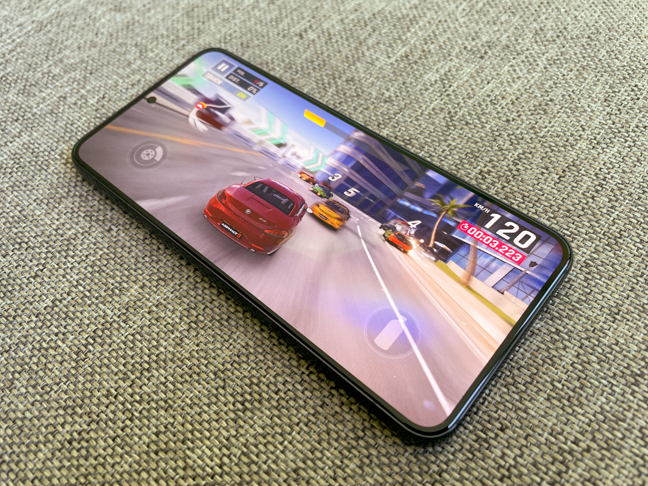 If you buy the Galaxy S22 for gaming, you won't be disappointed
Audio quality was excellent in calls on both ends, and the signal reception was good. Connectivity was good as well. I had no issues using my Panasonic wireless earbuds with the Samsung Galaxy S22, and the Wi-Fi speeds were constant as well. There is no headphone jack, but if you are lucky, you might catch a sale and get the Samsung Galaxy Buds Pro bundled with the smartphone. Even if you don’t, I highly recommend them, their sound quality is very good.
If you buy the Galaxy S22 for gaming, you won't be disappointed
Audio quality was excellent in calls on both ends, and the signal reception was good. Connectivity was good as well. I had no issues using my Panasonic wireless earbuds with the Samsung Galaxy S22, and the Wi-Fi speeds were constant as well. There is no headphone jack, but if you are lucky, you might catch a sale and get the Samsung Galaxy Buds Pro bundled with the smartphone. Even if you don’t, I highly recommend them, their sound quality is very good.
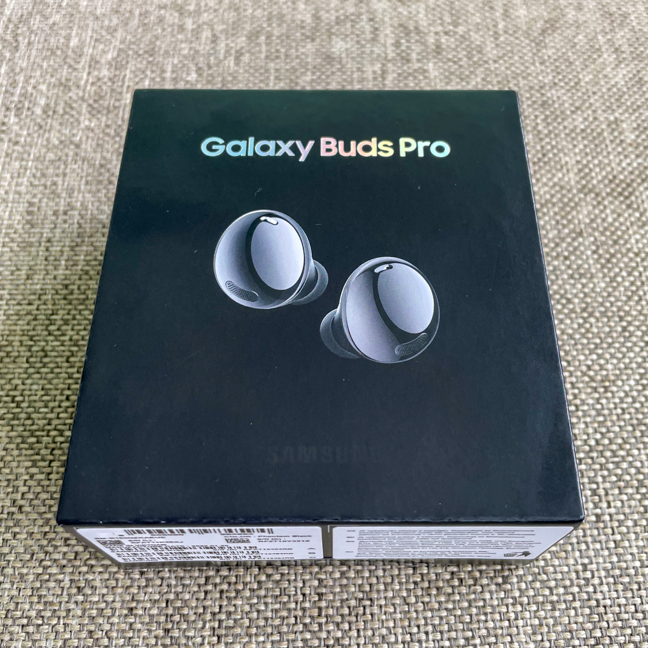 The Galaxy Buds Pro are a perfect match for the Samsung Galaxy S22
As I suspected, battery life isn’t great. It’s not “last-gen iPhone” bad, it can get you through the day, but only just, especially if you use the smartphone intensively. The standby consumption is great, but when gaming or using multimedia apps, the battery drains pretty fast. Thus, the autonomy is nowhere near the Galaxy S21 FE or the S22 Ultra, and it’s worse than the previous flagship, the Galaxy S21. I used a Samsung 45W fast charger to test the charging time (although the smartphone only charges at a maximum of 25W), and here are the results:
The Galaxy Buds Pro are a perfect match for the Samsung Galaxy S22
As I suspected, battery life isn’t great. It’s not “last-gen iPhone” bad, it can get you through the day, but only just, especially if you use the smartphone intensively. The standby consumption is great, but when gaming or using multimedia apps, the battery drains pretty fast. Thus, the autonomy is nowhere near the Galaxy S21 FE or the S22 Ultra, and it’s worse than the previous flagship, the Galaxy S21. I used a Samsung 45W fast charger to test the charging time (although the smartphone only charges at a maximum of 25W), and here are the results:
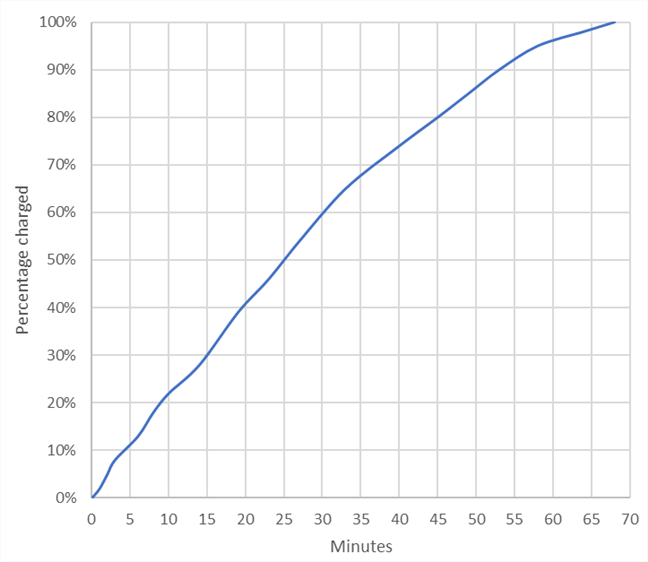
 Charging time for the Samsung Galaxy S22
The battery gets to 50% in around 25 minutes, which is decent, but compare it with the 15 minutes that the Xiaomi 11T takes to reach the same charge, or even better, the 12 minutes for the Realme GT2 Pro (both of which have significantly higher-capacity batteries), and you’ll see that Samsung has some catching up to do.
Honestly, Samsung smartphones feel more and more like Apple products, but without the restrictive software environment. The Samsung Galaxy S22 5G is a well-rounded product, with good performance, an excellent screen, and mature software. It’s a natural evolution from the previous generation of Samsung flagship smartphones, and apart from the reduced battery life, I really had no issue at all.
Charging time for the Samsung Galaxy S22
The battery gets to 50% in around 25 minutes, which is decent, but compare it with the 15 minutes that the Xiaomi 11T takes to reach the same charge, or even better, the 12 minutes for the Realme GT2 Pro (both of which have significantly higher-capacity batteries), and you’ll see that Samsung has some catching up to do.
Honestly, Samsung smartphones feel more and more like Apple products, but without the restrictive software environment. The Samsung Galaxy S22 5G is a well-rounded product, with good performance, an excellent screen, and mature software. It’s a natural evolution from the previous generation of Samsung flagship smartphones, and apart from the reduced battery life, I really had no issue at all.
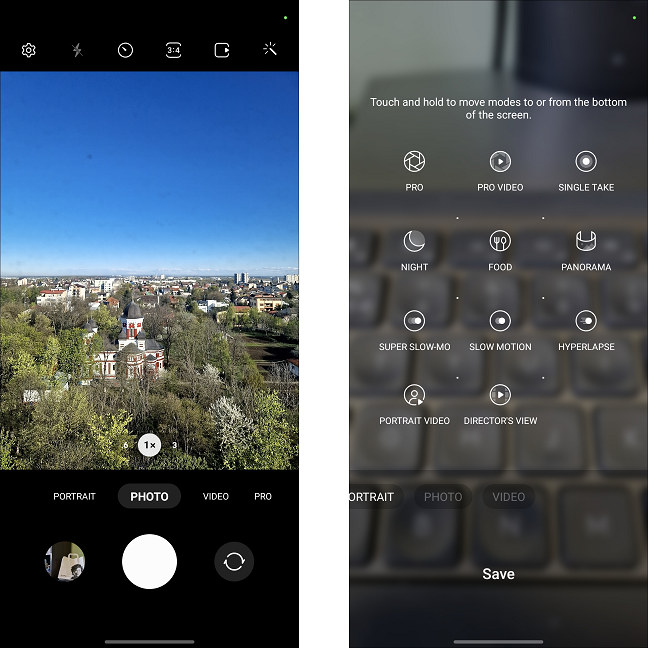 The camera interface on the Samsung Galaxy S22
The camera setup differs from the one on the Galaxy S21. The sensor for the main camera is completely different, with a resolution of 50 megapixels (compared to the 12 megapixels on the S21). The 10-megapixel telephoto camera is different as well, providing 3x optical zoom. The ultrawide is identical to the one on the Galaxy S21, at least on paper. The main camera uses pixel binning to combine four adjacent pixels into one, producing 12.5-megapixel photos.
The pictures taken by the Samsung Galaxy S22 main camera are very good. They retain a good amount of detail, even at 100% crop, as you can see below:
The camera interface on the Samsung Galaxy S22
The camera setup differs from the one on the Galaxy S21. The sensor for the main camera is completely different, with a resolution of 50 megapixels (compared to the 12 megapixels on the S21). The 10-megapixel telephoto camera is different as well, providing 3x optical zoom. The ultrawide is identical to the one on the Galaxy S21, at least on paper. The main camera uses pixel binning to combine four adjacent pixels into one, producing 12.5-megapixel photos.
The pictures taken by the Samsung Galaxy S22 main camera are very good. They retain a good amount of detail, even at 100% crop, as you can see below:
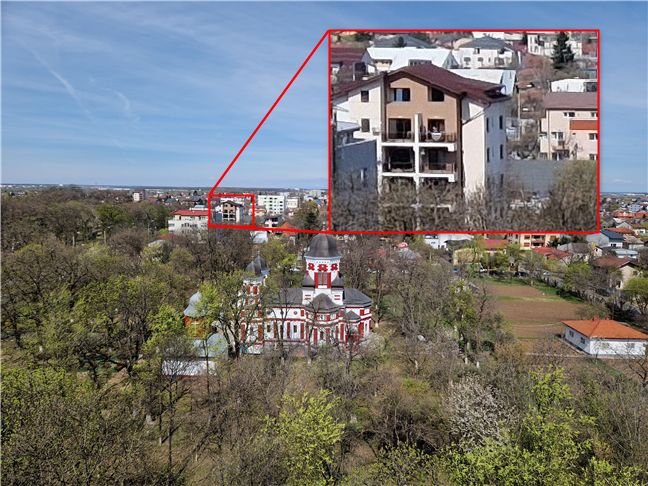 The photos taken with the new wide-angle camera are sharp, with good detail
You can play around with the settings and even shoot at 50 megapixels, but make sure to enable the Detail Enhancer feature - it really makes a difference.
The telephoto camera has a double role: it can be used for regular magnification, and it can also be used for macro or close-up shots. Here is a photo taken from the same spot, using the telephoto camera at 3x zoom. The level of resolved detail is excellent for a smartphone camera, even if the image is softer at 100% crop.
The photos taken with the new wide-angle camera are sharp, with good detail
You can play around with the settings and even shoot at 50 megapixels, but make sure to enable the Detail Enhancer feature - it really makes a difference.
The telephoto camera has a double role: it can be used for regular magnification, and it can also be used for macro or close-up shots. Here is a photo taken from the same spot, using the telephoto camera at 3x zoom. The level of resolved detail is excellent for a smartphone camera, even if the image is softer at 100% crop.
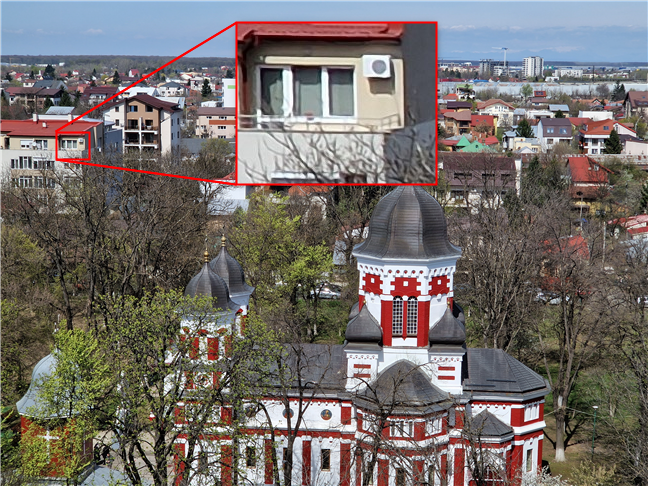 Photos taken with the telephoto camera are very detailed, even if they are a bit over-processed
Finally, here is a shot from the ultrawide camera. The white balance and the colors are a bit warmer, and the level of resolved detail is, as expected, not great.
Photos taken with the telephoto camera are very detailed, even if they are a bit over-processed
Finally, here is a shot from the ultrawide camera. The white balance and the colors are a bit warmer, and the level of resolved detail is, as expected, not great.
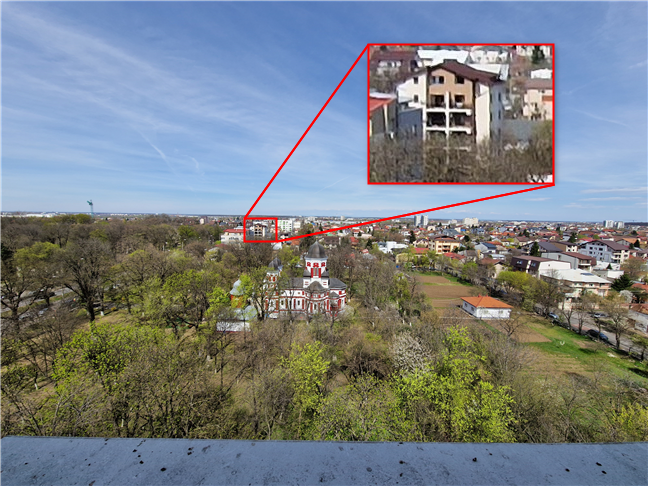 The wide-angle camera keeps up with the other two, but only just
Samsung advertises a significant improvement when it comes to night shots. Indeed, the quality is good even with Night Mode off. When you activate Night Mode, though, the quality of the pictures becomes amazing. The smartphone takes multiple shots and combines them to create a detailed and bright image. Remember to check the full-size samples to see the differences.
The wide-angle camera keeps up with the other two, but only just
Samsung advertises a significant improvement when it comes to night shots. Indeed, the quality is good even with Night Mode off. When you activate Night Mode, though, the quality of the pictures becomes amazing. The smartphone takes multiple shots and combines them to create a detailed and bright image. Remember to check the full-size samples to see the differences.
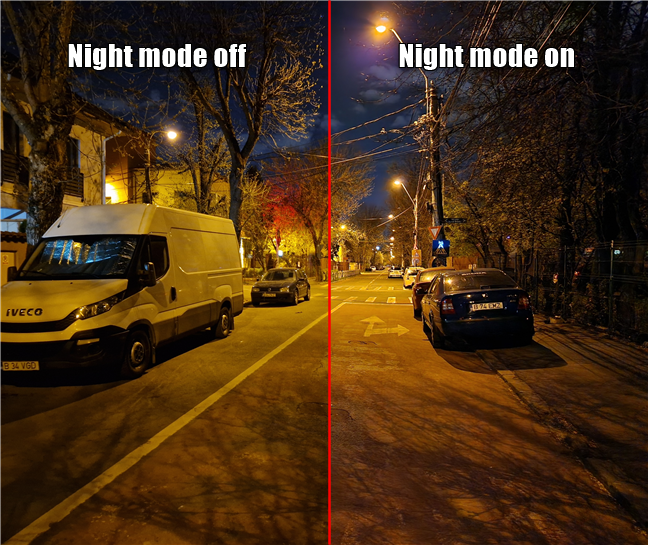
 The effect of the Night mode on low-light photography for the Samsung Galaxy S22
The selfie camera hardware is identical to the one on the Galaxy S21, and to be honest, I can understand why they decided to keep it. Don’t fix it if it ain’t broken:
The effect of the Night mode on low-light photography for the Samsung Galaxy S22
The selfie camera hardware is identical to the one on the Galaxy S21, and to be honest, I can understand why they decided to keep it. Don’t fix it if it ain’t broken:
 Selfies are detailed, with good colors and dynamic range
Overall, a solid camera system for photos, but what about videos? Well, I can report that they are very good as well. I strongly recommend recording in 4K, as the level of detail is much better, but 1080p is decent if you want to record a video and then send it via social media apps. 8K video recording is very choppy and I cannot recommend it yet. Here is a short video captured in 4K at 60 fps:
Video stabilization is very good, here is a sample recorded at 1080p and 30 fps while walking:
Here is a short slow-motion video in 1080p resolution. The framerate is 30 fps:
There is also a Super Slow-motion mode. The recording is done at 720p, so the videos don’t look great, but thanks to the high frame rate of the recording, the subject is moving 32 times slower!
The camera experience is great in good lighting and even more so in poor lighting conditions. Night Mode is amazing. The camera app is easy to use, the automatic scene adjustments are subtle, and the camera setup is perfect for casual recording.
Selfies are detailed, with good colors and dynamic range
Overall, a solid camera system for photos, but what about videos? Well, I can report that they are very good as well. I strongly recommend recording in 4K, as the level of detail is much better, but 1080p is decent if you want to record a video and then send it via social media apps. 8K video recording is very choppy and I cannot recommend it yet. Here is a short video captured in 4K at 60 fps:
Video stabilization is very good, here is a sample recorded at 1080p and 30 fps while walking:
Here is a short slow-motion video in 1080p resolution. The framerate is 30 fps:
There is also a Super Slow-motion mode. The recording is done at 720p, so the videos don’t look great, but thanks to the high frame rate of the recording, the subject is moving 32 times slower!
The camera experience is great in good lighting and even more so in poor lighting conditions. Night Mode is amazing. The camera app is easy to use, the automatic scene adjustments are subtle, and the camera setup is perfect for casual recording.
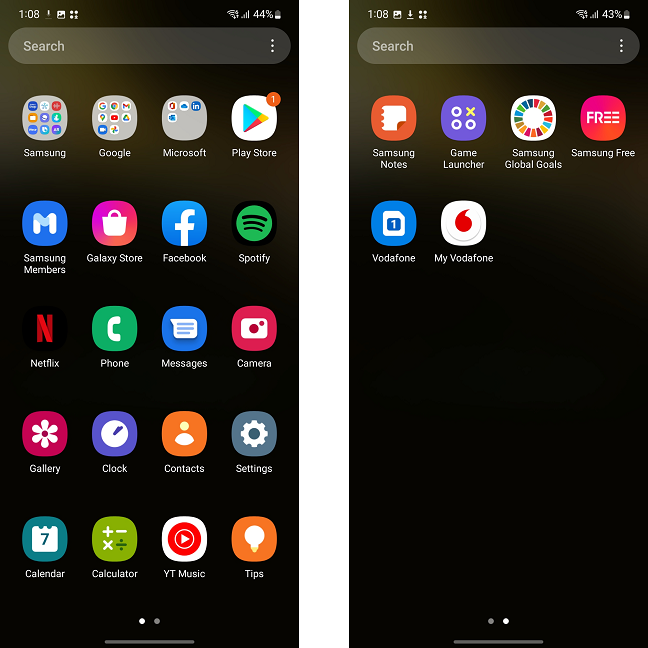 There are quite a few preinstalled apps, some of them very useful, others less so
The full Samsung experience includes:
There are quite a few preinstalled apps, some of them very useful, others less so
The full Samsung experience includes:
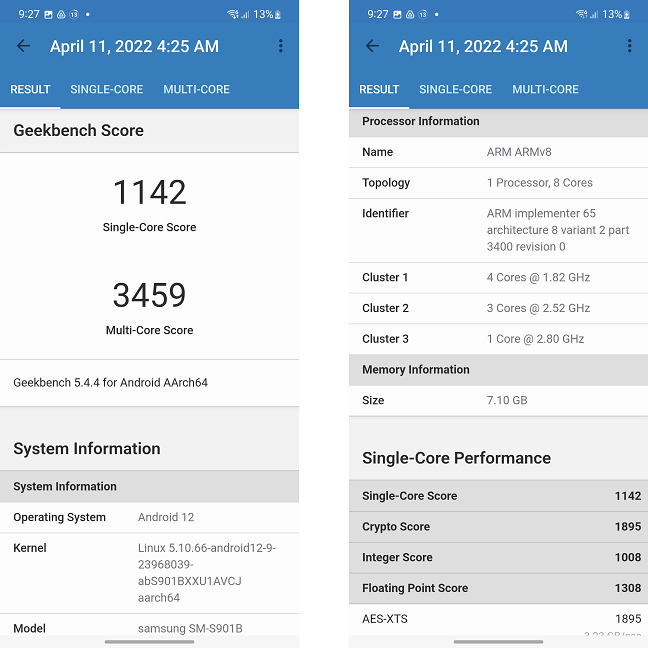 The Geekbench 5.0 score for the Samsung Galaxy S22 (Exynos)
Next, I installed PCMark for Android, which simulates a wider range of tasks (browsing, text editing, etc.). In the Work 3.0 test, the Samsung Galaxy S22 scored 12849 points, an excellent result.
The Geekbench 5.0 score for the Samsung Galaxy S22 (Exynos)
Next, I installed PCMark for Android, which simulates a wider range of tasks (browsing, text editing, etc.). In the Work 3.0 test, the Samsung Galaxy S22 scored 12849 points, an excellent result.
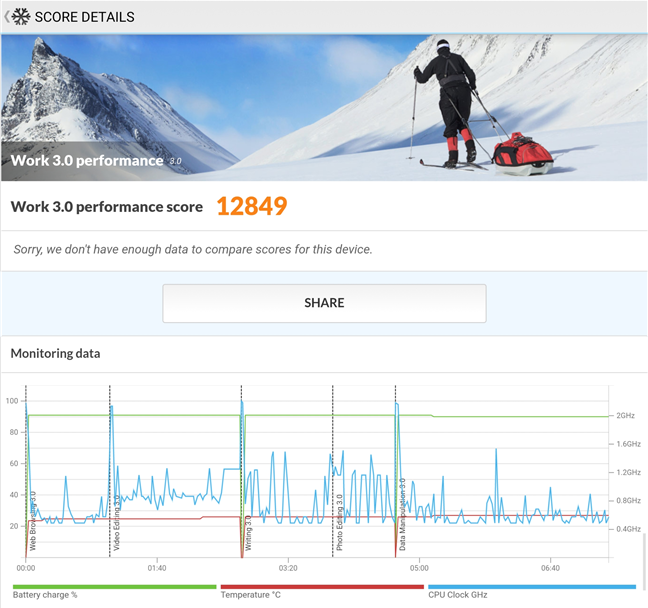
 The PCMark score for the Samsung Galaxy S22
I then focused on graphic tests. The Exynos 2200 chipset has a very interesting GPU, the Xclipse 920, produced in collaboration with AMD (makers of Ryzen processors and Radeon graphics cards). It features new ray-tracing and ray-shading technologies which could dramatically improve visual quality. However, developers need to implement this technology into their games. It will be interesting to see how the GPU performs a year from now, when (hopefully) games that take advantage of this new tech will be available. For now, I ran 3DMark, more specifically the Wild Life and Wild Life Extreme tests. The Samsung Galaxy S22 performed great, scoring 6979 points in Wild Life and 2085 in Wild Life Extreme. However, the performance was well below the Adreno 730 GPU present on the Snapdragon 8 Gen 1 chipset. For example, the Realme GT2 Pro managed a stellar 9215 (Wild Life) / 2572 (Wild Life Extreme). Although the difference is significant, my guess is that there is still some performance still left on the table for the Xclipse 920, and we will see an increase as the software evolves.
The PCMark score for the Samsung Galaxy S22
I then focused on graphic tests. The Exynos 2200 chipset has a very interesting GPU, the Xclipse 920, produced in collaboration with AMD (makers of Ryzen processors and Radeon graphics cards). It features new ray-tracing and ray-shading technologies which could dramatically improve visual quality. However, developers need to implement this technology into their games. It will be interesting to see how the GPU performs a year from now, when (hopefully) games that take advantage of this new tech will be available. For now, I ran 3DMark, more specifically the Wild Life and Wild Life Extreme tests. The Samsung Galaxy S22 performed great, scoring 6979 points in Wild Life and 2085 in Wild Life Extreme. However, the performance was well below the Adreno 730 GPU present on the Snapdragon 8 Gen 1 chipset. For example, the Realme GT2 Pro managed a stellar 9215 (Wild Life) / 2572 (Wild Life Extreme). Although the difference is significant, my guess is that there is still some performance still left on the table for the Xclipse 920, and we will see an increase as the software evolves.
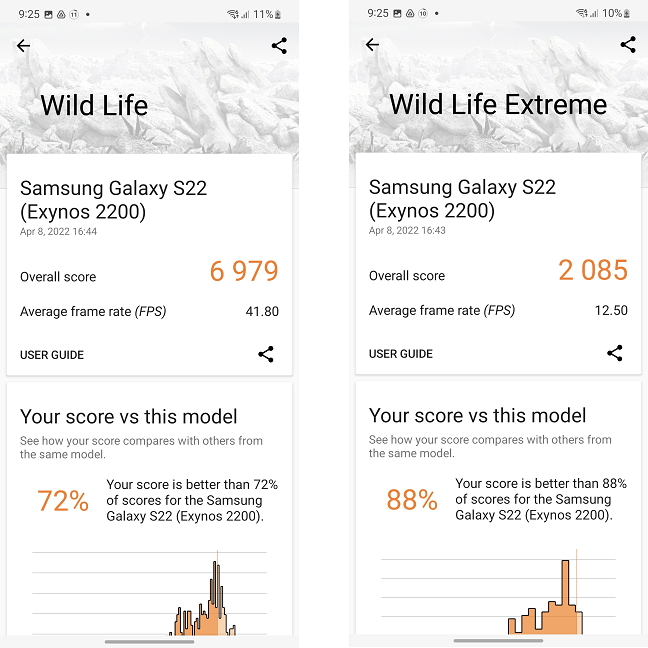 The 3DMark scores are high, but the Xclipse 920 is nowhere near the Adreno 730
The GFXBench scores are in line with the results from 3DMark - below Adreno 730 and similar to Adreno 660 (which is part of the Snapdragon 888 chipset). The Samsung Galaxy S22 had an average frame rate of 64 fps in the Car Chase test (3811 frames rendered) and 65 fps in the 1080p Car Chase Offscreen test (3835 frames rendered).
The 3DMark scores are high, but the Xclipse 920 is nowhere near the Adreno 730
The GFXBench scores are in line with the results from 3DMark - below Adreno 730 and similar to Adreno 660 (which is part of the Snapdragon 888 chipset). The Samsung Galaxy S22 had an average frame rate of 64 fps in the Car Chase test (3811 frames rendered) and 65 fps in the 1080p Car Chase Offscreen test (3835 frames rendered).
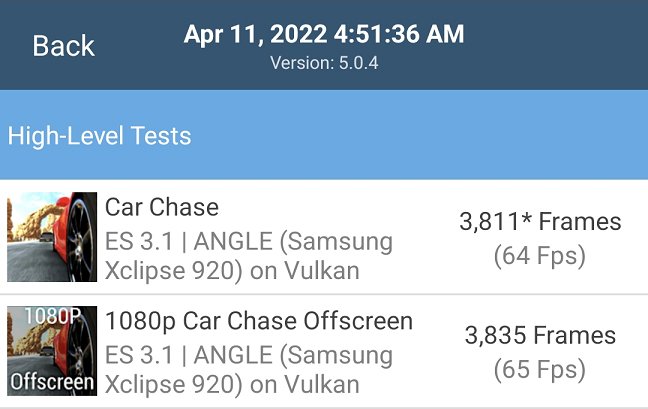
 The GFXBench results are very similar to those of the previous-gen Adreno 660 GPU
After setting the device’s screen brightness to 250 lux and with all other settings at default values, I used the Battery Life 3.0 test from the PCMark suite to test, well, the battery life. It ran for 9 hours and 29 minutes, which is not a great result. For reference, the Samsung Galaxy 21 FE ran for almost 14 hours.
The GFXBench results are very similar to those of the previous-gen Adreno 660 GPU
After setting the device’s screen brightness to 250 lux and with all other settings at default values, I used the Battery Life 3.0 test from the PCMark suite to test, well, the battery life. It ran for 9 hours and 29 minutes, which is not a great result. For reference, the Samsung Galaxy 21 FE ran for almost 14 hours.
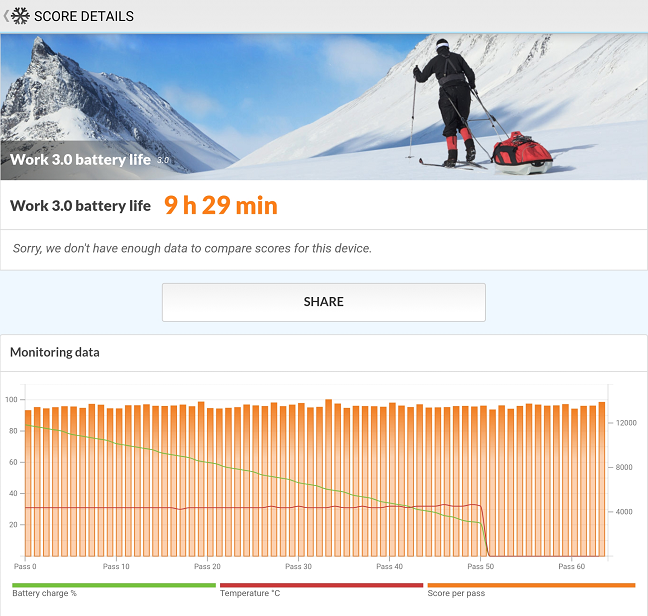
 The battery test from PCMark revealed one of the few weaknesses of the Galaxy S22
The 5G reception is a bit iffy with my current carrier, so I didn’t test the 5G speeds. I did measure the Wi-Fi 6 speeds though, using Ookla’s Speedtest, and the Samsung Galaxy S22 managed around 600 Mbps for download and roughly 580 Mbps for upload. These are good speeds, but nothing out of the ordinary.
The battery test from PCMark revealed one of the few weaknesses of the Galaxy S22
The 5G reception is a bit iffy with my current carrier, so I didn’t test the 5G speeds. I did measure the Wi-Fi 6 speeds though, using Ookla’s Speedtest, and the Samsung Galaxy S22 managed around 600 Mbps for download and roughly 580 Mbps for upload. These are good speeds, but nothing out of the ordinary.
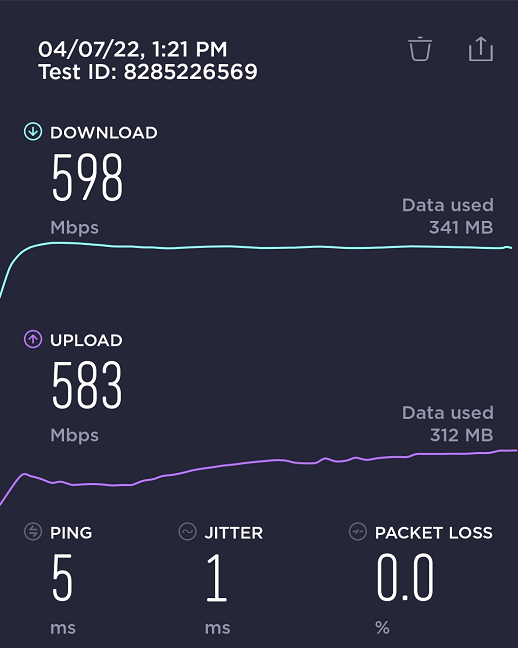
 Wi-Fi speeds obtained by the Samsung Galaxy S22 over Wi-Fi 6 in a 1Gbps network
The Samsung Galaxy S22 (Exynos) is a very powerful device that should handle the most demanding games and apps without any issues. The GPU has lower scores than its Snapdragon counterpart, the Adreno 730, but it still provides an excellent browsing, gaming, and working experience.
Wi-Fi speeds obtained by the Samsung Galaxy S22 over Wi-Fi 6 in a 1Gbps network
The Samsung Galaxy S22 (Exynos) is a very powerful device that should handle the most demanding games and apps without any issues. The GPU has lower scores than its Snapdragon counterpart, the Adreno 730, but it still provides an excellent browsing, gaming, and working experience.
Samsung Galaxy S22: Who is it good for?
The Samsung Galaxy S22 is a great choice for:- Users who want to upgrade to the latest Samsung Galaxy flagship device
- Android users who enjoy a compact and powerful smartphone
- Smartphone users who want the best gaming and multimedia performance and are never too far from a charger or an external battery
- People who want an experience similar to what Apple offers without the restrictive ecosystem
Pros and cons
Testing the Samsung Galaxy S22 5G revealed lots of qualities:
- It can be considered a compact flagship, one of the precious few on the Android market today
- It’s a very sturdy smartphone, with an IP68 rating
- Top build and material quality
- Its performance is near the top of the charts
- The AMOLED screen is excellent, bright, with a high pixel density and 120 Hz refresh rate
- The cameras are very good as well, even in poor lighting conditions
- The battery life - it’s not bad, but it’s worse than that of the previous generation
- The lack of a fast charger, screen protection, or a case
- The same smartphone with the same name has two very different chipsets, depending on the region. Graphical performance differs between the two chipsets used, sometimes by a substantial margin
Verdict
We have a winner! And not because of bold moves, not because of fancy, experimental tech, but because Samsung decided to improve on its already great Galaxy S21. The Samsung Galaxy S22 is a natural evolution from its predecessor. Better cameras, better performance, a more compact chassis, the same polished interface and ecosystem integration, and all that at a similar price as last year’s flagship. If it weren’t for that small decrease in battery capacity (and battery life), I would’ve had nothing major to complain about. I highly recommend the Samsung Galaxy S22 for people who want the best all-round Android smartphone and for those who love compact smartphones.Unboxing the Samsung Galaxy S22
The package for the Samsung Galaxy S22 5G is, as usual, very simple and relatively small. The box is completely black, continuing the trend from last year’s S21. Its dimensions are 6.37 x 3.38 x 1.42 inches (162 x 86 x 36 mm) and on its front, it only features the name of the smartphone.Design and build quality
When you compare it to the Galaxy S21, the Samsung Galaxy S22 feels and looks like an iterative update. It’s slightly smaller in all dimensions (5.75 x 2.78 x 0.30 inches or 146 x 70.6 x 7.6 mm versus S21’s 5.97 x 2.80 x 0.31 inches or 151.7 x 71.2 x 7.9 mm), lighter (5.89 oz or 168 grams, three grams lighter than the S21) and its chassis feels sturdier. It’s not just an impression, as due to the shape of the Galaxy S22, the frame is thicker and the overall structural strength of the device has clearly increased. The Galaxy S21 had a rounded back, whereas the Galaxy S22 is almost flat. This is true on the front as well: the S21 had what’s called a 2.5D glass, with rounded edges; the Galaxy S22, on the other hand, has a perfectly flat display, with its edges protected by the same aluminum frame. This bodes well for the drop and scratch resistance, as well as the fact that the display and the back are protected by Corning Gorilla Victus+ glass. On the front of the Samsung Galaxy S22, you can only see a tiny cutout for the camera. There are other features as well, but they are invisible: a light sensor, a proximity sensor, an ultrasonic fingerprint reader, and the main speaker. If you look closely, you may notice the speaker slit above the camera, but overall, the front is as clean as they get.Hardware specifications
With the Galaxy S22, Samsung went for an incremental upgrade to the Galaxy S21. In Europe, the S22 is powered by Samsung’s own Exynos 2200 chipset (a step up from the Exynos 2100 used on the S21). The rest of the world gets the Snapdragon 8 Gen 1 version, arguably the most powerful chipset on the Android market at the moment. The amount of memory hasn’t changed, it’s still 8 GB, with 128 GB or 256 GB of storage. I won’t even mention expandable storage, as Samsung doesn’t offer this “highly advanced” feature (which is present on its low-end smartphones). The operating system occupies roughly 22 GB.- The main camera has a 50 MP sensor, sitting behind an f/1.8, 23mm (wide) lens, with Dual Pixel PDAF (Phase Detection Autofocus) and optical image stabilization (OIS)
- The telephoto camera sensor has a resolution of 10 MP and the lens has an aperture equivalent to f/2.4, 70mm focal length. It provides 3x zoom and also has PDAF and OIS
- The ultrawide camera has 12 MP and an f/2.2, 13mm, 120˚ lens
- The front (selfie) camera has a resolution of 10 MP, with an f/2.2, 26mm (wide) lens. It has Dual Pixel PDAF, so it should be capable to focus quickly and accurately.
The smartphone experience on the Samsung Galaxy S22
To be honest, I’m a fan of small smartphones. I am using an iPhone 12 Mini as my secondary phone, and I love the fact that I can use it with one hand and it fits in my pocket without sticking out. So while you may see or hear some users complain about Samsung Galaxy S22’s small size, I’m definitely not going to. If you ask me, it’s actually a bit too large.The camera experience on the Samsung Galaxy S22 5G
NOTE: The pictures in the article are resized for optimization purposes. You can find pictures captured by the Samsung Galaxy S22 in the gallery below: The camera interface is simple and easy to use, with almost no changes from other members of the Galaxy S family. The main modes for the camera are Portrait, Photo, and Video, while the More section contains eleven more, such as Slow Motion and Super Slow-mo. You can rearrange the modes or place any of them on the main mode dial by dragging and dropping the icons on it.Android 12 and bundled apps
The Samsung Galaxy S22 comes with Android 12 and One UI 4.1 out of the box. Looks like Android smartphone manufacturers took the hint from Apple: Samsung has pledged to offer four operating system updates and five years of security patches. This is excellent news, it means that your smartphone should be safe to use even in 2027! The initial setup is easy, and you can skip installing some of the Samsung apps.- Samsung Browser - while I still prefer to use Chrome, the Samsung Browser is fast and has the advantage of being fully tested on Samsung devices
- SmartThings - Samsung’s app for the management and automation of smart devices
- Bixby - Samsung’s very own intelligent voice in the cloud, ready to help
- Samsung Health - a health & fitness app that needs a Samsung account and Samsung wearables
- Galaxy Wearable - helps you pair and configure Samsung wearable devices with your smartphone
- AR Zone - allows you to play with augmented reality emoji, doodles, and other items
- Galaxy Store - Samsung’s app store. Can’t help but wonder - are there any people using it instead of Google Play Store?
- Samsung Voice Recorder - a simple voice recording app that does what you expect it to do
- Samsung Members - helps you connect with other Samsung Galaxy device owners and get help when running into problems
- Spotify - the popular music streaming service
- Gallery - Samsung’s alternative to Google Photos
- Samsung Notes - a good and easy-to-use app for note-taking. You might enjoy using it
- Game Launcher - a mix between a game store and a gaming platform allowing the user to play games without installing them on the device. It also allows tweaking of some performance settings for games
- Samsung Global Goals - an app that enables users to donate money to charity by viewing ads or donating directly
- Samsung Free - Samsung’s alternative to Google Discover
Performance in benchmarks
I recently had the chance to test several devices with the Snapdragon 8 Gen 1 chipset, and I was very curious to find out where the Samsung Galaxy S22 with the Exynos chipset was sitting in terms of performance, compared to the (arguably) best chipset on the market. I also had a Samsung S21 FE laying around, which has the previous generation Qualcomm chipset, the Snapdragon 888. Let the competition begin! I started out, as usual, with Geekbench, and the Samsung Galaxy S22 (Exynos) scored 1142 in Single-Core and 3459 in Multi-Core. The result is very similar to the Snapdragon 888-powered S21 FE (which achieved 1084 in Single-Core and 3252 in Multi-Core). When compared to smartphones with Snapdragon 8 Gen 1, the Exynos 2200 chipset has slightly lower single-core performance, but similar multi-core performance.

Discussion (0)
Comments are closed.