



Linksys WRT1900AC is the modern successor of the iconic Linksys WRT54G - one of the most popular routers ever made. It has a very similar look to its predecessor and the most impressive hardware specifications we've seen so far on a wireless router. Some even said that this router is the best in the world. You can imagine that we were very excited to test it out and see for ourselves what is has to offer. If you would like to learn more about Linksys WRT1900AC and its real world performance, read our review!
Unboxing the Linksys WRT1900AC Router
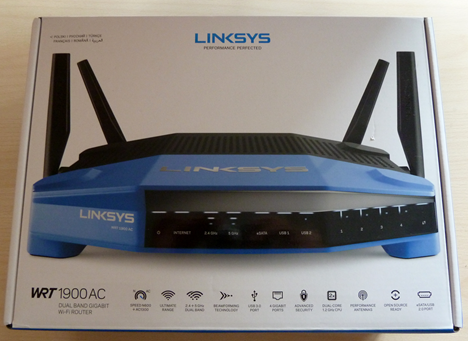
We loved the way Linksys WRT1900AC looks from the moment we looked at its packaging. You can prominently see the router with its imposing old-school look as well as learn about its specifications.
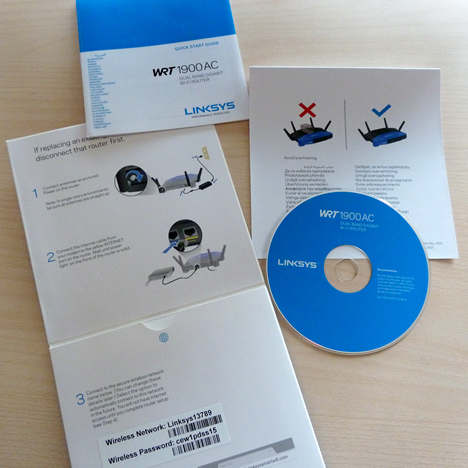
Inside the box you will find the router, the four external antennas, a network cable, a power cable and power adapter, the quick start guide and a disc with the user manual. As you can see in the picture below, the disc with the documentation is found inside the cardboard with the quick start guide.
For more details about the unboxing experience, don't hesitate to view the brief video below:
Hardware Specifications
From the first touch, this device feels impressive: it's massive, strong, heavy and with a very old-school look. We just loved it!
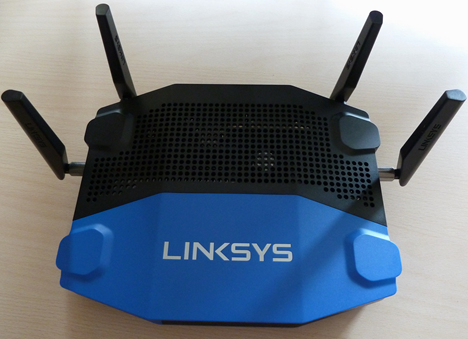
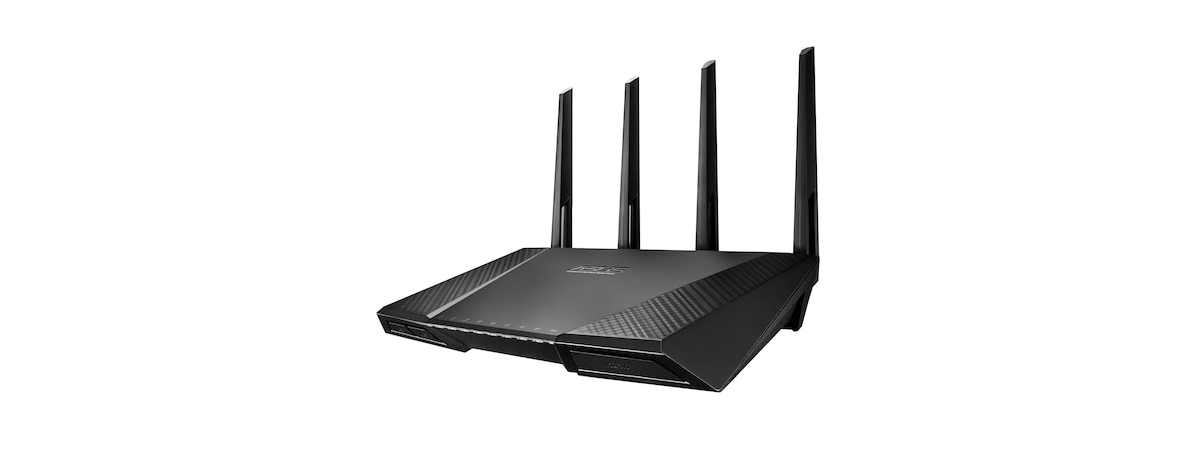
As you can see in the picture below it has four external antennas and it offers support for all the modern wireless networking standards, including the new 802.11ac standard. Obviously, it is a dual band router which promises a maximum theoretical throughput of 600Mbps for the 2.4 GHz wireless network and of 1300 Mbps for the 5 GHz wireless network.
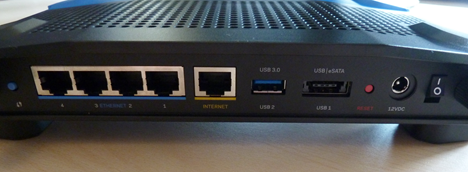
It has the fastest processor available on any router at the time of our testing: a dual-core Marvell Armada XP MV78230 running at 1.2 GHz. It has 256 MB of RAM memory and 128 MB of flash storage. On its back you will find four Ethernet ports, one Internet port, a USB 3.0 port and an eSATA/USB 2.0.
In terms of specifications, everything is impressive about this router, except one important detail: Linksys WRT1900AC advertises its "support" for Open Source firmware, more specifically OpenWRT. Unfortunately this support does not exist even though several months have passed since Linksys has released this router. As you can read on the OpenWRT page, "At this point it is not possible to compile a fully working (including WiFi) customized OpenWrt build for WRT1900AC."
Also, an OpenWRT spokesman has said that "Given how much is still missing, and that not even the GPL code for this device was posted to the Linksys GPL code center, we consider these claims to be premature and unfortunately misleading."
Those of you that want the official list of specifications, can find them here: Linksys WRT1900AC.
Setting Up & Using the Linksys WRT1900AC Router
When setting up the Linksys WRT1900AC for the first time, first connect the antennas to the router. Then, connect it to a power outlet and plug in the Internet cable in the port that's marked with the label Internet. Connect the router to your desktop PC or your laptop with the network cable that's found inside the box. Obviously, you should plug it into one of the four Ethernet ports on the back of the router. Then, wait for the router to boot up. When done, open your favorite browser and go to linksyssmartwifi.com or to 192.168.1.1 (the default IP address of the router) and follow the setup wizard.
The setup guide was able to correctly detect and set our Internet connection. Then it proceeded to setting up the wireless networks. Even though it lets users configure the name and password for the 2.4 GHz wireless network, it doesn't let them do the same for the 5GHz wireless network. We found that disappointing as we wanted more control from the setup wizard of a premium router like this one.
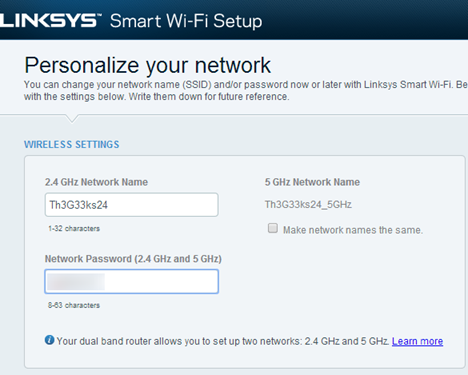
After finishing the setup wizard, we highly recommend that you go through all configuration options that are available for this router. There will be plenty of things left for you to set up in order to make it work the way you want to. The user interface is available in 22 languages which is good and similar to what its competitors offer.

During our testing, we used the latest firmware version available at the time - 1.1.8.161917.
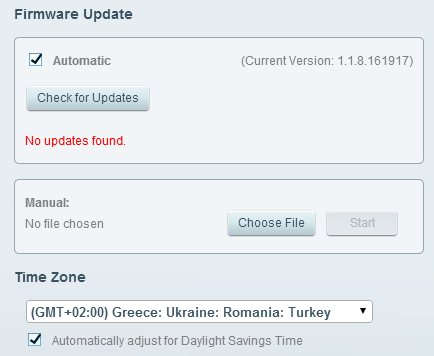
The firmware used by Linksys WRT1900AC is the same as that used on other Linksys routers, which is not great. Even though the homepage of this router's control panel looks friendly and seems easy to use, it is not.
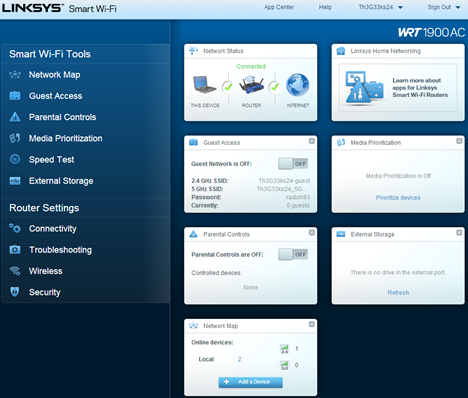
When fiddling with the Router Settings section, you will learn that some of the available settings are not grouped in a logical manner. To give you one example: the reboot option is hidden under Troubleshooting -> Diagnostics. It took us a long time to find it.
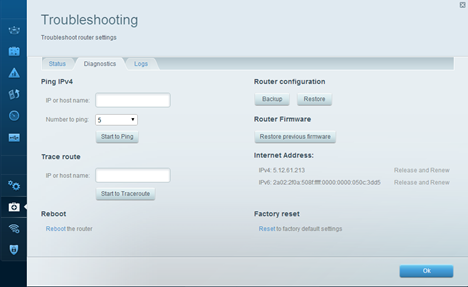
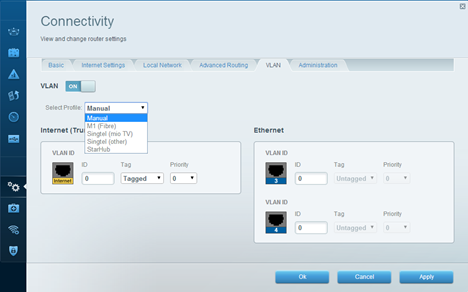
Also, some features and settings like VLAN (virtual lan) and DMZ (Demilitarized Zone) are not properly explained and most users won't know what to do with them.
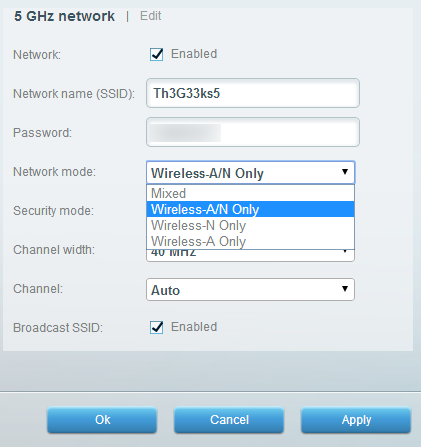
During our initial setup we have set the 5 GHz wireless network to use the network mode Wireless-A. That's because with have 802.11ac capable devices in our network and we wanted to see what's the maximum speed that can be achieved with this router. Unfortunately, this network mode doesn't work well and our test devices reached speeds of only 22 Mbps. That was very bad. The network mode in which we achieved good speeds on the 5 GHz wireless network was Wireless-A/N Only. Linksys should fix this problem in a future firmware update.
This is one more reason why we recommend that you go through all the available settings. This exercise will make you familiar with all the features this router has to offer and you will be able to make it work the way you want to, while also disabling the things you don't want to use.
Once we fixed our problems with the configuration of this router, we started our measurements, to see how well it works and how it compares with its competition in terms of speed and wireless network coverage.
Go go the second page of this tutorial to see our benchmarks and the real-life speeds offered by this wireless router.
Wireless Network Performance
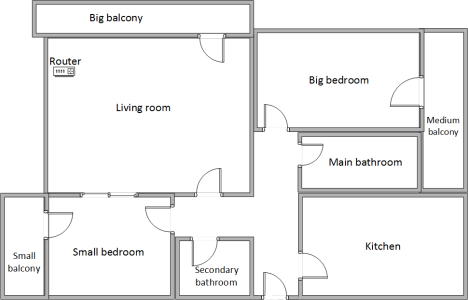
First, let's take a look at the apartment we used in our testing and how it is set up. You can see that the router is placed in the living room. In our measurements, we have compared Linksys WRT1900AC with its most important competitor ASUS RT-AC68U and its more affordable brother - Linksys EA6900. Our testing was done using a fast 1 Gigabit Internet connection.
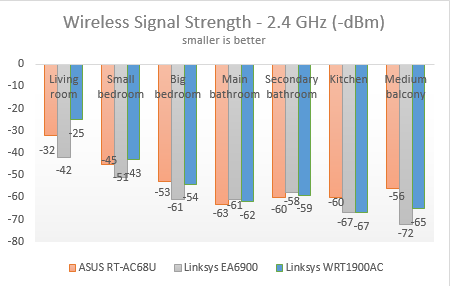
With the help of a tool named inSSIDer, we have measured the signal strength for the 2.4 GHz wireless network and recorded how it changes from room to room.
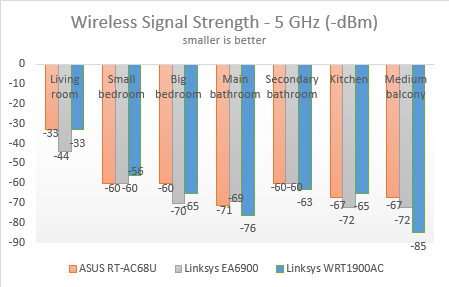
As you can see in the chart below, the signal strength was great, especially in the rooms that are closer to the router. In the rooms that are farther away from it, ASUS RT-AC68U delivered slightly better signal strength.
The same trend was also noticed for the 5 GHz wireless network.
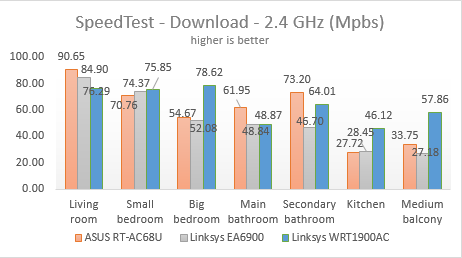
Then, we ran SpeedTest for measuring the download and upload speed on both wireless networks. When using the 2.4 GHz wireless network, ASUS RT-AC68U was fastest in the rooms that are closer to the router while Linksys WRT1900AC was the performance leader in the rooms that are farther from the router.
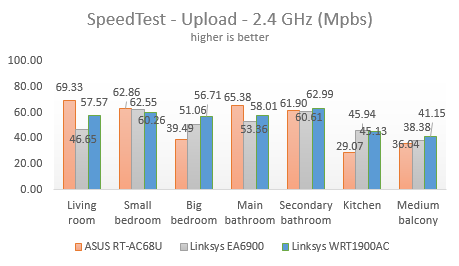
The same trend was noticed when measuring the upload speed on the 2.4 GHz wireless network.
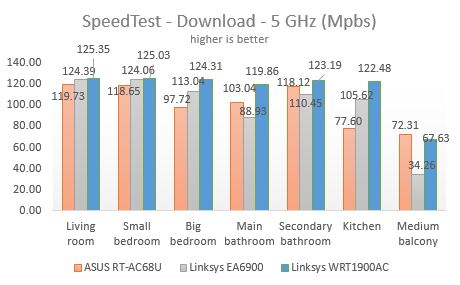
Things got very interesting when using the 5 GHz wireless network. In the download test, Linksys WRT1900AC was clearly the best performing router, beating ASUS RT-AC68U in every room except one. In some rooms the differences were as small as 4% while in others as big as 58%.
In the upload test, ASUS RT-AC68U was the top performing router, beating Linksys WRT1900AC in every room. In some rooms, the differences were as small as 9% while in others as big as 340%.
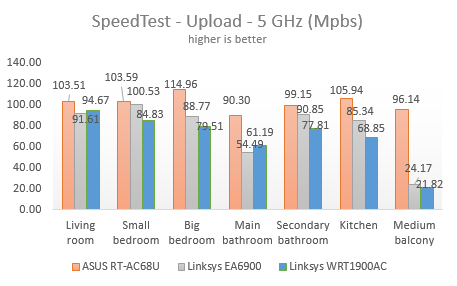
Linksys WRT1900AC delivers great wireless networking performance. It is a close fight between it and ASUS RT-AC68U. Linksys delivers faster downloads when using the 5 GHz wireless network while ASUS RT-AC68U delivers faster uploads. When using the 2.4 GHz wireless network, ASUS RT-AC68U is faster in the rooms that are closer to the router while Linksys WRT1900AC is faster in those that are farther from the router. All-in-all, we were very pleased with the wireless networking performance offered by Linksys WRT1900AC.
Wired Network Performance
In order to test the quality of the wired Ethernet connection, we have used a desktop PC, equipped with an eight-core processor, 8GB of RAM and a very fast ADATA SX900 SSD drive, as well as an old laptop with a quad-core processor and an SSD drive from RunCore.
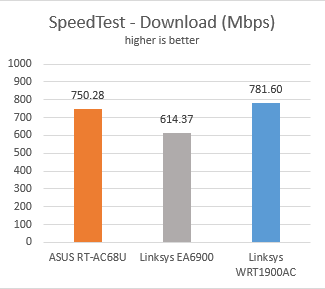
First, we measured the download and upload speeds using SpeedTest. Linksys WRT1900AC was the fastest router, offering an average download speed of 781.60 Mbps. This is 4 % faster than its main competitor - ASUS RT-AC68U.
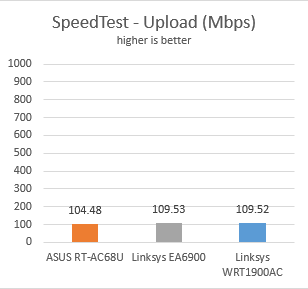
In terms of upload speed, Linksys WRT1900AC was 5% faster than ASUS RT-AC68U and on par with its cheaper brother Linksys EA6900.
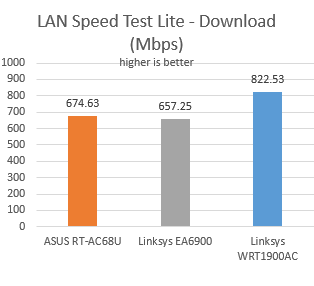
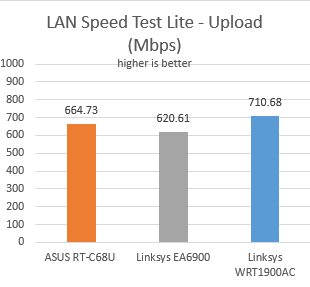
Next, we used LAN Speed Test Lite to measure the download and upload speeds when transferring a 350 MB file to and from the two computers connected to the network via Ethernet cables. Linksys WRT1900AC was the fastest router we have tested so far, offering an average download speed of 822.53 Mbps - 22% faster than ASUS RT-AC68U.
The difference was smaller though in terms of upload speed - Linksys WRT1900AC was 7% faster than ASUS RT-AC68U.
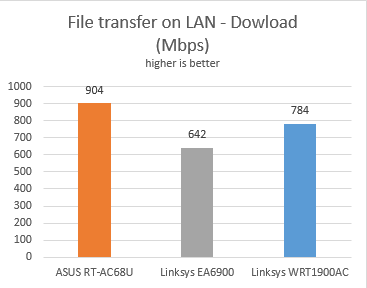
Last but not least, we transferred an 883 MB file across the network, between the same two computers. When measuring the average download speed, Linksys WRT1900AC was the second fastest router with an average speed of 784 Mbps. This is 13% slower than ASUS RT-AC68U.
The average upload speed offered by Linksys WRT1900AC was of 885 Mbps - 2% slower than that offered by ASUS RT-AC68U.
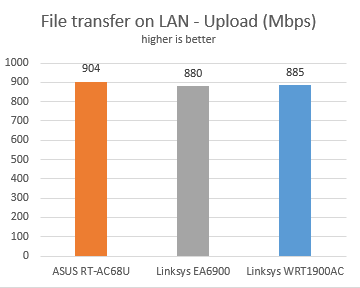
Linksys WRT1900AC is a great router when it comes to the speeds obtained when using wired Ethernet connections. In most of our tests it was the fastest router while in others it was a close second.
Extra Features
The firmware on Linksys WRT1900AC includes some useful extra features but there are not as many as those offered by its direct competitors:
- Guest access - you can set up a different wireless network for your guests so that they can use it to access the Internet and remain isolated from the rest of your network.
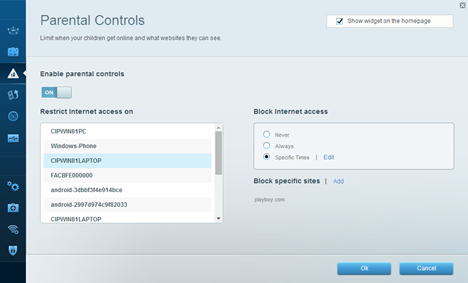
- Parental Controls - a simple feature that allows you to restrict Internet access (not network access) for any of your devices, at specific times. Also, you can block access to specific websites.
- External Storage - you can use the USB & eSATA ports available to connect external disk drives and share them with the devices on your network. You can set up secure access with a username and password and also transform the router into an FTP server or a Media server.
- Media prioritization - with the help of the QoS feature, you can prioritize different devices, applications or online games. Setting up this feature is very visual and it generally works well.
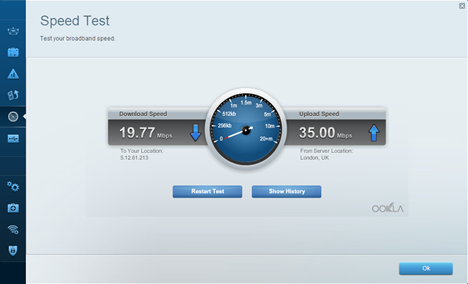
- Speed Test - a very basic feature that allows you to measure the download and upload speed available using SpeedTest. Unfortunately this widget is not customizable and you are better off using the SpeedTest website.
- Smart Wi-Fi apps - Linksys provides additional Smart Wi-Fi apps for different mobile platforms. With the help of these apps you can monitor remotely what's going on in your network, share content with others or block devices. Unfortunately some of these apps cost extra while others are available only for certain platforms. Only iOS users get access to all the apps. In contrast, Windows Phone users get access only to one app.
For a premium router like Linksys WRT1900AC, the firmware offered by Linksys is rather underwhelming. A router this strong hardware-wise should have deserved more complex firmware with more features like a VPN server or the Dual-WAN feature found on the ASUS RT-AC68U. Open source software would have been a good alternative but unfortunately the promised support is not available. This will surely disappoint geeks and knowledgeable users that want more features and complete control over their router.
Verdict
Linksys WRT1900AC offers a bittersweet experience and giving a verdict for it is a difficult task. The hardware used by this router is amazing and its performance is definitely top-notch in most usage scenarios. This is clearly one of the fastest routers in the world! There's no question about it. However, the bitter part about using the Linksys WRT1900AC is its firmware. It doesn't offer as many features and as much control as its competitors do. Also, the firmware doesn't get updated as often as that of its competitors. This problem wouldn't have been so big if the promised open source firmware support would have been real but unfortunately this is only a false promise from Linksys's part. We can recommend this router only to those users who are interested in raw power and fast network connections but don't need a detailed level of control, open source firmware or more advanced features like Dual-WAN or a VPN server.

Discussion (3)
The reviewers misunderstand the settings with the 5GHz network. By selecting “A only”, you are selecting 802.11a, which is COMPLETELY different and older/slower speeds than 802.11ac. Please don’t confuse the two. No, you currently can’t select AC only, but Mixed Mode includes AC, as well as A and N. Hopefully AC only mode will be released in a firmware update. But what is written in this article is misleading about AC as it is entirely different from A. In other words, by selecting “A only”, your AC capable devices were NOT connected via 802.11ac, only 802.11a.
I use this router in an office setting and it does most of what we need. What it doesn’t have is a way to firewall (block) specific IP address blocks. We operate a community access cable TV channel, and need the broadcast server on port 80. We are constantly getting full log files from idiots in Korea and China who keep trying to brute-force the broadcast server password. Our old Dlink router was able to block these idiots once we identified the offending IP range. We could also block all IP addresses other than the known good addresses that needed external access. If Linksys is not going to release the code for this device, they then need to address this need before we go back to Dlink.
FYI: If you continually ban IP addresses on your router, you will eventually burn out your firmware flash and brick the unit. Happens even on Cisco.