ASUS RT-AC1200G+ is the newest addition in ASUS's portfolio of affordable wireless routers that cost 100 USD or less. If you look at its specs, it doesn't seem spectacular and its looks are ordinary too. But, for people on a budget, these factors are anything but important. What's more important is what you get in terms of networking performance and features. And boy, we were in for a great surprise: ASUS RT-AC1200G+ delivered a lot more than what we expected and it clearly demonstrated that it is one of the best affordable routers on the market. Read this review to learn more about what this product has to offer:
Unboxing the ASUS RT-AC1200G Plus dual-band wireless router
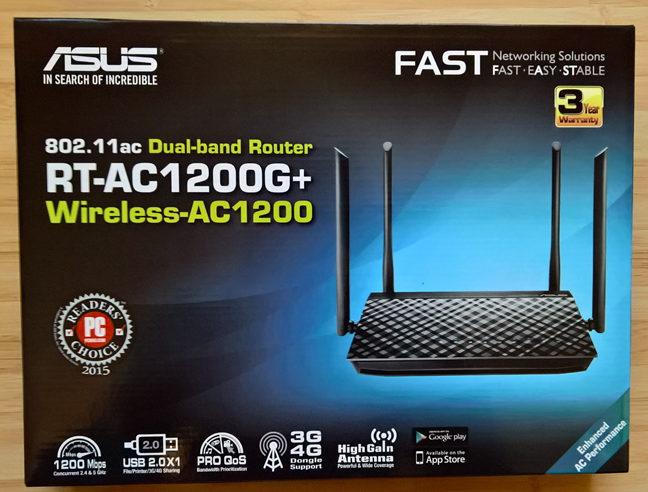
The packaging for the ASUS RT-AC1200G+ dual-band wireless router is similar to that of other ASUS routers. On the front you can see a picture of the device as well as some of its most important specifications.
ASUS RT-AC1200G+, dual-band, wireless, AC1200, router, review, performance
On the back side of the box you can see more information about the features of this router, as well as the ports that are available and a comparison with other wireless routers from ASUS's portfolio.
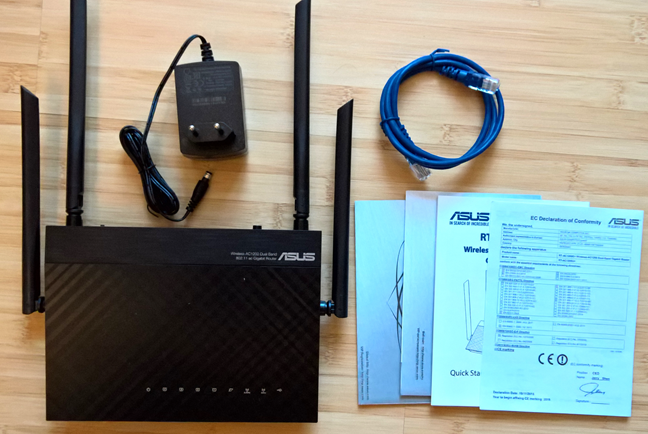
Inside the box you will find the router itself, a RJ-45 network cable, the power adaptor, the Quick Start Guide and the warranty.
ASUS RT-AC1200G+, dual-band, wireless, AC1200, router, review, performance
As you can see, the unboxing experience is very simple and straightforward, as you would expect from a device this affordable.
Hardware specifications
ASUS RT-AC1200G+ includes a Broadcom BCM47189 chip running at 900 MHz, which is the first to integrate a 2x2 802.11ac radio on a single chip with a CPU and Ethernet switch, which reduces cost of manufacturing wireless routers for the 802.11ac networking standard. The wireless router also has 128 MB of RAM and 16 MB of storage space.
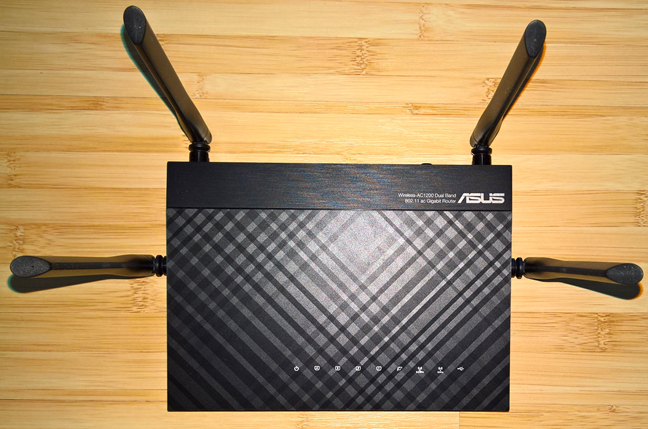
It has four external antennas: 2 for the 2.4 GHz frequency and 2 for the 5 GHz frequency. The theoretical maximum bandwidth is of 867 Mbps for the 5 GHz frequency and of 300 Mbps for the 2.4 GHz frequency, leading to a total maximum bandwidth of 1167 Mbps. It offers support for the following networking standards: IEEE 802.11a, 802.11b, 802.11g, 802.11n and 802.11ac.
ASUS RT-AC1200G+, dual-band, wireless, AC1200, router, review, performance
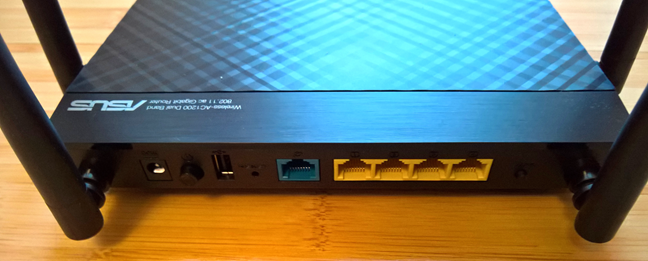
As you can see in the picture below, on the back of this router you will find the following: the AC socket, the Power button, a USB 2.0 port, a Reset button, an Ethernet port for connecting the router to the Internet service provide, four Gigabit ports for connecting the devices in your network to the wireless router and a WPS button.
ASUS RT-AC1200G+, dual-band, wireless, AC1200, router, review, performance
In terms of size, ASUS RT-AC1200G+ is not very large: it is 207mm (8.14 inches) in width, 148mm (5.8 inches) in depth and 35mm (1.37 inches) in height. Also, it weighs only 432 grams or 15.23 ounces.
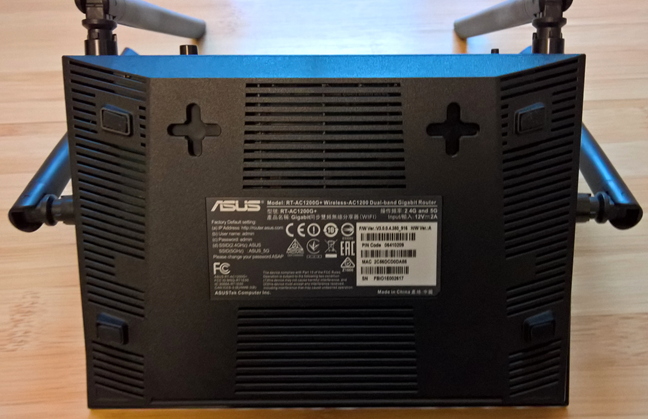
On the back side of the router you will find two mounting holes with slots that allow you to use screws that will fit in the holes. They are very useful for mounting this router on walls.
ASUS RT-AC1200G+, dual-band, wireless, AC1200, router, review, performance
If you are interested to learn more about the official specifications of this wireless router, go to this page: ASUS RT-AC1200G+ Specifications.
Setting up & using the ASUS RT-AC1200G Plus dual-band wireless router
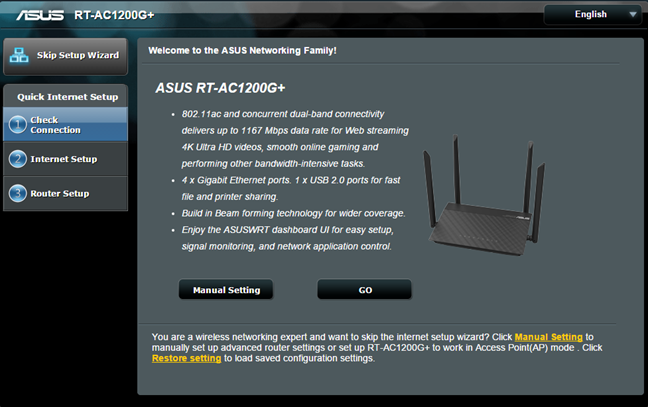
Connect the ASUS RT-AC1200G+ wireless router to your computer using the bundled network cable. Plug in its power adapter, then the Internet connection cable from your Internet service provider and start your favorite browser. Go to 192.168.1.1 or https://router.asus.com and follow the setup wizard.
The setup wizard is quick and easy to go through. Once you press Go, it starts with asking you to change the default login name and password for the router, which is a very good security precaution.
ASUS RT-AC1200G+, dual-band, wireless, AC1200, router, review, performance
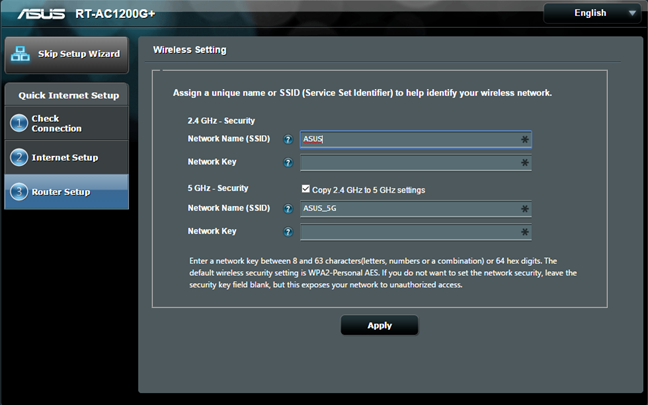
Then, it detects the type of Internet connection that you have available and it asks for the appropriate connection details, depending on its type. At the end of the setup wizard, you get to set the two wireless networks that are broadcast by ASUS RT-AC1200G+. The initial setup should not take more than a minute to complete.
ASUS RT-AC1200G+, dual-band, wireless, AC1200, router, review, performance
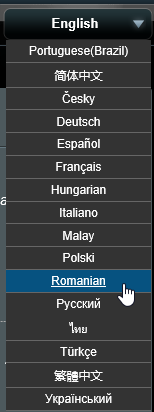
Once that is over, we recommend that you to continue by configuring your wireless router in detail. The user interface is available in 16 languages, which you can see below.
ASUS RT-AC1200G+, dual-band, wireless, AC1200, router, review, performance
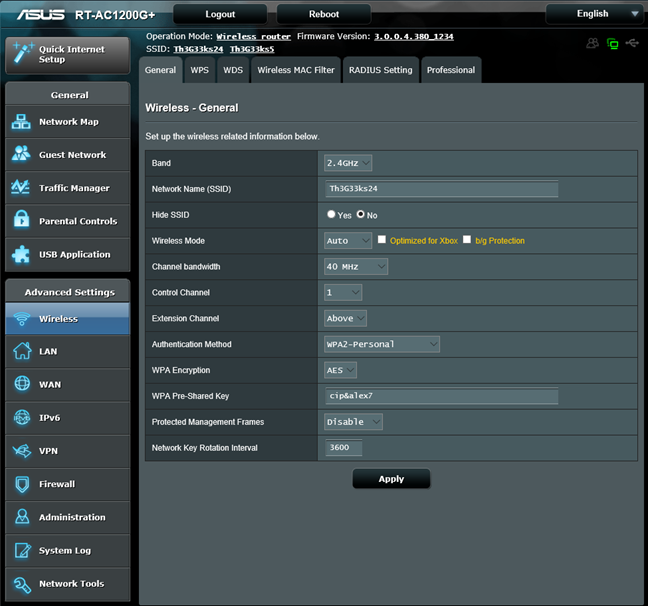
The user interface is also well organized and easy to use, both for advanced users and beginners. Another upside is the fact that almost every setting is explained well by the documentation made available by ASUS. When you hover the mouse over most settings, a question mark is shown. If you then click on that setting, an explanation is shown for that setting, letting you know what it does. This is a good approach, that will be appreciated by many users.
ASUS RT-AC1200G+, dual-band, wireless, AC1200, router, review, performance
During our testing, we have used the latest firmware version that was available at the time: 3.0.0.4.380.1234. ASUS has the good habit of releasing regular firmware updates for its routers. Therefore, when you purchase an ASUS RT-AC1200G+, check for new firmware. It's possible that a new version is available, which fixes some bugs or improves performance.
Regarding the user interface, we have only one small downside to report: if you use the Opera web browser to access it, the default settings are not prepopulated. All the drop-down lists are shown without any values. If you access the administration interface in other browsers, like Firefox or Chrome, there's no problem. This is a bit weird and ASUS should be able to fix this problem quite quickly, in a future firmware update.
After setting up the router, we started connecting all our devices from the network: desktop PCs, laptops, tablets, consoles, smartphones and wireless printers. We had no issues connecting any of them and network sharing, media streaming and other networking-related tasks worked smoothly, without any issues.
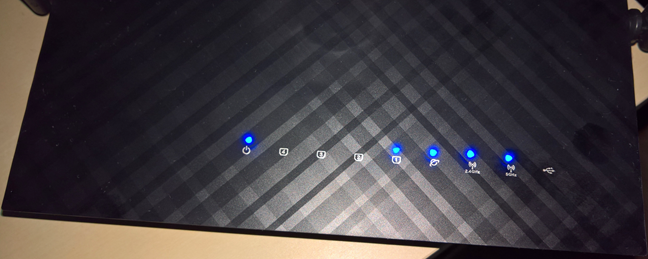
During our one week of use, we noticed that the ASUS RT-AC1200G+ got quite hot after a while. In our test apartment, this caused no issues but, if you place this router in very warm environments, heat might become an issue. Also, another minor aspect that we would like to report is that there is no button to turn off the status LEDs shown on the top of the router. This may be an issue for some users.
ASUS RT-AC1200G+, dual-band, wireless, AC1200, router, review, performance
We are pleased with how easy it was to set up our network and the amount of control offered by the user interface for administering the ASUS RT-AC1200G+ router. The user interface is easy to use and it offers a great deal of customization. Also, it's well organized, meaning that beginners can also have a pleasant experience when setting up this router. Overall, it worked very well during our testing and we did not encounter issues with stability and performance.
To learn more about the real-world performance offered by this router, read the next page in this review.
Wireless network performance
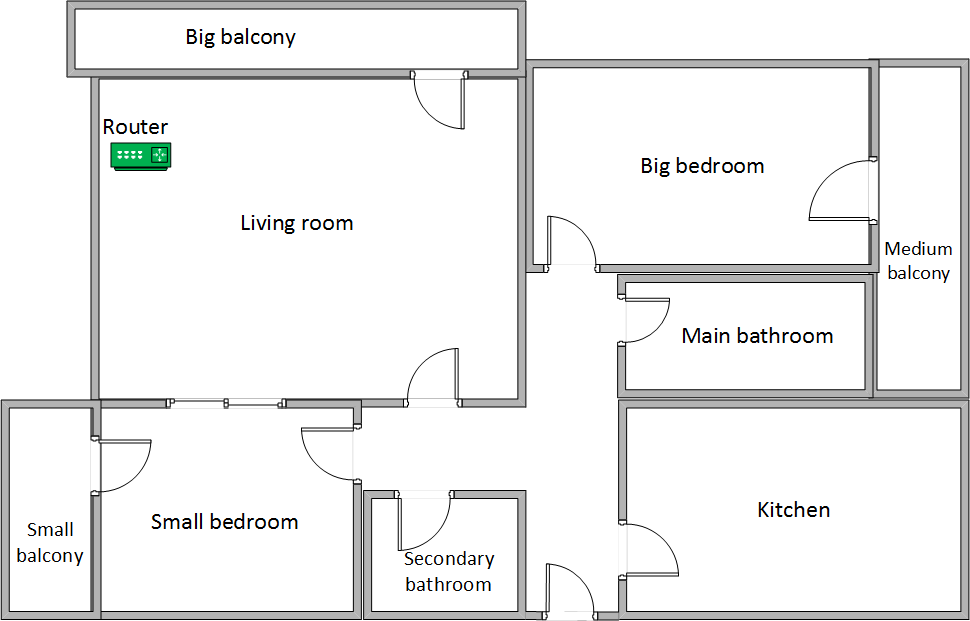
Before sharing the details of our measurements, let's take a look at the apartment that was used in our testing and how it is set up. You can see that the router is placed in the living room. With most wireless routers, the signal strength is not that great in rooms like the Kitchen and the Medium balcony.
ASUS RT-AC1200G+, dual-band, wireless, AC1200, router, review, performance
Our testing was done using a fast 1 Gigabit Internet connection that's capable of uploads on the Internet of up to 200 Mbps. We used a Microsoft Surface Pro 3 for all our measurements and several software tools. To get a better perspective of the performance offered by ASUS RT-AC1200G+, we compared it with TP-LINK Archer C7 and ASUS RT-AC56U, two older routers which today have a similar price to ASUS RT-AC1200G+.
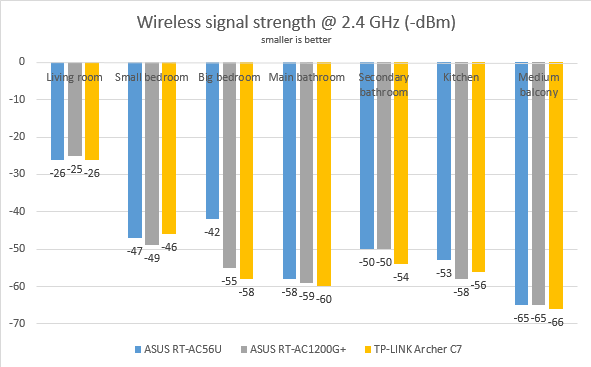
We started by evaluating the 2.4 GHz wireless network and measured the signal strength offered in each room, using a tool named inSSIDer. As you can see in the graph below, the signal strength was very similar with that offered by the other two routers.
ASUS RT-AC1200G+, dual-band, wireless, AC1200, router, review, performance
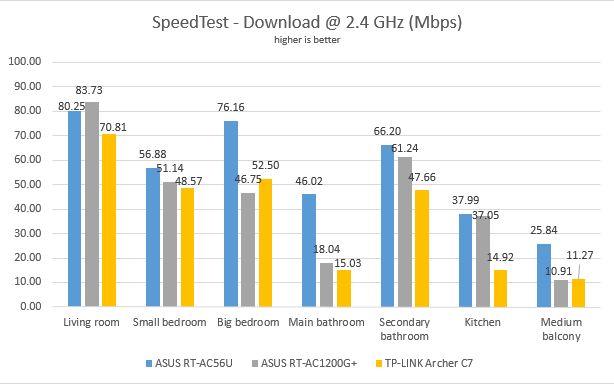
We used SpeedTest to measure how fast the Internet connection offered by this router is. In the download test, ASUS RT-AC1200G+ performed well without being spectacular. It was the fastest router only in the room where we placed the router. In other rooms, it's speed was generally the second best.
ASUS RT-AC1200G+, dual-band, wireless, AC1200, router, review, performance
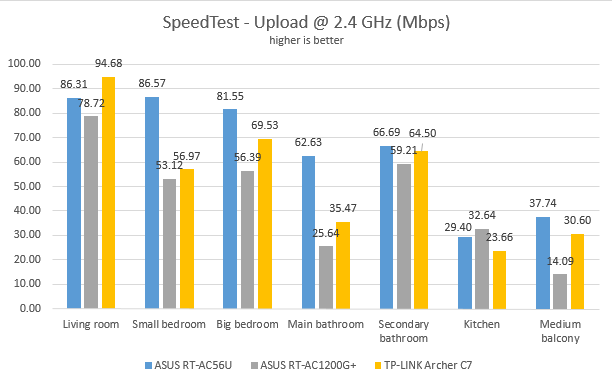
When moving to the upload speed measurements, ASUS RT-AC1200G+ offered speeds that were mostly below those offered by it's competitors.
ASUS RT-AC1200G+, dual-band, wireless, AC1200, router, review, performance
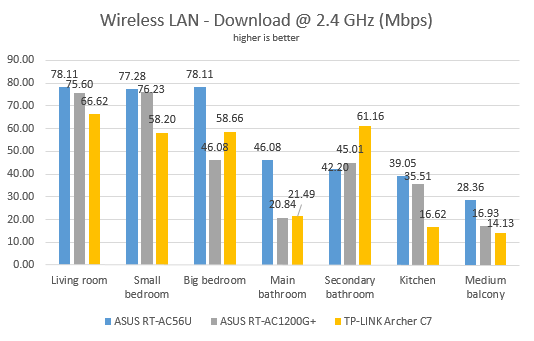
Continuing our measurements on the 2.4 GHz wireless network, we used LAN Speed Test Lite to measure downloads and uploads when transferring a 350MB file between two computers connected to the network. On average, ASUS RT-AC1200G+ offered similar performance to the other two routers we compared it to.
ASUS RT-AC1200G+, dual-band, wireless, AC1200, router, review, performance
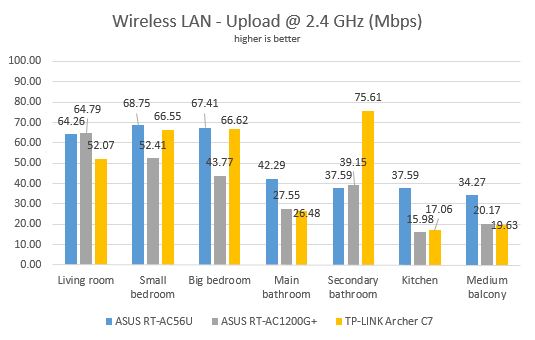
When measuring the upload speed, ASUS RT-AC1200G+ offered again similar performance to the other two routers we compared it to.
ASUS RT-AC1200G+, dual-band, wireless, AC1200, router, review, performance
The transfer speed offered by ASUS RT-AC1200G+ on the 2.4 GHz wireless frequency is similar to that of other routers in its price range. There's nothing to make it stand out in any way.
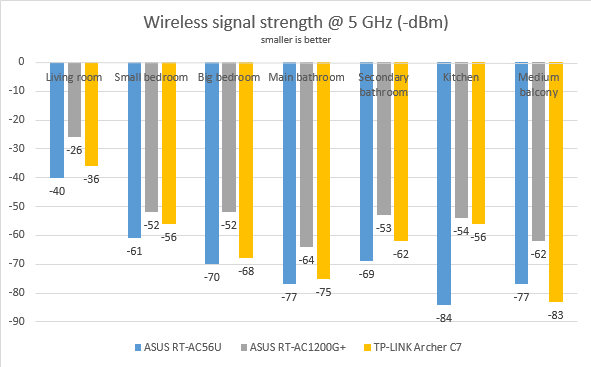
Next, we analyzed the performance offered by the 5GHz wireless network. First, we looked at the evolution of the signal strength, from room to room. As you can see below, the signal strength offered by ASUS RT-AC1200G+ was very good, managing to beat with ease the routers we compared it to.
ASUS RT-AC1200G+, dual-band, wireless, AC1200, router, review, performance
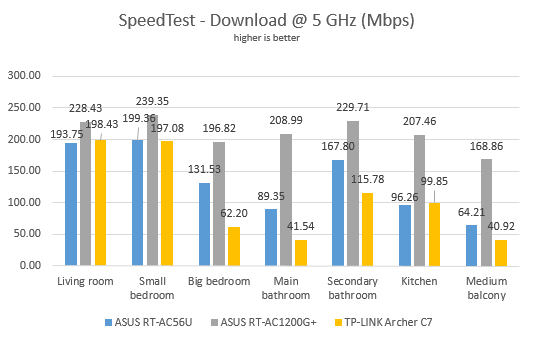
We moved to SpeedTest, to measure the speed of the Internet connection on the 5GHz wireless network. The download speed offered by ASUS RT-AC1200G+ was excellent in all rooms. We were highly impressed by the numbers we measured.
ASUS RT-AC1200G+, dual-band, wireless, AC1200, router, review, performance
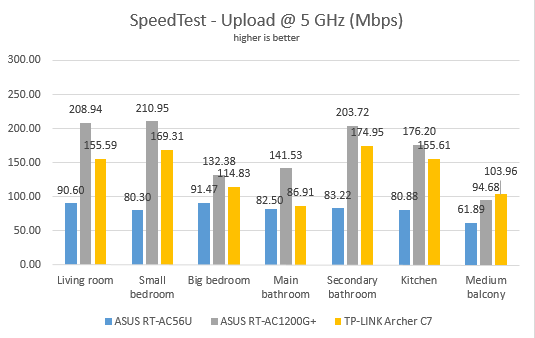
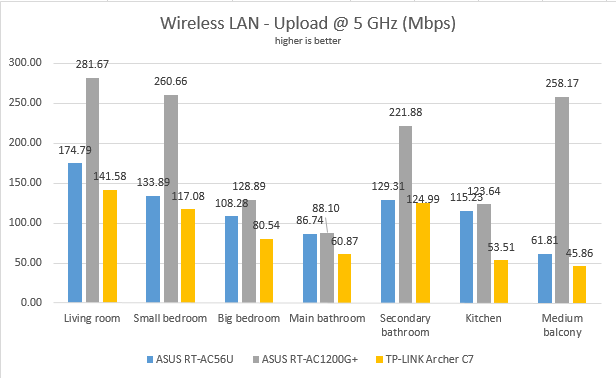
The same was true when evaluating the upload speed with SpeedTest. ASUS RT-AC1200G+ was again, the best performer we've seen in its price range.
ASUS RT-AC1200G+, dual-band, wireless, AC1200, router, review, performance
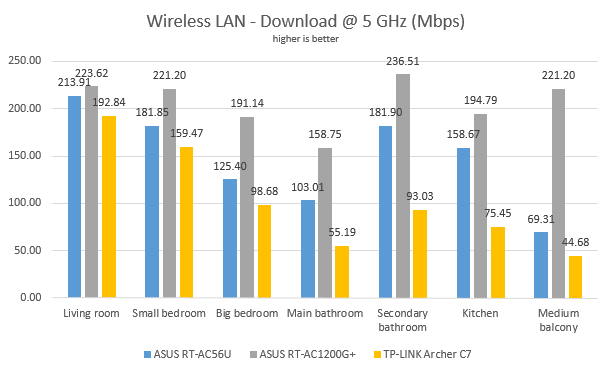
Lastly, we used LAN Speed Test Lite to measure downloads and uploads when transferring a 350MB file between two computers connected to the network. This test confirmed that ASUS RT-AC1200G+ is a very good performer, managing to offer fast downloads in all the rooms of our test apartment.
ASUS RT-AC1200G+, dual-band, wireless, AC1200, router, review, performance
The same was noticed when measuring the upload speed.
ASUS RT-AC1200G+, dual-band, wireless, AC1200, router, review, performance
From our measurements, it is very clear that ASUS RT-AC1200G+ is a great performer when it comes to the 5GHz wireless network. It managed to offer great signal strength and stability, as well as very fast downloads and uploads. It's so good that it can easily compare itself to routers which are much more expensive.
Wired network performance
In order to test the quality of the wired Ethernet connection, we used a desktop PC, equipped with an Intel Core i5 4460 processor, running at 3.20GHz, 16GB of RAM and a very fast Samsung 850 Pro 512GB SSD and a Microsoft Surface Pro 3 with an Intel Core i5-4300U processor, running at 1.9 GHz, 8 GB of RAM and a fast 256 GB SSD drive from Samsung.
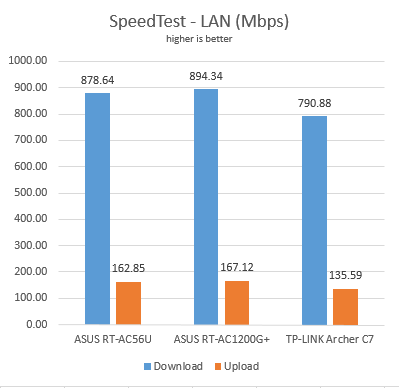
We started by measuring the download and upload speeds using SpeedTest. As you can see below ASUS RT-AC1200G+ was the top performer in this test.
ASUS RT-AC1200G+, dual-band, wireless, AC1200, router, review, performance
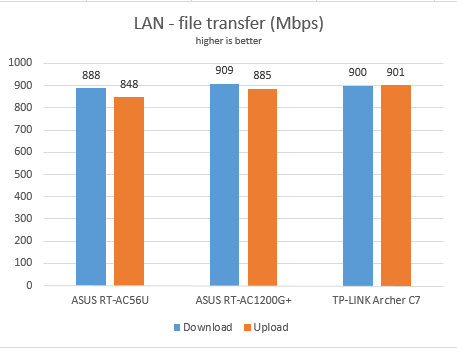
For the last measurement, we transferred an 883 MB file between the same two computers connected to the network, both of which were using an Ethernet cable. Here, the speed offered by ASUS RT-AC1200G+ was similar to that of the other two routers.
ASUS RT-AC1200G+, dual-band, wireless, AC1200, router, review, performance
ASUS RT-AC1200G+ delivers solid 1 Gbps Ethernet connections, like promised in its specifications.
Extra features
Even though it is not a high-end router, ASUS RT-AC1200G+ does bundle several extra features like:
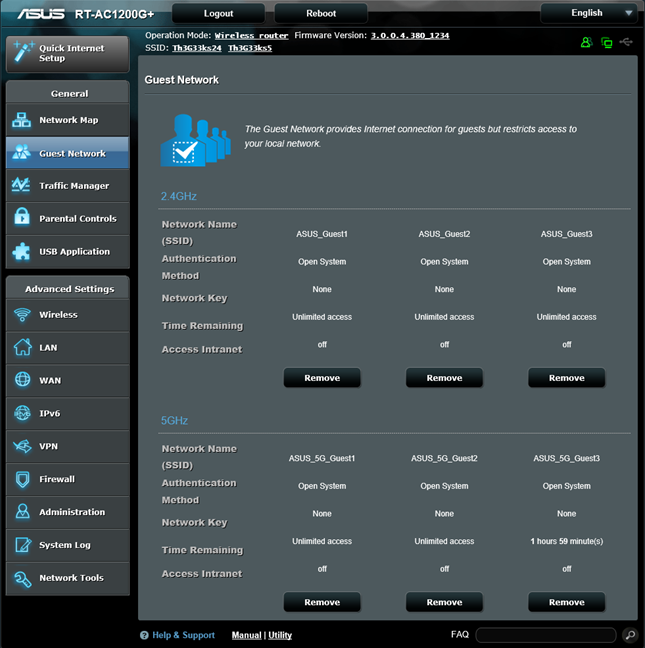
Guest Network - you can set up to six guest wireless networks that provide Internet access for your guests but restrict access to your network. You can enable up to three 2.4GHz guest networks and up to three 5GHz guest networks.
ASUS RT-AC1200G+, dual-band, wireless, AC1200, router, review, performance
Traffic Manager Quality of Service (QoS) - a traditional QoS service that ensures inbound and outbound bandwidth on both wired and wireless connections for prioritized applications and tasks via manual user-defined parameters.
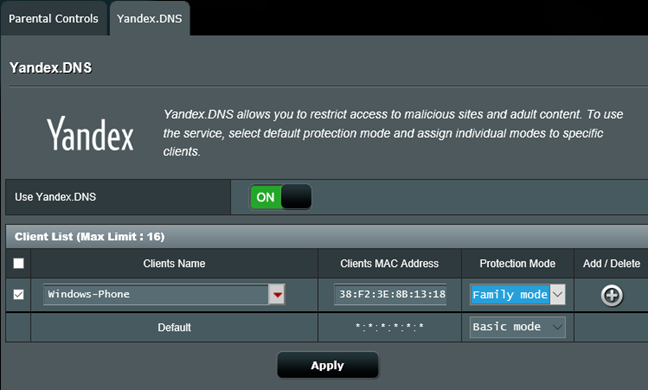
Parental Controls - A module that can be used to block access to all kinds of online content types, for any of the devices that are connected to your network. It can also be complemented by the Yandex.DNS service, which offers some protection against malicious sites and adult content. However, its effectiveness is not very great and you should not rely on it to filter all inappropriate adult content on your children's devices.
ASUS RT-AC1200G+, dual-band, wireless, AC1200, router, review, performance
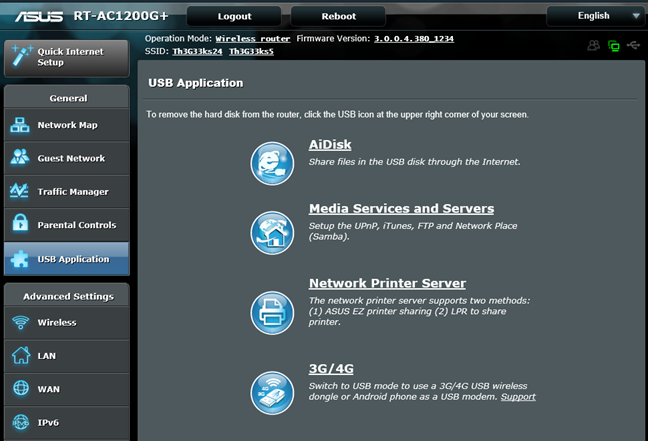
USB Applications - designed to work with all kinds of devices that you can connect to the router using USB: external hard disks, printers and 3G or 4G dongles or modems.
ASUS RT-AC1200G+, dual-band, wireless, AC1200, router, review, performance
VPN Server - you can set the router to work as a VPN server and you can also use it to turn your network-connected devices into VPN-enabled clients via OpenVPN, PPTP and L2TP protocols without additional VPN software required.
Network Tools - for analyzing the network and identifying what's wrong. They are surely useful when you need to troubleshoot problems.
ASUS AiCloud 2.0 - a mobile app that keeps you connected to your data wherever and whenever you have an Internet connection. With it, you can access the folders shared in your home network from your Android or iOS smartphone or via a personalized URL. The only downside is that there is no Windows Phone app available.
ASUS Router - a mobile app for iOS and Android, which allows you to monitor and manage your wireless router when you are away from home. Unfortunately there is no Windows Phone app available.
For a wireless router this affordable, ASUS RT-AC1200G+ is quite generous in offering many useful extra features which are not found in wireless routers from its competitors, at a similar price range. Users will appreciate features like the VPN Server, the Parental Controls or the many Guest networks that can be enabled.
Product rating5/5
Verdict
ASUS RT-AC1200G+ is a solid router, that offers excellent performance for 802.11ac wireless networks running on the 5 GHz wireless frequency - the best we've tested at its price-point. We also liked that it offers real 1 Gbps Ethernet connections, very good firmware with support for multiple languages and useful extra-features, and it can be easily mounted on walls.
Overall, you will have a very hard time finding a faster router at the same price point, when it comes to the wireless network at 5 GHz and wired Ethernet connections. If you want to modernize the wireless network in your home without spending too much cash, ASUS RT-AC1200G+ is one the best options you have. We highly recommend it to our readers.
Router worked well at the start, but the known bug that it sometimes restarted itself was a little annoying – they fixed if but it took some time.
After about a year I encountered weird behaviour while using p2p over wired network (game downloaders and torrents mainly) – it was really slow, bellow 20Mb/s on a 120Mb/s internet connection and bigger surprise was that it worked fine over wifi. I tried to flash older versions of firmware but nothing helped.
The second reason I would not buy this router (or Asus) again is the disgusting UI. It looks like Picasso painting with so many different fonts and random graphical elements with all the interesting stuff hidden somewhere in the corner. It might look appealing to standard user but they will set it up once and never look at it again. The mboile app doesn’t help either, there is next to nothing you can set up using the app.
Just buy a TP-Link equivalent for less with the same features and better reliability – old TP-Link TL-WR841N v1 saved me several times and it works perfectly fine for 7 years. Now I hope that TP-Link Archer C6 will last that long too, because I’m not a fan of buying a new router just after the warranty ends.
Quettesh ·
Update for TP-Link Archer C6 v2 vs this Asus.
It works perfectly fine so far. More usable web UI, but the mobile app is not that useful. I miss some statistics Asus had and it has less options for guest network and some other specific options. It feel cheaper then the Asus – really light and the glosy plastic is a dust magnet. Thermals are much better with the TP-Link – that Asus was really hot to the touch, but it had more powerful processor (and less ventilation), but I haven’t noticed any performance issues with the TP-Link (4 LAN connections active + 2 ac devices and 5 n devices active at the same time).
But it fixed my main issue with the p2p over wired connection and it has more stable wifi so far (with much quicker negotiation when connecting to the network).
Kunal ·
In the article you mentioned that ASUS RT-AC1200G+ has openVPN support. However when I look into the WRT of the router it only shows me PPTP and L2TP. Any idea what I need to do to get the open vpn?
Ciprian Adrian Rusen ·
This issue may be caused by firmware updates that removed this service.
Magda ·
Is it possible to get the service back?
Tor Asbjørn Bekkelund ·
Thanks for the good review. However there is one missing information.
Is this a house? How many stores/floors are there? It seems to be one according to the drawing.
How big is the area where it was tested? It will give people a good knowledge about how far the signals may reach.
Is it like 10 meters width (approximately 33 feet) from one side to the other if you draw a straight horizontal line inside the house? What about the length?
Ciprian Adrian Rusen ·
It is a large apartment, exactly like in our drawing. It has 70+ square meters.
Louis ·
I would like to ask your opinion about 2 router prouduct that you tested before.
Asus RT-AC1200G or Archer C1200 has stronger transmit power?
or you have other router in your mind that has better wifi signal?
Ciprian Adrian Rusen ·
Both routers are very good choices. It all comes down to personal preferences and pricing.
Terry ·
This statement is incorrect in the article , “four Gigabit ports for connecting the devices in your network” if you go to ASUS.com and read the specifications it is only 10/100 lan ports.
Ciprian Adrian Rusen ·
In our review we measure and demonstrate that they are Gigabit ports. Look at our data on the second page of this review.
Amigo ·
Runs fast but reboot every few days. 5GHz is not stable with bandwidth 80Mhz. I have try many different configuration and replace for a new one but doesn’t help. If you have any tips to help, lave a comment
Wankerville ·
Same thing happen to my router as well.
It will hang from time to time. No connection.
And this is a 5 star product by reviewer? How much did you get paid for making a glowing review by ASUS? *sic*
Ciprian Adrian Rusen ·
If you had issues and we did not, it doesn’t mean we were paid to write this review. It only means that you have some issues we did not encounter. You may want to speak with ASUS Tech Support to fix them. They tend to be responsive to customer requests.
Karolis ·
So, as I understand from testing, ASUS RT-AC1200G+ shows better results as TP-LINK Archer C7, though manufacturer specify bigger speed for TP-LINK Archer C7 (5GHz: Up to 1300Mbps, 2.4GHz: Up to 450Mbps), correct? ASUS RT-AC1200G+ specify less speed 802.11n : up to 300 Mbps, 802.11ac : up to 867 Mbps.
Ciprian Adrian Rusen ·
It is definitely faster, newer and better than the Archer C7.































Discussion (16)
Hello,
I have some long term user experience to share.
Router worked well at the start, but the known bug that it sometimes restarted itself was a little annoying – they fixed if but it took some time.
After about a year I encountered weird behaviour while using p2p over wired network (game downloaders and torrents mainly) – it was really slow, bellow 20Mb/s on a 120Mb/s internet connection and bigger surprise was that it worked fine over wifi. I tried to flash older versions of firmware but nothing helped.
The second reason I would not buy this router (or Asus) again is the disgusting UI. It looks like Picasso painting with so many different fonts and random graphical elements with all the interesting stuff hidden somewhere in the corner. It might look appealing to standard user but they will set it up once and never look at it again. The mboile app doesn’t help either, there is next to nothing you can set up using the app.
Just buy a TP-Link equivalent for less with the same features and better reliability – old TP-Link TL-WR841N v1 saved me several times and it works perfectly fine for 7 years. Now I hope that TP-Link Archer C6 will last that long too, because I’m not a fan of buying a new router just after the warranty ends.
Update for TP-Link Archer C6 v2 vs this Asus.
It works perfectly fine so far. More usable web UI, but the mobile app is not that useful. I miss some statistics Asus had and it has less options for guest network and some other specific options. It feel cheaper then the Asus – really light and the glosy plastic is a dust magnet. Thermals are much better with the TP-Link – that Asus was really hot to the touch, but it had more powerful processor (and less ventilation), but I haven’t noticed any performance issues with the TP-Link (4 LAN connections active + 2 ac devices and 5 n devices active at the same time).
But it fixed my main issue with the p2p over wired connection and it has more stable wifi so far (with much quicker negotiation when connecting to the network).
In the article you mentioned that ASUS RT-AC1200G+ has openVPN support. However when I look into the WRT of the router it only shows me PPTP and L2TP. Any idea what I need to do to get the open vpn?
This issue may be caused by firmware updates that removed this service.
Is it possible to get the service back?
Thanks for the good review. However there is one missing information.
Is this a house? How many stores/floors are there? It seems to be one according to the drawing.
How big is the area where it was tested? It will give people a good knowledge about how far the signals may reach.
Is it like 10 meters width (approximately 33 feet) from one side to the other if you draw a straight horizontal line inside the house? What about the length?
It is a large apartment, exactly like in our drawing. It has 70+ square meters.
I would like to ask your opinion about 2 router prouduct that you tested before.
Asus RT-AC1200G or Archer C1200 has stronger transmit power?
or you have other router in your mind that has better wifi signal?
Both routers are very good choices. It all comes down to personal preferences and pricing.
This statement is incorrect in the article , “four Gigabit ports for connecting the devices in your network” if you go to ASUS.com and read the specifications it is only 10/100 lan ports.
In our review we measure and demonstrate that they are Gigabit ports. Look at our data on the second page of this review.
Runs fast but reboot every few days. 5GHz is not stable with bandwidth 80Mhz. I have try many different configuration and replace for a new one but doesn’t help. If you have any tips to help, lave a comment
Same thing happen to my router as well.
It will hang from time to time. No connection.
And this is a 5 star product by reviewer? How much did you get paid for making a glowing review by ASUS? *sic*
If you had issues and we did not, it doesn’t mean we were paid to write this review. It only means that you have some issues we did not encounter. You may want to speak with ASUS Tech Support to fix them. They tend to be responsive to customer requests.
So, as I understand from testing, ASUS RT-AC1200G+ shows better results as TP-LINK Archer C7, though manufacturer specify bigger speed for TP-LINK Archer C7 (5GHz: Up to 1300Mbps, 2.4GHz: Up to 450Mbps), correct? ASUS RT-AC1200G+ specify less speed 802.11n : up to 300 Mbps, 802.11ac : up to 867 Mbps.
It is definitely faster, newer and better than the Archer C7.