




HUAWEI just updated its mid-range tablet lineup with the new MatePad 11.5 (2025) PaperMatte Edition. This model is made to be flexible and budget-friendly. It’s also meant to be a tablet you can use for both work and fun, whether you want to watch a movie, take notes, draw, or even do some typing with a keyboard. The PaperMatte display promises to be gentle on your eyes, its battery aims to provide excellent autonomy, and its price is reasonable enough that many can afford it. But is it really as good as it sounds? Let’s find out:
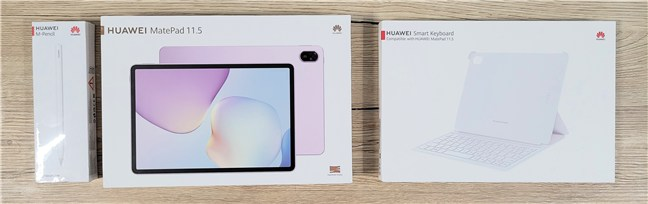
 The HUAWEI MatePad 11.5 2025 PaperMatte Edition time-limited bundle
Opening all the boxes is a simple but pleasant experience. Once I got everything out, I had the tablet, a USB-C charging cable, a microfiber cloth for cleaning the screen, the keyboard, and the M-Pencil. Each of the three boxes also includes some documents with manuals and warranty details. One important detail to consider is that you don’t get a charger included with the tablet.
The HUAWEI MatePad 11.5 2025 PaperMatte Edition time-limited bundle
Opening all the boxes is a simple but pleasant experience. Once I got everything out, I had the tablet, a USB-C charging cable, a microfiber cloth for cleaning the screen, the keyboard, and the M-Pencil. Each of the three boxes also includes some documents with manuals and warranty details. One important detail to consider is that you don’t get a charger included with the tablet.
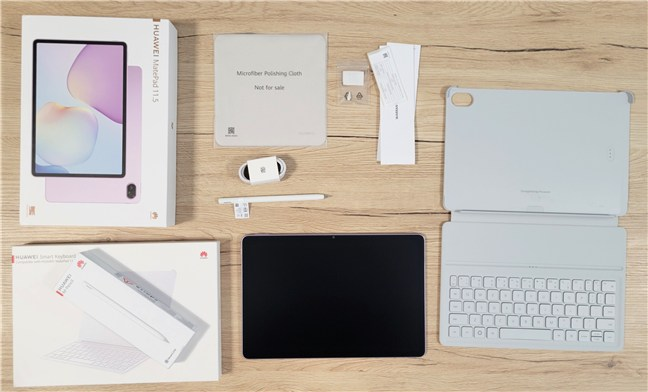
 Everything you get in the boxes
In the tablet’s packaging, you get what you need to start using it, and it’s nice to receive useful extra accessories. They appear to be high quality, but you’ll need to factor them into the final cost unless you manage to grab the bundle during the launch promo.
Everything you get in the boxes
In the tablet’s packaging, you get what you need to start using it, and it’s nice to receive useful extra accessories. They appear to be high quality, but you’ll need to factor them into the final cost unless you manage to grab the bundle during the launch promo.
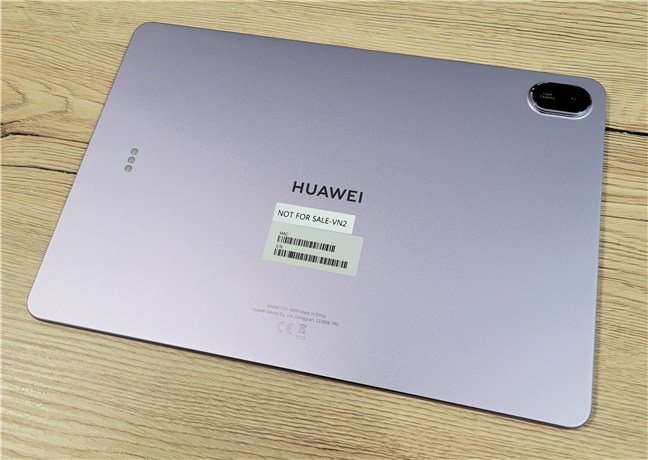
 The HUAWEI MatePad 11.5 2025 PaperMatte Edition has a solid metal body
In terms of size, the tablet is 262.63 mm (~10.34”) wide and 177.53 mm (~7”) tall, with a thickness of about 6.1 mm (0.24”). It weighs around 515 grams (~1.14 pounds), so it’s still pretty light for an 11.5-inch tablet, but if you’re using it for a long time, you’ll probably want to hold it with both hands.
The HUAWEI MatePad 11.5 2025 PaperMatte Edition has a solid metal body
In terms of size, the tablet is 262.63 mm (~10.34”) wide and 177.53 mm (~7”) tall, with a thickness of about 6.1 mm (0.24”). It weighs around 515 grams (~1.14 pounds), so it’s still pretty light for an 11.5-inch tablet, but if you’re using it for a long time, you’ll probably want to hold it with both hands.
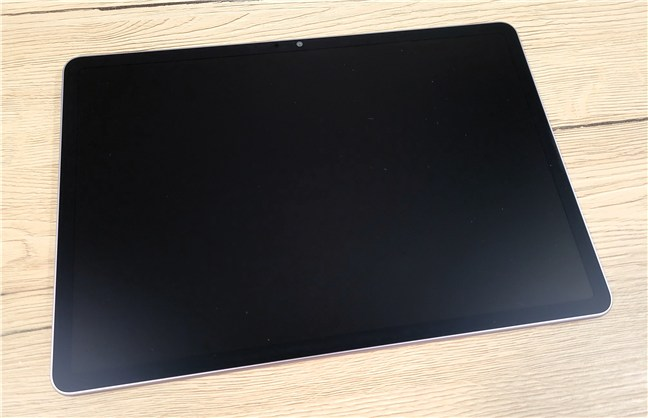
 The tablet is relatively large but still lightweight
It comes in at least two colors: Space Gray and Violet. Both look nice and understated, and while the gray is more traditional, the violet gives it a subtle bit of “youthness”.
The tablet is relatively large but still lightweight
It comes in at least two colors: Space Gray and Violet. Both look nice and understated, and while the gray is more traditional, the violet gives it a subtle bit of “youthness”.
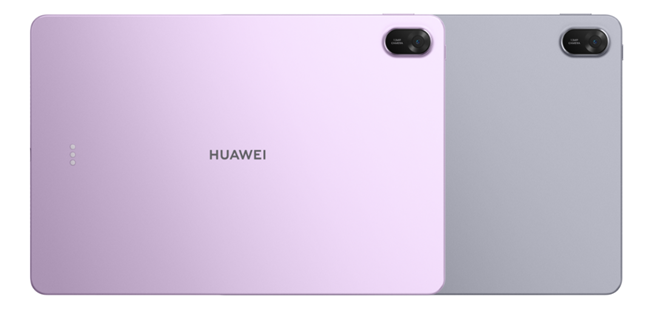
 The colors you can get the HUAWEI MatePad 11.5 2025 PaperMatte Edition in
The screen is an 11.5” IPS LCD with a 3:2 aspect ratio and a resolution of 2456 x 1600 pixels. It’s a high pixel density that makes the display sharp for both reading and watching videos. The PaperMatte coating is great, as it cuts down on glare and reflections, making it ideal for reading under bright lights or near windows. Colors look good, and because it’s an IPS panel with no flicker, it’s easier on the eyes when used for many hours. It also has a dynamic 120 Hz refresh rate, so everything scrolls and moves smoothly.
The colors you can get the HUAWEI MatePad 11.5 2025 PaperMatte Edition in
The screen is an 11.5” IPS LCD with a 3:2 aspect ratio and a resolution of 2456 x 1600 pixels. It’s a high pixel density that makes the display sharp for both reading and watching videos. The PaperMatte coating is great, as it cuts down on glare and reflections, making it ideal for reading under bright lights or near windows. Colors look good, and because it’s an IPS panel with no flicker, it’s easier on the eyes when used for many hours. It also has a dynamic 120 Hz refresh rate, so everything scrolls and moves smoothly.
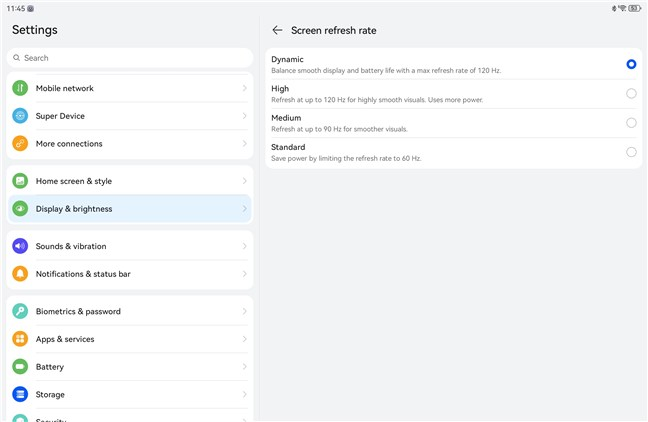
 The display offers smart resolution and refresh rate
Sound-wise, the four speakers are loud and clear. They’re very good for movies and video calls. However, even if there’s some bass, it’s mostly the mids and highs that shine, which is typical for thin tablets.
The display offers smart resolution and refresh rate
Sound-wise, the four speakers are loud and clear. They’re very good for movies and video calls. However, even if there’s some bass, it’s mostly the mids and highs that shine, which is typical for thin tablets.
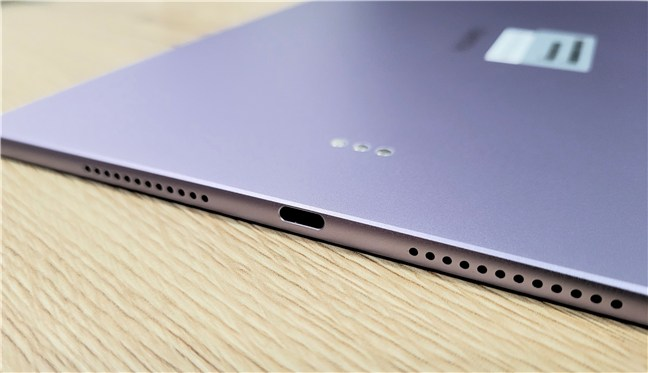
 The tablet uses USB-C and has 4 speakers
On the hardware side, you get a USB-C port (for charging and accessories), buttons for power and volume, and some pins on the side for attaching the keyboard.
The tablet uses USB-C and has 4 speakers
On the hardware side, you get a USB-C port (for charging and accessories), buttons for power and volume, and some pins on the side for attaching the keyboard.
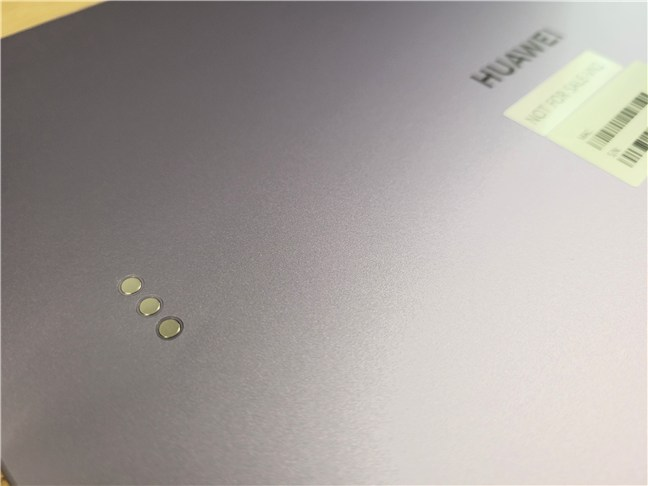
 The pins on the back of the tablet
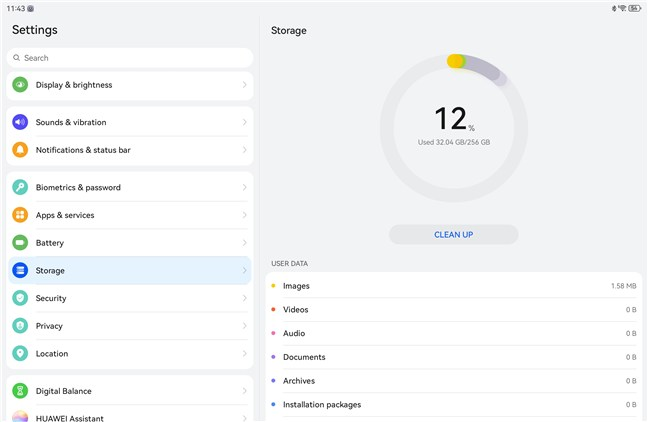
There’s no fingerprint sensor or headphone jack, and you won’t find any GPS chip, SIM slot, or microSD card reader either. Storage is either 128 GB or 256 GB. You do get Wi-Fi 6 and Bluetooth 5.2, though, which is more than enough for everyday use.
The pins on the back of the tablet
There’s no fingerprint sensor or headphone jack, and you won’t find any GPS chip, SIM slot, or microSD card reader either. Storage is either 128 GB or 256 GB. You do get Wi-Fi 6 and Bluetooth 5.2, though, which is more than enough for everyday use.
 You get Bluetooth 5.2 and Wi-Fi 6
Inside, the tablet runs on HUAWEI’s octa-core Kirin T82B chip, which is decent for most tasks performed on a tablet. It’s paired with 8 GB of RAM, and performance is good as long as you don’t try to push it too hard. It’s not a powerhouse, but it handles multitasking, browsing, and media just fine.
You get Bluetooth 5.2 and Wi-Fi 6
Inside, the tablet runs on HUAWEI’s octa-core Kirin T82B chip, which is decent for most tasks performed on a tablet. It’s paired with 8 GB of RAM, and performance is good as long as you don’t try to push it too hard. It’s not a powerhouse, but it handles multitasking, browsing, and media just fine.
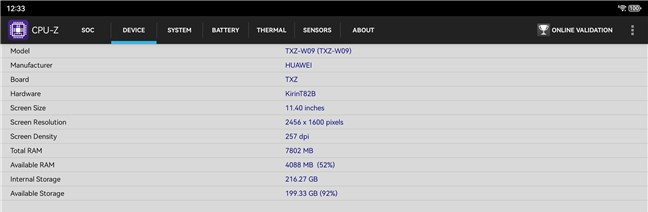
 Hardware specs for the HUAWEI MatePad 11.5 2025 PaperMatte Edition
It’s worth noting that the MatePad 11.5 (2025) PaperMatte Edition also has a 13 MP rear camera for quick shots or scanning documents, and an 8 MP front camera placed on the long edge for better video calls in landscape mode. They’re not meant to replace your phone, but they should work well for meetings, notes, and casual use.
Hardware specs for the HUAWEI MatePad 11.5 2025 PaperMatte Edition
It’s worth noting that the MatePad 11.5 (2025) PaperMatte Edition also has a 13 MP rear camera for quick shots or scanning documents, and an 8 MP front camera placed on the long edge for better video calls in landscape mode. They’re not meant to replace your phone, but they should work well for meetings, notes, and casual use.
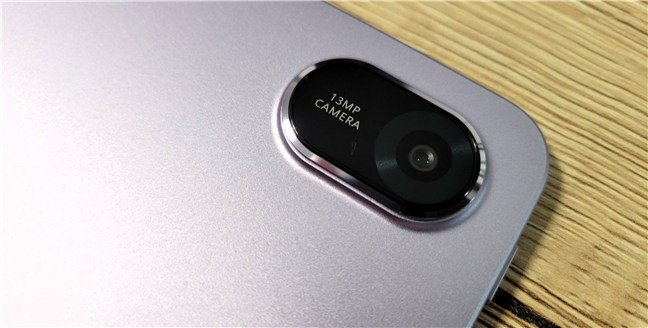
 The main rear camera on the HUAWEI MatePad 11.5 2025 PaperMatte Edition
The battery has changed significantly compared to the past. At 10100 mAh, it’s much larger than the one in the previous version. You can expect around 8 to 9 hours of mixed use or up to more than twelve hours if you’re mostly reading or watching video. Charging is fairly quick if you use a higher-wattage charger, as the tablet supports 40W fast charging. There’s no wireless charging, but with a battery this size, that’s not surprising.
The main rear camera on the HUAWEI MatePad 11.5 2025 PaperMatte Edition
The battery has changed significantly compared to the past. At 10100 mAh, it’s much larger than the one in the previous version. You can expect around 8 to 9 hours of mixed use or up to more than twelve hours if you’re mostly reading or watching video. Charging is fairly quick if you use a higher-wattage charger, as the tablet supports 40W fast charging. There’s no wireless charging, but with a battery this size, that’s not surprising.
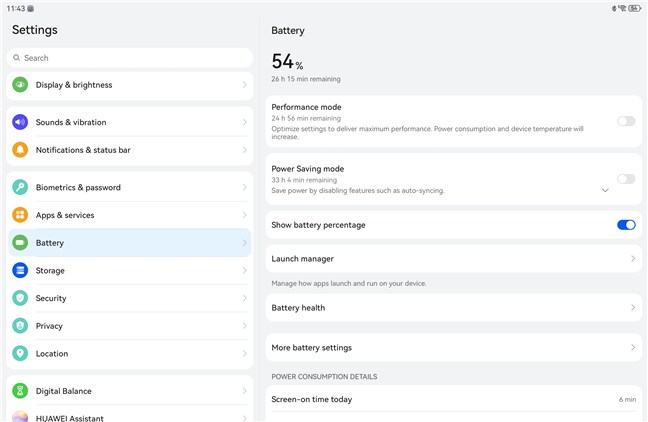 The battery is large and the tablet supports fast charging
In short, the MatePad 11.5 PaperMatte Edition feels well-built, the display is great, and the hardware choices make sense for the price. If you want to check all the specs of this product, access the tablet’s official page: HUAWEI MatePad 11.5 2025.
The battery is large and the tablet supports fast charging
In short, the MatePad 11.5 PaperMatte Edition feels well-built, the display is great, and the hardware choices make sense for the price. If you want to check all the specs of this product, access the tablet’s official page: HUAWEI MatePad 11.5 2025.
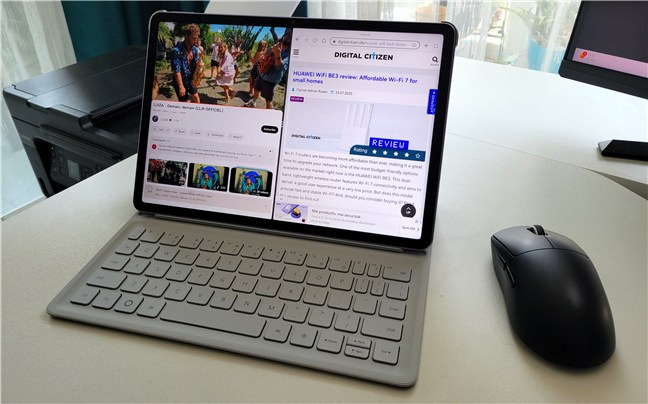
 You can connect a keyboard and a mouse
The stylus experience is just as good. The M-Pencil snaps magnetically to the top and charges there, too. Drawing or writing feels natural thanks to the PaperMatte screen, and there’s barely any delay. It also supports pressure and tilt, so it works well for art and detailed notes. HUAWEI’s GoPaint app is preinstalled and is pretty solid, especially for casual sketching or students. Combined with the anti-glare screen, it makes for a very capable digital notebook or sketchpad.
You can connect a keyboard and a mouse
The stylus experience is just as good. The M-Pencil snaps magnetically to the top and charges there, too. Drawing or writing feels natural thanks to the PaperMatte screen, and there’s barely any delay. It also supports pressure and tilt, so it works well for art and detailed notes. HUAWEI’s GoPaint app is preinstalled and is pretty solid, especially for casual sketching or students. Combined with the anti-glare screen, it makes for a very capable digital notebook or sketchpad.
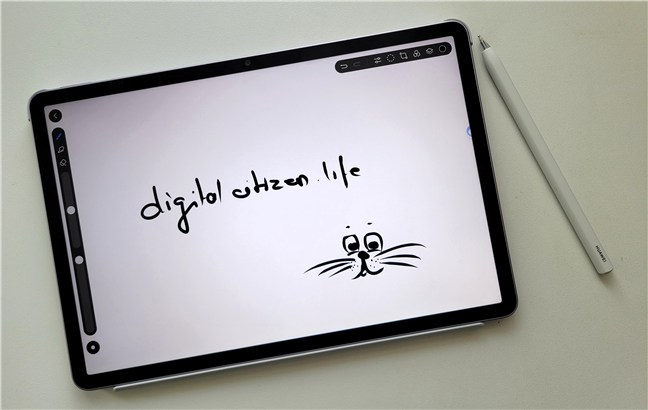
 Writing and sketching on the HUAWEI MatePad 11.5 2025 PaperMatte Edition
HarmonyOS 4 runs well on the MatePad. It looks and works like Android in many ways, but it has a few tricks of its own. Multitasking is especially good: you can run apps side-by-side or use floating windows. If you use the keyboard, it even starts to feel a bit like a laptop.
Writing and sketching on the HUAWEI MatePad 11.5 2025 PaperMatte Edition
HarmonyOS 4 runs well on the MatePad. It looks and works like Android in many ways, but it has a few tricks of its own. Multitasking is especially good: you can run apps side-by-side or use floating windows. If you use the keyboard, it even starts to feel a bit like a laptop.

 Using two apps side-by-side
Media playback is where this tablet shines. The screen is bright and sharp, the speakers sound great, and the PaperMatte finish cuts down reflections while watching movies. It even has an eBook mode that makes reading more comfortable, especially at night. I used it to read articles and eBooks, and I really appreciated how easy it was on the eyes.
Using two apps side-by-side
Media playback is where this tablet shines. The screen is bright and sharp, the speakers sound great, and the PaperMatte finish cuts down reflections while watching movies. It even has an eBook mode that makes reading more comfortable, especially at night. I used it to read articles and eBooks, and I really appreciated how easy it was on the eyes.
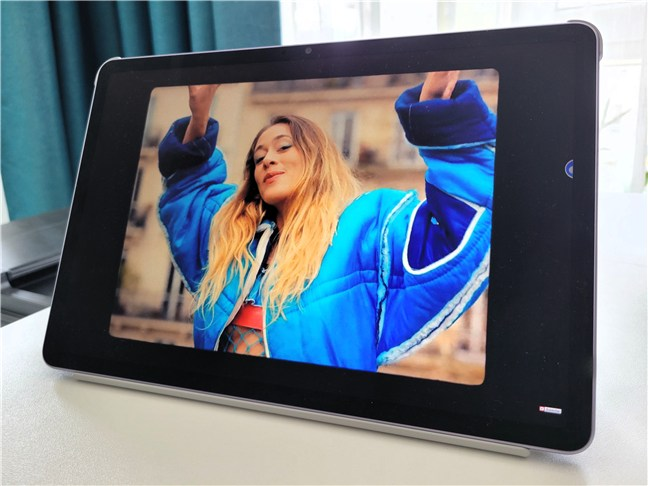 This tablet is great for media consumption
Gaming performance is okay. Casual games run without issues. Heavier games like Genshin Impact are playable on medium settings. The tablet warms up during longer sessions but doesn’t overheat or slow down too much. For casual gaming or younger users, it’s more than enough.
This tablet is great for media consumption
Gaming performance is okay. Casual games run without issues. Heavier games like Genshin Impact are playable on medium settings. The tablet warms up during longer sessions but doesn’t overheat or slow down too much. For casual gaming or younger users, it’s more than enough.
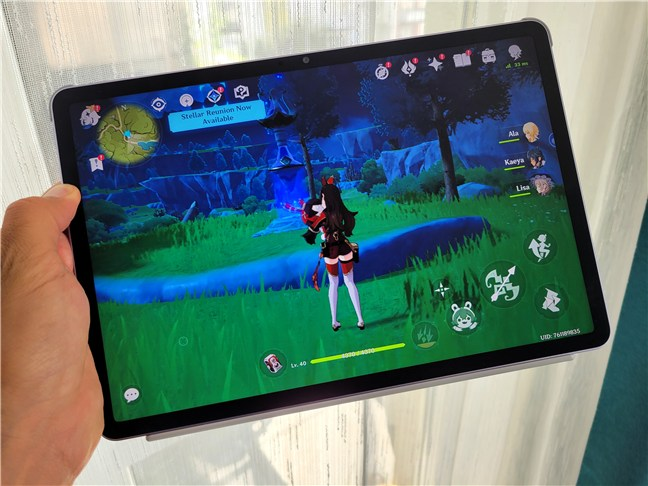 Gaming is possible and decent
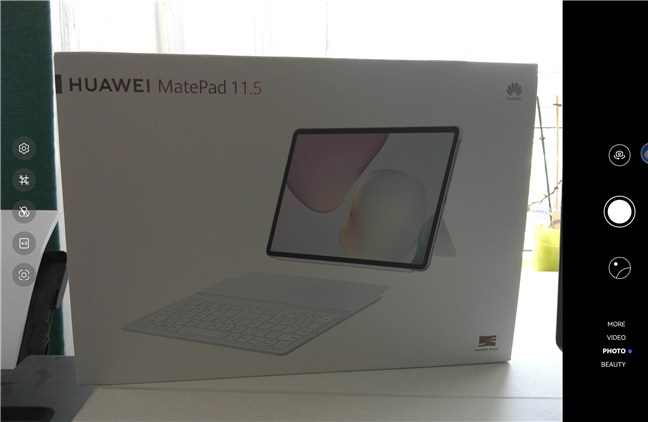
Cameras are decent. The rear 13 MP camera takes clear shots in good light, which is okay for snapping notes or documents. The front 8 MP camera is placed on the long side, so it’s centered during video calls.
Gaming is possible and decent
Cameras are decent. The rear 13 MP camera takes clear shots in good light, which is okay for snapping notes or documents. The front 8 MP camera is placed on the long side, so it’s centered during video calls.
 Cameras are okay but they won't compare to the ones on your smartphone
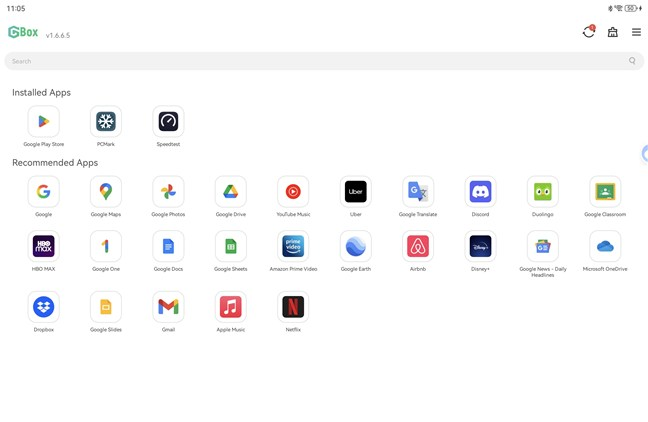
Since this is a HUAWEI tablet, there’s no Google Play Store by default. But HUAWEI includes the GBox app, which lets you install Google apps like YouTube, Gmail, or Google Drive. Most of them work well, but a few may need extra steps or have small bugs. For most people, though, this is good enough.
Cameras are okay but they won't compare to the ones on your smartphone
Since this is a HUAWEI tablet, there’s no Google Play Store by default. But HUAWEI includes the GBox app, which lets you install Google apps like YouTube, Gmail, or Google Drive. Most of them work well, but a few may need extra steps or have small bugs. For most people, though, this is good enough.
 For Google Play Store, use HUAWEI's GBox app
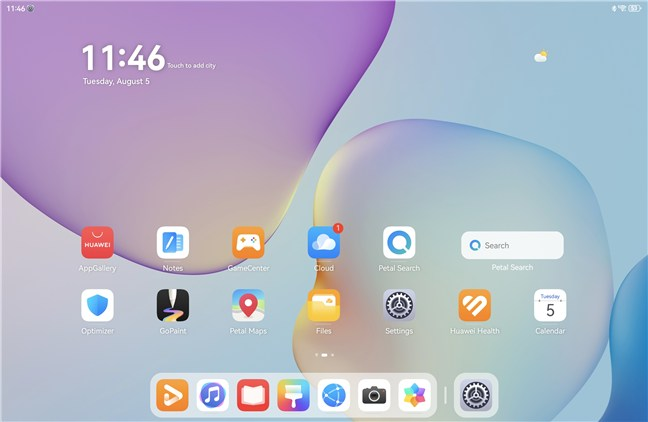
HarmonyOS is smooth, apps launch fast, and there’s little to no lag. The tablet handles lots of browser tabs or split-screen work. Furthermore, HUAWEIs built-in system features are probably really nice-to-haves if you also use other HUAWEI devices. Of course, there’s some bloatware too, but most of it can be either ignored or uninstalled.
For Google Play Store, use HUAWEI's GBox app
HarmonyOS is smooth, apps launch fast, and there’s little to no lag. The tablet handles lots of browser tabs or split-screen work. Furthermore, HUAWEIs built-in system features are probably really nice-to-haves if you also use other HUAWEI devices. Of course, there’s some bloatware too, but most of it can be either ignored or uninstalled.
 HarmonyOS works great
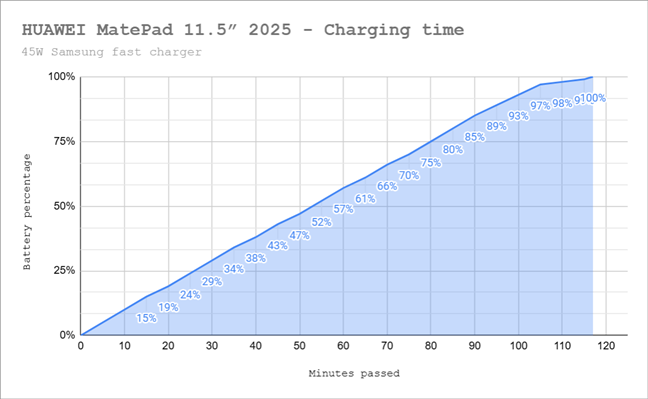
Battery life in everyday use is just as good as HUAWEI promises. A full day of mixed tasks (browsing, reading, and watching YouTube) still left me with plenty of charge in the evening. Leave it idle, and the battery hardly drops at all. To get a rough idea of what to expect, I streamed music videos on YouTube for an hour at medium volume and maximum brightness. The battery dropped by 10% during that time, which suggests the tablet could last around ten hours under continuous heavy use. Using a 45W charger took just under two hours for a full charge.
HarmonyOS works great
Battery life in everyday use is just as good as HUAWEI promises. A full day of mixed tasks (browsing, reading, and watching YouTube) still left me with plenty of charge in the evening. Leave it idle, and the battery hardly drops at all. To get a rough idea of what to expect, I streamed music videos on YouTube for an hour at medium volume and maximum brightness. The battery dropped by 10% during that time, which suggests the tablet could last around ten hours under continuous heavy use. Using a 45W charger took just under two hours for a full charge.
 Charging time for the HUAWEI MatePad 11.5 2025 PaperMatte Edition
All in all, the MatePad 11.5 feels like a chameleon: a notepad when you’re writing, a laptop when you’re working, and a media device when you want to relax. HarmonyOS takes a little getting used to, but once you’ve got your apps set up, it works.
Charging time for the HUAWEI MatePad 11.5 2025 PaperMatte Edition
All in all, the MatePad 11.5 feels like a chameleon: a notepad when you’re writing, a laptop when you’re working, and a media device when you want to relax. HarmonyOS takes a little getting used to, but once you’ve got your apps set up, it works.
 Benchmark results in Geekbench 6
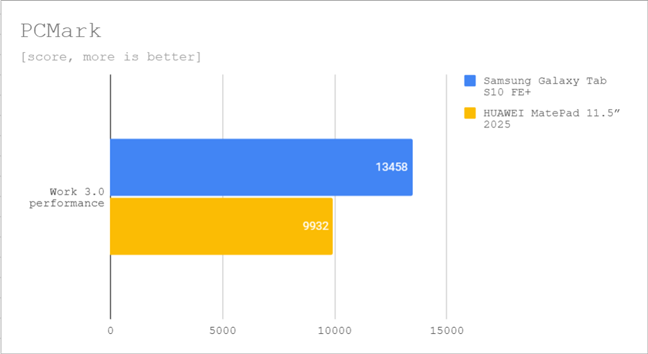
In PCMark Work 3.0, which measures general productivity performance, the MatePad 11.5 scored 9932 points. That’s a solid result for everyday tasks like browsing, writing, and light photo editing, but it’s noticeably lower than the Samsung Galaxy Tab S10 FE+ (13458 points). Unfortunately, I can’t compare results with the HUAWEI MatePad Pro 12.2 2025 PaperMatte Edition that my colleague tested a while ago, as that one crashed while running this benchmark.
Benchmark results in Geekbench 6
In PCMark Work 3.0, which measures general productivity performance, the MatePad 11.5 scored 9932 points. That’s a solid result for everyday tasks like browsing, writing, and light photo editing, but it’s noticeably lower than the Samsung Galaxy Tab S10 FE+ (13458 points). Unfortunately, I can’t compare results with the HUAWEI MatePad Pro 12.2 2025 PaperMatte Edition that my colleague tested a while ago, as that one crashed while running this benchmark.
 Benchmark results in PCMark
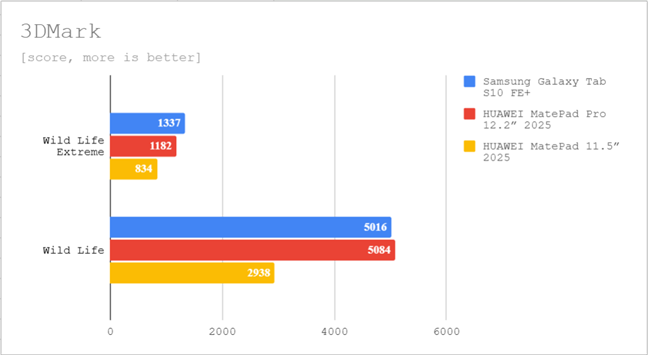
For 3DMark, which focuses on graphics performance, the MatePad 11.5 scored 2938 points in the standard Wild Life test and 834 in Wild Life Extreme. These results show it can handle casual and moderately demanding games, but high-end 3D titles will need lower settings to run smoothly.
Benchmark results in PCMark
For 3DMark, which focuses on graphics performance, the MatePad 11.5 scored 2938 points in the standard Wild Life test and 834 in Wild Life Extreme. These results show it can handle casual and moderately demanding games, but high-end 3D titles will need lower settings to run smoothly.
 Benchmark results in 3DMark
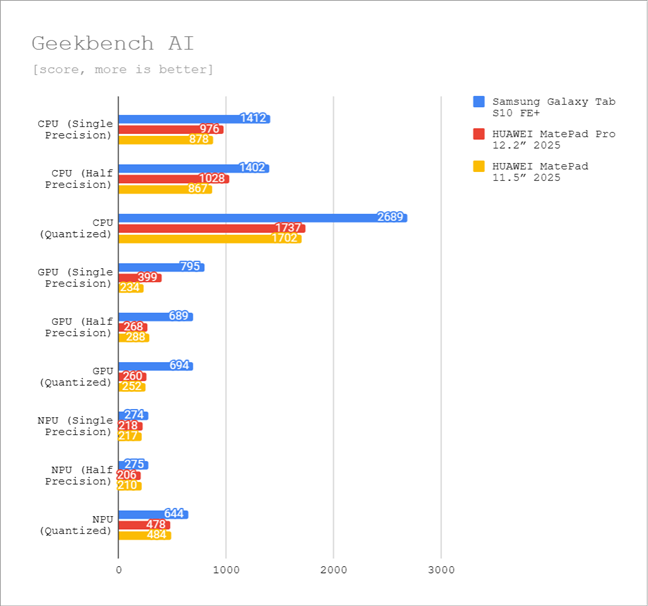
When it comes to AI performance, Geekbench AI shows the MatePad 11.5 trailing the competition in most categories, especially in GPU-based AI tasks. This doesn’t affect most everyday apps, but it does mean AI-heavy workloads will run slower than on the Tab S10 FE+.
Benchmark results in 3DMark
When it comes to AI performance, Geekbench AI shows the MatePad 11.5 trailing the competition in most categories, especially in GPU-based AI tasks. This doesn’t affect most everyday apps, but it does mean AI-heavy workloads will run slower than on the Tab S10 FE+.
 Benchmark results in Geekbench AI
On the connectivity side, Speedtest results were excellent, with download speeds of 910 Mbps and upload speeds of 888 Mbps. That’s faster than both the MatePad Pro 12.2 and the Samsung Galaxy Tab S10 FE+. So while its processor may be mid-range, its Wi-Fi performance is excellent.
Benchmark results in Geekbench AI
On the connectivity side, Speedtest results were excellent, with download speeds of 910 Mbps and upload speeds of 888 Mbps. That’s faster than both the MatePad Pro 12.2 and the Samsung Galaxy Tab S10 FE+. So while its processor may be mid-range, its Wi-Fi performance is excellent.
 Benchmark results in Speedtest
In short, the HUAWEI MatePad 11.5 2025 might not deliver top benchmark scores, but it’s tuned for stable, efficient performance in real-world use. It’s more than capable for students, professionals, and casual users who want a reliable tablet for work, media, and maybe some light gaming.
Benchmark results in Speedtest
In short, the HUAWEI MatePad 11.5 2025 might not deliver top benchmark scores, but it’s tuned for stable, efficient performance in real-world use. It’s more than capable for students, professionals, and casual users who want a reliable tablet for work, media, and maybe some light gaming.
HUAWEI MatePad 11.5 2025 PaperMatte Edition: Who is it good for?
This tablet is a good fit for:- Students and professionals who want a lightweight device to write, take notes, or sketch
- Anyone who likes watching shows, reading, or browsing the web on a bigger screen
- People who want a tablet that can also act like a mini-laptop when paired with a keyboard
Pros and cons
Here’s what I liked most about the HUAWEI MatePad 11.5 PaperMatte Edition:
- The PaperMatte screen is easy on the eyes and is great for reading or drawing
- It has a robust all-metal build
- Good audio quality
- The battery lasts a long time and supports fast charging
- You can use the latest M-Pencil with it
- The optional keyboard case turns it into a compact laptop
- No Google apps built-in, so you’ll need to use GBox to access them
- You can’t expand the storage, use a SIM card, or navigate with GPS
Verdict
Most people will like the HUAWEI MatePad 11.5 2025 PaperMatte Edition. It looks good, feels solid, and the screen is both beautiful and easy on the eyes. The big battery and helpful accessories make it great for working or relaxing. You can comfortably use it for hours, whether you’re watching movies, reading, or taking notes. Still, it’s not perfect. The Kirin chip gives it enough power for normal use, but don’t expect lightning speed or high-quality gaming experiences. And while you can get Google apps to work on this tablet, you may encounter a few hiccups now and then. Even so, it’s an attractive option for those who want a tablet that can do a little bit of everything for a reasonable price.Unboxing the HUAWEI MatePad 11.5 2025 PaperMatte Edition
Before anything else, I must tell you that depending on the region you live in, HUAWEI might also offer together with this tablet a limited-time bundle that includes both the keyboard and the M-Pencil at no extra cost. This is what I got for this review: the HUAWEI MatePad 11.5 PaperMatte Edition bundled with the keyboard in the box, plus the additional M-Pencil.Design, hardware, and build quality
The MatePad 11.5 PaperMatte Edition has a clean, modern design that looks more expensive than it is. It has a solid metal body with a matte finish that doesn’t collect fingerprints and feels nice to hold.The user experience on the HUAWEI MatePad 11.5 2025
Day-to-day use is smooth and enjoyable. Setting up the accessories is easy: the keyboard connects through magnets and pins, and the tablet recognizes it instantly. It also doubles as a stand, and the typing experience is good for such a slim device. There’s no touchpad, but you can use a Bluetooth mouse if you want.Performance in benchmarks
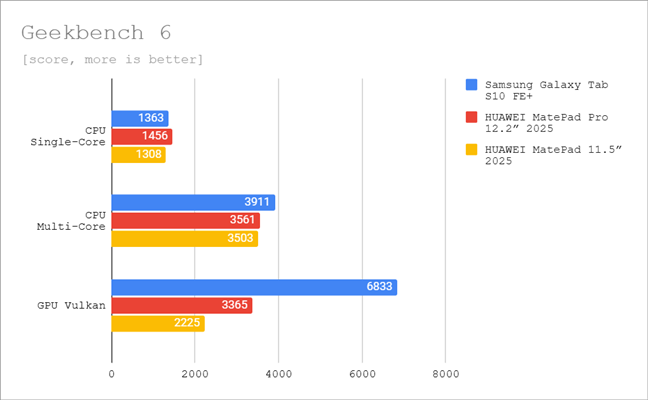
The HUAWEI MatePad 11.5 2025 is built around the Kirin T82B chip with 8 GB of RAM, which puts it straight into the mid-range Android tablets category. In day-to-day use, it feels smooth and responsive, but some benchmarks can help you understand better what you get in terms of performance. In Geekbench 6, the MatePad 11.5 scored 1308 points in the single-core tests and 3503 points in the multi-core ones. This puts it slightly behind the HUAWEI MatePad Pro 12.2 2025 and well behind the Samsung Galaxy Tab S10 FE+ in processor (CPU) power, especially in multi-core tasks. Graphics performance in Geekbench’s Vulkan test came in at 2225 points. Again, enough for casual gaming but clearly weaker than both the Pro model (3365 points) and the Samsung (6833 points).


Discussion (0)
Be the first to comment.