




If you want to surprise someone instantly, sending an Amazon gift card by email is the fastest way to do it. You don’t need a physical card or shipping—just a few clicks and your recipient gets their gift directly in their inbox. In this guide, we’ll walk you through how to send an Amazon eGift card via email, how delivery works, and what to do if your recipient doesn’t receive it.
Step 1: Go to Amazon’s Gift Card Page
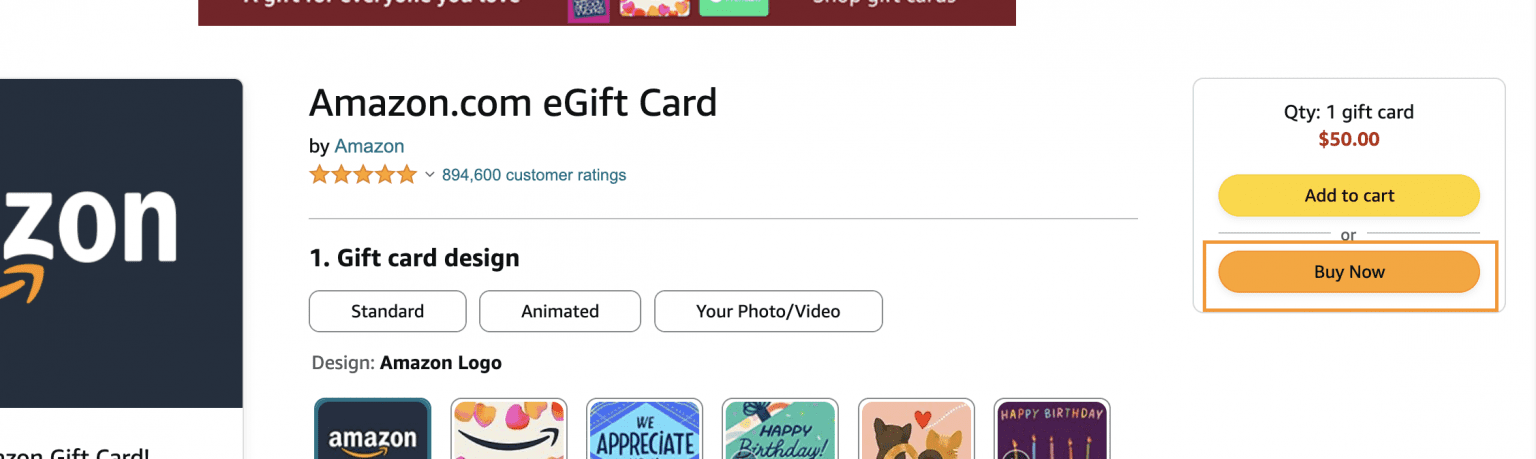
Visit Amazon.com and hover over the “Gift Cards” section on the homepage. From the dropdown, click “eGift Cards.” This page lets you choose Amazon digital gift cards that can be delivered through email instead of the mail.

Step 2: Choose an eGift Card Design
Amazon offers dozens of designs for every occasion—birthdays, holidays, thank-you gifts, and more. You can also personalize the card with a custom message, amount, and theme image. Pick from any of the Amazon digital gift cards that catch your fancy, then proceed.

Step 3: Enter the Recipient’s Email and Your Message
Type the recipient’s email address carefully—it’s where the gift card will be delivered. Then add your name, a short personal note, and the delivery date. You can choose “Now” for instant delivery or schedule it for a future date.
Pro tip: Always double-check the email spelling before sending. Amazon cannot redirect an eGift card once it’s been sent to the wrong address.
Step 4: Select the Gift Amount
Amazon digital gift cards start at $25 and can go up to $2,000. You can choose a preset amount or enter a custom value.

Step 5: Complete Payment and Confirm Delivery
Proceed to checkout and select your preferred payment method. Click “Buy Now” once you’ve chosen the amount. After completing the purchase, you’ll receive a confirmation email, and your recipient will get theirs shortly after. The subject line typically reads “A Gift for You from [Your Name].”
If you selected a scheduled delivery, Amazon will automatically send it on your chosen date.
What to Do If the Recipient Doesn’t Receive the Email
Sometimes, eGift cards can end up in spam or promotions folders. Ask your recipient to check there first. If it’s still missing, go to Your Orders → Gift Cards in your Amazon account. You can resend the email or view the code to copy and share manually.
Tip: Avoid typing errors in the email address and make sure your payment method went through successfully.
Sending an Amazon Gift Card Without an Account
While most users need an Amazon account to buy the card, you can send Amazon eGift card through Amazon Pay balance or a retailer that sells digital codes. These let you purchase and email a redeemable code without logging in to Amazon.
FAQs About Sending Amazon eGift Cards
Can I send an Amazon gift card by text?
Yes. On the eGift card page, select “Text Message” as your delivery option instead of “Email.” You’ll enter the recipient’s phone number instead.
Can I print an Amazon eGift card?
Absolutely. Choose “Print at Home” on the Gift Cards page to generate a printable PDF version.
How fast is email delivery?
Most Amazon digital gift cards arrive within 5 minutes, but it can take up to 15 minutes during high-traffic periods, such as holidays.
What if I want to send multiple gift cards?
You can send up to 400 eGift cards at once using Amazon’s Corporate Gift Card feature, ideal for teams or customers.
Summary: Send an Amazon Gift Card by Mail in 5 Steps
- Go to Amazon’s eGift Cards page.
- Choose your design and select Email as the delivery method.
- Enter your recipient’s email and a personal message.
- Choose the gift amount and click Buy Now.
- Check your confirmation email and ensure delivery.
Conclusion
It's a great idea to learn how to send an Amazon gift card via email because it's one of the quickest and most thoughtful ways to send a digital gift. It’s fast, customizable, and available anytime—even on holidays or last-minute occasions. Whether you’re celebrating a birthday, showing appreciation, or just saying thanks, Amazon eGift cards make the process simple and secure!


Discussion (0)
Be the first to comment.