




If your iPhone, MacBook, iPad, or Apple Watch needs hands-on support, booking a Genius Bar appointment gives you direct access to an Apple technician. Apple requires appointments for most in-store repairs, and the process works best when you follow the correct steps for your device and location.
Below, you’ll find the fastest ways to book a Genius Bar appointment, plus what to do when no time slots appear.
Table of contents
- What you need before booking
- How to make a Genius Bar appointment on iPhone or iPad
- How to make a Genius Bar appointment on a Mac or Windows PC
- How to choose the right Apple Store and time slot
- What to do if no Genius Bar appointments are available
- Common problems when booking a Genius Bar appointment
- What to bring to your Genius Bar appointment
- How much Genius Bar repairs usually cost
- Tips to get faster Genius Bar support
- FAQs
- Summary
What you need before booking
Sign in with your Apple ID before you start. Make sure your device appears under your account, or keep the serial number ready.
Update your device software if possible and back up your data. Apple may need to reset or replace your device during service.
How to make a Genius Bar appointment on iPhone or iPad
The Apple Support app offers the quickest and most reliable booking method on mobile.
Book using the Apple Support app
- Open the Apple Support app and sign in with your Apple ID.
- Tap your device.
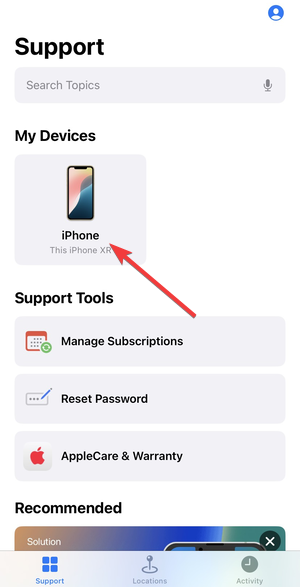

- Next, choose the issue category.
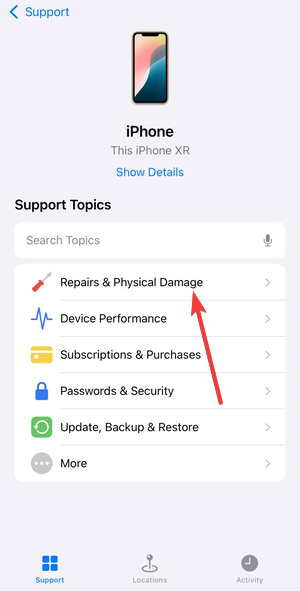

- Now, select Make a Reservation.


- Pick a nearby Apple Store and select an available time slot.
- Confirm the appointment and save the confirmation screen or email.
How to make a Genius Bar appointment on a Mac or Windows PC
You can book an appointment from any browser if you do not use the Apple Support app.
Book through the Apple Support website
- Open Apple’s support site in your browser and sign in with your Apple ID.


- Select your device, choose the problem, then pick the option for in-store repair.
- Enter your zip code, choose an Apple Store location and select an available time.

- Confirm the booking and save your confirmation details.
How to choose the right Apple Store and time slot
Availability varies by store and device type. Large city locations fill up faster, especially for iPhone repairs.
Check early morning and late evening slots for better availability. Weekdays usually offer more open times than weekends.
What to do if no Genius Bar appointments are available
Apple often limits visible slots based on staffing and demand. A full schedule does not always mean support is unavailable.
Use Apple live chat or call support
Contact Apple Support through chat or phone. A support agent may suggest alternate stores, different issue categories, or remote troubleshooting that resolves the problem.
Try walk-in support and same-day availability
Some Apple Stores accept limited walk-ins, especially for quick diagnostics. Visit early in the day and expect possible wait times.
Common problems when booking a Genius Bar appointment
- Device not listed or not eligible: Older or unlinked devices may not appear under your Apple ID. Add the device manually using the serial number.
- Store not showing or stuck loading: Enable location services in your browser or app. Clear cookies, switch browsers, or try a different network if the page stalls.
What to bring to your Genius Bar appointment
Bring your device, charging cable, and valid photo ID. If you use AppleCare+, make sure it appears under your Apple ID.
Turn off Find My before your visit. This step speeds up diagnostics and repairs.
How much Genius Bar repairs usually cost
Diagnostics cost nothing. Repairs remain free under AppleCare+ or limited warranty if Apple covers the issue.
Out-of-warranty repairs vary by device and damage type. Apple provides a repair estimate before starting work.
Tips to get faster Genius Bar support
- Book early in the day when stores run less behind schedule.
- Select the closest matching issue to unlock more time slots.
- Check availability multiple times a day because cancellations open new slots.
FAQs
Can I make an Apple Genius Bar appointment without an Apple ID?
You need an Apple ID to book a Genius Bar appointment online or in the Apple Support app. Without one, you must contact Apple Support by phone for assistance. While some say you can use the iCloud email, there is no report of this being correct.
Do Apple Stores accept walk-ins without an appointment?
Some Apple Stores allow limited walk-ins, but availability depends on location and staff capacity. An appointment always guarantees faster service.
Can I book a Genius Bar appointment for someone else?
Yes, you can book an appointment for another person if the device appears under your Apple ID or you have the device’s serial number.
How long does a Genius Bar appointment usually take?
Most appointments last 15 to 30 minutes. Repairs may take longer if Apple needs to keep the device.
Summary
- Sign in with your Apple ID and prepare your device details.
- Use the Apple Support app for the fastest booking experience.
- Book through a browser if you do not use iOS or iPadOS.
- Contact Apple Support if no appointments appear.
- Bring ID, backups, and disable Find My before your visit.
Booking an Apple Genius Bar appointment works best when you use the Apple Support app and prepare your device in advance. If time slots look unavailable, chat or phone support often unlocks alternatives. With the right prep, you can resolve most Apple hardware issues in a single store visit.


Discussion (0)
Be the first to comment.