




Downloading McAfee antivirus takes only a few minutes when you follow the right steps. The installer differs across Windows, macOS, Android, and iOS, so choosing the correct method prevents activation issues. This guide shows you exactly where to download McAfee safely and how to activate it afterward.
1) How to download McAfee on Windows
Windows users should download McAfee directly from their account dashboard. This delivers the correct installer and avoids unsafe sources.
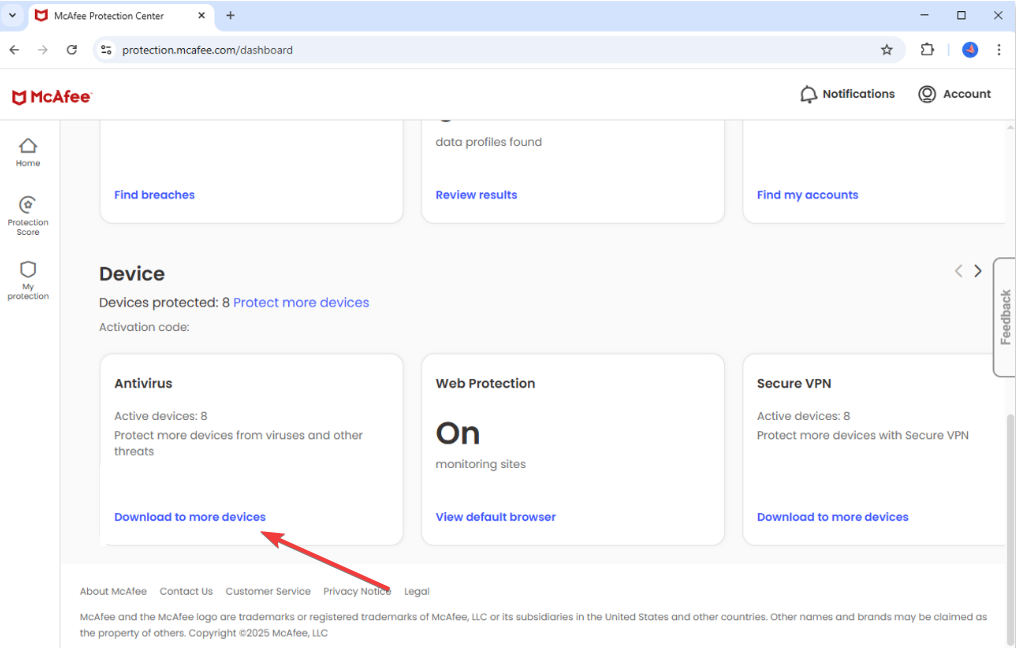
Start by going to the McAfee website on your browser and signing in to your account. Next, go to the Device section, click Download to more devices under the Antivirus tile, and click Download on this device on the Add a device you want to protect screen.
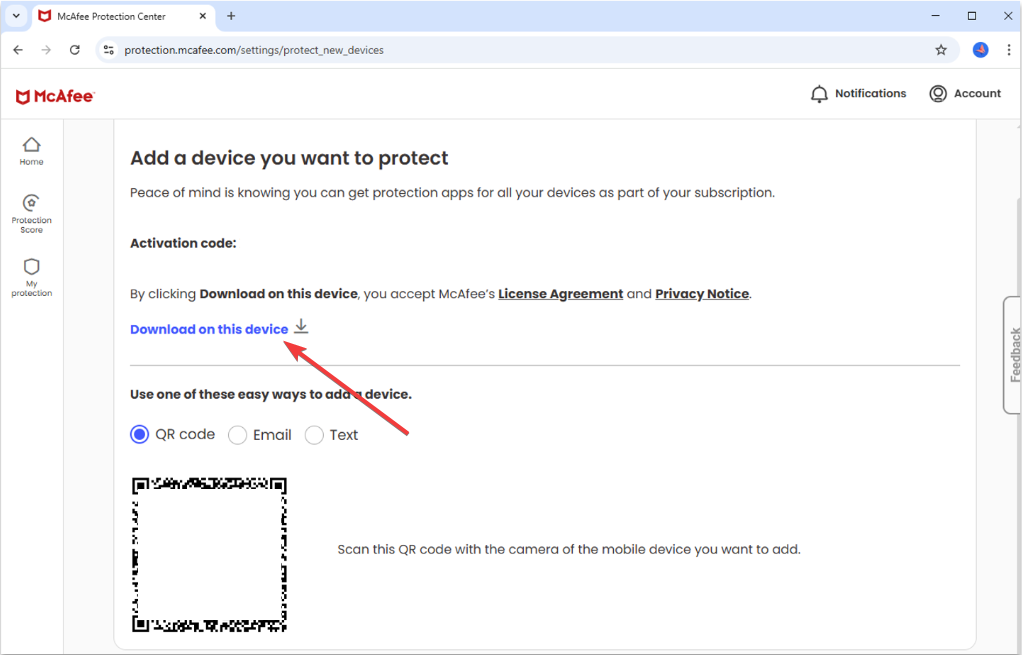
Now, under the PC tab, select Download and accept the agreements to save the installer file. Lastly, open the downloaded EXE file and approve the permissions so McAfee can install the required components and enable protection.
2) How to download McAfee on macOS
Log in to your McAfee account dashboard and go to the Device section. Click Download to more devices > Download on this device. Now, click Download under the Mac tab and accept the agreements to save the DMG file to your Mac.
Lastly, open the DMG from your Downloads folder and run the installer. Ensure to approve the security prompts to enable real-time protection.
3) How to download McAfee on Android
Open Google Play Store and search for McAfee. Next, tap Install and wait for the installation to complete.
Finally, open the app and sign in with your McAfee account to activate your subscription.

4) How to download McAfee on iPhone/iPad
Search for McAfee using the App Store search bar. This avoids unofficial or outdated versions.
Next, click Get and use your password or double-tap to confirm the installation. When the installation is complete, sign in with your account details. The subscription unlocks mobile protection features.

5) How to activate McAfee after downloading
Activation ensures McAfee updates correctly and provides full real-time protection.
Open the McAfee app on your device and sign in. This links the installation to your subscription. Some subscriptions require a code during setup; enter the code shown in your account to complete activation.
6) How to verify your McAfee installation
Open the app and check the dashboard status. It should display active real-time protection. You can also start a quick scan to verify protection is working properly and check for any initial threats.
Lastly, you can opt for the McAfee Total Protection to ensure your device is completely safe.
Troubleshooting download or installation issues
- Check your internet and storage: A slow connection or low storage can interrupt downloads. Free space and retry the download.
- Disable other antivirus tools: Third-party antivirus programs may block McAfee installation. Remove or disable them before installing.
- Use McAfee’s official installer again: Re-download the installer from your account if the first file failed during transfer. This fixes most corrupted-file errors.
Tips for downloading McAfee
- Keep your login details available so activation completes quickly.
- Remove old trial antivirus apps that could cause conflicts.
- Restart your device after installation to finalize all system changes.
- Keep automatic updates on for continuous protection.
FAQs
What is the safest place to download McAfee? Always download McAfee from your account dashboard. This guarantees you receive the correct version for your subscription.
Do I need an account to download McAfee? Yes, downloading through your account links your device to your subscription.
Why will not the installer open? A corrupted download or blocked permission can stop the installer. Re-download and run it as an administrator.
Can I use McAfee on multiple devices? Most plans support multiple devices. Check your subscription details in your dashboard.
Summary
- Sign in to your McAfee account on your device.
- Download the installer for Windows, macOS, Android, or iOS.
- Run the setup file and allow permissions.
- Sign in or enter your activation code to unlock protection.
- Verify installation using the dashboard and a quick scan.
McAfee downloads quickly when you use the correct installer for your device. Installing from your account dashboard simplifies activation and helps avoid unsafe third-party sources. Once installed, a quick scan verifies that everything is working and your device is protected.

Discussion (1)
where is the Chrome version