




The SIM card PIN code is meant to protect your data against unauthorized access. Each SIM you insert into a smartphone has a PIN code that you need to enter in order to activate the card. Some mobile providers use standard PIN codes, like 0000 or 1234, for all their SIM cards, while others generate unique PIN codes for each SIM. Whatever the case, it’s safer to change the default SIM PIN code to one of your choosing. Or, while I don’t recommend it, maybe you want to disable it and skip having to enter a SIM PIN each time you start your Android smartphone. Regardless of what you are trying to do, this tutorial has the answers you need for both Android and Samsung Galaxy smartphones:
NOTE: You need to know your current SIM PIN code to go ahead with this tutorial. Unfortunately, you can’t find the SIM PIN code on your Android device, and entering the PIN incorrectly three times blocks your SIM card. You can unlock it but you must use a PUK (or PUC - personal unblocking code) for that, which you can get from your mobile operator.
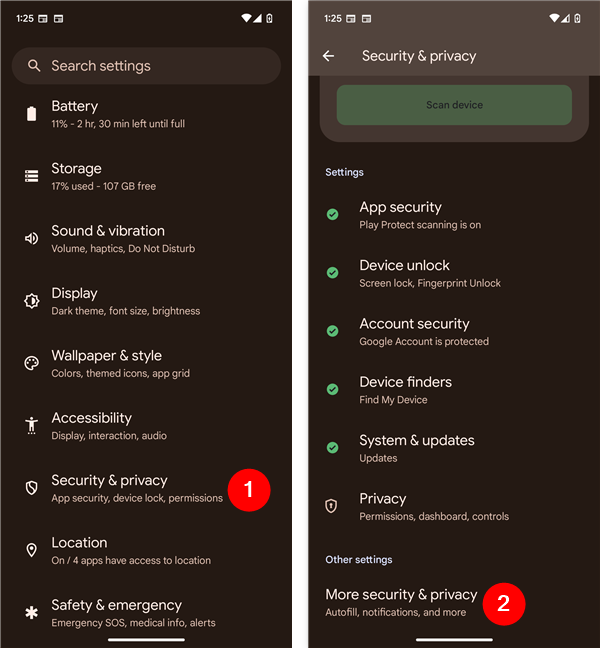
 Open Settings and go to Security & privacy > More security & privacy
On the More security & privacy screen, tap SIM lock.
Open Settings and go to Security & privacy > More security & privacy
On the More security & privacy screen, tap SIM lock.
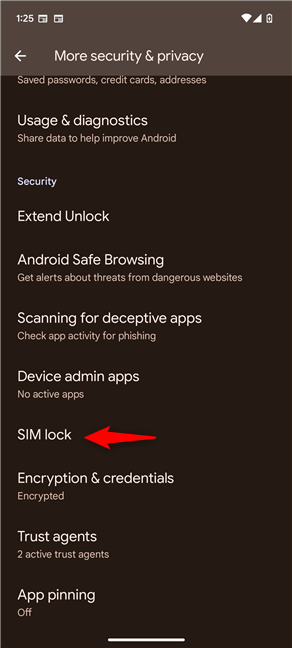
 Access the SIM lock settings on Android
TIP: If you have trouble finding out the SIM lock settings, try using the search in the Settings app. Type “sim lock” and then tap SIM lock in the results that show up on the screen.
Access the SIM lock settings on Android
TIP: If you have trouble finding out the SIM lock settings, try using the search in the Settings app. Type “sim lock” and then tap SIM lock in the results that show up on the screen.
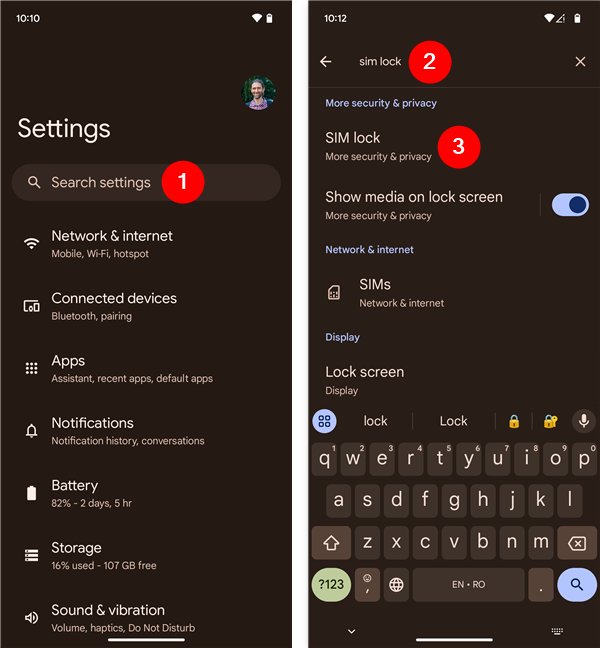 Searching for SIM lock may be a good idea
Then, follow the steps in the next chapters of this guide to see how to remove or change the SIM PIN code of your Android smartphone.
Searching for SIM lock may be a good idea
Then, follow the steps in the next chapters of this guide to see how to remove or change the SIM PIN code of your Android smartphone.
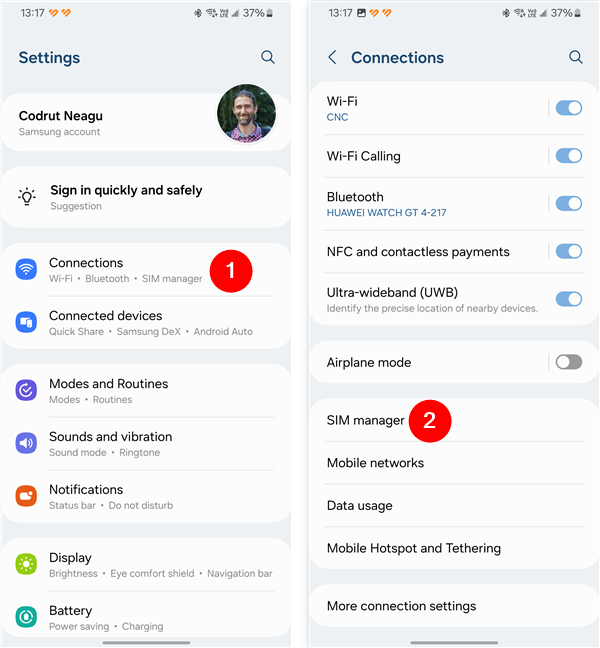 Open Settings, go to Connections, and tap SIM manager
Head to More SIM settings, and then tap the SIM card security entry at the top of the screen.
Open Settings, go to Connections, and tap SIM manager
Head to More SIM settings, and then tap the SIM card security entry at the top of the screen.
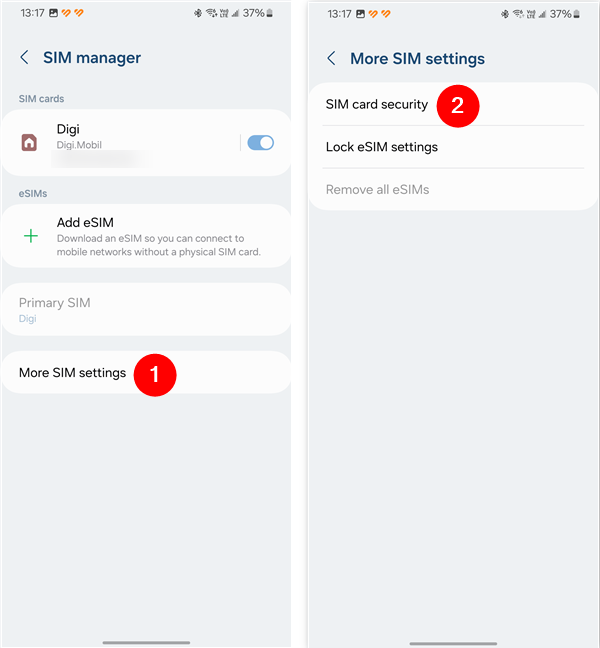 Access More SIM settings and tap SIM card security
NOTE: From this point forward, the steps are the same for both Samsung Galaxy devices and other Android smartphones. To keep things as simple as possible while also giving you all the details you need, the following images include screenshots from stock Android on the left and screenshots from a Samsung Galaxy phone on the right.
Access More SIM settings and tap SIM card security
NOTE: From this point forward, the steps are the same for both Samsung Galaxy devices and other Android smartphones. To keep things as simple as possible while also giving you all the details you need, the following images include screenshots from stock Android on the left and screenshots from a Samsung Galaxy phone on the right.
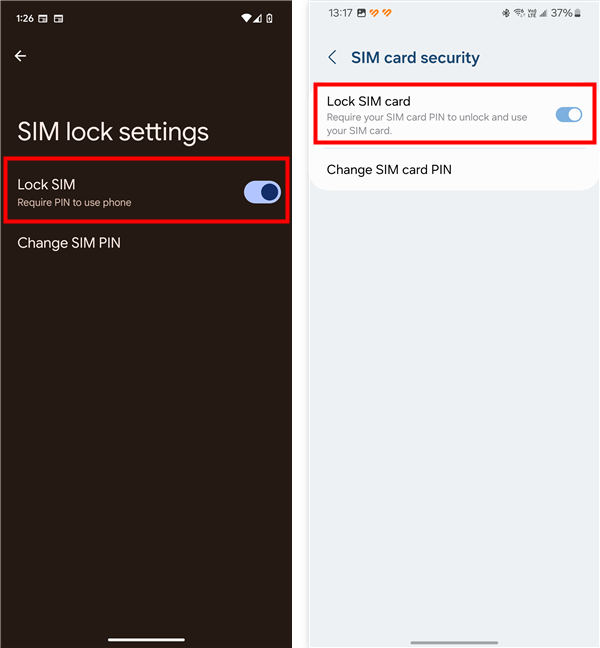 How to disable SIM card PIN on Android
You are then prompted to enter your current SIM card PIN code. Type it and tap OK.
How to disable SIM card PIN on Android
You are then prompted to enter your current SIM card PIN code. Type it and tap OK.
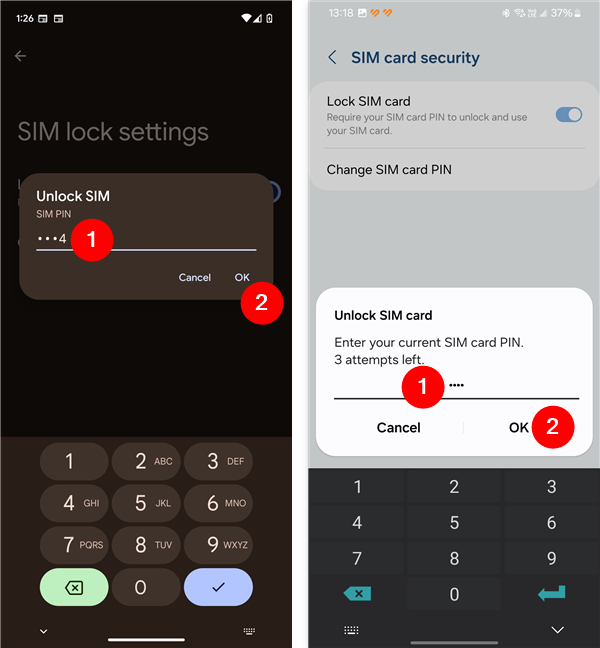 Confirm your PIN code to remove it
From now on, you no longer have to enter the SIM lock code each time your smartphone or tablet starts. However, you must still enter your device’s PIN code, pattern, password or use the fingerprint scanner or face unlock features to access your data.
NOTE: If you remove the SIM card PIN lock, the Change SIM PIN and the Change SIM card PIN options illustrated in the next chapter are grayed out. You must activate the SIM-locking switch to make any changes to the current SIM PIN code.
Confirm your PIN code to remove it
From now on, you no longer have to enter the SIM lock code each time your smartphone or tablet starts. However, you must still enter your device’s PIN code, pattern, password or use the fingerprint scanner or face unlock features to access your data.
NOTE: If you remove the SIM card PIN lock, the Change SIM PIN and the Change SIM card PIN options illustrated in the next chapter are grayed out. You must activate the SIM-locking switch to make any changes to the current SIM PIN code.
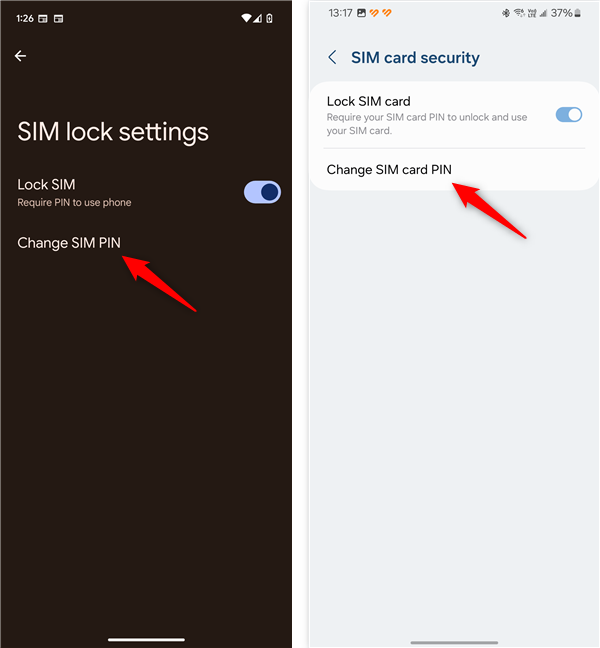 How to change the SIM PIN in Android
When you are prompted to insert your old or current SIM PIN, type it. Then, tap OK.
How to change the SIM PIN in Android
When you are prompted to insert your old or current SIM PIN, type it. Then, tap OK.
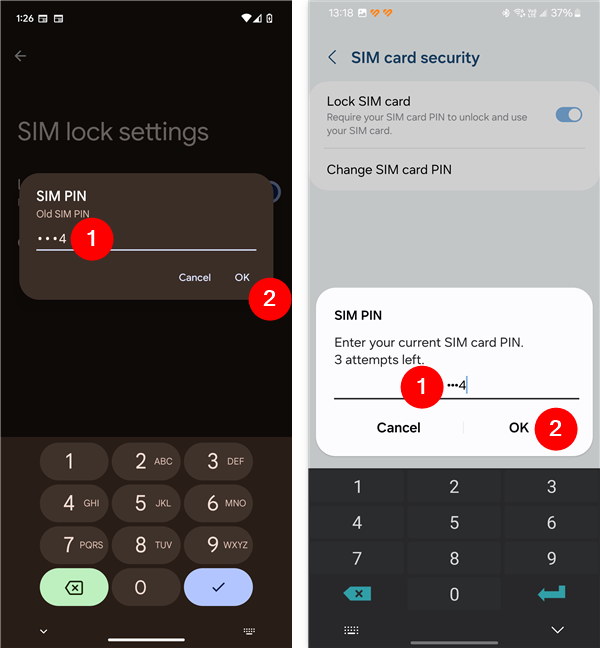 Enter the old SIM card PIN code
Next, enter the new SIM PIN you want to use. You can choose a code that is between four and eight digits long. When you are done, tap OK. The following screen asks you to insert the new PIN again and looks pretty much the same. Confirm the new SIM PIN code by typing it once more, and then press OK.
Enter the old SIM card PIN code
Next, enter the new SIM PIN you want to use. You can choose a code that is between four and eight digits long. When you are done, tap OK. The following screen asks you to insert the new PIN again and looks pretty much the same. Confirm the new SIM PIN code by typing it once more, and then press OK.
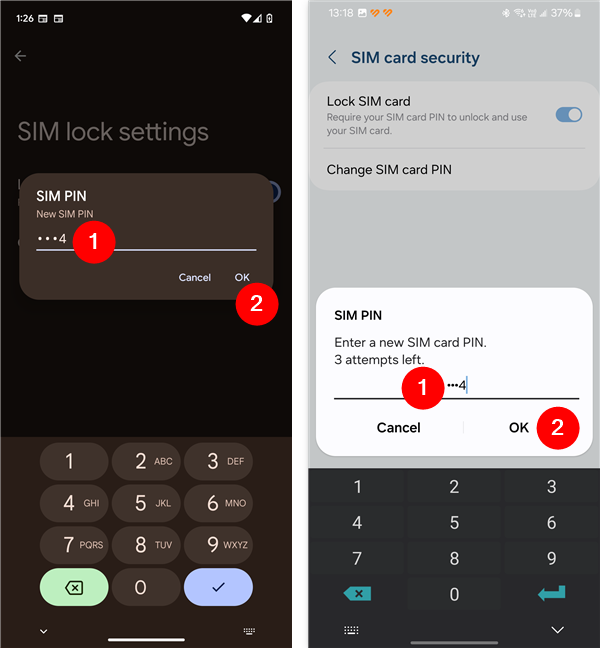 Enter the new SIM card PIN code
Your SIM card PIN code is now changed, and you get a notification letting you know.
Enter the new SIM card PIN code
Your SIM card PIN code is now changed, and you get a notification letting you know.
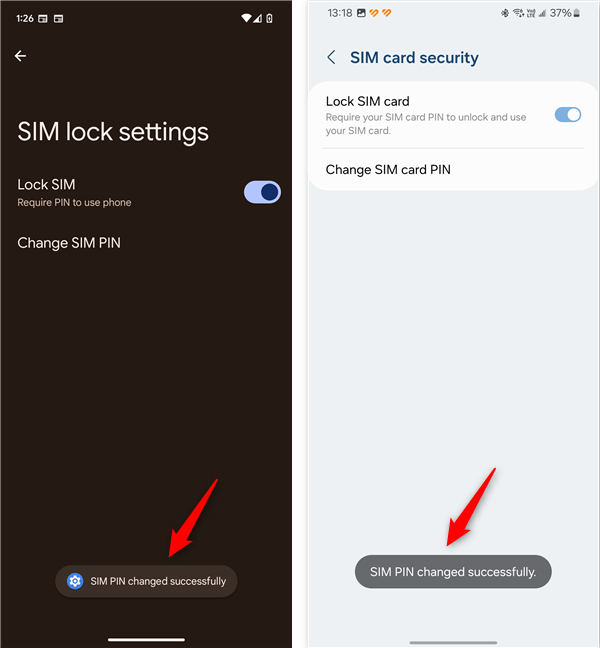 SIM PIN changed successfully
IMPORTANT: Do not confuse the SIM PIN code with the one used to unlock your Android device. The SIM card PIN is required each time you start or restart your Android smartphone or tablet, or when you introduce a SIM card into the device. It’s not needed when you unlock the device’s screen, once Android has loaded and the SIM card is already unlocked.
SIM PIN changed successfully
IMPORTANT: Do not confuse the SIM PIN code with the one used to unlock your Android device. The SIM card PIN is required each time you start or restart your Android smartphone or tablet, or when you introduce a SIM card into the device. It’s not needed when you unlock the device’s screen, once Android has loaded and the SIM card is already unlocked.
How to access the SIM card lock settings on Android
In order to change or remove the PIN code of your SIM card, you must first know how to get to its settings. Depending on whether you’re using the stock Android operating system or a Samsung Galaxy smartphone, follow the steps in one of the next two sub-chapters to see how to access the SIM PIN settings.How to find the SIM PIN code settings on stock Android
On a smartphone running the Android operating system, open the Settings and tap Security & privacy. Then, locate and tap More security & privacy at the bottom of the options list.How to find the SIM PIN code settings on a Samsung Galaxy
If you’re using a Samsung Galaxy smartphone, open its Settings, access Connections, and tap the SIM manager entry.How to remove the SIM PIN lock when starting your Android (including Samsung Galaxy)
If you do not want to enter the SIM PIN code each time you start your Android smartphone or tablet, turn off the Lock SIM (stock Android) or Lock SIM card (Samsung Galaxy) switch.How to change the SIM card PIN code on Android (including Samsung Galaxy)
If you want to change the existing SIM PIN code to another one, tap the Change SIM PIN or the Change SIM card PIN option, depending on the type of Android phone you’re using.


Discussion (31)
My Samsung S20 ultra on Mint Mobile demands a pin after the first ring on dialed numbers. The sim card came “pinned” as well as a $9.95 replacement pin. Customer support provided two pin numbers neither worked. Obtained PUK from Mint Mobile and followed instructions to reset pin. That did not work either. Ordered another $9.95 sim card hoping that I can find a way to use or reset the sim card pin. Only get to make wifi calls. Any suggestions?
My phone keeps getting hacked. I do the factory reset thing and they were in it again in less than 10 minutes. They lock the sim card before I get the chance. Then do whatever they want with my phone. My tiny allotment of data was used up in days last month. I want control of my phone back but I’m too slow. I tried to get to the sim pin as soon as I could but, yah. Now I have 1 try left. I tried to get help from my carrier last month (cricket) and they treated me like shit and basically blew me off. So I wandered slowly out bewildered. I’ll be getting a new phone with a different carrier as soon as I can. But right now I need the device. It is infuriating.
Thanks, that worked. I used the info to remove the PIN from a SIM card which I plan to use in a GPS tracker (these devices only work without a PIN since obviously there is no way to enter a code). To do that, I first placed the card into a very old, but still working, Android phone, and followed the instructions.
I’m glad our guide has helped you. If you want to receive other useful guides like this one, don’t hesitate to subscribe to our newsletter. It’s free: https://www.digitalcitizen.life/newsletter/
Thank you but I block my sim card and it is late so I have to wait until morning to call my carrier
Could you help me? I forget my sim card password in security setting. How should i do? ??
This may sound crazy but honestly I’m kinda scared to even try it even once. Scared there’ll be a preset SIM PIN already. Scared it won’t be the typical 0000 or 1234 set by who the heck knows. Scared I won’t ever get it changed, even if I do figure out the original one. There is a lot more, but too many to list here. Don’t wanna bore anyone, I’m not that crazy (I hope), or mean.
I came across the SIM PIN lock screen on my Samsung Galaxy S10e, but no service carrier-only use on WiFi obviously, & no complaints from me for now. But, like I started above, too many fears re:SIM PIN for now, I just wanted to try & find out how to figure it all out when I finally scrape up enuf nerve to actually give it a try (or just find someone else to do it for me lol). All I want to do really is create (or change if need be) my own personal SIM card PIN for yet another extra layer of security & for my peace of mind too of course.
One final thought, & it is one that I believe another reader noticed & requested, just as I am currently attempting to do as well. In reading all of the above instructions, I don’t recall seeing anywhere exactly how or where an Android’s original SIM PIN is located. Am thinking maybe either I missed it or is it possible that I might have misread something, somewhere?
I do know that this article was so well written, w/step-by-step instructions, & each step includes a screenshot of that step, so the user can actually see & know what to expect at each step. There is not many out there that would actually take the time to write everything down, make it simple & easy to understand (even a child could follow easily), as well as include imagery assistance on top of eveeyrhing else. I will say that once my nerve grows (as above stated) I’m fairly positive there won’t be any issues as long as I follow this guide to the letter. Thank you again for providing almost everything I was searching for this evening. Hopefully the rest will make itself known in due time.
Call your mobile operator and ask them about the default PIN they use on their SIM cards. This info should be easily provided by their tech support service.
My boyfriend was hacking my phone
My Sim pin has already been pre set and I’ve never had to enter it after a restart. Someone is stealing my data cause Google archives said my scheduled data transfer as requested and something called inactive device manager said my data would be going to the person I requested but i neverI never requested anythibg
I was not able to change my sim pin because that option was faded. I couldn’t access that option.
I forget my punk code and,pin code
It said enter my SIM card lock and I instinctively entered a 4 digit code I use for something else! And As soon as I did it I knew I messed up No where do I find the PUK #
Thanks.
The sum card refuses to unlock ????
I want to remove my sim pin to enable it work in a tracker device
what about disabling the SIM PIN on iPhone please
I want to unlock my old pin and lost my sim park
I was able to remove my PUK Code from the ‘start up’ on my phone and replace it with a 4 Digit Code…………..thank u for providing a simple-to-understand article that I could follow.
My other phone is locked and I don’t recall the pin.at all. I have tried and it has remained one attempt to be blocked
how get pin password
no signal – i set pin in diff phone, changed phones, new phone doesnt have sim pin option avail.
My new qlink free phone locked me out. Said puk code should be 8 numbers or more. I have no service.
I changed pin to a six digit, not the PUK #s.
Very good. 😉
Im on a lg x power, it doesnt show this in my security settings. U also forgot my pin for my sim card pls help :c srry for bad grammar
My task is to use the SIM in a wireless router, in order to accees the Internet. This needs to completely remove the PIN: follow the Android procedure for Unlock the PIN is not enough. There is a way to remove the PIN?
I change the Pin code.
Changed the SIM pin and left it on so I have to enter it each time the phone is turned off.
That is a good idea. 🙂
9611548187