




If you’ve forgotten the PIN of the SIM card inside your smartphone, you’ll need to use the PUK code to unlock it. Considering that your SIM card may store personal data, like your contacts, it makes sense that PUK stands for personal unlocking key. In this tutorial, I’ll show you where to enter the PUK code on your Android device and how to reset your SIM PIN. You’ll see how to enter and confirm your desired new PIN code to ensure your SIM is secure again. Here’s how it all works:
NOTE: Since I want to make sure I cover the most common situations, in all the images from this tutorial, you’ll see photos of a Google Pixel phone running stock Android on the left, and photos of a Samsung Galaxy phone running OneUI on the right. However, the process of entering the PUK code is similar on all Android-powered devices, so you should be good to go even if you have a smartphone from Xiaomi, realme, Motorola, OnePlus, OPPO, or some other manufacturer.
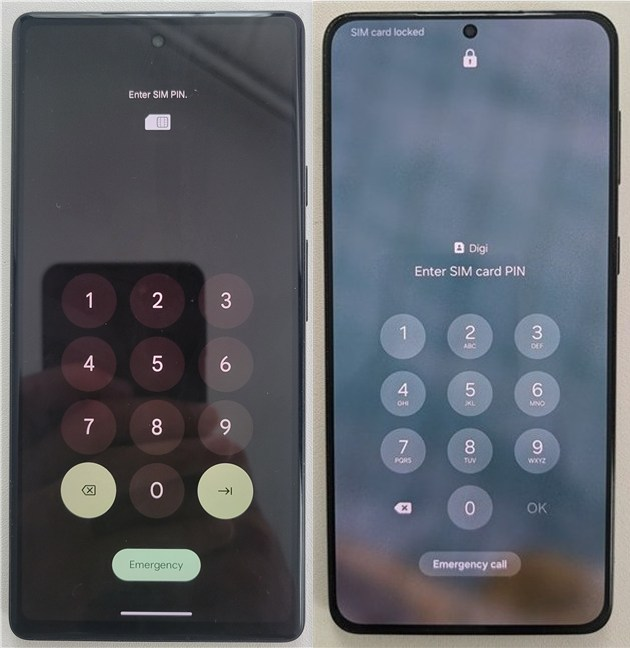
 Your SIM card is blocked if you enter the wrong PIN code three times
That is when the PUK code comes in handy, as it’s the only way to unlock your Android’s SIM card, thus preventing you from losing precious data. This code can’t be changed by the user, so if you don’t know it and aren’t sure where to find it, here are a few ways to get the PUK code of your SIM card.
Your SIM card is blocked if you enter the wrong PIN code three times
That is when the PUK code comes in handy, as it’s the only way to unlock your Android’s SIM card, thus preventing you from losing precious data. This code can’t be changed by the user, so if you don’t know it and aren’t sure where to find it, here are a few ways to get the PUK code of your SIM card.
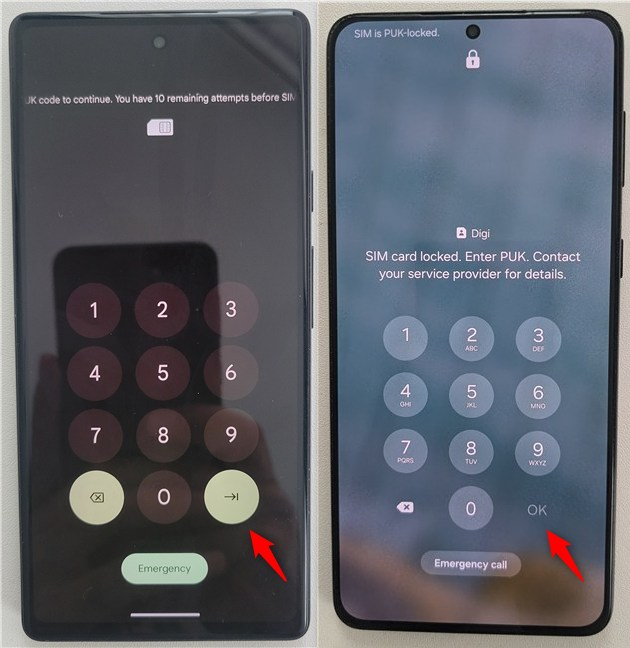 Where to enter the PUK code on Android phones
After you enter the correct PUK code, your Android bypasses the current PIN code of your SIM and asks you to set a new one.
Enter the desired PIN code and tap the Enter or OK button.
Where to enter the PUK code on Android phones
After you enter the correct PUK code, your Android bypasses the current PIN code of your SIM and asks you to set a new one.
Enter the desired PIN code and tap the Enter or OK button.
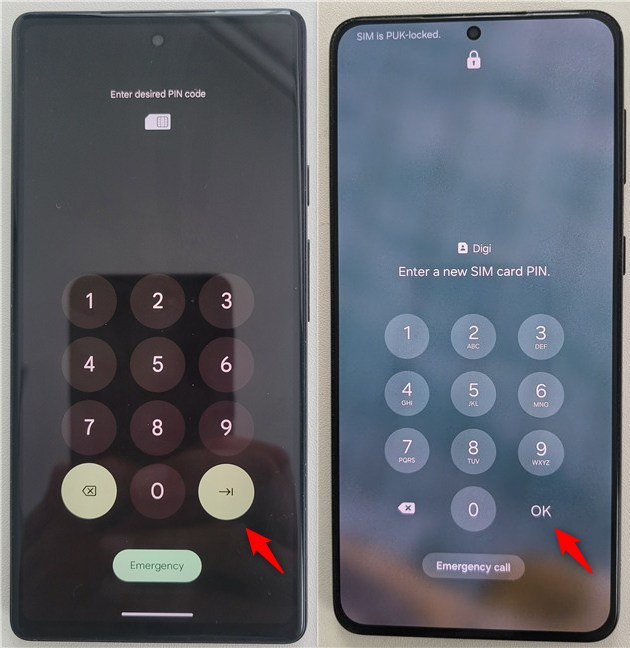 Enter the desired PIN code for your SIM
Confirm the desired PIN code for your Android’s SIM and tap the Enter or OK button once more.
Enter the desired PIN code for your SIM
Confirm the desired PIN code for your Android’s SIM and tap the Enter or OK button once more.
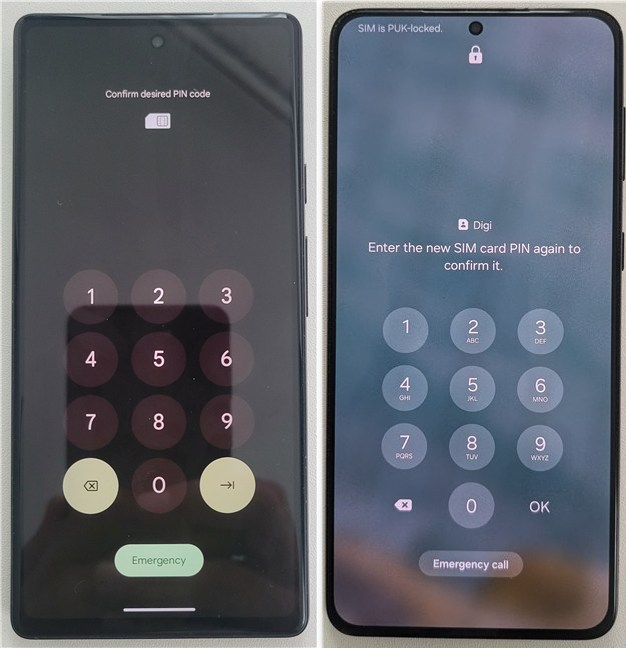
 Confirm desired PIN code for the SIM
Your smartphone is unlocked. Wait for a couple of moments until it connects to your mobile network.
When you see your mobile carrier listed on the top-left corner, you are done.
Confirm desired PIN code for the SIM
Your smartphone is unlocked. Wait for a couple of moments until it connects to your mobile network.
When you see your mobile carrier listed on the top-left corner, you are done.
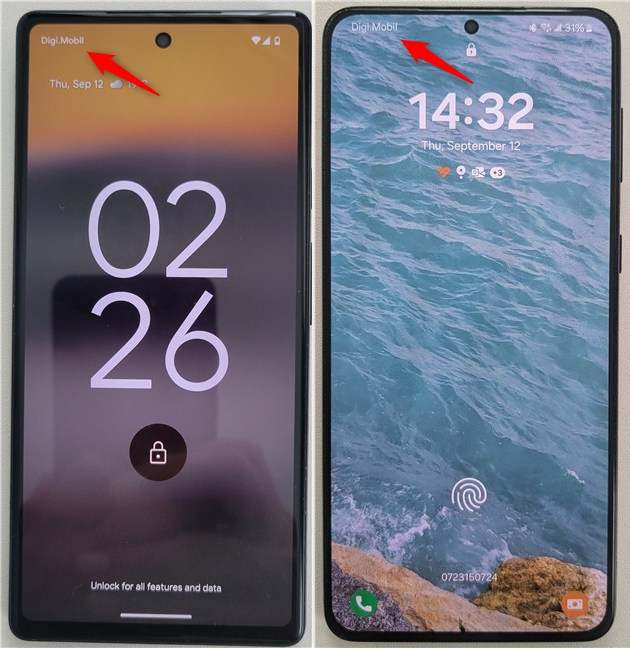 The Android smartphone is unlocked
And that’s all!
The Android smartphone is unlocked
And that’s all!
First things first: What is a PUK code and where can you find it?
PUK stands for personal unlocking key. It is sometimes also called a PUC - personal unblocking code. If you insert the wrong PIN code three times on your Android smartphone, either when starting the device or when trying to change or remove the SIM PIN, your SIM card becomes PUK-locked.How to use the PUK code to unlock your Android’s SIM card
Inserting the PIN code incorrectly three times in a row disables your SIM card. If you get a message that you must contact your carrier to unlock your device, press OK. Your phone then shows the PUK screen. On some Android devices, you get a message telling you that “You have 10 remaining attempts before SIM becomes permanently unusable.” In case you’re the owner of a Samsung Galaxy, the message is less frightening but the idea is the same: “SIM card locked. Enter PUK. Contact your service provider for details.” Regardless, you must now insert the PUK code for your SIM and tap the Enter or OK button to continue.

Discussion (14)
Don’t have my puk for my Sim card
I lock my Sim card
I forget my puk and my sim is blocked.
I have a Verizon molarola moto z3 with trac fron as my carrier my phone was unlocked then I got mint mobile and put the wrong code in i need puk and pin
I can’t find my PUK code at all what don’t know what to do?
I don’t have a SIM card and I can’t unlock my phone. When I talk to my google assistant it tells me to move down, but my screen is locked and doesn’t move. Please I need help my husband suffered a stroke and is paralyzed I’m disabled and this is our only means of communication with the outside world.
I tried several times, having bypassed the puk code, the confirmation of my new pin kept in saying puk error till i used up my ten tries and now my sim card is permanently blocked. please what should i do?
Go to your telecom provider and speak with them about your problem. Nobody else can help.
what if you dont have a service provider as the phone was bught in full online from the wish app
I think you are stuck and you need to buy another SIM card, and throw away the old one.
I forgot the code to switch power back on for my Android. Is the Puck code used for that?
I blocked my simcard and it says its permanently unusable wat can I do
Need to unlock sim card need puk code
So I ordered a phone from wish
For Xmas an upon arrival my daughter was checking it out
Well she stuck in a SIM card as I have all my old ones still
Well she accidentally puk locked my new phone an we have no idea which SIM card she used or how to find a code to unlock it please help I’m exhausted at trying night and day an the poor kid cry’s all the time because she locked my new phone that I secretly bought for her any ideas will be greatly appreciated thank you for all y’all tutorials aswell as I enjoy learning about my devices