




Android offers extensive customization, but emoji design remains one of the biggest visual differences between Android and iOS. If you recently switched from an iPhone or simply prefer Apple’s emoji style, there are a few reliable ways to use iPhone emoji on Android.
This guide covers the safest and most practical methods that still work at the time of writing.
Use ZFont To Add iPhone Emojis Without Root
ZFont is an open-source font installer that replaces system emoji files with iOS-style emoji. It does not require rooting on most supported devices and works by applying a compatible emoji font.
Compatibility depends on the phone manufacturer, but many Samsung, Xiaomi, Vivo, Tecno, and OnePlus models support it.
- Install ZFont from the Play Store and open the app.

- Scroll to the Emoji section and tap See All.
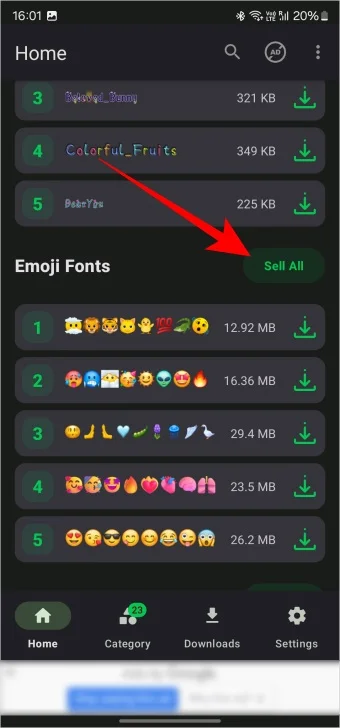
- Select the latest available iOS emoji pack.

- Download the emoji font and tap Apply.
- Follow the on-screen instructions to install the font.
- Restart the phone if prompted.
After installation, system emojis across apps such as Messages, WhatsApp, and social media will appear in iOS style.
Using A Third-Party iPhone Emoji Keyboard
If ZFont is not supported on your device, a third-party iOS emoji keyboard can be used as an alternative. This method works on Pixel phones and unsupported Android models.
Unlike font replacement, this approach changes emojis only inside the keyboard.
- Install an iPhone emoji keyboard from the Play Store.
- Enable the keyboard in system input settings.
- Set it as the active keyboard.
- Open any text field and switch to the emoji panel.
Emojis sent from this keyboard will appear as iOS emojis to recipients, even if they look different on your device.
What Devices Support iPhone Emojis Best
Font-based emoji replacement works best on Android skins that allow system font changes. Devices with heavily restricted system access may block emoji replacement entirely.
Pixel phones require rooting for full system emoji changes and are better suited for keyboard-based solutions.
Troubleshooting Common Problems
If emojis do not change after installation, the font may not have applied correctly. Restarting the phone often resolves this issue.
Some Android updates reset system fonts, requiring the emoji font to be re-applied.
Tips
- Avoid unofficial emoji apps that request unnecessary permissions.
- System emoji replacement affects all apps, while keyboards affect only typing.
- Keep your emoji font updated for the latest iOS emoji designs.
FAQ
Can I get iPhone emojis on Android without rooting?
Yes, many Android phones support emoji replacement through font installers like ZFont.
Do iPhone emojis work in all apps?
System emoji replacement works across most apps, while keyboard emojis work only when typing.
Are third-party emoji apps safe?
Some are safe, but keyboard apps should be used cautiously due to privacy concerns.
Summary
- ZFont offers the closest iOS emoji experience without root.
- Keyboard apps work when system replacement is unavailable.
- Compatibility varies by manufacturer and Android version.
Conclusion
Using iPhone emoji on Android is still possible with the right tools. Font-based solutions provide the most authentic experience, while keyboards offer a universal fallback. Choosing the right method depends on your device and comfort with system customization.


Discussion (0)
Be the first to comment.