You might need to find all the wireless networks that are broadcast in your area, including those which have a weak WiFi signal and those that have hidden their SSID (network name). For this task, you have to install a wireless network scanner and use it to identify the WiFi networks which exist in your area. However, many of these tools are expensive and only a few of them are free and work well. In this tutorial, we show you a tool that works in all versions of Windows, for free. Let's get started:
Step 1. Download and install NetSpot (free hidden wifi finder)
The first step is to download and install NetSpot FREE edition, from this page. Install the app. Follow the setup instructions and the installation is over in a couple of seconds.
Hidden WiFi, Netspot
Then, launch Netspot. You can use this app for free if all you want is to discover the WiFi networks in your area and analyze them. If you desire advanced features like advanced visual analysis and planning of wireless networks, you need to purchase the PRO version. You can find more about Netspot, and why it is an excellent choice, from this review: NetSpot review: a great app for WiFi analysis and troubleshooting!
Step 2. Use NetSpot to find the WiFi networks in your area (including hidden SSIDs)
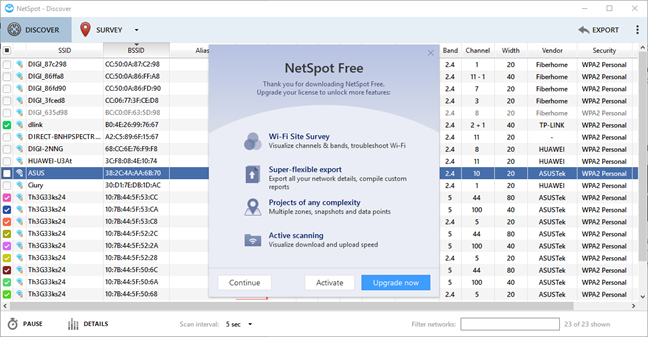
When you start NetSpot, you see a prompt that encourages you to upgrade your license to PRO. Press Continue and you can use the app for free, as long as you want.
Hidden WiFi, Netspot
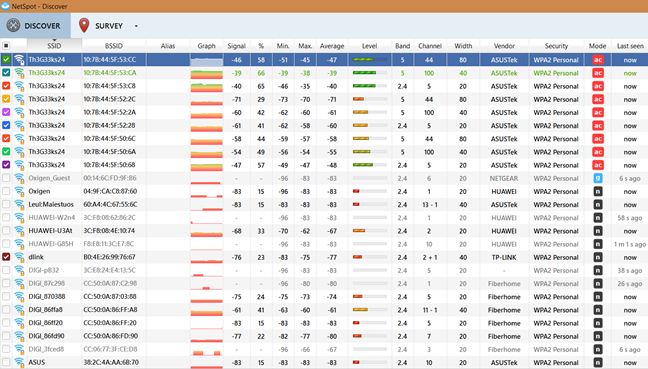
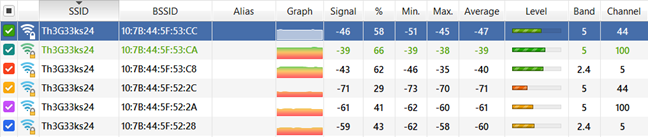
Wait for a couple of seconds until it analyzes the wireless spectrum in your area and it displays the WiFi networks that it finds. For each WiFi network in your area, you see:
Hidden WiFi, Netspot
its SSID or the network name
the MAC address of the router or wireless access point that is emitting the signal
the alias of the network (set by you)
a graph with the signal strength history
the current signal strength measured in dBm, the minimum, maximum and average signal, the level of the network signal
the wireless band on which signal is emitted, the channel used, and the width of the frequency channel (20, 40 or 80 MHz),
the vendor of the device emitting the wireless signal
the security used or the type of encryption
the wireless mode or the standard used for the network: 802.11ac, 802.11n, etc.
when the network was last seen in your area.
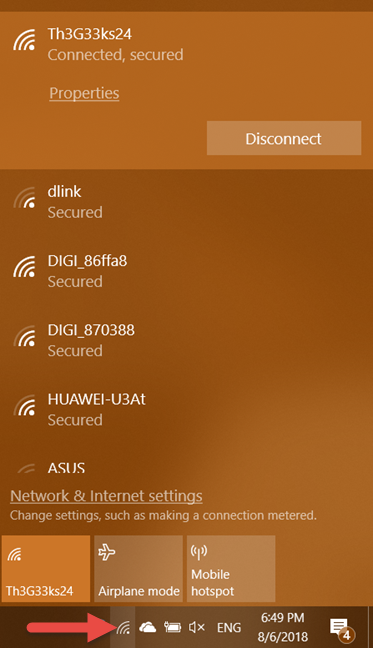
Scroll down the list of WiFi SSIDs and see what NetSpot has discovered. Write down those that interest you. Then, on your Windows laptop or tablet, click or tap the WiFi icon in the system tray area of the taskbar. You see a list with all the wireless networks that are not hidden.
Hidden WiFi, Netspot
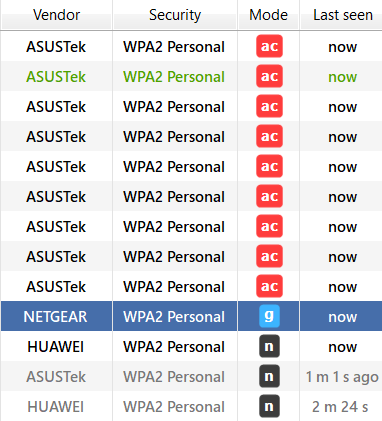
Compare the list of SSIDs in NetSpot with those displayed by Windows, and those that show up only in NetSpot, are hidden by their owners. In our area, Netspot has detected a total of 22 SSIDs or network names. By comparison, Windows 10 detected only 12 wireless networks. Ten wireless networks in our area are hidden. We were able to see all kinds of interesting information about them. For example, we know what kind of encryption they are using, the wireless networking standard used for broadcasting the WiFi signal (802.11ac/n/b/g), or when the networks were last detected. Some of them had a weak signal and kept disappearing from the radar.
Hidden WiFi, Netspot
Another useful piece of information that you get from NetSpot is when a network name is broadcast using many network addresses. This is the case when using wireless repeaters or mesh WiFi systems. If you carefully analyze the data offered by NetSpot, you get an accurate understanding of the wireless architecture in your area.
As you can see from this guide, NetSpot is a useful app that allows you to discover all the wireless networks in your area. In our block of flats, we discovered two wireless networks which are hidden as well as open, with no password set. Their owners thought that, if they hid their WiFi networks, they cannot be found and used by others. They are wrong, and you should not follow their example. With the correct tools, anyone can discover your hidden WiFi and lots of details about how it is set up. Before closing this tutorial, share with us examples about what you have found in your area. We are curious to know your story.
I installed Netspot but the “Hidden Network” that goes by that name is not shown in the list, what do I do ?
IIzod ·
My phone was cloned after letting a friend of 20 years use it and then every electronic device in my house was hacked. They are trying to steal my bitcoins. I noticed changes to my email account used for my account with the coin exchange, so I notified the exchange of the hack and they froze my account and it remains frozen until I know the hackers are gone. I live in a very remote area with my closest neighbor a quarter mile away. I know the hackers have a hidden network because it popped up on one of my computers and there’s no way it could belong to any of my neighbors because we live so far apart so I need to find their router. Any helpful instructions on how to track down a router will be greatly appreciated. I also believe they installed cameras in my home too.
Ciprian Adrian Rusen ·
You can find the location of the router by looking at the signal strength of the hidden Wi-Fi. Move around the house. If you see the strength increasing in one direction, keep moving until you see it around -40 dBm. When you see it around that number, it means that the router is hidden very close by, 2-3-4 meters away from where you stand.
Linda Sloan ·
Stalker for five years and there is a hidden network in my house. He is crazy
t ·
this is very helpful, thank you !!
Fake as hell... ·
Totally stupid… By definition an hidden SSID cannot be just shown magically in the list… As it is, I let you guess, HIDDEN !
James ·
cannot find this app on google play store. where is it?
Anonymous ·
This app is not for Android. It is for Windows, and macOS X.
natalie stone ·
for some reason my wireless connection has become hiddien, I have downloaded the above and can now see my network name on the list, however I am unsure of how to connect to it, any help guys?
Ciprian Adrian Rusen ·
You need to connect to your router via a network cable. Connect a computer with this cable to the router, login to the administration panel of the router and change its settings. Instructions for logging will be found in your router’s manual.
Ankur ·
Useful but I guess you wont make anything out of it.
The only reason you would want to gain such info was to perhaps break in someone PC and thats when linux would be more useful.
Ciprian Adrian Rusen ·
If you would read the whole article you would get an idea on the uses of such a tool. For example, I found it very useful to learn how my network’s wireless signal evolves from room to room, in my apartment.
I will then change the position of the router so that the signal strength is more constant across rooms.
You can also use it to learn if you network is using the same channel as other networks in the area. Changing the channel will make your connection work better, with less interference from other networks.














Discussion (12)
I installed Netspot but the “Hidden Network” that goes by that name is not shown in the list, what do I do ?
My phone was cloned after letting a friend of 20 years use it and then every electronic device in my house was hacked. They are trying to steal my bitcoins. I noticed changes to my email account used for my account with the coin exchange, so I notified the exchange of the hack and they froze my account and it remains frozen until I know the hackers are gone. I live in a very remote area with my closest neighbor a quarter mile away. I know the hackers have a hidden network because it popped up on one of my computers and there’s no way it could belong to any of my neighbors because we live so far apart so I need to find their router. Any helpful instructions on how to track down a router will be greatly appreciated. I also believe they installed cameras in my home too.
You can find the location of the router by looking at the signal strength of the hidden Wi-Fi. Move around the house. If you see the strength increasing in one direction, keep moving until you see it around -40 dBm. When you see it around that number, it means that the router is hidden very close by, 2-3-4 meters away from where you stand.
Stalker for five years and there is a hidden network in my house. He is crazy
this is very helpful, thank you !!
Totally stupid… By definition an hidden SSID cannot be just shown magically in the list… As it is, I let you guess, HIDDEN !
cannot find this app on google play store. where is it?
This app is not for Android. It is for Windows, and macOS X.
for some reason my wireless connection has become hiddien, I have downloaded the above and can now see my network name on the list, however I am unsure of how to connect to it, any help guys?
You need to connect to your router via a network cable. Connect a computer with this cable to the router, login to the administration panel of the router and change its settings. Instructions for logging will be found in your router’s manual.
Useful but I guess you wont make anything out of it.
The only reason you would want to gain such info was to perhaps break in someone PC and thats when linux would be more useful.
If you would read the whole article you would get an idea on the uses of such a tool. For example, I found it very useful to learn how my network’s wireless signal evolves from room to room, in my apartment.
I will then change the position of the router so that the signal strength is more constant across rooms.
You can also use it to learn if you network is using the same channel as other networks in the area. Changing the channel will make your connection work better, with less interference from other networks.