




WhatsApp does not include a built-in option to download Status photos or videos. Still, you can save them easily using a few safe methods on Android, iPhone, or a computer, as long as you view the Status first and respect privacy boundaries.
Table of contents
- Why WhatsApp status downloads are not straightforward
- How to download WhatsApp status photos and videos on Android
- How to download WhatsApp status photos and videos on iPhone
- How to download WhatsApp status using WhatsApp Web on PC or Mac
- Can you download WhatsApp status without the other person knowing
- Is it legal and safe to download WhatsApp status media
- Troubleshooting issues when downloading WhatsApp status
- Tips for saving WhatsApp status media safely
- FAQs
- Summary
Why WhatsApp status downloads are not straightforward
WhatsApp Status updates disappear after 24 hours and stay hidden from standard download menus. The app stores Status media temporarily, which makes downloads possible if you know where to look.
How to download WhatsApp status photos and videos on Android
Use the built-in file manager
Android saves viewed Status media inside a hidden WhatsApp folder. This method works fast and avoids third-party apps.
- Open File Manager or My Files.
- Go to Internal storage → Android → media.
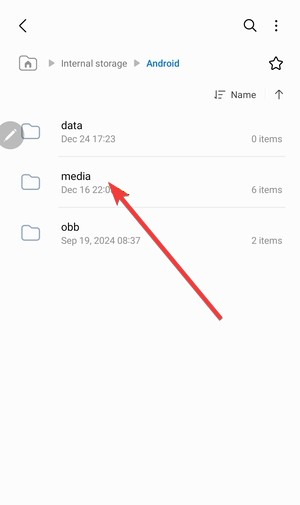

- Open com.whatsapp → WhatsApp → Media → .Statuses.
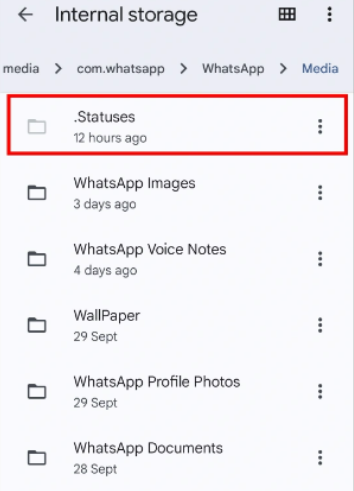

- Long-press the photo or video and copy it to another folder.
You must view the Status first, or it will not appear in this folder.
Use Google Files to access the hidden Status folder
Some Android versions hide system folders by default. Google Files makes them visible.
- Open Files by Google.
- Tap the three-dot menu → Settings.
- Enable Show hidden files.
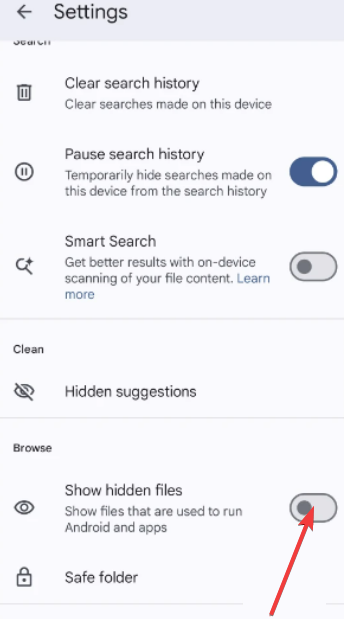

- Navigate to the .Statuses folder and save the media.
This method works well on newer Android releases with stricter storage rules.
Use a dedicated Status saver app
Status saver apps scan the hidden folder automatically. Use them only if manual access fails and avoid apps that request contact or message permissions.
How to download WhatsApp status photos and videos on iPhone
Save status photos using screenshots
iOS blocks access to WhatsApp’s internal files. Screenshots offer the simplest workaround.
- Open the Status photo.
- Take a screenshot using Side button + Volume Up.
- Crop the image in the Photos app.
This method works for photos but reduces image quality slightly.
Save status videos using screen recording
Screen recording lets you capture Status videos directly.
- Enable Screen Recording from Control Center.
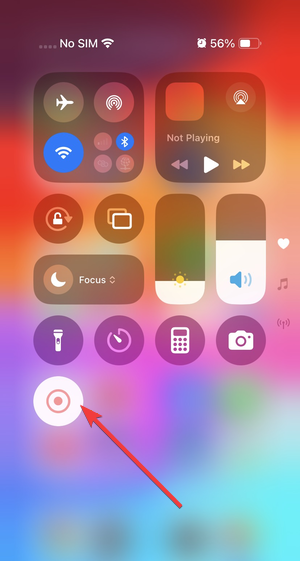

- Start screen recording.
- Play the Status video.
- Stop recording and trim the clip in Photos.
You may lose original resolution, but this method works reliably.
Use WhatsApp Web with iPhone as a workaround
WhatsApp Web offers the cleanest way to save Status media on iPhone.
- Open web.whatsapp.com on a computer. This will display a QR code.
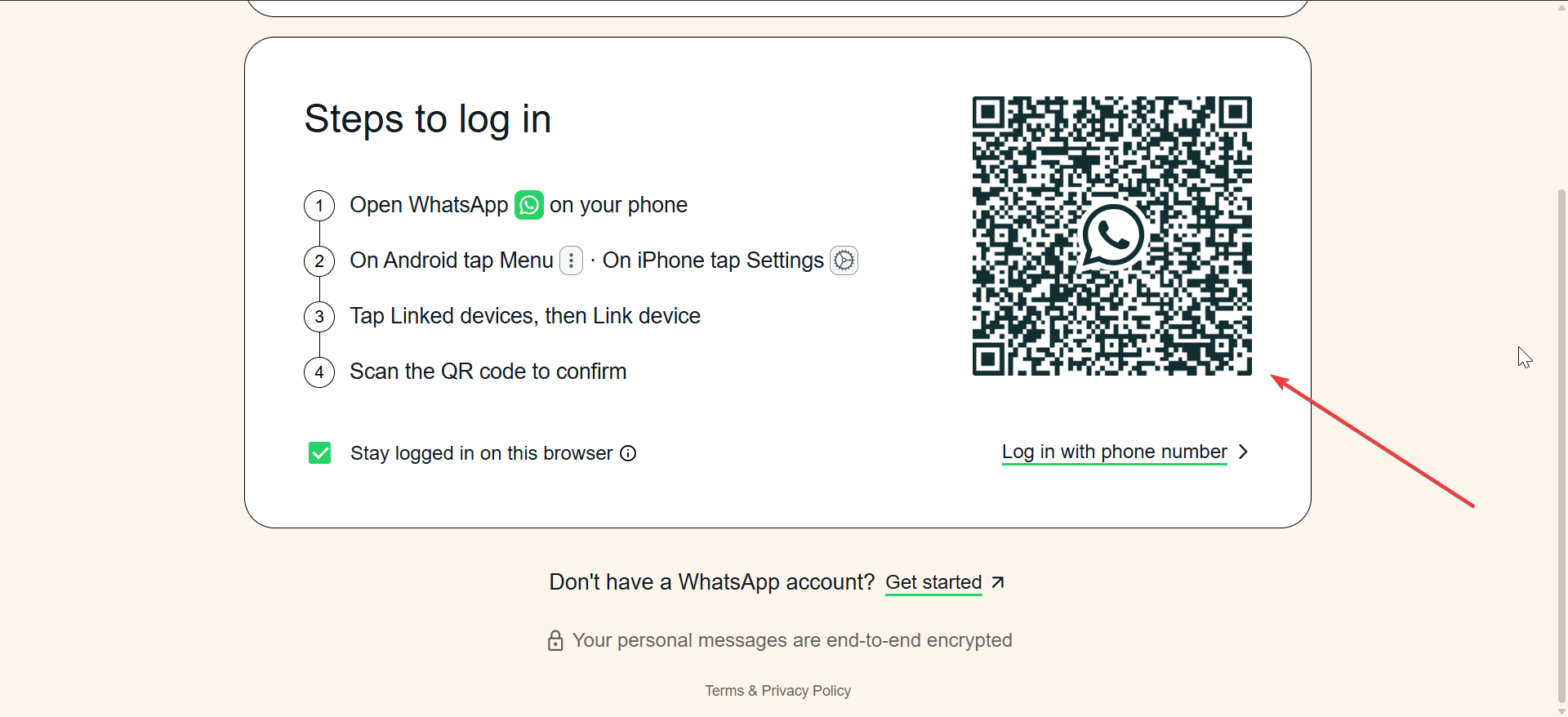

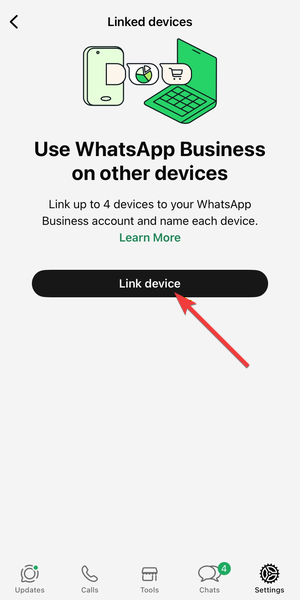
- Scan the QR code by going to WhatsApp → Settings → Linked Devices → Link device on your phone.

- Open the Status tab.
- Right-click the photo or video and save it.
This method preserves original quality without screen recording.
How to download WhatsApp status using WhatsApp Web on PC or Mac
Download status photos and videos directly from the browser
WhatsApp Web temporarily stores Status media in the browser session.
- Open WhatsApp Web.
- Click the Status icon.
- Open the Status photo or video.
- Right-click and choose Save image as or Save video as.
This method works on Windows, macOS, and Linux.
Download WhatsApp status using an extension
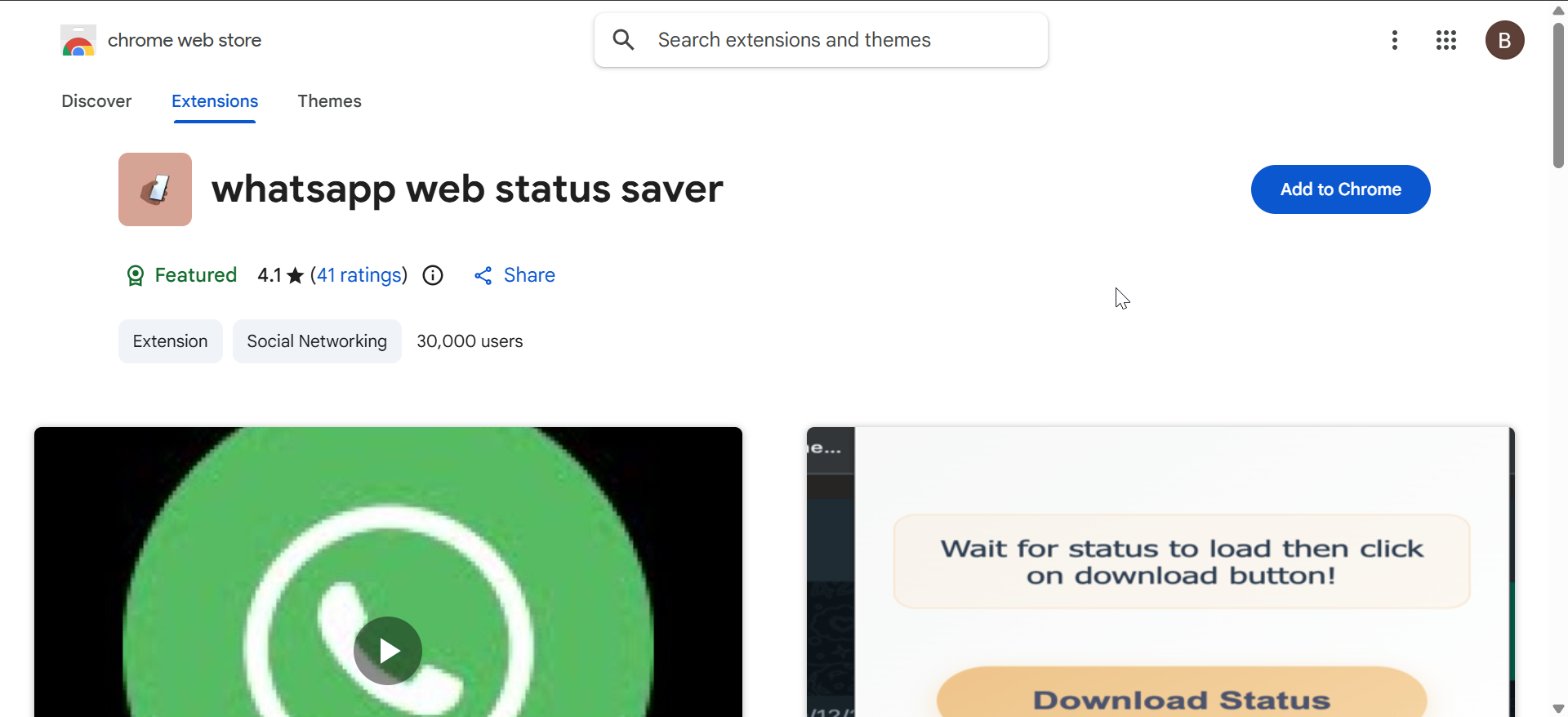
Alternatively, you can use a WhatsApp status saver extension on Chrome and other chromium-based browsers. With most extension, when you open the status, it shows an a pop-up that allows you to save the status with just one click.
Can you download WhatsApp status without the other person knowing
WhatsApp does not notify users when someone downloads or records a Status. Still, always respect personal boundaries and content ownership.
Is it legal and safe to download WhatsApp status media
Personal use usually stays acceptable, but reposting or sharing without consent can violate privacy or copyright rules. Avoid downloading sensitive or private content.
Troubleshooting issues when downloading WhatsApp status
- Status folder not visible on Android: Enable hidden files in your file manager. If the folder still does not appear, update WhatsApp and view the Status again.
- Status video downloads without sound: Turn on system volume and disable silent mode. Screen recordings often mute audio when microphone access stays disabled.
- WhatsApp Web does not show Status updates: Refresh the page and reconnect the linked device. Use a supported browser like Chrome or Edge.
Tips for saving WhatsApp status media safely
- Save files immediately before the 24-hour window ends.
- Avoid apps that request unnecessary permissions.
- Use WhatsApp Web for best quality.
- Ask for permission before reposting content.
FAQs
What is the easiest way to download WhatsApp status videos
Using WhatsApp Web on a computer provides the cleanest and highest-quality method.
Can I download WhatsApp status photos in original quality
Yes, WhatsApp Web preserves original resolution better than screenshots.
Do status saver apps still work on newer Android versions
Some work, but manual folder access remains safer and more reliable.
Why can’t iPhone save WhatsApp status directly
iOS restricts app file access, which blocks direct downloads.
Summary
- Android lets you download WhatsApp Status directly from a hidden folder.
- iPhone relies on screenshots, screen recording, or WhatsApp Web.
- WhatsApp Web offers the best quality on any device.
- Downloads stay private, but consent still matters.
Using the right method depends on your device and quality needs. For consistent results and original files, WhatsApp Web remains the most reliable option across platforms.
Finally, if you are facing media download failed errors on WhatsApp, check our detailed guide to fix the problems.


Discussion (0)
Be the first to comment.