




Yes, Target takes Apple Pay in stores, online, and in the Target app. You can pay using Apple Pay at checkout counters, self-checkout lanes, and during online purchases when Apple Pay is set up on your device.
This makes Target a convenient option for shoppers who prefer fast, contactless payments using an iPhone or Apple Watch.
Set Up A Card Before Using Apple Pay At Target
Before you can use Apple Pay in store at Target, you must add at least one debit or credit card to the Wallet app on your Apple device. Apple Pay will not work at checkout unless this setup is completed first.
This setup only needs to be done once, and you can add multiple cards if needed.
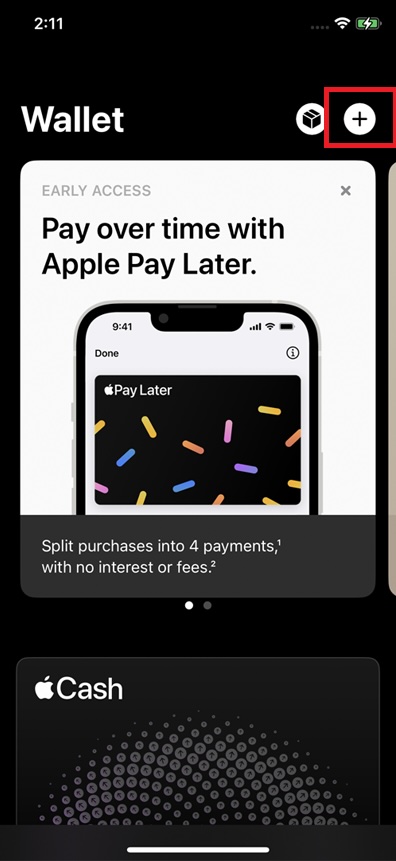
- Open the Wallet app on your iPhone.
- Tap the Add Card button in the top-right corner.
- Select Debit Or Credit Card.
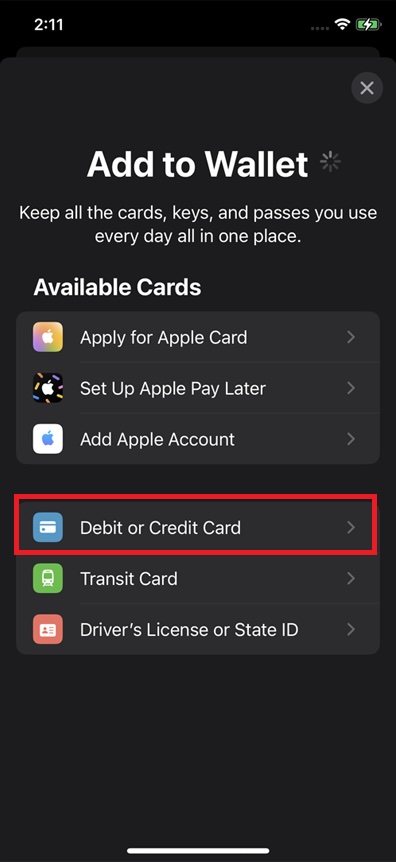
- Scan your card or enter the details manually.

- Verify the card using your bank’s confirmation method.
- Make sure the card shows as active in Wallet.
If you plan to use Apple Pay with an Apple Watch, confirm that the card also appears in the Watch app under Wallet settings.
How To Use Apple Pay At Target In Store
Once your card is set up, paying at a Target store takes only a few seconds. Apple Pay works at standard checkout lanes and self-checkout terminals that support contactless payments.
- Unlock your iPhone or raise your Apple Watch.
- Open the Wallet app automatically by double-clicking the side button.
- Select the card you want to use.
- Hold your device near the contactless payment reader.
- Authenticate with Face ID, Touch ID, or your passcode.
- Wait for the payment confirmation on the screen.
How To Use Apple Pay In The Target App
Apple Pay also works inside the Target app for pickup, delivery, and shipping orders.
- Open the Target app and add items to your cart.
- Go to checkout and choose a fulfillment option.
- Select Apple Pay as the payment method.
- Confirm the purchase using Face ID, Touch ID, or passcode.
How To Use Apple Pay On Target.com
You can use Apple Pay on Target’s website when shopping from Safari on a compatible Apple device.
- Open Target.com in Safari.
- Add items to your cart and proceed to checkout.
- Select Apple Pay as your payment option.
- Approve the payment on your device.
Benefits Of Using Apple Pay At Target
Apple Pay offers speed and security when shopping at Target. Your actual card number is never shared, and each transaction uses encrypted tokenization.
It also allows for contactless checkout, which many shoppers prefer for convenience.
Other Payment Methods Target Accepts
Target accepts multiple payment options in addition to Apple Pay, including credit cards, debit cards, Target GiftCards, Target RedCard, cash in stores, and other digital wallets like Google Pay and Samsung Pay.
Troubleshooting Common Problems
If Apple Pay does not work at Target, the issue is usually related to setup or device authentication.
- Confirm that your card is active in the Wallet app.
- Make sure your device is unlocked before payment.
- Hold the device steady near the reader until confirmation.
- Try a different card if the first one fails.
- Restart your device and try again.
Tips
- Set a default card in Wallet for faster checkout.
- Keep Face ID or Touch ID enabled for smoother payments.
- Use Apple Watch for hands-free checkout.
- Carry a backup payment method in case a terminal is offline.
FAQ
Can I use Apple Pay at Target self-checkout
Yes. Apple Pay works at self-checkout lanes that support contactless payments.
Does Target offer cash back with Apple Pay
No. Target does not support cash back when paying with Apple Pay.
Can I add Target RedCard to Apple Pay
No. Target RedCard cannot be added to Apple Pay.
Does Apple Pay work at all Target locations
Most Target stores support Apple Pay, but terminal availability can vary.
Summary
- Target accepts Apple Pay in store, online, and in the app.
- A card must be added to Wallet before using Apple Pay.
- Apple Pay works with iPhone and Apple Watch.
- Payments are fast, secure, and contactless.
Conclusion
Target takes Apple Pay across multiple shopping options, including in-store checkout, self-checkout, the Target app, and online purchases. As long as your card is set up in the Wallet app, Apple Pay provides a fast and secure way to pay at Target without using a physical card.


Discussion (0)
Be the first to comment.