



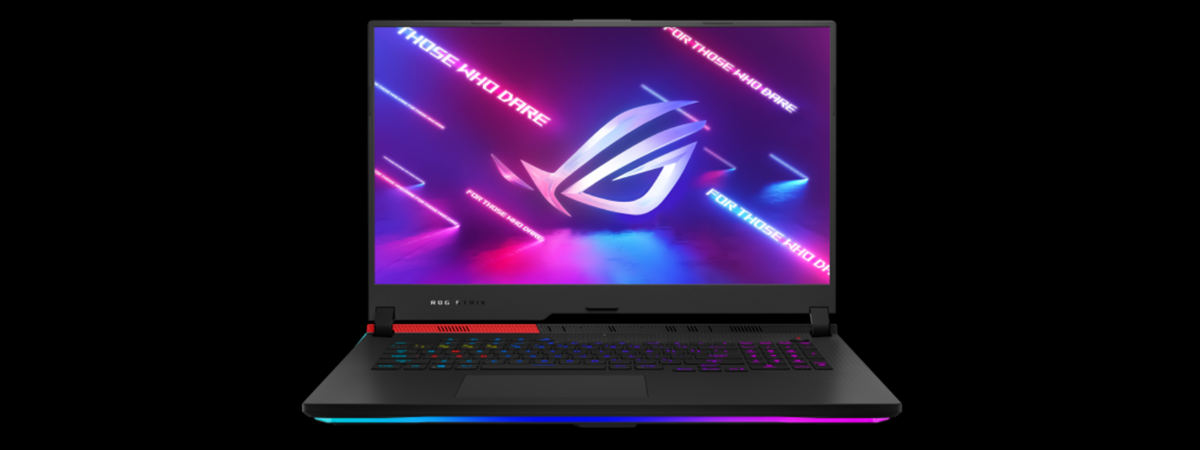
ASUS ROG Strix G17 G713 is an interesting lineup of gaming laptops that bundle the latest AMD Ryzen processors with powerful graphics cards from Nvidia, at an excellent price. This lineup includes several models at different price-points, including some that are surprisingly affordable. One of the best in terms of price per performance is the G713QC-HX008, a laptop that we tested and then bought as one of our work laptops. It’s a 17.3” gaming notebook that features a high-end AMD Ryzen 7 5800H processor, 16GB of DDR4 RAM, and the GeForce RTX 3050 graphics card. If you want to know more about the ASUS ROG Strix G17 G713 lineup in general and the G713QC model in particular, read this review, and see how it works with Windows 11:
![Verdict]()

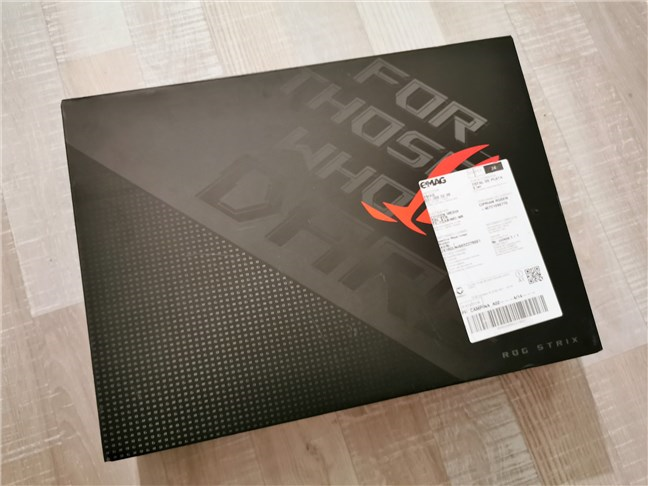
 The packaging used for ASUS ROG Strix G17
In the package, you find the laptop, its power adapter, and power cable, the quick start guide, the warranty card, and a leaflet inviting you to install the MyASUS app.
The packaging used for ASUS ROG Strix G17
In the package, you find the laptop, its power adapter, and power cable, the quick start guide, the warranty card, and a leaflet inviting you to install the MyASUS app.
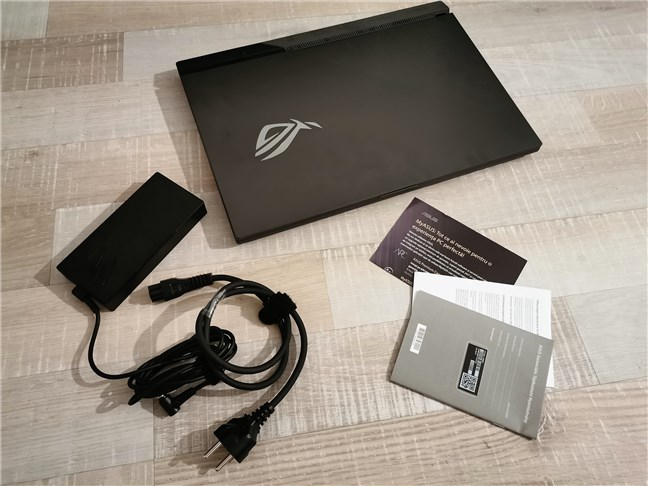 Unboxing the ASUS ROG Strix G17
Unpacking the ASUS ROG Strix G17 is a straightforward experience. What we can say is that we loved the looks of the laptop from the first glance.
Unboxing the ASUS ROG Strix G17
Unpacking the ASUS ROG Strix G17 is a straightforward experience. What we can say is that we loved the looks of the laptop from the first glance.
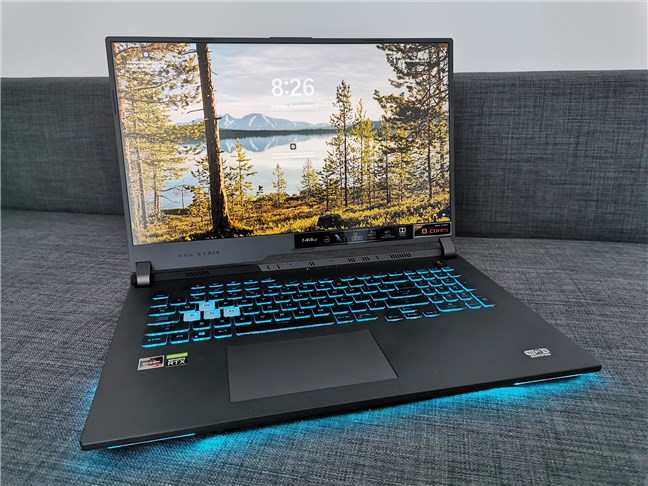 What the ASUS ROG Strix G17 G713QC looks like
On the laptop’s screen lid, the ROG logo is also illuminated, although it only lights up in white and cannot be disabled even if you want such a thing.
What the ASUS ROG Strix G17 G713QC looks like
On the laptop’s screen lid, the ROG logo is also illuminated, although it only lights up in white and cannot be disabled even if you want such a thing.
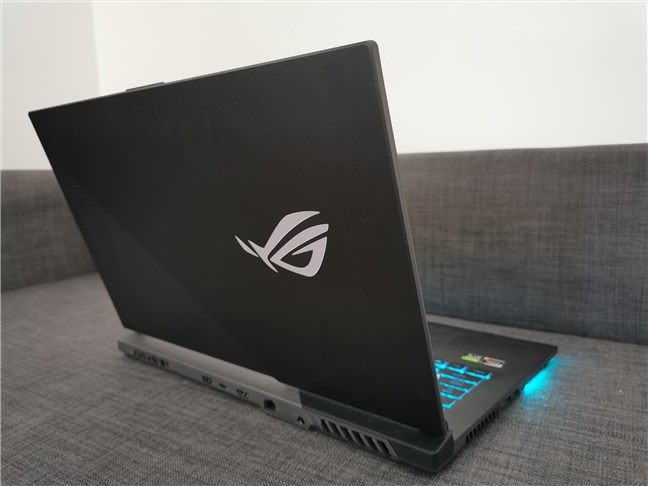 The lid of the ASUS ROG Strix G17 G713QC
The hinges that connect the screen to the laptop’s body are pretty large and seem to be robust. The laptop’s rear and sides hold generous air vents, and the bottom is filled with tiny holes arranged in patterns that fit the main heating components like the processor, graphics, and RAM. Everything put together should provide adequate airflow to keep the laptop’s insides cool at all times.
The lid of the ASUS ROG Strix G17 G713QC
The hinges that connect the screen to the laptop’s body are pretty large and seem to be robust. The laptop’s rear and sides hold generous air vents, and the bottom is filled with tiny holes arranged in patterns that fit the main heating components like the processor, graphics, and RAM. Everything put together should provide adequate airflow to keep the laptop’s insides cool at all times.
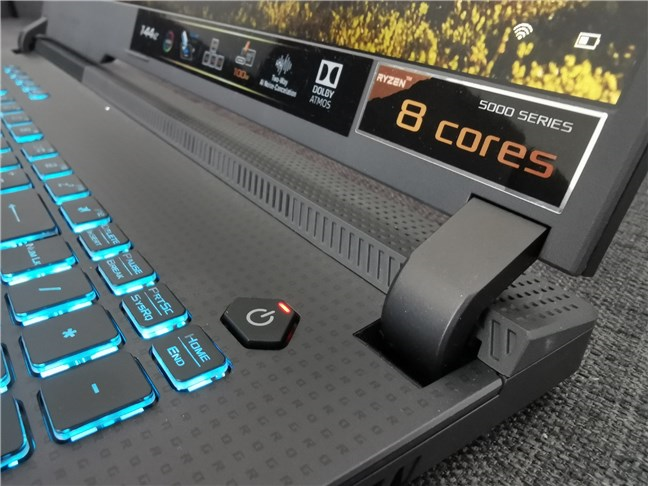 ASUS ROG Strix G17 G713QC has robust hinges
The ASUS ROG Strix G17 G713 series has 17” laptops with a body size that is not as large as you might expect, measuring 5.55 x 11.10 x 0.84 ~ 0.97 inches or 39.5 x 28.2 x 2.14 ~ 2.46 cm in width by depth by height. The weight is 5.29 pounds or 2.40 kg.
The laptop gets its wits from an AMD Ryzen 7 5800H processor, a model launched by AMD in the spring of 2021. It’s built on the 7-nanometer manufacturing process and comes with 8 cores (16 threads) running at a base frequency of 3.2 GHz and a maximum boost clock of 4.4 GHz. The CPU also offers 16MB of Level 3 cache memory and has a default TDP of 45 Watts. It’s one of the fastest and most powerful mobile processors available today.
ASUS ROG Strix G17 G713QC has robust hinges
The ASUS ROG Strix G17 G713 series has 17” laptops with a body size that is not as large as you might expect, measuring 5.55 x 11.10 x 0.84 ~ 0.97 inches or 39.5 x 28.2 x 2.14 ~ 2.46 cm in width by depth by height. The weight is 5.29 pounds or 2.40 kg.
The laptop gets its wits from an AMD Ryzen 7 5800H processor, a model launched by AMD in the spring of 2021. It’s built on the 7-nanometer manufacturing process and comes with 8 cores (16 threads) running at a base frequency of 3.2 GHz and a maximum boost clock of 4.4 GHz. The CPU also offers 16MB of Level 3 cache memory and has a default TDP of 45 Watts. It’s one of the fastest and most powerful mobile processors available today.
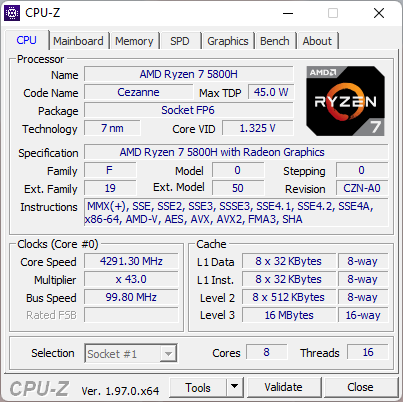
 ASUS ROG Strix G17 G713QC: Processor details
In terms of memory, the laptop we tested had 16GB of DDR4 RAM running at a frequency of 3200 MHz. There are two SO-DIMM slots available on the laptop, and, if you need or want, you can upgrade to a maximum of 32GB of RAM.
ASUS ROG Strix G17 G713QC: Processor details
In terms of memory, the laptop we tested had 16GB of DDR4 RAM running at a frequency of 3200 MHz. There are two SO-DIMM slots available on the laptop, and, if you need or want, you can upgrade to a maximum of 32GB of RAM.
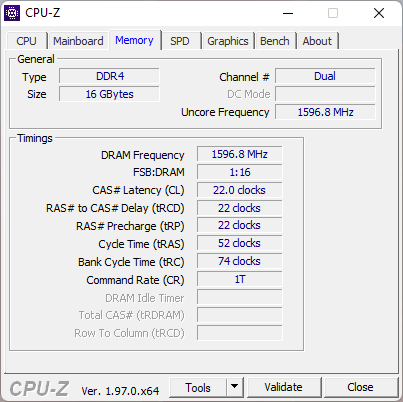 ASUS ROG Strix G17 G713QC: RAM specs
Regarding graphics, the ASUS ROG Strix G17 G713QC laptop is equipped with a GPU chip included in its processor, but also a dedicated Nvidia graphics card. The processor’s GPU chip is an AMD Radeon Graphics with 8 cores running at 2000 MHz.
ASUS ROG Strix G17 G713QC: RAM specs
Regarding graphics, the ASUS ROG Strix G17 G713QC laptop is equipped with a GPU chip included in its processor, but also a dedicated Nvidia graphics card. The processor’s GPU chip is an AMD Radeon Graphics with 8 cores running at 2000 MHz.
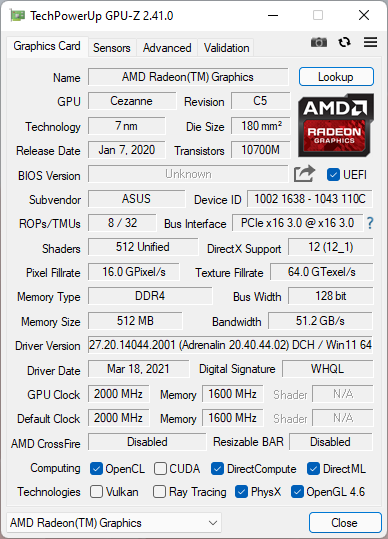
 ASUS ROG Strix G17 G713QC: Integrated GPU details
The more powerful discrete graphics card is an NVIDIA GeForce RTX 3050 with 4GB of GDDR6, running on a 128-bit bus width. Although the RAM is a bit less than you might expect, this graphics card offers support for Nvidia’s Ray Tracing and DLSS technologies and should be able to run any game today, at least on medium video quality settings.
ASUS ROG Strix G17 G713QC: Integrated GPU details
The more powerful discrete graphics card is an NVIDIA GeForce RTX 3050 with 4GB of GDDR6, running on a 128-bit bus width. Although the RAM is a bit less than you might expect, this graphics card offers support for Nvidia’s Ray Tracing and DLSS technologies and should be able to run any game today, at least on medium video quality settings.
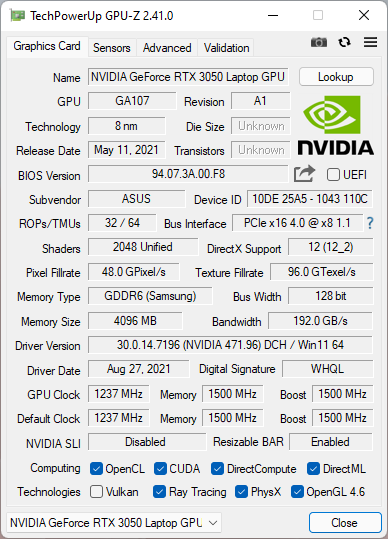 ASUS ROG Strix G17 G713QC: Geforce RTX 3050
The display uses an IPS-Level 17.3” FHD (1920 x 1080 pixels) panel with a high refresh rate of 144 Hz. However, the IPS-Level term is misleading, as it does not mean that it’s an IPS panel. It only means that ASUS considers that its quality is close to that of an IPS panel. In reality, it’s probably a TN or VA panel.
As for the storage options available, the ASUS ROG Strix G17 G713QC comes with a 512GB M.2 NVMe PCIe 3.0 solid-state drive made by Samsung, mounted in one of the laptop’s two M.2 2280 PCIe 4.0 slots. Unfortunately, there are no standard SATA ports inside it, and the two M.2 slots don’t support M.2 SATA SSDs either, only NVMe.
ASUS ROG Strix G17 G713QC: Geforce RTX 3050
The display uses an IPS-Level 17.3” FHD (1920 x 1080 pixels) panel with a high refresh rate of 144 Hz. However, the IPS-Level term is misleading, as it does not mean that it’s an IPS panel. It only means that ASUS considers that its quality is close to that of an IPS panel. In reality, it’s probably a TN or VA panel.
As for the storage options available, the ASUS ROG Strix G17 G713QC comes with a 512GB M.2 NVMe PCIe 3.0 solid-state drive made by Samsung, mounted in one of the laptop’s two M.2 2280 PCIe 4.0 slots. Unfortunately, there are no standard SATA ports inside it, and the two M.2 slots don’t support M.2 SATA SSDs either, only NVMe.
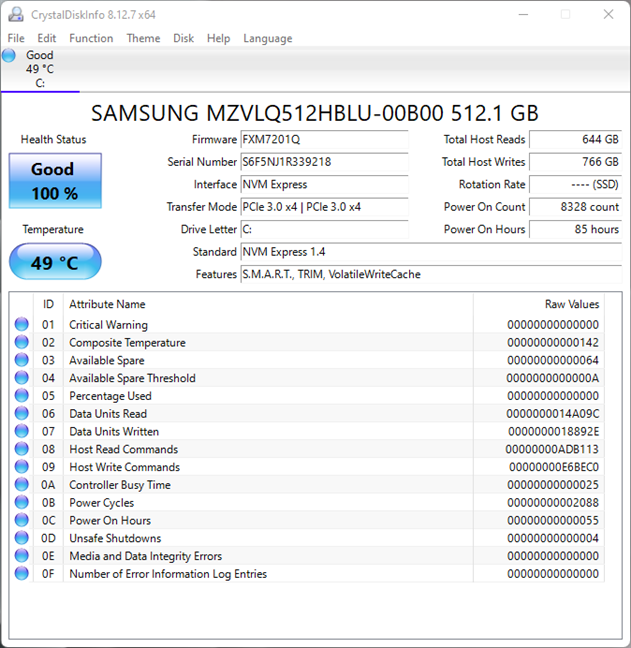
 The Samsung SSD used by the laptop
ASUS ROG Strix G17 G713QC bundles great options in terms of networking. On the wireless side, you get WiFi 6 (Intel AX201) with 2×2 MU-MIMO with Bluetooth 5.0, and for wired connections, you get Gigabit LAN (Realtek RTL8168/8111).
Regarding audio, the ASUS ROG Strix G17 G713 laptops deliver it via a set of built-in stereo speakers, each rated at 2 Watts, and Dolby Atmos. There’s also a noise-canceling microphone for when you need to talk. 🙂 Unfortunately, there’s no webcam whatsoever, so if you intend on using your laptop for video conferences, you’ll need to buy a webcam.
The laptop is relatively generous when it comes to the input/output ports available. Some are found on its rear side, while others are found on the left. On the rear, there is a USB 3.2 Gen 2 Type-C port, a USB 3.2 Gen 1 Type-A port, an RJ-45 Ethernet port, an HDMI 2.0b port, and the AC power connector.
The Samsung SSD used by the laptop
ASUS ROG Strix G17 G713QC bundles great options in terms of networking. On the wireless side, you get WiFi 6 (Intel AX201) with 2×2 MU-MIMO with Bluetooth 5.0, and for wired connections, you get Gigabit LAN (Realtek RTL8168/8111).
Regarding audio, the ASUS ROG Strix G17 G713 laptops deliver it via a set of built-in stereo speakers, each rated at 2 Watts, and Dolby Atmos. There’s also a noise-canceling microphone for when you need to talk. 🙂 Unfortunately, there’s no webcam whatsoever, so if you intend on using your laptop for video conferences, you’ll need to buy a webcam.
The laptop is relatively generous when it comes to the input/output ports available. Some are found on its rear side, while others are found on the left. On the rear, there is a USB 3.2 Gen 2 Type-C port, a USB 3.2 Gen 1 Type-A port, an RJ-45 Ethernet port, an HDMI 2.0b port, and the AC power connector.
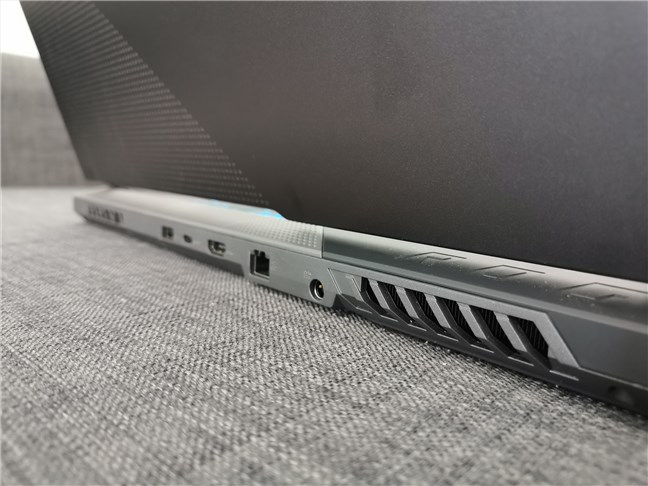 The rear ports found on the ASUS ROG Strix G17
On the left edge of the laptop, you get two USB 3.2 Gen 1 Type-A ports and a 3.5 mm combo audio jack. The only thing missing here is a card reader, in case you were wondering. 🙂
The rear ports found on the ASUS ROG Strix G17
On the left edge of the laptop, you get two USB 3.2 Gen 1 Type-A ports and a 3.5 mm combo audio jack. The only thing missing here is a card reader, in case you were wondering. 🙂
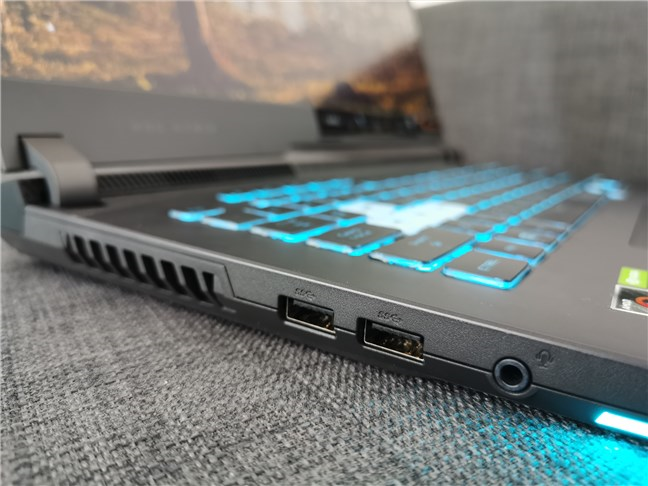 The ports found on the notebook's left side
Finally, you should also know that the ASUS ROG Strix G17 G713 bundles a 4-cell Li-ion battery with a capacity of 56WHrs. Our exact model didn’t have any operating system installed, although other variations of the laptop can come with Windows 10 Home or Pro. ASUS also says that this laptop supports Windows 11, and we can testify to that, as we already installed the Beta version.
For more details about the features and technical specs of this laptop and alternative configurations for it, visit the ASUS ROG Strix G17 G713 webpage.
The hardware specs of the ASUS ROG Strix G17 G713 series recommend it to anyone who wants a gaming laptop that can run any game at medium to high graphics settings. The design is neat, and the RGB-illuminated keyboard, as well as the LED bar on its bottom front, can make this laptop a “light delight.” 🙂
On the next page of this review, we share details about the user experience, the software, and apps bundled with the ASUS ROG Strix G17 G713QC laptop, as well as its benchmark results.
The ports found on the notebook's left side
Finally, you should also know that the ASUS ROG Strix G17 G713 bundles a 4-cell Li-ion battery with a capacity of 56WHrs. Our exact model didn’t have any operating system installed, although other variations of the laptop can come with Windows 10 Home or Pro. ASUS also says that this laptop supports Windows 11, and we can testify to that, as we already installed the Beta version.
For more details about the features and technical specs of this laptop and alternative configurations for it, visit the ASUS ROG Strix G17 G713 webpage.
The hardware specs of the ASUS ROG Strix G17 G713 series recommend it to anyone who wants a gaming laptop that can run any game at medium to high graphics settings. The design is neat, and the RGB-illuminated keyboard, as well as the LED bar on its bottom front, can make this laptop a “light delight.” 🙂
On the next page of this review, we share details about the user experience, the software, and apps bundled with the ASUS ROG Strix G17 G713QC laptop, as well as its benchmark results.
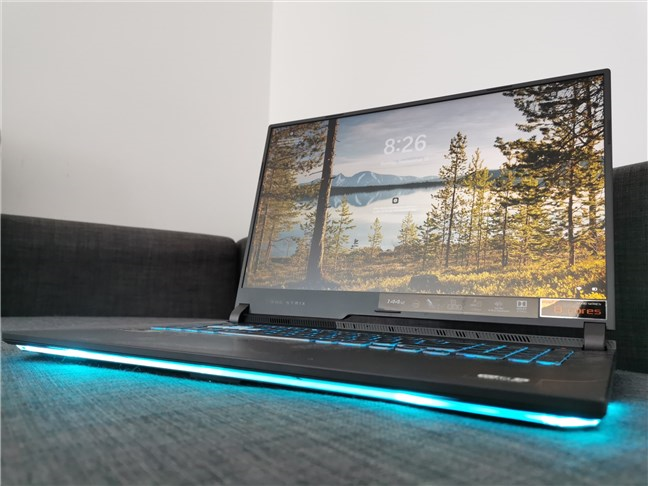 A look at the ASUS ROG Strix G17 G713QC
As for gaming, my experience with the ASUS ROG Strix G17 G713QC was good and, if I also take its price into consideration, I could actually say great! Among the games I played and still play, I count Metro Exodus, Shadow of the Tomb Raider, Assassin’s Creed Valhalla, and League of Legends. The first three run well using medium to high graphics settings, while the latter is too easy for what this laptop can do. 🙂 You’ll find more details on the gaming experience in the benchmarks section of this review.
The keyboard on the ASUS ROG Strix G17 G713 series is excellent. It uses rubber dome keys, and it’s RGB-illuminated. I found it very comfortable to type on, which is something that obviously matters greatly for me. It doesn’t bend and feels solid overall. The keys look great with their large characters, and the lighting effects are independently customizable for each key. Furthermore, the WASD keycaps are semitransparent and have a different texture that makes it easier to find them while gaming.
A look at the ASUS ROG Strix G17 G713QC
As for gaming, my experience with the ASUS ROG Strix G17 G713QC was good and, if I also take its price into consideration, I could actually say great! Among the games I played and still play, I count Metro Exodus, Shadow of the Tomb Raider, Assassin’s Creed Valhalla, and League of Legends. The first three run well using medium to high graphics settings, while the latter is too easy for what this laptop can do. 🙂 You’ll find more details on the gaming experience in the benchmarks section of this review.
The keyboard on the ASUS ROG Strix G17 G713 series is excellent. It uses rubber dome keys, and it’s RGB-illuminated. I found it very comfortable to type on, which is something that obviously matters greatly for me. It doesn’t bend and feels solid overall. The keys look great with their large characters, and the lighting effects are independently customizable for each key. Furthermore, the WASD keycaps are semitransparent and have a different texture that makes it easier to find them while gaming.
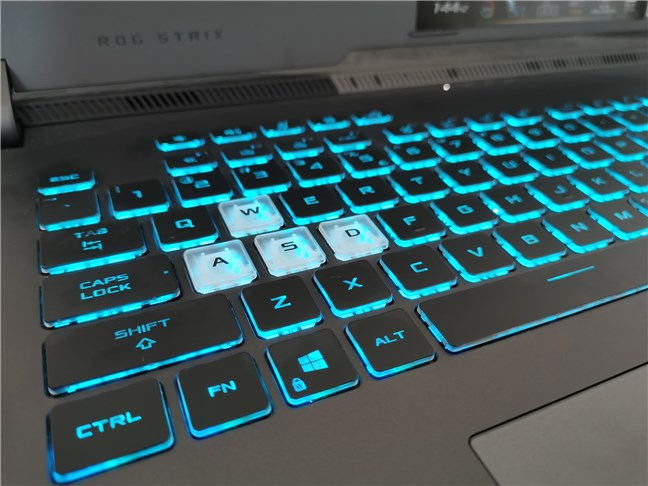 The keyboard on the ASUS ROG Strix G17 G713QC
The only quirk I don’t like about the keyboard is the fact that the Numpad is not very well delimited from the standard keys. One of the unwanted things that made me do repeatedly was press the F12 key instead of Delete, which proved to be quite annoying when writing.
The keyboard on the ASUS ROG Strix G17 G713QC
The only quirk I don’t like about the keyboard is the fact that the Numpad is not very well delimited from the standard keys. One of the unwanted things that made me do repeatedly was press the F12 key instead of Delete, which proved to be quite annoying when writing.
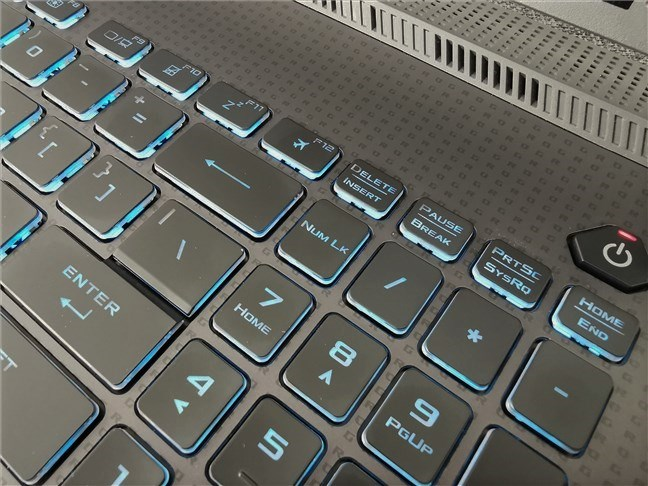 Numpad is too close to the standard keys
The touchpad is large and responsive, and its surface feels soft, which is nice. The left and right touchpad buttons are built-in, but pressing them gives you a satisfying feedback.
Numpad is too close to the standard keys
The touchpad is large and responsive, and its surface feels soft, which is nice. The left and right touchpad buttons are built-in, but pressing them gives you a satisfying feedback.
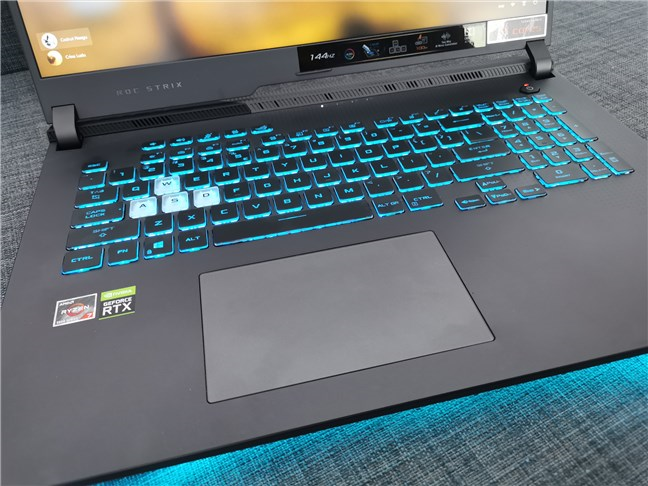 The large trackpad found on this gaming laptop
Gaming laptops usually have problems with dissipating heat, and many of them tend to get parts of the keyboard or touchpad too hot to be comfortable placing your hands on them. The good news is that the ASUS ROG Strix G17 G713QC is not one of those troublesome models. Its cooling system gets the heat out through its back and sides, and neither the keyboard nor the touchpad gets too warm.
The large trackpad found on this gaming laptop
Gaming laptops usually have problems with dissipating heat, and many of them tend to get parts of the keyboard or touchpad too hot to be comfortable placing your hands on them. The good news is that the ASUS ROG Strix G17 G713QC is not one of those troublesome models. Its cooling system gets the heat out through its back and sides, and neither the keyboard nor the touchpad gets too warm.
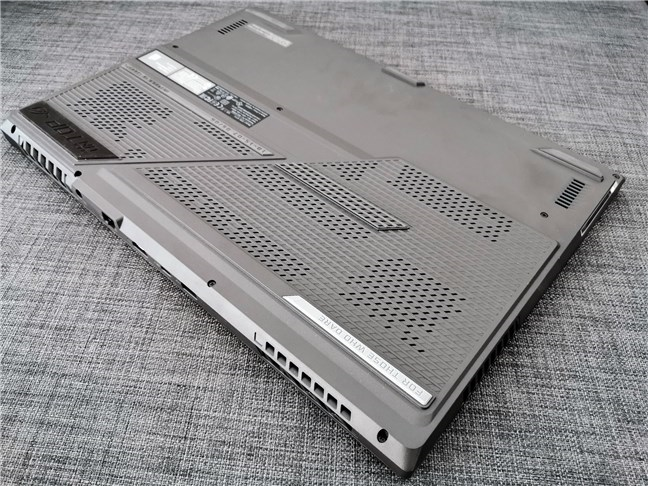 The cooling system of the ASUS ROG G17 G713
As for the audio quality, things could be better, to be honest. If you’re using headphones, it’s great, but the built-in speakers are relatively weak. They don’t sound bad, but the maximum sound level is less than what you’d expect.
Using the ASUS ROG Strix G17 G713QC is a pleasant experience. It’s fast and powerful, and the keyboard is actually good for typing. It also doesn’t get hot, and, at least in productivity tasks, it’s very silent.
The cooling system of the ASUS ROG G17 G713
As for the audio quality, things could be better, to be honest. If you’re using headphones, it’s great, but the built-in speakers are relatively weak. They don’t sound bad, but the maximum sound level is less than what you’d expect.
Using the ASUS ROG Strix G17 G713QC is a pleasant experience. It’s fast and powerful, and the keyboard is actually good for typing. It also doesn’t get hot, and, at least in productivity tasks, it’s very silent.
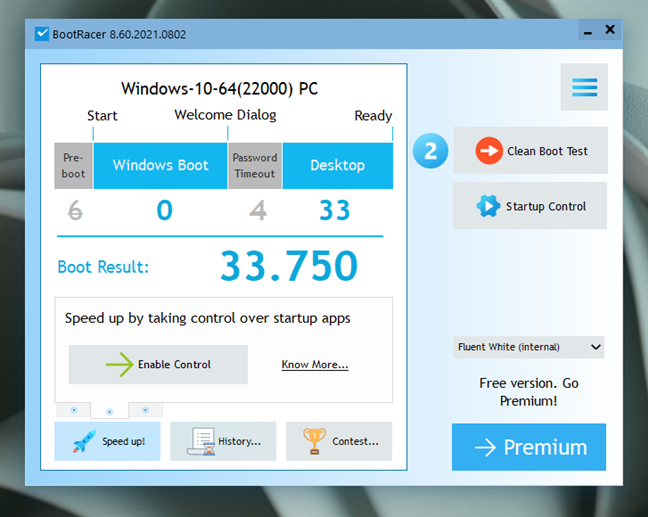
 Boot time in Windows 11
Next, we tested the 512GB M.2 NVMe Samsung SSD used by our ASUS ROG Strix G17 G713QC. For that, we used CrystalDiskMark, and, as you can see below, both the reading and writing speeds are excellent.
Boot time in Windows 11
Next, we tested the 512GB M.2 NVMe Samsung SSD used by our ASUS ROG Strix G17 G713QC. For that, we used CrystalDiskMark, and, as you can see below, both the reading and writing speeds are excellent.
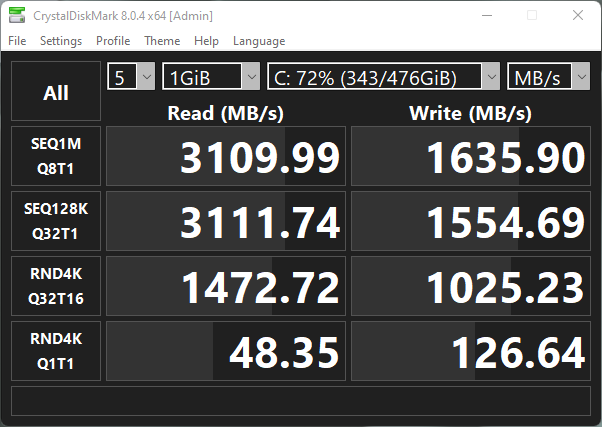
 CrystalDiskMark: SSD benchmark results
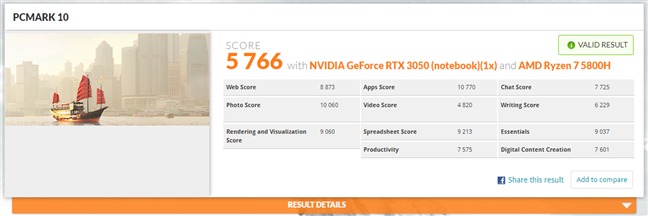
Before the gaming benchmarks, we checked how the laptop fares in everyday productivity tasks using PCMark 10. This app evaluates performance when working with Office apps, videoconferencing, browsing the internet, and creating digital content. As expected, we obtained a high score of 5766 points.
CrystalDiskMark: SSD benchmark results
Before the gaming benchmarks, we checked how the laptop fares in everyday productivity tasks using PCMark 10. This app evaluates performance when working with Office apps, videoconferencing, browsing the internet, and creating digital content. As expected, we obtained a high score of 5766 points.
 Benchmark results in PCMark 10
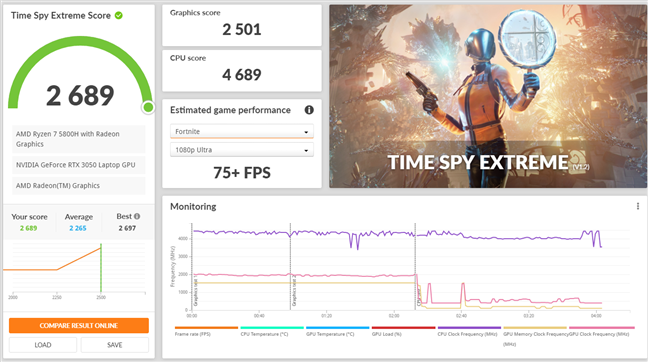
Next came the gaming benchmarks, starting with 3DMark's Time Spy Extreme, in which we got a score of 2689 points. That means this laptop offers a similar performance to a notebook equipped with an Nvidia RTX 2060 graphics card.
Benchmark results in PCMark 10
Next came the gaming benchmarks, starting with 3DMark's Time Spy Extreme, in which we got a score of 2689 points. That means this laptop offers a similar performance to a notebook equipped with an Nvidia RTX 2060 graphics card.
 Benchmark results in 3DMark Time Spy Extreme
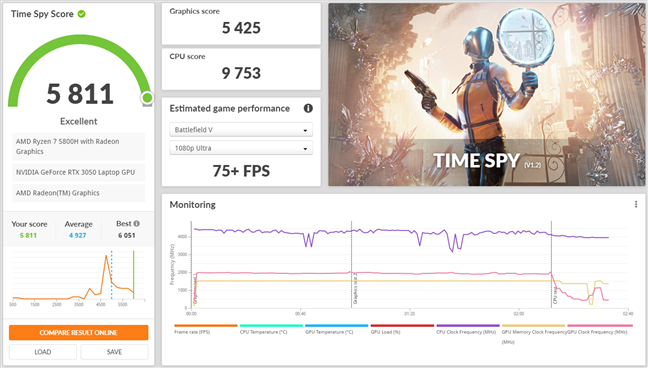
In 3DMark's regular Time Spy benchmark, ASUS ROG Strix G17 G713QC had a score of 5811 points. It's a better score than 43% of all the computers and laptops ranked by 3DMark.
Benchmark results in 3DMark Time Spy Extreme
In 3DMark's regular Time Spy benchmark, ASUS ROG Strix G17 G713QC had a score of 5811 points. It's a better score than 43% of all the computers and laptops ranked by 3DMark.
 Benchmark results in 3DMark Time Spy
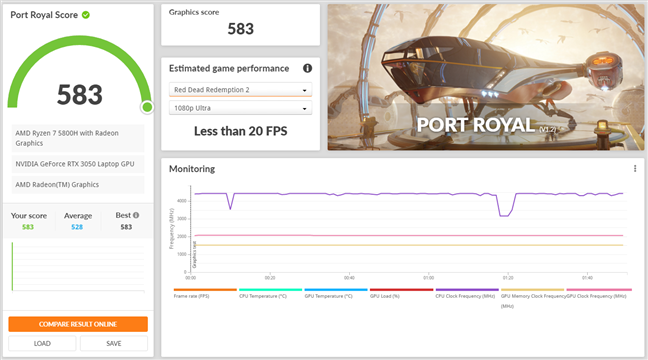
The third test we ran was 3DMark’s Port Royal, which measures the graphics performance for ray tracing effects. ASUS ROG Strix G17 G713QC got a score of 583 points. It’s a very low score for ray tracing and has to do with the small amount of graphics memory and bus width of the Nvidia GeForce RTX 3050 GPU (only 4GB and 128-bit bus width). Still, being an RTX card, it means that it also supports DLSS, which is the next thing we tested.
Benchmark results in 3DMark Time Spy
The third test we ran was 3DMark’s Port Royal, which measures the graphics performance for ray tracing effects. ASUS ROG Strix G17 G713QC got a score of 583 points. It’s a very low score for ray tracing and has to do with the small amount of graphics memory and bus width of the Nvidia GeForce RTX 3050 GPU (only 4GB and 128-bit bus width). Still, being an RTX card, it means that it also supports DLSS, which is the next thing we tested.
 Benchmark results in 3DMark Port Royale (Ray Tracing)
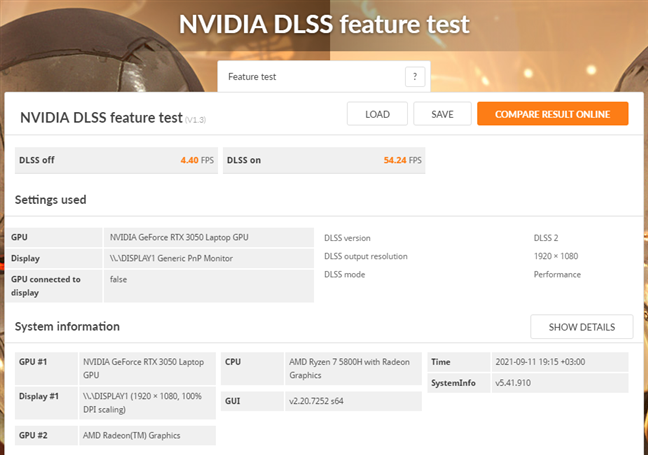
In 3DMark’s Nvidia DLSS feature test, this notebook rendered an average of only 4.4 frames per second with DLSS off. Turning DLSS on and using its Performance setting, it managed to achieve 54.24 frames per second. That’s quite an impressive change, wouldn’t you say so?
Benchmark results in 3DMark Port Royale (Ray Tracing)
In 3DMark’s Nvidia DLSS feature test, this notebook rendered an average of only 4.4 frames per second with DLSS off. Turning DLSS on and using its Performance setting, it managed to achieve 54.24 frames per second. That’s quite an impressive change, wouldn’t you say so?
 Benchmark results in 3DMark Nvidia DLSS
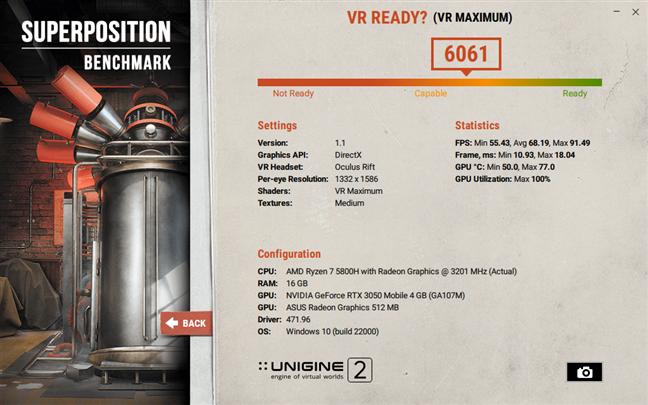
To see whether the ASUS ROG Strix G17 G713QC can run VR (Virtual Reality) apps, we used the Unigine’s SuperPosition VR Maximum benchmark. The laptop managed to achieve a score of 6059 points, which is a good result, showing that it can render VR at medium to high graphics quality.
Benchmark results in 3DMark Nvidia DLSS
To see whether the ASUS ROG Strix G17 G713QC can run VR (Virtual Reality) apps, we used the Unigine’s SuperPosition VR Maximum benchmark. The laptop managed to achieve a score of 6059 points, which is a good result, showing that it can render VR at medium to high graphics quality.
 Benchmark results in Unigine SuperPosition VR
We also ran a few benchmarks in games: Shadow of the Tomb Raider, Metro Exodus, and Assassin’s Creed Valhalla. All the benchmarks were run in Full HD (1920 x 1080) resolution, but we set the graphics settings differently for each one, depending on what we needed to get as close to 60 frames per second.
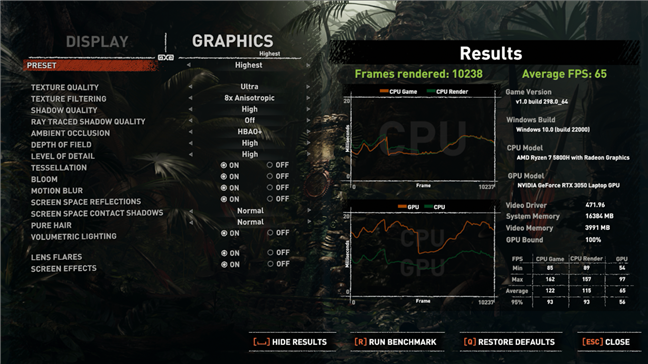
In Shadow of the Tomb Raider, with DirectX 12, the Highest graphics quality, and DLSS (Performance), we got excellent results: a minimum frame rate of 54, an average of 65, and a maximum of 97 fps.
Benchmark results in Unigine SuperPosition VR
We also ran a few benchmarks in games: Shadow of the Tomb Raider, Metro Exodus, and Assassin’s Creed Valhalla. All the benchmarks were run in Full HD (1920 x 1080) resolution, but we set the graphics settings differently for each one, depending on what we needed to get as close to 60 frames per second.
In Shadow of the Tomb Raider, with DirectX 12, the Highest graphics quality, and DLSS (Performance), we got excellent results: a minimum frame rate of 54, an average of 65, and a maximum of 97 fps.
 Benchmark results in Shadow of the Tomb Raider
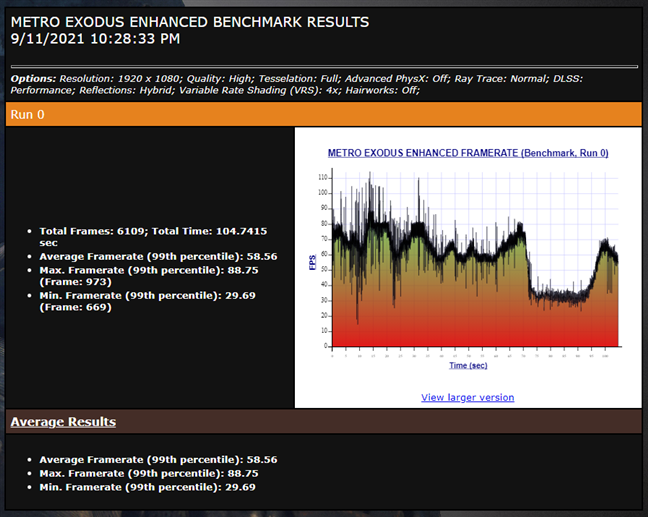
In Metro Exodus, we used the High preset with Ray Trace set to Normal and DLSS set on Performance. We got a minimum of 29 frames per second, an average of 58 fps, and a maximum of 88. These are good results.
Benchmark results in Shadow of the Tomb Raider
In Metro Exodus, we used the High preset with Ray Trace set to Normal and DLSS set on Performance. We got a minimum of 29 frames per second, an average of 58 fps, and a maximum of 88. These are good results.
 Benchmark results in Metro Exodus
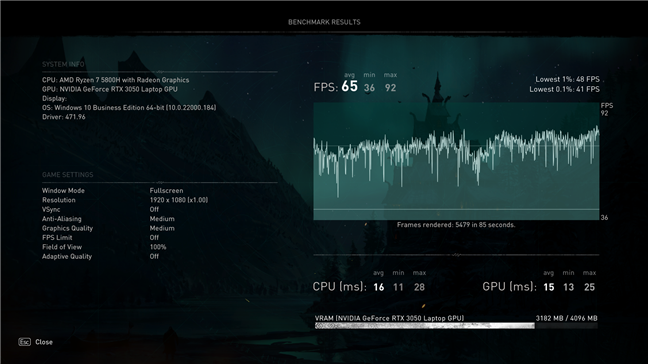
For Assassin’s Creed Valhalla, we had to use the Medium graphics settings, as the Nvidia GeForce RTX 3050 GPU doesn’t have enough memory for more than that. Also, this game doesn’t support ray tracing or DLSS. We got a minimum frame rate of 36, an average of 65 fps, and a maximum of 92 frames per second. We consider these results to be satisfactory for a gaming laptop in this price range.
Benchmark results in Metro Exodus
For Assassin’s Creed Valhalla, we had to use the Medium graphics settings, as the Nvidia GeForce RTX 3050 GPU doesn’t have enough memory for more than that. Also, this game doesn’t support ray tracing or DLSS. We got a minimum frame rate of 36, an average of 65 fps, and a maximum of 92 frames per second. We consider these results to be satisfactory for a gaming laptop in this price range.
 Benchmark results in Assassin's Creed Valhalla
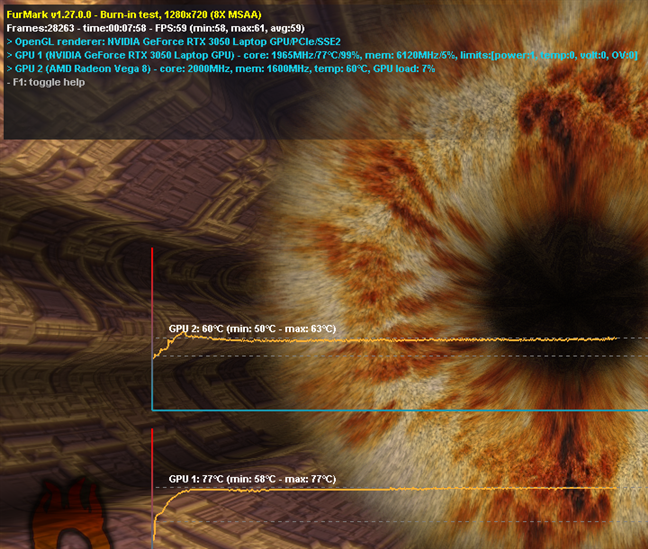
Next, we wanted to evaluate the laptop’s cooling system, which we did, using FurMark's benchmark. The graphics card reached a maximum temperature of 170 degrees Fahrenheit (77 degrees Celsius). It's a low temperature for a laptop GPU, and that’s a good thing!
Benchmark results in Assassin's Creed Valhalla
Next, we wanted to evaluate the laptop’s cooling system, which we did, using FurMark's benchmark. The graphics card reached a maximum temperature of 170 degrees Fahrenheit (77 degrees Celsius). It's a low temperature for a laptop GPU, and that’s a good thing!
 GPU temperatures measured with Furmark
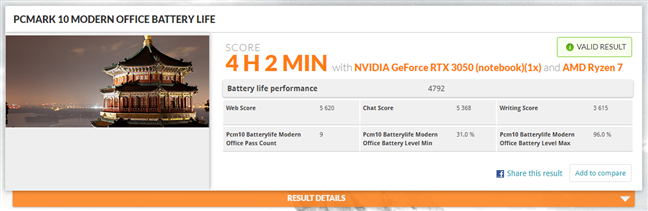
Finally, we also ran PCMark 10 to check the laptop's battery life. While running everyday home computing tasks such as writing, web browsing, and video conferencing tasks, the ASUS ROG Strix G17 G713QC managed to keep on going for 4 hours and 2 minutes. It's a good result, although a 6-cell instead of a 4-cell battery would have been even better. 🙂
GPU temperatures measured with Furmark
Finally, we also ran PCMark 10 to check the laptop's battery life. While running everyday home computing tasks such as writing, web browsing, and video conferencing tasks, the ASUS ROG Strix G17 G713QC managed to keep on going for 4 hours and 2 minutes. It's a good result, although a 6-cell instead of a 4-cell battery would have been even better. 🙂
 ASUS ROG Strix G17 G713QC: Battery life when doing Office work
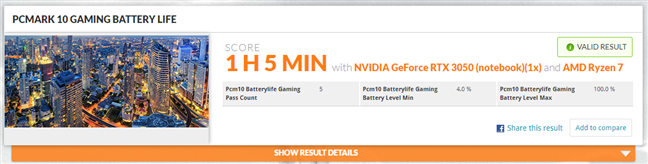
As this is a gaming laptop, we also used PCMark 10’s Gaming tests, which evaluates the battery life under heavy load. This is useful if you want to know how long the battery can last you when playing games. The ASUS ROG Strix G17 G713QC managed to keep on going for an hour and 5 minutes. It’s not so much, but it’s enough for one or two League of Legends matches. 🙂
ASUS ROG Strix G17 G713QC: Battery life when doing Office work
As this is a gaming laptop, we also used PCMark 10’s Gaming tests, which evaluates the battery life under heavy load. This is useful if you want to know how long the battery can last you when playing games. The ASUS ROG Strix G17 G713QC managed to keep on going for an hour and 5 minutes. It’s not so much, but it’s enough for one or two League of Legends matches. 🙂
 ASUS ROG Strix G17 G713QC: Battery life when playing games
The benchmarks we ran show that the ASUS ROG Strix G17 G713QC is a good gaming laptop. In productivity tasks, it aces everything. For gaming purposes, you know now that it can run any game at medium to high graphics quality. The processor is excellent, and Nvidia’s GeForce RTX 3050, although it can be tagged as average, compensates by offering support for the DLSS technology, which improves framerates in many games.
ASUS ROG Strix G17 G713QC: Battery life when playing games
The benchmarks we ran show that the ASUS ROG Strix G17 G713QC is a good gaming laptop. In productivity tasks, it aces everything. For gaming purposes, you know now that it can run any game at medium to high graphics quality. The processor is excellent, and Nvidia’s GeForce RTX 3050, although it can be tagged as average, compensates by offering support for the DLSS technology, which improves framerates in many games.
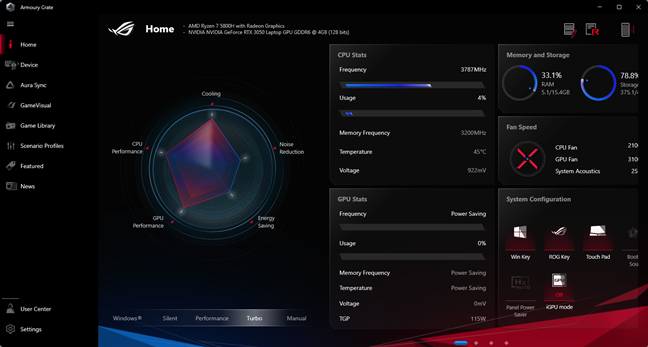
 ASUS Armoury Crate
ASUS bundles no bloatware on the ROG Strix G17 G713. We love this approach, and we’re sure most people will do too.
ASUS Armoury Crate
ASUS bundles no bloatware on the ROG Strix G17 G713. We love this approach, and we’re sure most people will do too.
ASUS ROG Strix G17 G713: Who is it good for?
The ASUS ROG Strix G17 G713 laptop is an excellent choice for:- People who want a gaming laptop with an excellent price per performance ratio
- Those who long for a beautiful notebook with great design and RGB lighting
- Anyone who needs a modern laptop that can run Windows 11 and also intends to use it for productivity tasks
Pros and cons
There are many good things to say about the ASUS ROG Strix G17 G713QC model that we tested:- It comes with a top-notch processor (AMD Ryzen 7 5800H)
- The Nvidia GeForce RTX 3050 supports ray tracing and DLSS
- 144Hz display
- RGB illuminated keyboard and large trackpad
- Well built, with a beautiful design
- Good selection of ports
- The cooling system is good
- Battery life is fine
- Good value for the price
- Has a graphics card with a low amount of memory (only 4GB)
- Doesn’t have a webcam
- Doesn’t come with a card reader
- Has no Off switch for the Republic of Gamers logo on its lid
Verdict
The ASUS ROG Strix G17 G713 proves to be a good gaming laptop series that we recommend to anyone who wants a powerful device, able to run any game in Full HD resolution at medium to high graphics settings. The processors included in this series are capable of handling anything, and the graphics cards are good for modern games, although our specific model could have benefited greatly from more RAM on its GeForce RTX 3050. However, in its price range of about 1200 USD, you really get a lot of value and performance. Suffice to say that productivity tasks are something that this notebook aces without any problem. All in all, the ASUS ROG Strix G17 G713QC-HX008 is a well balanced laptop.Unboxing the ASUS ROG Strix G17 G713
The ASUS ROG Strix G17 G713 laptops arrive in large boxes made of black and dark gray hardened cardboard. The design of the package is on the minimalist side. Besides the red Republic of Gamers logo, it also features the message “For those who dare” painted in large letters.Design and hardware specifications
The G713QC model that we tested is a powerful gaming laptop with an impressive design. The matte gray chassis, with its slick lines and Republic of Gamers patterns and logos, looks great and makes you feel like you’ve got a premium device in your hands.Using the ASUS ROG Strix G17 G713QC
The ASUS ROG Strix G17 G713QC is a laptop equipped with powerful hardware. Although it’s a gaming laptop, I also use it for work. That consists mostly of researching the internet with dozens of open tabs for finding ideas and information for our next tutorials, articles, and reviews. I also use the laptop for writing and editing the stuff we, at Digital Citizen, write. For everything regarding working with Microsoft Word, Excel, Excel, running virtual machines, and so on, I can say that this notebook performs great, and it’s never lagging or feeling slow.Performance in benchmarks
To get a better and more accurate idea about how fast this gaming laptop is, we ran several benchmarks. Furthermore, we ran all of them on Windows 11 Pro, which we decided would be best, as it will soon be available for everyone and promises to be faster than Windows 10. First, we used BootRacer to measure how much time the laptop needs to start. We found that the ASUS ROG Strix G17 G713QC usually boots in about 34 seconds, which is a good result.Apps bundled with the ASUS ROG Strix G17 G713 series
The ASUS ROG Strix G17 G713 series comes with a surprisingly short list of bundled apps:- MyASUS, which you can use to register your laptop, diagnose problems, contact customer support, link your laptop to your smartphone, manage how the laptop’s battery is charged, etc.
- Armoury Crate, which gives you details and allows you to configure your laptop’s hardware, adjust its performance modes, manage RGB lighting effects, create game scenarios, and so on.

Discussion (0)
Comments are closed.