



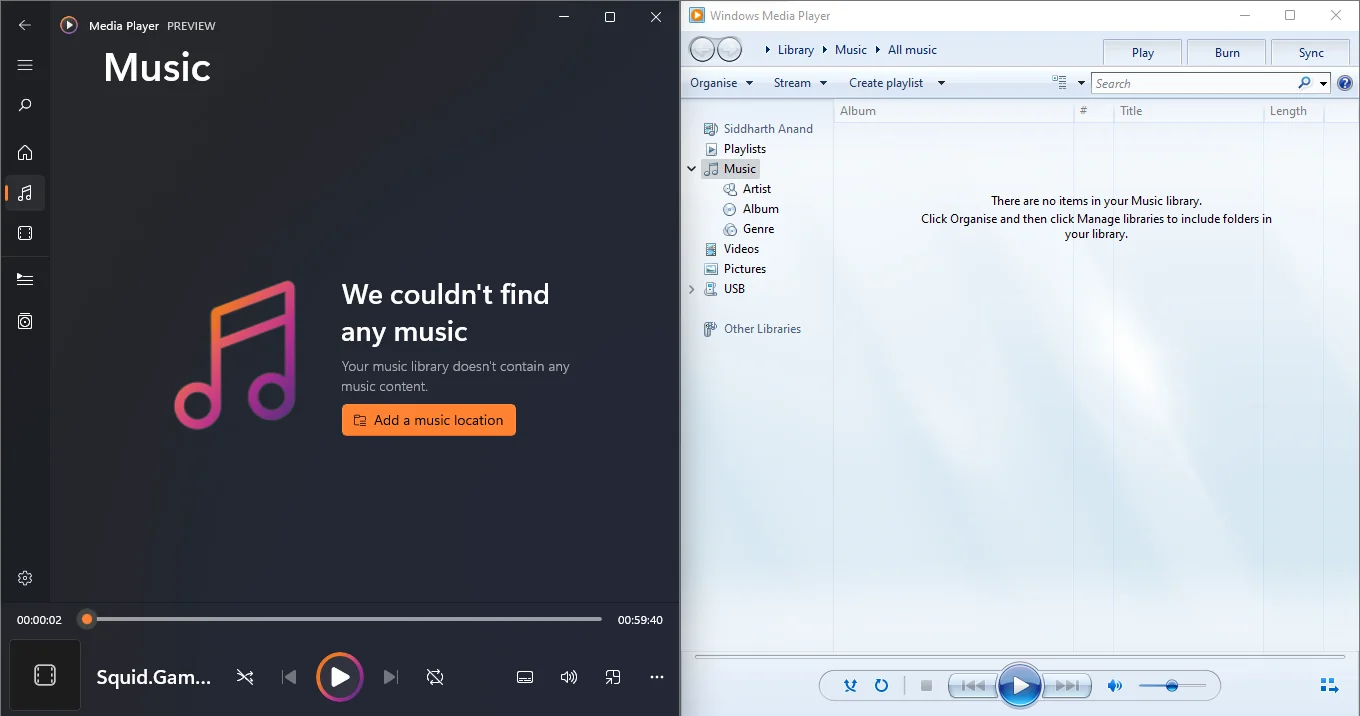
Microsoft is testing a new Windows Media Player update with Windows Insider members, but the modern app still does not fully match the older legacy version available on Windows 11. The update improves stability, subtitle handling, and codec error messages, yet the classic Windows Media Player remains faster, lighter, and more practical for some common media playback needs.
The latest version appears to focus on making the modern app more reliable. That is useful because Windows Media Player is supposed to be the default built in option for simple audio and video playback. Better subtitle behavior and clearer codec information should help people understand why a file does not play correctly.
Even with those improvements, the older Windows Media Player still has clear advantages. It launches faster, uses much less memory, and supports some formats in ways that the new version does not handle as well.
What the new Windows Media Player update changes
The updated Windows Media Player is currently available to Windows Insider members. It is not a full redesign, but it brings several practical fixes.
The biggest improvements are tied to stability and subtitles. That should help when playing video files with external or embedded subtitle tracks. Microsoft also appears to have improved the way the app explains missing codec problems. Instead of giving a vague failure message, the player can now provide clearer information about which codec is missing.
That may sound small, but it matters. Many playback issues happen because a file uses a format or codec that Windows does not support by default. A clearer message can help you understand whether you need an extension, a different app, or another version of the file.
| Area | New Windows Media Player | Legacy Windows Media Player |
|---|---|---|
| Stability | Improved in latest Insider update | Generally reliable |
| Subtitle handling | Improved | Depends on file and setup |
| Launch speed | Slower | Faster |
| Memory use | Around 377MB in testing | Around 103.4MB in testing |
| HEVC playback | Paid feature | Supported in the legacy app |
| Best use case | Modern interface and basic playback | Faster and lighter local playback |
The old Windows Media Player is still faster
The biggest weakness of the modern player is performance. The classic Windows Media Player launches faster and uses fewer resources.
In testing noted by Windows Latest, the new app used around 377MB of memory, while the legacy version used about 103.4MB. That is a large gap for a media player, especially when the job is simply to open and play local files.
On powerful PCs, that difference may not feel dramatic. But on older laptops, budget desktops, or systems already running many apps, lighter software still matters. A media player should feel quick and simple, and the older app still does that better.
HEVC support is another problem for the new app
File compatibility is also a concern. The legacy version supports HEVC playback, while the modern Windows Media Player treats HEVC as a paid feature.
That can be frustrating because HEVC is common in modern video files, phones, cameras, and streaming workflows. If you try to play an HEVC file in the new player and Windows does not have the required extension, you may need to pay for support or use a different media player.
For anyone who often handles local video files, that makes the older app or a third party player more convenient.
VLC remains the safer choice for full compatibility
The simplest answer for broad media support is still VLC. It is free, widely used, and supports a large range of audio and video formats without asking you to buy extra codec packs for common playback needs.
That does not mean Microsoft should stop improving Windows Media Player. A built in media player is still useful, especially for people who want a simple app that works out of the box. But the current version needs to become faster, lighter, and more capable before it can fully replace the legacy experience.
Microsoft still has work to do
The latest Windows Media Player update is a step in the right direction, but it is not enough to settle the debate. Stability fixes and better subtitle handling are welcome, and clearer codec messages should reduce confusion. Still, the classic app remains better in important everyday areas.
A modern media player should not feel heavier than the old one without offering clear benefits in return. Microsoft needs to improve speed, memory use, codec support, and local file handling if it wants the new Windows Media Player to become the obvious choice.
For now, Windows 11 still gives you three practical options. Use the modern player if you want the newer interface, use the legacy Windows Media Player if you want speed and lower resource use, or install VLC if you want the broadest file compatibility.



Discussion (0)
Be the first to comment.