




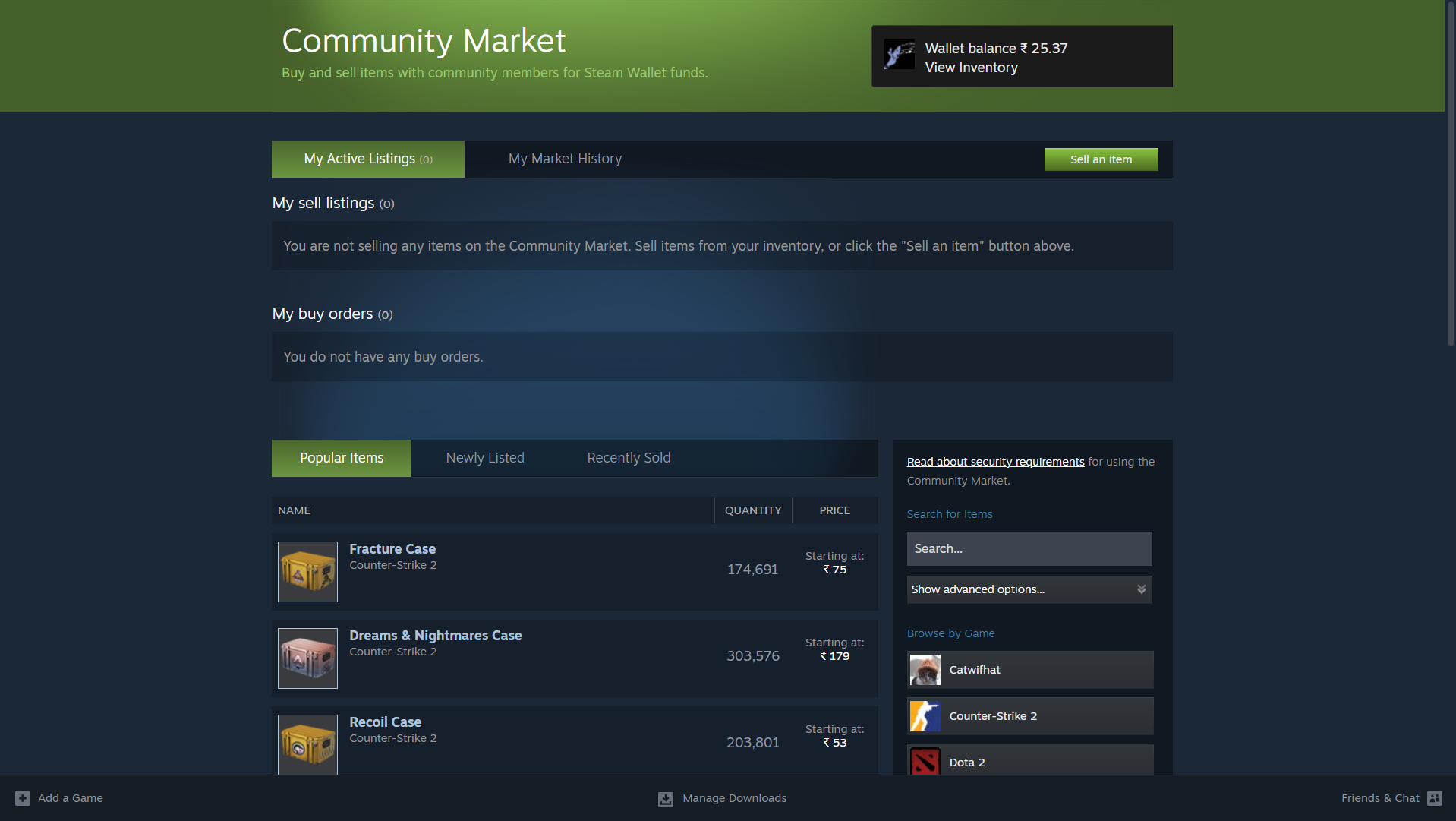
The Steam Marketplace, officially called the Steam Community Market, is a digital marketplace where players can buy and sell in-game items using their Steam accounts. These items usually come from games available on Steam and include skins, trading cards, emoticons, profile backgrounds, and other cosmetic items.
The marketplace allows players to trade items with other users using Steam Wallet funds. This makes it possible to earn money from items obtained in games or through gameplay rewards.
What Is the Steam Marketplace?
The Steam Marketplace is a platform built into Steam that allows players to trade digital items with other users. It works similarly to an online marketplace where items are listed by players and purchased by other players.
Common items sold on the Steam Marketplace include:
- Game skins and cosmetic items
- Steam trading cards
- Profile backgrounds
- Chat emoticons
- In-game collectibles
The transactions are handled using Steam Wallet funds.
How the Steam Marketplace Works
The Steam Marketplace works through a listing and purchasing system. Players who own items can list them for sale, and other users can buy them instantly.
The basic process works like this:
- A player lists an item on the marketplace.
- Steam displays the item with the price.
- Another user purchases the item using Steam Wallet funds.
- The item transfers to the buyer’s inventory.
The seller receives the money in their Steam Wallet after the sale is completed.
Requirements to Use the Steam Marketplace
Before using the Steam Marketplace, your account must meet certain requirements.
Typically you need:
- A Steam account in good standing
- Steam Guard enabled
- A Steam Wallet
- At least one Steam purchase on the account
These requirements help reduce fraud and unauthorized trading.
How to Buy Items on the Steam Marketplace
Buying items on the Steam Marketplace is straightforward.
Step 1: Open Steam
Launch the Steam client or open Steam in your web browser.
Step 2: Go to the Community Market
- Click Community in the top menu.
- Select Market.
This will open the Steam Community Market.
Step 3: Search for an Item
Use the search bar to find items from specific games such as skins or trading cards.
Step 4: Purchase the Item
- Click the item you want.
- Review the price and details.
- Click Buy.
The item will appear in your Steam inventory.
How to Sell Items on the Steam Marketplace
You can also sell items from your Steam inventory.
Steps:
- Open Steam.
- Go to Inventory.
- Select the item you want to sell.
- Click Sell on Community Market.
- Set the price and confirm the listing.
Once a buyer purchases the item, the funds will be added to your Steam Wallet.
Steam Marketplace Fees
Steam charges a small fee for each transaction.
The fee usually includes:
- A Steam transaction fee
- A game developer fee
The exact percentage may vary depending on the item and the game.
Popular Games on the Steam Marketplace
Many games have active item markets.
Some of the most popular ones include:
- Counter-Strike 2
- Dota 2
- Team Fortress 2
- Rust
- PUBG
These games have large communities that frequently trade skins and items.
Safety Tips for Using the Steam Marketplace
To protect your account while using the marketplace:
- Enable Steam Guard authentication
- Avoid third-party trading websites
- Never share your Steam login credentials
- Confirm all transactions carefully
These steps help keep your Steam account secure.
Final Thoughts
The Steam Marketplace is a useful platform that allows players to buy and sell digital items from their favorite games. Whether you want to purchase skins, collect trading cards, or sell items from your inventory, the marketplace provides a convenient way to trade within the Steam ecosystem.
By using the marketplace responsibly and keeping your account secure, you can safely participate in Steam’s player-driven economy.
FAQs
What is the Steam Marketplace?
It is a platform where Steam users can buy and sell in-game items using Steam Wallet funds.
Can I withdraw money from the Steam Marketplace?
No. Funds earned from sales are added to your Steam Wallet and cannot be withdrawn as cash.
Do I need Steam Guard to use the marketplace?
Yes. Steam Guard authentication is usually required for trading and selling items.
Is the Steam Marketplace safe?
Yes. Transactions are handled through Steam’s official platform, which provides built-in security features.

Discussion (0)
Be the first to comment.