



When choosing a processor or checking your PC specifications, you will often see references to CPU cores. Understanding what CPU cores are helps you know how fast your computer can handle tasks, multitasking, and modern applications.
This guide explains what CPU cores are, how they work, and why they are important for everyday computing.
What Is a CPU Core
A CPU core is an individual processing unit inside a processor. Each core can execute instructions independently, allowing the CPU to handle multiple tasks at the same time.
In simple terms, more cores allow your computer to do more work simultaneously, especially when running multiple applications or demanding software.
Single-Core vs Multi-Core Processors
Older computers often used single-core processors, which could handle only one task at a time. Modern processors use multiple cores to improve performance.
Here is how they differ:
- Single-core CPU
Processes one task at a time and struggles with multitasking - Dual-core CPU
Can handle two tasks at once and offers better responsiveness - Quad-core CPU
Ideal for everyday multitasking, office work, and light gaming - Six-core and higher CPUs
Designed for gaming, content creation, and professional workloads
Most modern PCs come with at least four cores.
How CPU Cores Improve Performance
CPU cores improve performance by dividing work between them. For example:
- One core can run your web browser
- Another can handle background updates
- A third can manage antivirus scans
This prevents the system from slowing down when multiple tasks are active.
Applications designed for multi-core processors benefit the most, including video editing software, games, and virtual machines.
CPU Cores vs Threads
CPU cores are physical components, while threads are virtual processing paths created by technologies like Hyper-Threading or Simultaneous Multithreading.
A single core can handle two threads at the same time, which improves efficiency but does not replace physical cores.
For example:
- A 4-core CPU with 8 threads can handle more tasks than a 4-core CPU with 4 threads.
Both cores and threads matter, but physical cores have a bigger impact on performance.
How Many CPU Cores Do You Need
The number of CPU cores you need depends on how you use your PC.
- Basic use
Web browsing, emails, and office apps work well with 2 to 4 cores - Everyday multitasking
4 to 6 cores offer smooth performance - Gaming and creative work
6 to 8 cores or more are recommended - Professional workloads
Video rendering, 3D modeling, and software development benefit from 8 or more cores
More cores help only if the software can use them.
How to Check CPU Cores in Windows
You can easily check how many CPU cores your PC has.
Steps:
- Press Ctrl + Shift + Esc to open Task Manager
- Go to the Performance tab
- Select CPU
- Look for the Cores value
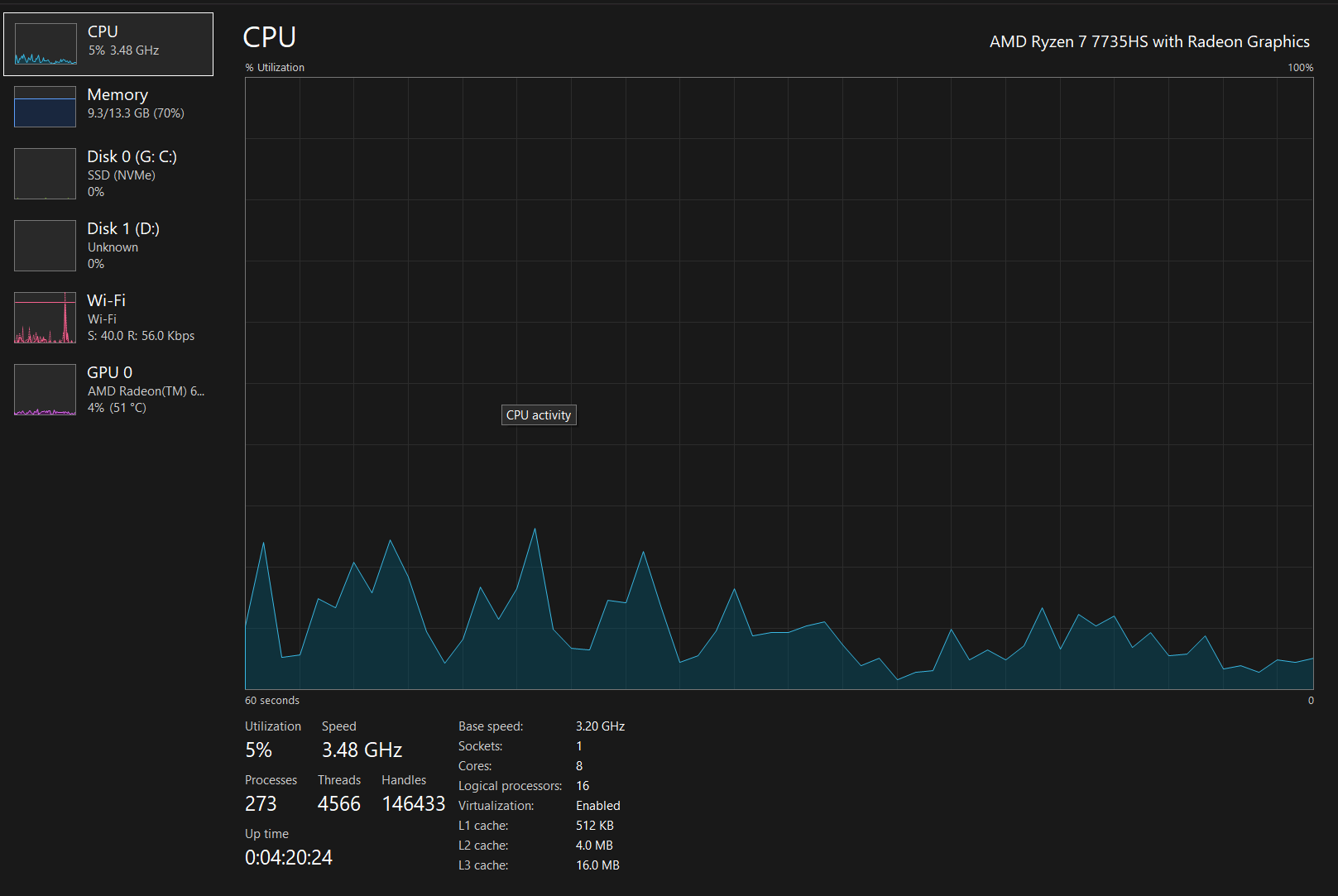
This works on both Windows 10 and Windows 11.
Do More CPU Cores Always Mean Better Performance
Not always. Performance also depends on:
- CPU clock speed
- Architecture and generation
- Software optimization
Some applications rely more on speed than core count. A balanced CPU with good clock speed and enough cores is usually the best choice.
Final Thoughts
CPU cores play a major role in how well your computer performs, especially when multitasking or running demanding applications. While more cores can improve performance, choosing the right CPU depends on your usage, not just the highest core count. Understanding this helps you make smarter hardware decisions.
FAQs
What are CPU cores
CPU cores are individual processing units inside a processor that handle tasks independently.
Is more CPU cores always better
More cores help with multitasking and heavy workloads, but clock speed and software support also matter.
How many CPU cores do I need for Windows 11
Windows 11 works well with 4 cores for most users.
Can games use multiple CPU cores
Yes, modern games can use multiple cores, especially newer titles.
How do I check CPU cores in Windows
Open Task Manager, go to Performance, and select CPU to see the core count.


Discussion (0)
Be the first to comment.