



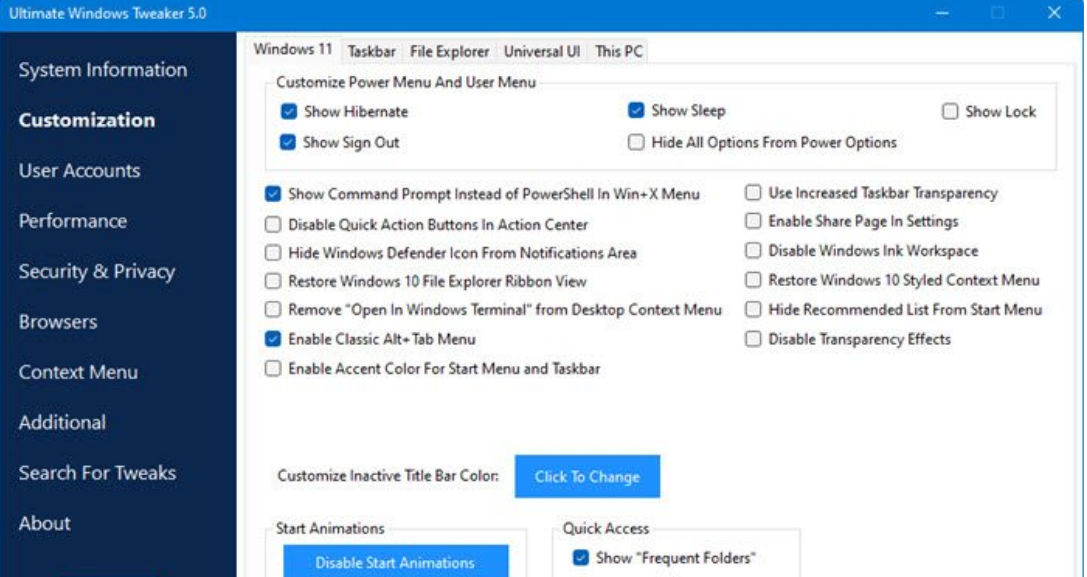
Ultimate Windows Tweaker 5 for Windows 11 is a free customization tool that lets you tweak system settings, improve privacy, and adjust performance options from a single interface. It is designed specifically for Windows 11 and works without requiring complex commands or scripts.
If you want more control over Windows 11 beyond what the Settings app offers, Ultimate Windows Tweaker 5 can help. This guide explains what it does, its main features, and how to use it safely.
What Is Ultimate Windows Tweaker 5 for Windows 11?
Ultimate Windows Tweaker 5 is a lightweight portable utility developed for Windows 11. It provides access to hidden or advanced system settings that are normally scattered across different menus or registry locations.
You do not need to install it. It runs as a standalone executable file.
It allows you to:
- Customize taskbar and Start menu behavior
- Improve privacy settings
- Optimize performance
- Adjust File Explorer options
- Manage security-related tweaks
Because it modifies system settings, it is recommended to create a restore point before applying changes.
Why Use Ultimate Windows Tweaker 5 in Windows 11?
Windows 11 limits certain customization options compared to earlier versions. Many advanced settings require registry edits or group policy changes.
Ultimate Windows Tweaker 5 simplifies this by:
- Providing one-click tweaks
- Grouping settings by category
- Reducing the need for manual registry editing
- Offering quick system repair options
It is especially useful for power users and IT administrators.
Main Features of Ultimate Windows Tweaker 5
The tool organizes tweaks into categories. Below are the most important sections.
1. Customization
This section includes options to:
- Modify taskbar alignment
- Disable certain visual elements
- Adjust context menu behavior
- Change system UI settings
These tweaks help personalize Windows 11 beyond default limitations.
2. User Accounts
You can manage account-related options such as:
- Logon screen behavior
- Security prompts
- User account settings
3. Performance Tweaks
Performance settings include:
- Reducing animations
- Speeding up shutdown time
- Adjusting visual effects
These options are useful for older hardware.
4. Security & Privacy
This section allows you to:
- Disable telemetry
- Adjust Windows Defender settings
- Control privacy-related features
These tweaks help improve system privacy control.
5. Additional System Tweaks
You can also find:
- Context menu adjustments
- Explorer tweaks
- Network optimizations
- Repair tools
The interface clearly describes what each tweak does before you apply it.
How to Use Ultimate Windows Tweaker 5 for Windows 11
Follow these steps carefully.
Step 1: Download the Tool
Download Ultimate Windows Tweaker 5 from its official source.
After downloading:
- Extract the ZIP file
- Run the executable as administrator
Step 2: Create a Restore Point
Before applying tweaks:
- Click the built-in option to create a restore point
- Wait for confirmation
This allows you to revert changes if needed.
Step 3: Apply Tweaks
- Browse through categories.
- Read the description of each tweak.
- Check or select the tweak you want.
- Click Apply.
Some changes may require restarting Windows Explorer or rebooting your PC.
Is Ultimate Windows Tweaker 5 Safe?
Yes, when downloaded from a trusted source. The tool does not install background services or bundled software.
However:
- It modifies system settings
- Incorrect changes may affect system behavior
- Always create a restore point first
Careful usage ensures system stability.
Should You Use Ultimate Windows Tweaker 5?
It is ideal if you:
- Want deeper customization
- Prefer one-click tweaks
- Manage multiple Windows 11 systems
- Understand system settings
It may not be necessary if you are satisfied with default Windows 11 settings.
Final Thoughts
Ultimate Windows Tweaker 5 for Windows 11 is a powerful and lightweight utility that gives you greater control over your system. It simplifies advanced tweaks and organizes them in a user-friendly interface.
If used responsibly, it can enhance customization, improve privacy, and optimize performance without requiring manual registry edits. Just remember to create a restore point before applying changes to keep your system safe.
FAQs
What is Ultimate Windows Tweaker 5 for Windows 11?
It is a free portable tool that allows you to customize and optimize Windows 11 using advanced system tweaks.
Does Ultimate Windows Tweaker 5 require installation?
No. It is a portable application that runs without installation.
Is Ultimate Windows Tweaker 5 safe to use?
Yes, when downloaded from a trusted source. Always create a restore point before applying changes.
Can Ultimate Windows Tweaker 5 improve Windows 11 performance?
Yes. It includes performance-related tweaks such as reducing animations and adjusting system behavior for better responsiveness.

Discussion (0)
Be the first to comment.