UP

Hardware

Reviews, tutorials and articles about hardware components, laptops, smartphones, computers, and gadgets of all kinds. Learn how to manage your hardware and its settings.

How do I connect my iPhone to my computer with Windows 10?

There are many reasons why you might want to connect your iPhone to your Windows 10 PC. Maybe you want to move some music from one device to the other, add some videos on your iPhone to watch while commuting or even create a manual backup of everything important on your iPhone. Whatever your reasons are, here is how to connect an iPhone to a Windows 10 PC, both using

Trust GXT 860 Thura review: Affordable keyboard, for gamers!

Do you want a keyboard with affordable pricing that looks like it has RGB lighting, even though it does not, to keep the cost low? Do you play a lot of games on your computer? Then, you might be interested in Trust GXT 860 Thura. It is a keyboard that aims to deliver a lot of value-for-money while being affordable for any computer user in the world. If you want

MIO MiVue J60 review: Dash cam with built-in Wi-Fi and GPS tracking

The dash cams market has grown slowly but steadily over the last few years and is now filled with many choices. MIO is one of the most prolific manufacturers of dash cams, and most of them are excellent. We received in testing one of their more discreet dash cams called the MiVue J60. It is a camera that hides from sight in the back of the rearview mirror and which

2 ways to see which Windows 10 apps drain the most battery

Most smartphones and tablets offer ways of finding out which apps drain their batteries. However, Windows devices did not have this feature in the past, and there was no easy way to discover which apps consumed the most power on our laptops or tablets. However, newer versions of Windows 10 have brought new features that change all that. Now, there are two ways in which you can find which apps

ASUS TUF Gaming K5 review: Affordable keyboard with RGB illumination

The ASUS TUF family of gaming peripherals includes a keyboard called K5, which we tested for about ten days of daily use. The ASUS TUF Gaming K5 keyboard features RGB illumination with AURA Sync compatibility and Mech-Brane key switches that are said to offer excellent tactile feedback, similar to mechanical switches, although they are using domes. It also has media buttons, a wrist pad, and support for macro actions. All

7 ways to tell how many cores your processor has

Unless you own an old computer, and by that we mean a computer that's from the nineties, you probably have a multicore processor inside it. Do you know how many cores and logical processors your CPU has? Do you want to find out this information? In this article we will show you seven methods that you can use to see how many cores your computer's processor has, or how many

ASUS ROG Balteus Qi review: Mouse pad with RGB lighting and wireless charging!

We received for testing a fascinating device: an RGB gaming mouse pad with Qi wireless charging built-in. It sounds unreal, doesn't it? RGB lighting on a mouse pad? A mouse pad that also charges your smartphone? It comes from ASUS, and it is called ROG Balteus Qi. It is a surprisingly elegant device, that's built for gamers, but can be useful to other types of users too. If you want

ASUS TUF Gaming M5 mouse review: Small, affordable, and reliable!

We recently received for testing an interesting gaming device: a mouse from ASUS that promises to be ergonomic, durable and offer a long lifespan. It is called ASUS TUF Gaming M5 and, although sold at an affordable price, it uses Omron switches and has support for the Aura Sync technology. Does it manage to be a good mouse? Is a great choice for gamers? You can find the answers to
tutorial How to use the Resource Monitor in Windows

How to use the Resource Monitor in Windows

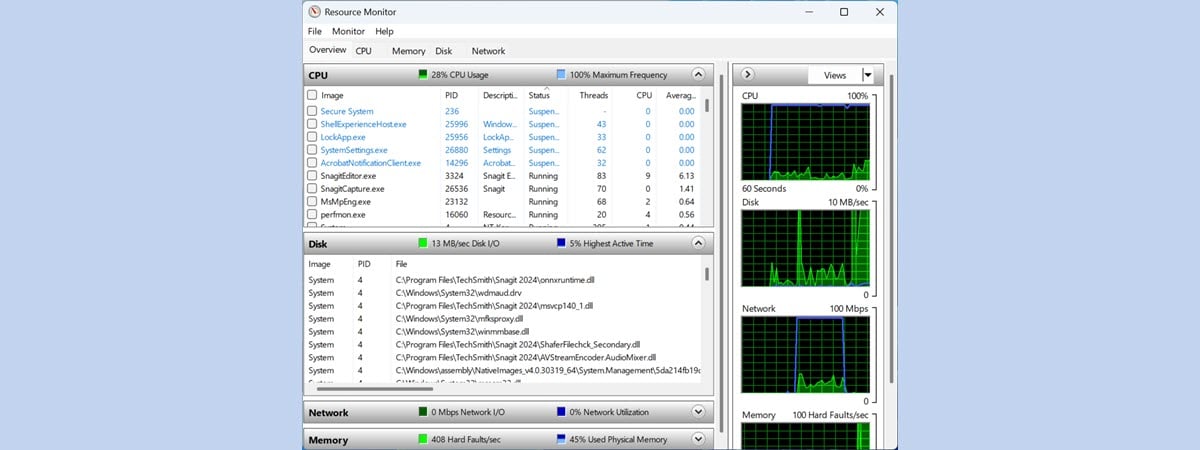
When Windows slows down or freezes, we usually turn to the Task Manager to figure out what is going on. If you need a better understanding of the way Windows and its apps use the resources of your computer, Resource Monitor (resmon.exe) is the right tool for the task. The information is concise and real-time with graphs and grouping by resources. You can monitor
article What is DPI when referring to a computer mouse?

What is DPI when referring to a computer mouse?

DPI is a term that is commonly used when referring to photography, but also to computer mice, especially gaming mice. Do you know what DPI means when used for computer mice? Do you know why every major manufacturer of gaming accessories (Razer, ASUS RoG, SteelSeries, etc) shows off with their latest high-DPI mouse? Does a high DPI always make a good mouse? If you

What is an AMOLED screen? What does AMOLED mean?

AMOLED is a display technology that is used on many screens. Most of them are usually found on smartphones, so if you have been looking for a smartphone, from brands like Samsung or Google Pixel, you might have stumbled on some that brag about having AMOLED displays. Do you know what AMOLED stands for and what it is? If you want to know the answer and see why AMOLED is

What is OLED? What does OLED mean?

We bet that you have heard about OLED TVs. Every tech retailer sells them nowadays. Maybe you have even been interested in OLED computer monitors. But, do you know what OLED means, why it is good and why it is bad? Do you want to know whether or not you should invest your money in an OLED screen? If you do, read on, and you are going to find your
tutorial 3 reasons to create more than one partition on your PC

3 reasons to create more than one partition on your PC

We all know that most computer users have one physical hard disk drive or solid state drive on their PCs and only one partition is labeled C. Some people also know that you can create more than one partition on a computer and there are several advantages to doing it. For example, if you have two partitions, one for the operating system and one

TP-Link Deco M4 review: Affordable and with excellent potential!

TP-Link is preparing the international launch of a new mesh WiFi system, called Deco M4 or Deco M4R. It is their most affordable mesh WiFi system yet, and it plans to compete with other brands that have aggressive pricing like Tenda. It packs solid hardware, and also fewer features than previous models. If you want to know more about the most affordable mesh WiFi from TP-Link, read our world-premiere review

Microsoft Surface Arc Mouse review: Beautiful and highly portable!

Microsoft Surface Arc Mouse is a beautiful Bluetooth device, that looks like a mix between the Microsoft Arc Touch Mouse SE, and Microsoft Touch Mouse (We loved using Microsoft Arc Touch Mouse SE, and we disliked the Microsoft Touch Mouse). You can imagine that we were curious to test it and see if it is new "hybrid" is a good choice for laptop and tablet users. Read this review and

ASUS ZenScreen MB16AC review: A beautiful portable monitor!

For this review, we tested a rather interesting device: a portable Full HD display created by ASUS, called ZenScreen MB16AC. It is a monitor which you can connect to your laptop via USB Type C or USB Type A, and which is small and light enough to fit in a small bag. The ZenScreen MB16AC is designed for people who are used to working on dual screen setups and who

Review TP-Link Deco M5 v2: A beautiful whole-home WiFi system!

TP-Link is famous for its affordably priced home networking products. They manufacture not only wireless routers but also mesh WiFi systems. Their top-selling product in this niche is Deco M5, which now has a new v2 variant, which brings several quality-of-life improvements compared to the first model. We very much enjoyed testing TP-Link Deco M5 v1, and we were curious to see whether v2 is an even better model. Read

ROCCAT Horde AIMO review: A gaming keyboard for everyday use!

ROCCAT Horde AIMO is a gaming keyboard that is presented as being membranical. The idea behind this concept it is that the keys on the keyboard use membranes instead of physical mechanical switches, and the experience should resemble that of a mechanical keyboard. Among other extras, it is also equipped with RGB lighting and features dedicated macro keys and a tuning wheel that resembles the Surface Dial from Microsoft. As

ROCCAT Kone AIMO review: An excellent gaming mouse with bold design and illumination

ROCCAT is a well-known gaming company, and their devices are usually of excellent quality. Recently, we received in testing one of their newest gaming mouses: the ROCCAT Kone AIMO. It is a large mouse with a bold design and powerful illumination. You might ask yourself: how good is it in real-life gaming? What about for general computer use? After a few weeks of playing with it, we have answers for