




If you carry lots of data, be that video files, photos, archives, or even game backups, the Samsung T5 Evo may be just what you need. It doesn’t aim to break speed records, and it almost certainly won’t impress you with its benchmark results. Instead, this drive focuses on giving you a generous amount of space in a compact form, making it an excellent choice for everyday users who need reliable storage that just works. In this review, I’ll show you what it’s like using the Samsung T5 Evo, how it performs, and whether it makes sense getting one.
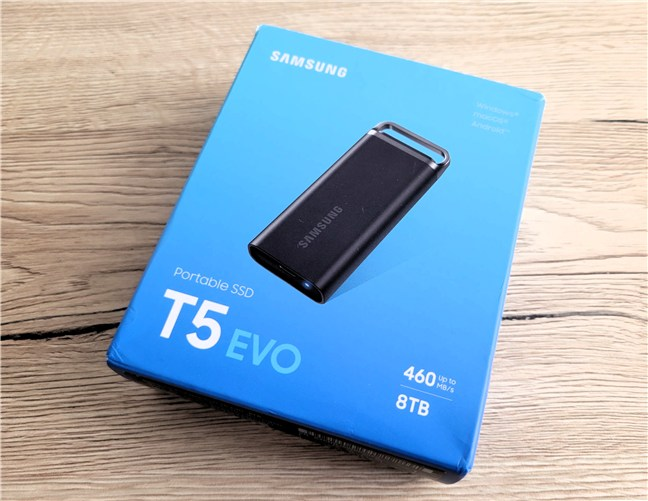
 What the packaging of the Samsung T5 Evo looks like
Inside the package, you find the drive itself and a USB-C to USB-C cable. Some bundles may also include a USB-A to USB-C adapter, but that can vary from region to region. Worth noting, you also get a small quick-start guide inside the package.
What the packaging of the Samsung T5 Evo looks like
Inside the package, you find the drive itself and a USB-C to USB-C cable. Some bundles may also include a USB-A to USB-C adapter, but that can vary from region to region. Worth noting, you also get a small quick-start guide inside the package.
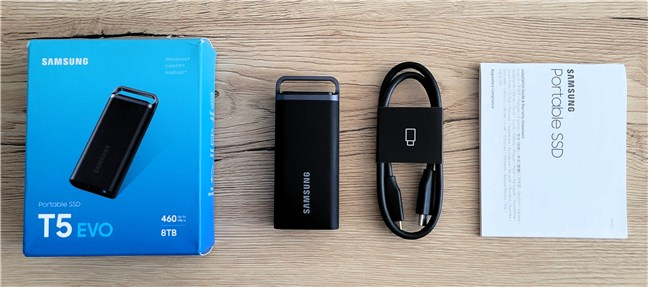
 The SSD includes a USB-C cable
The unboxing experience is simple and straight to the point. This isn’t a premium product, and Samsung makes no attempt to dress it up, which is a plus in my book. 🙂
The SSD includes a USB-C cable
The unboxing experience is simple and straight to the point. This isn’t a premium product, and Samsung makes no attempt to dress it up, which is a plus in my book. 🙂
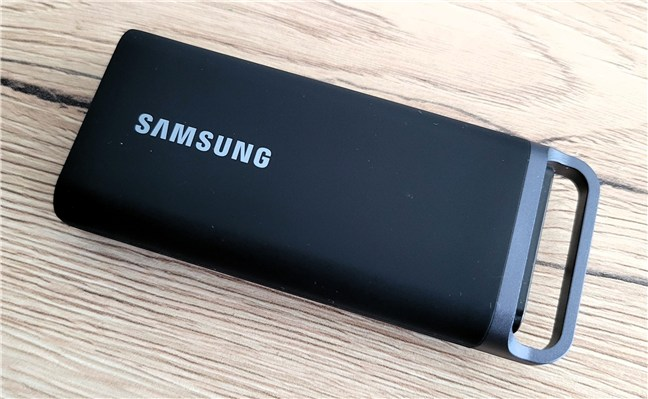
 The Samsung T5 Evo features a clean design
Physically, the T5 Evo is compact at 95 × 40 × 17 mm (3.74 × 1.57 × 0.67 inches) and weighs 102 grams (3.6 ounces), with a sturdy metal body and rubber sleeve. It includes a metal ring for easy attachment and is drop-resistant from up to 2 meters. Unlike the rugged Samsung T7 Shield, there’s no IP rating, so avoid water exposure.
The Samsung T5 Evo features a clean design
Physically, the T5 Evo is compact at 95 × 40 × 17 mm (3.74 × 1.57 × 0.67 inches) and weighs 102 grams (3.6 ounces), with a sturdy metal body and rubber sleeve. It includes a metal ring for easy attachment and is drop-resistant from up to 2 meters. Unlike the rugged Samsung T7 Shield, there’s no IP rating, so avoid water exposure.
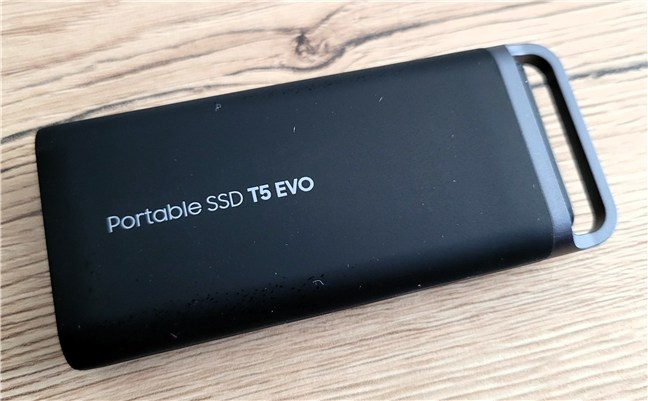
 T5 Evo is made of metal and covered by a rubberized sleeve
The drive uses the USB 3.2 Gen 1 interface (at speeds of up to 5 Gbps), offering up to 460 MB/s sequential reads and writes. It comes in 2, 4, and 8 TB versions. For this review, I tested the 8 TB model. Platform-wise, the Samsung T5 Evo is compatible with any Windows computer or Mac with a USB Type-C port, as well as Android smartphones and tablets, and even gaming consoles. Unfortunately, there’s no official compatibility with iPhones and iPads.
T5 Evo is made of metal and covered by a rubberized sleeve
The drive uses the USB 3.2 Gen 1 interface (at speeds of up to 5 Gbps), offering up to 460 MB/s sequential reads and writes. It comes in 2, 4, and 8 TB versions. For this review, I tested the 8 TB model. Platform-wise, the Samsung T5 Evo is compatible with any Windows computer or Mac with a USB Type-C port, as well as Android smartphones and tablets, and even gaming consoles. Unfortunately, there’s no official compatibility with iPhones and iPads.
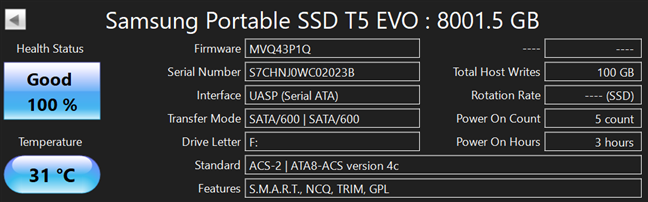
 Tech specs for the Samsung T5 Evo
Security features include AES 256‑bit hardware encryption and password setup via Samsung’s Portable SSD software. You’ll find the software on the solid-state drive out of the box, or you can download it from Samsung’s website. Once set, the drive can only be accessed by entering the password on Windows, macOS, or Android.
Tech specs for the Samsung T5 Evo
Security features include AES 256‑bit hardware encryption and password setup via Samsung’s Portable SSD software. You’ll find the software on the solid-state drive out of the box, or you can download it from Samsung’s website. Once set, the drive can only be accessed by entering the password on Windows, macOS, or Android.
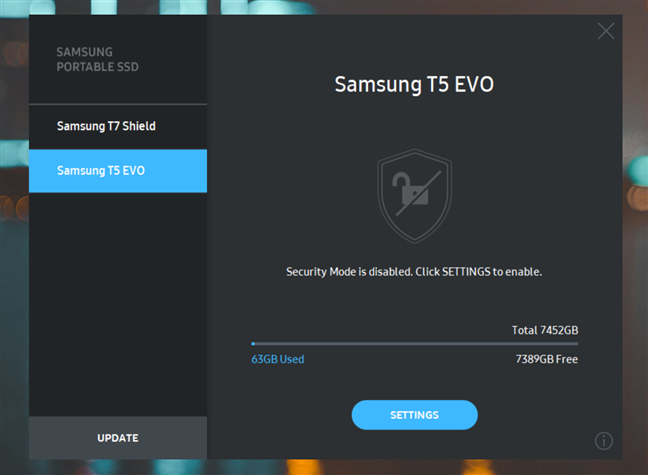
 You can encrypt the Samsung T5 Evo
These were all the essential design and hardware specs of the drive. If you want to know even more details, check out Samsung’s Portable SSD T5 site.
This SSD is made for convenience. If you don’t need a rugged shell or lightning-fast speeds, the Samsung T5 Evo gives you an impressive amount of storage while keeping things simple.
You can encrypt the Samsung T5 Evo
These were all the essential design and hardware specs of the drive. If you want to know even more details, check out Samsung’s Portable SSD T5 site.
This SSD is made for convenience. If you don’t need a rugged shell or lightning-fast speeds, the Samsung T5 Evo gives you an impressive amount of storage while keeping things simple.
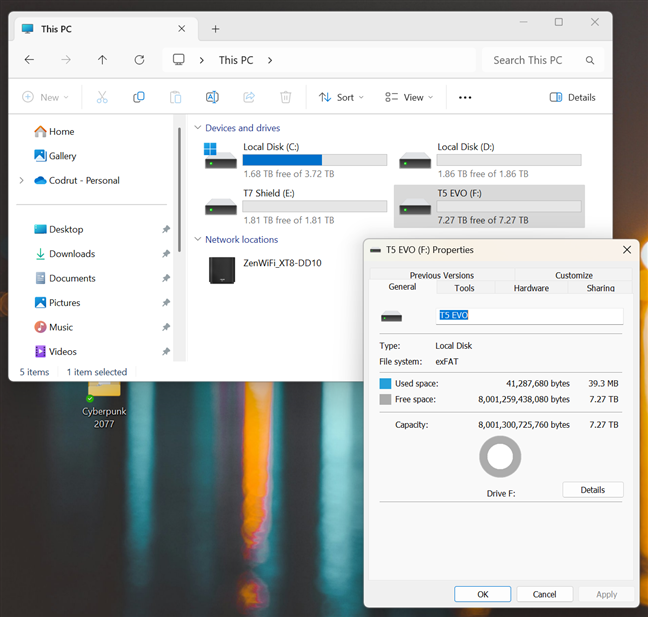
 The real storage capacity of the drive
To simulate a real-world use case, I moved a large game folder (Cyberpunk 2077, around 61.5 GB in size) onto and off the drive. Writing the folder to the T5 Evo took about three minutes, at a maximum speed of circa 370 MB/s.
The real storage capacity of the drive
To simulate a real-world use case, I moved a large game folder (Cyberpunk 2077, around 61.5 GB in size) onto and off the drive. Writing the folder to the T5 Evo took about three minutes, at a maximum speed of circa 370 MB/s.
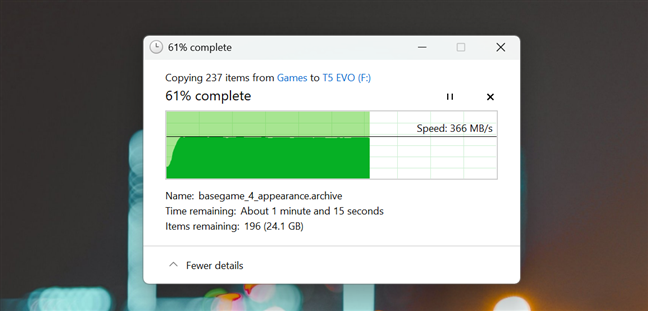
 Copying a large game folder on the Samsung T5 Evo
Moving it back to the internal SSD was a bit faster (up to 408 MB/s, approximately), finishing in two minutes and fifty seconds. That’s not blazing-fast, but it’s consistent.
Copying a large game folder on the Samsung T5 Evo
Moving it back to the internal SSD was a bit faster (up to 408 MB/s, approximately), finishing in two minutes and fifty seconds. That’s not blazing-fast, but it’s consistent.
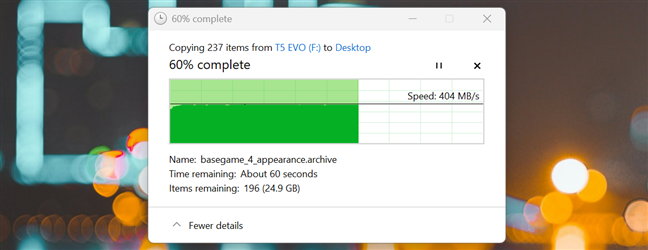
 Copying a large game folder from the Samsung T5 Evo
In everyday use, the drive felt good enough. File copies, photo archives, and document work went smoothly. You can store huge folders, back up your media collection, or even carry your entire game library if you want. Just don’t expect great speeds if you’re working directly with large 4K videos or high-resolution images. Moreover, the drive stayed cool during usage. External temperatures hovered around 37°C (99°F), and the internal sensors didn’t report anything concerning. There were no signs of throttling or slowdowns.
Copying a large game folder from the Samsung T5 Evo
In everyday use, the drive felt good enough. File copies, photo archives, and document work went smoothly. You can store huge folders, back up your media collection, or even carry your entire game library if you want. Just don’t expect great speeds if you’re working directly with large 4K videos or high-resolution images. Moreover, the drive stayed cool during usage. External temperatures hovered around 37°C (99°F), and the internal sensors didn’t report anything concerning. There were no signs of throttling or slowdowns.
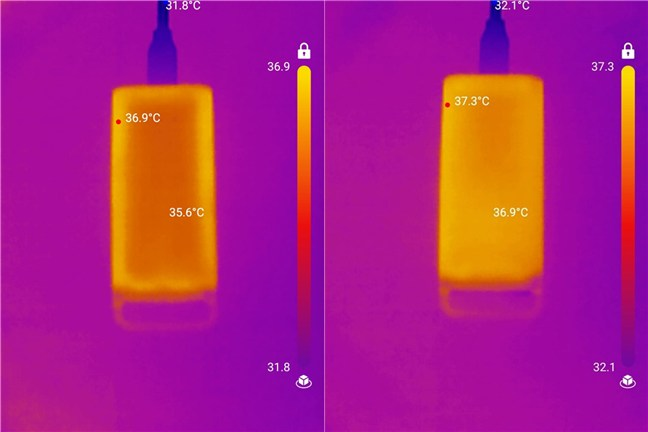
 The drive doesn't heat up, not even in full load
As a subjective opinion, I can say that the Samsung T5 Evo isn’t built for speed, but it delivers consistent performance and stays cool even during large transfers. It’s a reliable choice for everyday storage, backups, and carrying any kind of large file libraries.
The drive doesn't heat up, not even in full load
As a subjective opinion, I can say that the Samsung T5 Evo isn’t built for speed, but it delivers consistent performance and stays cool even during large transfers. It’s a reliable choice for everyday storage, backups, and carrying any kind of large file libraries.
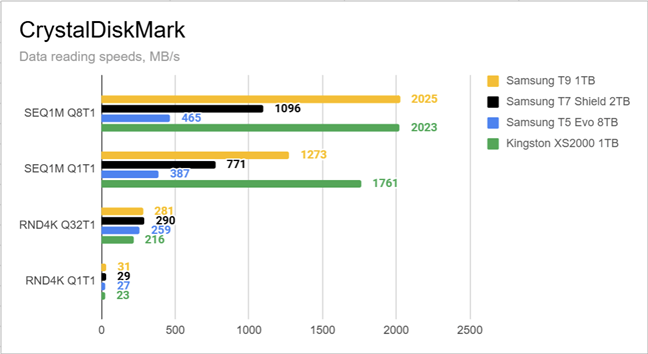
 Data reading speeds measured with CrystalDiskMark
For write performance, the Samsung T5 Evo topped out at 464 MB/s in sequential Q8T1 and 438 MB/s in Q1T1. These numbers are well below the other three drives, with the T7 Shield being more than twice as fast. In random writes, it reached 153 MB/s (Q32T1) and 56 MB/s (Q1T1). Again, slower, but usable.
Data reading speeds measured with CrystalDiskMark
For write performance, the Samsung T5 Evo topped out at 464 MB/s in sequential Q8T1 and 438 MB/s in Q1T1. These numbers are well below the other three drives, with the T7 Shield being more than twice as fast. In random writes, it reached 153 MB/s (Q32T1) and 56 MB/s (Q1T1). Again, slower, but usable.
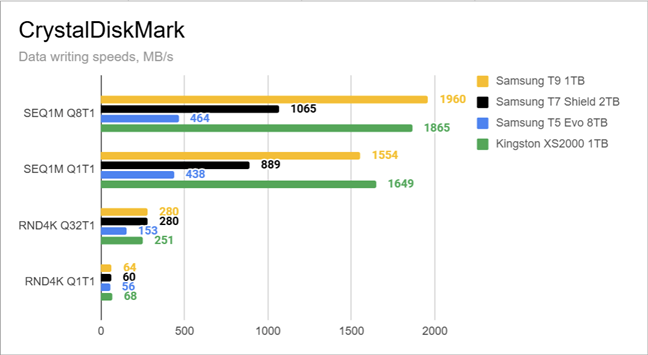
 Data writing speeds measured with CrystalDiskMark
In PCMark 10’s Data Drive Benchmark, the Samsung T5 Evo scored 477 points. For context, the T7 Shield scored 1026, while the Kingston XS2000 passed 1100. This makes it clear the T5 Evo isn’t aiming for high performance, but it still completes everyday tasks without issue.
Data writing speeds measured with CrystalDiskMark
In PCMark 10’s Data Drive Benchmark, the Samsung T5 Evo scored 477 points. For context, the T7 Shield scored 1026, while the Kingston XS2000 passed 1100. This makes it clear the T5 Evo isn’t aiming for high performance, but it still completes everyday tasks without issue.
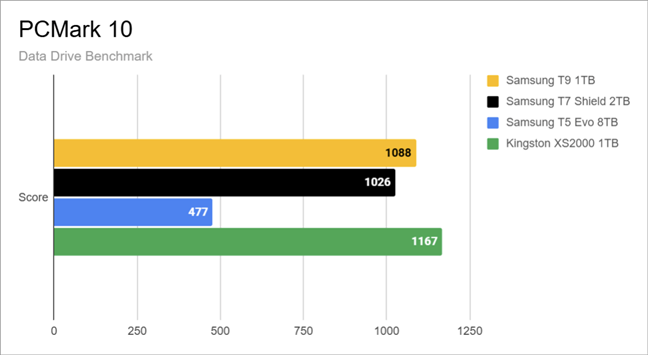 Data Drive Benchmark results in PCMark 10
In BlackMagic’s Disk Speed Test, the Samsung T5 Evo managed 424 MB/s for reading data and 374 MB/s for writing data. This matches its expected performance and confirms that you’re not getting more than what the drive’s interface allows. It’s enough for watching videos or managing large folders, but it may not be enough for demanding work.
Data Drive Benchmark results in PCMark 10
In BlackMagic’s Disk Speed Test, the Samsung T5 Evo managed 424 MB/s for reading data and 374 MB/s for writing data. This matches its expected performance and confirms that you’re not getting more than what the drive’s interface allows. It’s enough for watching videos or managing large folders, but it may not be enough for demanding work.
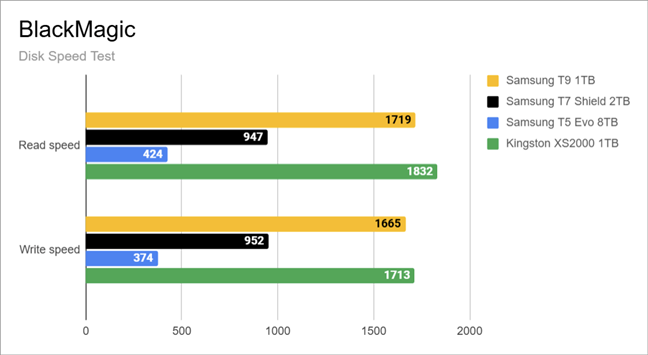 Disk Speed Test results in Blackmagic
The Samsung T5 Evo is clearly the slowest in my comparison, but it delivers stable speeds that match its 5 Gbps USB interface. While it’s probably not a good fit for demanding work, it handles everyday storage tasks just fine. If you’re a casual user who needs to backup their family pictures and videos, it’s fast enough. 🙂
Disk Speed Test results in Blackmagic
The Samsung T5 Evo is clearly the slowest in my comparison, but it delivers stable speeds that match its 5 Gbps USB interface. While it’s probably not a good fit for demanding work, it handles everyday storage tasks just fine. If you’re a casual user who needs to backup their family pictures and videos, it’s fast enough. 🙂
Samsung T5 Evo portable SSD: Who is it good for?
This portable SSD unit is a solid option for:- People who need to store a lot of data (up to 8 TB)
- Users who want portable backup storage
- Those looking for a basic external SSD for everyday use
- People looking for an SSD that offers good value for its price
Pros and cons
These are the strong points of the Samsung T5 Evo:- Massive storage capacity in a small device
- Lightweight and easy to carry
- Good value for its storage size
- Encryption support via Samsung’s software
- Works with multiple platforms
- Slower than other SSDs on the market
- No water or dust resistance
- Not suitable for demanding work
Verdict
If storage space is your top priority, the Samsung T5 Evo delivers. It’s a compact drive that can fit a surprising amount of data, which makes it great for backups, media collections, and general file storage. It’s not built for speed, and it lacks some of the features of newer models from Samsung, but for its purpose, it gets the job done. At around $550 for the 8 TB version, it’s not exactly cheap. However, it’s one of the most affordable options if you need this much portable storage without turning to regular hard disk drives. If you’re fine with average performance and want something that’s reliable and has a lot of storage space, the Samsung T5 Evo is a great choice.Unboxing the Samsung T5 Evo portable SSD
The Samsung T5 Evo comes in a relatively small box with a practical design. You can immediately tell it’s focused on simplicity. The front shows the drive and its total capacity, while the back briefly mentions software compatibility and additional features.Design and hardware specifications
The Samsung T5 Evo has a practical and minimalist design. Its matte plastic shell curves around the edges, giving it a softer look than its rugged cousins.Using the Samsung T5 Evo portable SSD
I tested the 8 TB Samsung T5 Evo on my main desktop setup, which includes an AMD Ryzen 9 9900X processor, 32 GB of DDR5 memory, and a high-speed internal SSD running on PCIe 5.0. The Samsung T5 Evo external solid-state drive came preformatted using the exFAT file system and offered about 7.27 TB of usable space.Performance in benchmarks
To get a better sense of what the Samsung T5 Evo can do, I compared it with three other portable SSDs: the premium Samsung T9, the rugged Samsung T7 Shield, and the high-end Kingston XS2000 from the competition. In CrystalDiskMark’s read tests, the T5 Evo reached 465 MB/s in sequential reads using multiple queues, and 387 MB/s with a single queue. That’s roughly half the speed of the Samsung T7 Shield and over 75% slower than the T9 and the Kingston XS2000. In random reads, it reached 259 MB/s (Q32T1) and 27 MB/s (Q1T1), which places it firmly behind the others but still excellent for general use.


Discussion (0)
Be the first to comment.