If you search the web for information about the ASUS RT-AC68U Dual-Band Wireless-AC1900 router, you will encounter statements like: "The world's fastest router" or "A cutting-edge Wi-Fi router that has it all". Reading such big words leads to having very high expectations. I managed to get my hands on this router for a couple of weeks and after using it on a daily basis in my home network, I am ready to share my conclusions. Is this the world's fastest router? Let's find out:
Unboxing the ASUS RT-AC68U
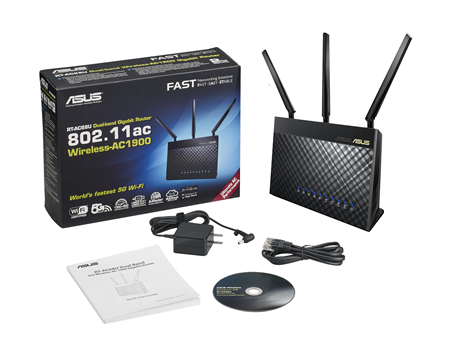
The packaging of the ASUS RT-AC68U looks good, just as you would expect from a premium device. Inside the box you will find the router itself, the power adapter, a network cable, the quick start guide and a support disc with the manual in several languages.
ASUS RT-AC68U, dual-band,wireless, router, ac1900, review, performance, benchmarks
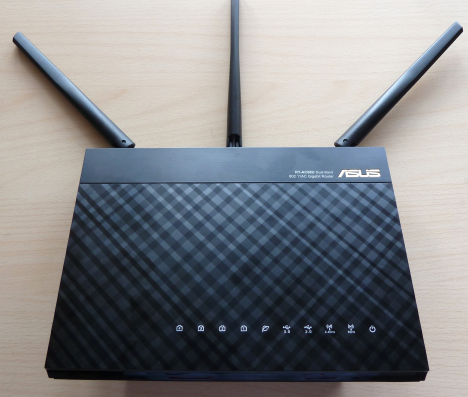
This router is bigger than other devices of its kind and the three external antennas are quite impressive to look at. The build quality and the design of this router are very solid. It doesn't feel fragile like other routers do and it doesn't use very cheap plastic.
ASUS RT-AC68U, dual-band,wireless, router, ac1900, review, performance, benchmarks
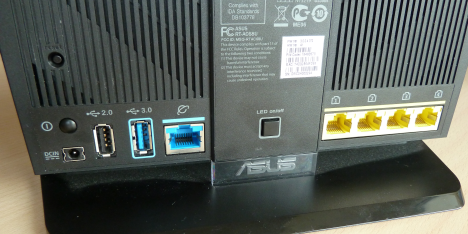
As with all ASUS routers, you will find several LEDs on the front of the device. They tell you whether the router is turned on if the wireless network and the Internet connection are working and how many devices are connected via Ethernet cables. On the back, you will find a button for turning them off, in case you don't like having so many blinking lights on it.
Hardware Specifications
ASUS RT-AC68U has dual-core processor (unfortunately its frequency and model are not shared by ASUS), three external antennas, five Gigabit ethernet ports and support for the most recent 802.1ac wireless networking standard. It promises maximum transfer rates of 600Mbps for 2.4GHz wireless networks and 1300 Mbps for 5GHz wireless networks. This router also has two USB ports: one USB 3.0 and one USB 2.0. Considering how over the top everything else about this device is, I would have expected two USB 3.0 ports. I guess they did not go for this because it would have required even more processing power and maybe even a quad-core processor. 🙂
ASUS RT-AC68U, dual-band,wireless, router, ac1900, review, performance, benchmarks
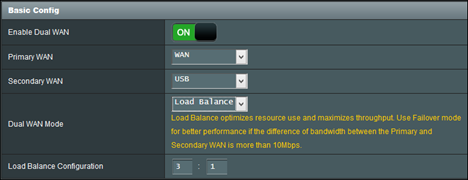
As you would expect from a device this expensive, it works with all the Internet connection types used worldwide and it has VPN support. What you won't expect is dual WAN support (you heard it right!): you can have two Internet connections from different providers and set the failover mode to use a secondary WAN for backup network access. It also has load balancing to optimize bandwidth, maximize throughput, minimize response time, and prevent data overload for both WAN connections. To top everything, the software managing this router is highly configurable and it allows you to set every parameter you can think of.
If you want a complete overview of everything this router has to offer in terms of hardware specs, don't hesitate to read its detailed list of specifications.
Setting Up the ASUS RT-AC68U Router
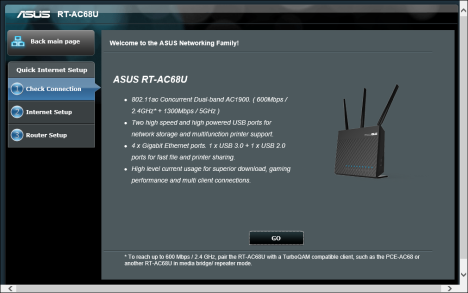
When setting up this router for the first time, it is best to connect to your computer using the bundled network cable. Plug in its power adapter, then the Internet connection cable from your Internet provider, connect it to your computer and start your favorite browser. Go to 192.168.1.1 or https://router.asus.com and follow the set up wizard.
ASUS RT-AC68U, dual-band,wireless, router, ac1900, review, performance, benchmarks
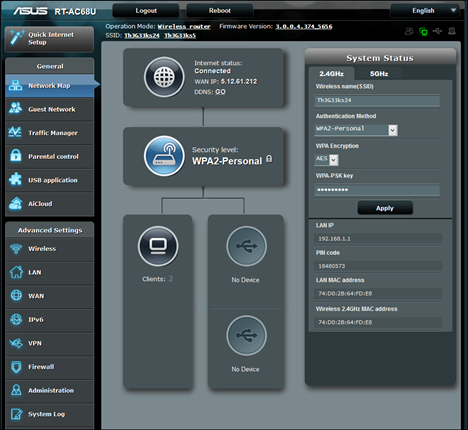
After you go through the initial set up and you get your Internet connection working, don't hesitate to check every section in this router's software. You will find plenty of things to configure, from the way your wireless networks function, to the firewall, VPN access, parental controls, port forwarding and much more.
ASUS RT-AC68U, dual-band,wireless, router, ac1900, review, performance, benchmarks
After looking through all the configuration options that are available, I was amazed by how much control this router has to offer. Geeks and IT professionals will simply love this and will be sure to dive right in and try tweaking everything. Many users will also appreciate its great multilingual support. Not many manufacturers provide support for less popular languages like Romanian but ASUS does. In the screenshot below, you can see all the languages that are supported on the ASUS RT-AC68U router.
ASUS RT-AC68U, dual-band,wireless, router, ac1900, review, performance, benchmarks
Once you configure everything you need, don't forget to update the firmware on this router. ASUS releases firmware updates once every month or two and they fix plenty of issues and improve the performance of the device. In my weeks of testing, I have used two firmware versions: 3.0.0.4.374.5047 and then 3.0.0.4.374_5656. I found it strange that some firmware upgrades require a manual reboot.
ASUS RT-AC68U, dual-band,wireless, router, ac1900, review, performance, benchmarks
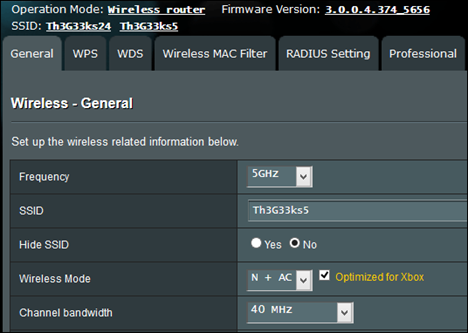
After you get everything working, don't hesitate to take a final look at all the features that are enabled on this router. As I said before, it offers many features and you will surely end up not using some of them. In order to improve its performance even more, enjoy some energy savings, a bit more security and an even better experience, I found it useful to disable the things I did not need, like network sharing or the DLNA Media Server. If you have an Xbox console in your home, you will be pleased to learn that ASUS allows you to optimize the settings for your wireless network so that it provides improved speed and stability when gaming on the Xbox.
ASUS RT-AC68U, dual-band,wireless, router, ac1900, review, performance, benchmarks
After taking a few hours to set everything up as I wanted, using the ASUS RT-AC68U was a breeze. This router delivered great signal strength, stability, and speed. I did not have to reboot the router once every few days like it happens with other routers, and the wireless network never stopped working for weird reasons, like on other routers. All the devices in my home network have never worked on a network this stable and fast.
Wireless Network Performance
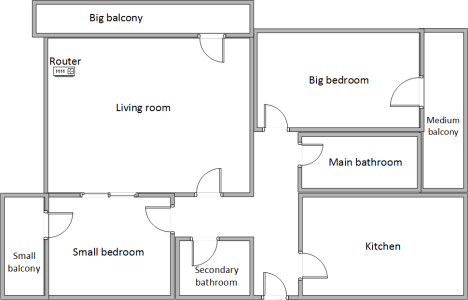
First, let's take a look at my apartment and how it is set up. You can see that I have placed the router in the living room, where I do most of my work.
ASUS RT-AC68U, dual-band,wireless, router, ac1900, review, performance, benchmarks
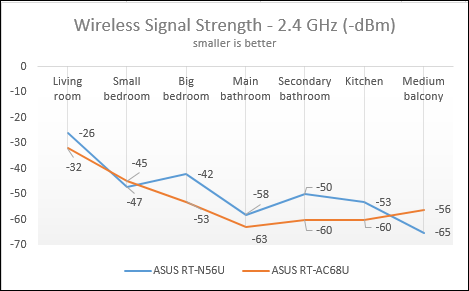
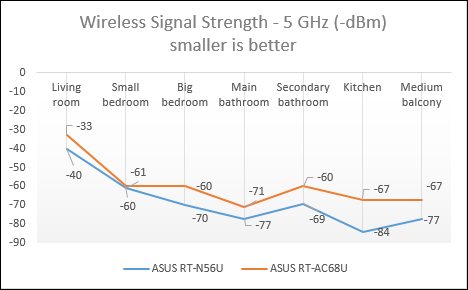
With the help of a tool named inSSIDer, you can see the wireless signal strength as it changes from room to room.
Obviously, the greater the distance between a room and the router, the weaker the signal. I was surprised to learn that, in terms of signal strength for the 2.4GHz wireless network, the ASUS RT-AC68U doesn't deliver any improvements over my previous router. In most rooms, the signal strength was weaker than when using my old ASUS RT-N56U.
ASUS RT-AC68U, dual-band,wireless, router, ac1900, review, performance, benchmarks
However, when switching to the 5GHz wireless network, I noticed improvements in every room, including those that are far away from the router. Looking at this data, it seems that ASUS focused a lot on delivering great wireless performance for modern 802.11ac and 802.11n networks that run at 5Ghz, and not that much for older types of networks.
ASUS RT-AC68U, dual-band,wireless, router, ac1900, review, performance, benchmarks
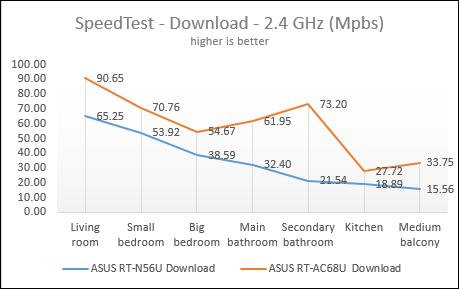
The signal strength doesn't mean much if downloading data from the Internet is not done at faster speeds. Next, I ran SpeedTest and compared the download speed on the 2.4GHz wireless network, in every room of my apartment. As you can see, ASUS RT-AC68U delivered improved download speeds in every room. These improvements ranged from 31% (in the small bedroom) to 239% (secondary bathroom), depending on the room where I have made my measurements.
ASUS RT-AC68U, dual-band,wireless, router, ac1900, review, performance, benchmarks
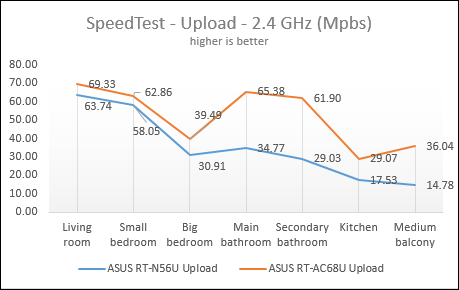
Then, I compared the upload speed in all the rooms, on the same 2.4GHz wireless network. Important improvements were noticed everywhere: the smallest was of 8% (in the small bedroom), while the biggest was of 144% (in the medium-sized balcony).
ASUS RT-AC68U, dual-band,wireless, router, ac1900, review, performance, benchmarks
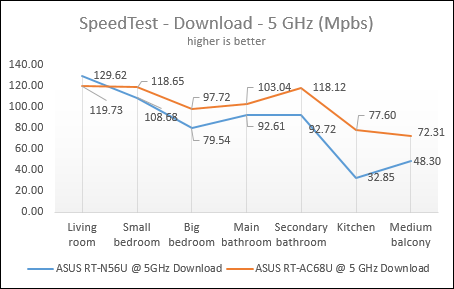
Then, I ran SpeedTest and compared the download speed on the 5GHz wireless network. I noticed that my old router delivered faster downloads for the devices that are placed in the same room with it. However, the download speed falls quite drastically if you go to the rooms that are far away from it. In contrast, ASUS RT-AC68U managed to deliver fast downloads even in those rooms that are far away from it. The biggest improvement was noticed in the kitchen - 136%.
ASUS RT-AC68U, dual-band,wireless, router, ac1900, review, performance, benchmarks
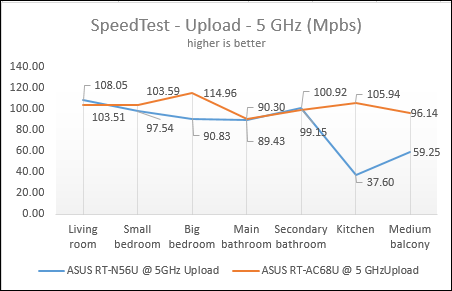
Next, I looked at the upload speed. The same trend was noticed: ASUS RT-AC68U delivered very good upload speeds even in those rooms that are far away from it. The biggest improvement was again noticed in the kitchen - 181%.
ASUS RT-AC68U, dual-band,wireless, router, ac1900, review, performance, benchmarks
The ASUS RT-AC68U router delivers very good coverage and great speed, both when downloading and uploading data from the Internet. You won't notice a sharp drop in speed when moving further away from it, as happens with other routers. This router manages to provide fast data transfers even in larger apartments where other routers have coverage issues.
Wired Network Performance
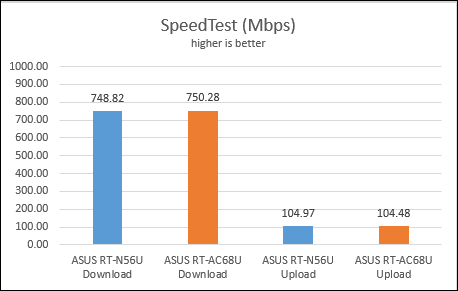
In order to test the quality of the wired Ethernet connection, I have used my desktop PC, equipped with a very fast ADATA SX900 SSD drive and an old laptop with an SSD from RunCore. First, I ran SpeedTest and compared the results obtained on my old router - ASUS RT-N56U - with the results obtained using the new ASUS RT-AC68U. As you can see below, there is not much of a difference between the two routers. The new ASUS RT-AC68U was faster at downloading data from the Internet by only 1.46Mbps. This is a statistical error and not a meaningful difference. The same goes for the upload speed: a difference of 0.49 Mbps in favor of my old ASUS RT-N56U.
ASUS RT-AC68U, dual-band,wireless, router, ac1900, review, performance, benchmarks
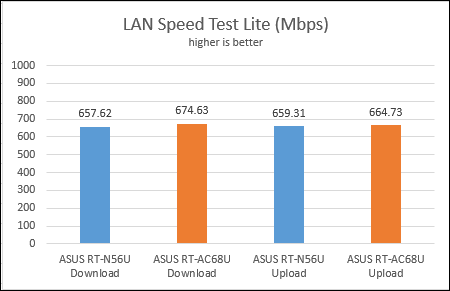
Then, I used LAN Speed Test Lite to measure the download and upload speeds when transferring a 350 MB file to and from two computers connected to the network via Ethernet cables. In this test, the new ASUS RT-AC68U was 2.5% faster than my old router in terms of download speed and approximately 1% faster in terms of upload speed.
ASUS RT-AC68U, dual-band,wireless, router, ac1900, review, performance, benchmarks
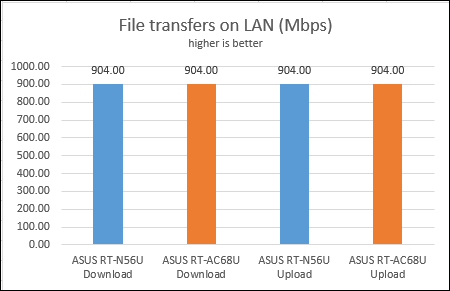
The last test I performed was to transfer an 883 MB file across the network, between the same two computers. The speed was exactly the same, both when downloading and uploading this file: 904 Mbps.
ASUS RT-AC68U, dual-band,wireless, router, ac1900, review, performance, benchmarks
It's clear from these results that, if you have computers with SSD drives, you will enjoy a true 1Gbps wired network connection. The new ASUS RT-AC68U cannot bring any important improvements in terms of speed when using wired Ethernet connections. The performance it delivers is very close to the advertised 1Gbps and you won't notice any important differences between this router and older models from ASUS.
Some of Its Coolest Features
There are many extras bundled by this router and I'm afraid I did not get the chance to use everything. It does offer what you would expect from a modern router: things like Quality of Service, sharing your printer with the network, using a 3G/4G USB wireless dongle as a backup Internet connection, and so on. I decided to share only a couple of big extras that I considered more interesting than what you find on competing routers:
Dual WAN - this is an amazing feature for small businesses or professionals who require always-on Internet connections. You can also use a dual WAN to improve the quality of your Internet connection and get the best performance possible.
ASUS RT-AC68U, dual-band,wireless, router, ac1900, review, performance, benchmarks
VPN server - ASUS RT-AC68U can be set to work as a VPN server, which allows you to access your home network from anywhere on the Internet.
ASUS AiCloud - with the help of this app, you can access the folders shared in your home network from your Android or iOS smartphone, from anywhere on the Internet. The only downside is that this app doesn't have a Windows Phone version.
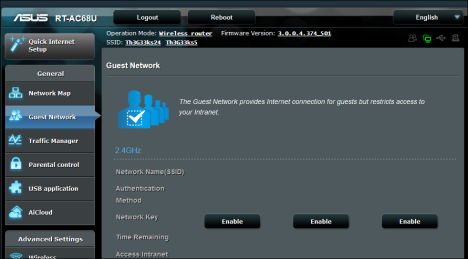
Guest network - you can set up a guest wireless network that provides Internet access for your guests but restricts access to your network devices.
ASUS RT-AC68U, dual-band,wireless, router, ac1900, review, performance, benchmarks
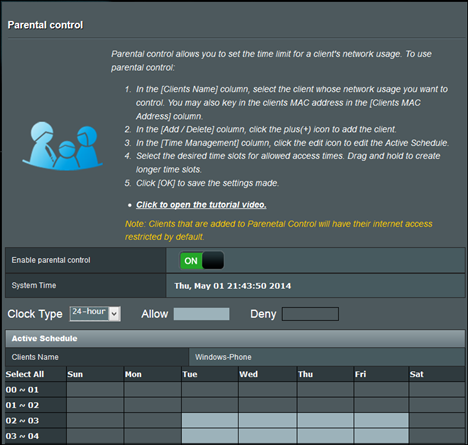
Parental Controls - these are basic controls that allow you to set when a network device can access the Internet and when it cannot. The router doesn't ban network access, only Internet access.
ASUS RT-AC68U, dual-band,wireless, router, ac1900, review, performance, benchmarks
If you do purchase this router, I encourage you to read its manual, experiment with all its features and keep turned on only those that are useful to you.
Product rating4/5
Verdict
The ASUS RT-AC68U is a great router which delivers plenty of features, great performance and lots of control. Geeks and IT professionals will simply love the amount of control they get and its special features like Dual-WAN or the VPN server. Casual users will love the fact that once set up, they don't have to fiddle with it or restart it regularly as it happens to other routers. This is the "set and forget" kind of router which also delivers great performance. I don't know if this is the world's fastest router because I did not get the chance to test its competitors but this is surely the fastest router I ever had the pleasure of testing. If you can afford its premium price, you won't go wrong with buying the ASUS RT-AC68U.
Hi, for your house size, one router is sufficient enough to cover your whole area?
Ciprian Adrian Rusen ·
Yes, it is enough.
Anrew ·
I have a router RT – N56U and ADSL modem . I planned to purchase just the model DSL – AC68U , but to the lack of a clear performance improvement (small % ) there is no need to spend money unnecessarily . Very good review and comparison of the two models. One comparison that I could find on the Web. It is a pity that there is no functional test parts of ADSL.
Bruce Fenster ·
I’m confused by your results with SpeedTtest. It does test your internet speed, right? Doesn’t your ISP limit download/upload speeds? I get about 34 Mbps DL with my upgraded plan which is way way slower than my LAN. Do you have unlimited speeds with your ISP? What am I missing? I have the RT-AC68P
Thanks.
Ciprian Adrian Rusen ·
We have a 1Gbps Internet connection.
ThiGey ·
There is no wireless network trnasfert test from one PC to other in this review???. That woud be a serious reason why I would purchase this expensive router, not the wire transfert speed that is the same with most cheap new router with Gigabit wired transfert rate
Eddie ·
I was just wondering is there much difference in the speed of the wired connection compared to a regular standard router?
Terry Titsworth ·
Purchased this unit in Nov. 2014. I am still trying to discover all the features that it has. Trying to convince the other users in the house that this unit will improve their ability to use the web…





























Discussion (9)
Hi, for your house size, one router is sufficient enough to cover your whole area?
Yes, it is enough.
I have a router RT – N56U and ADSL modem . I planned to purchase just the model DSL – AC68U , but to the lack of a clear performance improvement (small % ) there is no need to spend money unnecessarily . Very good review and comparison of the two models. One comparison that I could find on the Web. It is a pity that there is no functional test parts of ADSL.
I’m confused by your results with SpeedTtest. It does test your internet speed, right? Doesn’t your ISP limit download/upload speeds? I get about 34 Mbps DL with my upgraded plan which is way way slower than my LAN. Do you have unlimited speeds with your ISP? What am I missing? I have the RT-AC68P
Thanks.
We have a 1Gbps Internet connection.
There is no wireless network trnasfert test from one PC to other in this review???. That woud be a serious reason why I would purchase this expensive router, not the wire transfert speed that is the same with most cheap new router with Gigabit wired transfert rate
I was just wondering is there much difference in the speed of the wired connection compared to a regular standard router?
Purchased this unit in Nov. 2014. I am still trying to discover all the features that it has. Trying to convince the other users in the house that this unit will improve their ability to use the web…
Fantastic review – thanks