




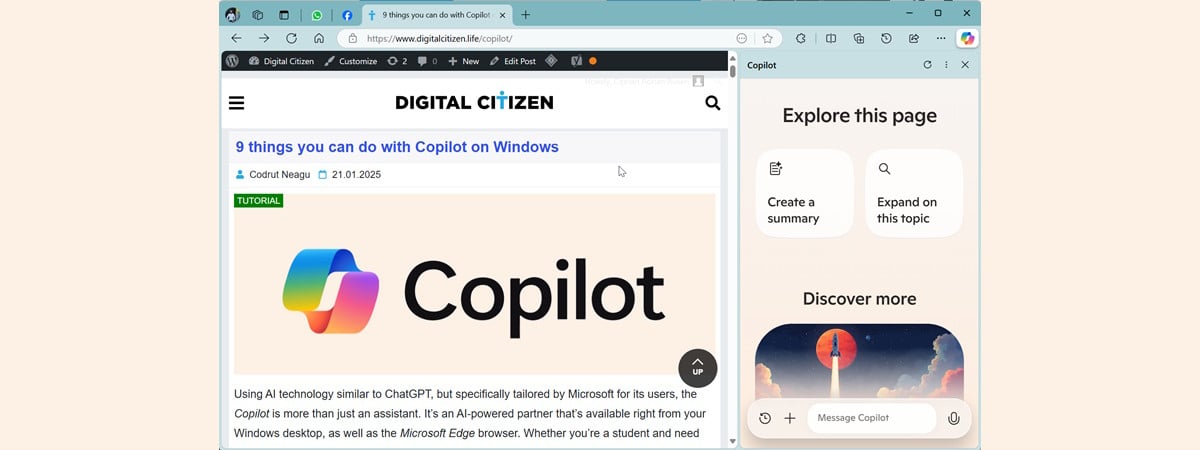
Microsoft is gradually reshaping Copilot from a feature into something much bigger. The latest move suggests that Copilot is evolving into a browser-like experience, where instead of switching between tabs, you interact with the web through AI.
At first glance, it sounds efficient. But it also raises a valid concern. Is this genuinely a better way to browse, or just another attempt to pull users deeper into Microsoft Edge?
The answer sits somewhere in between.
What Does “Copilot as a Browser” Actually Mean?
Microsoft isn’t replacing traditional browsers overnight. Instead, it’s layering a new way to interact with the web on top of existing browsing behavior.
Copilot can:
- Summarize web pages without opening multiple tabs
- Answer questions based on content across sites
- Navigate tasks like research or comparisons in a single interface
- Reduce the need to manually search and filter results
Instead of clicking through links, you’re essentially asking Copilot to do the browsing for you.
It’s less about pages and more about outcomes.
How It Changes the Browsing Experience
Traditional browsing is linear. You search, open links, scan content, and piece together information yourself.
Copilot flips that model.
You start with a question or task, and the system pulls together relevant information, often without requiring you to visit each source individually.
In practice, this means:
- Fewer tabs open at once
- Faster access to summarized information
- Less manual filtering of results
For research-heavy tasks, this can feel like a significant improvement.
But it also changes how much control you have over the process.
Why Microsoft Is Moving in This Direction
This isn’t just about convenience. It’s a strategic move.
Browsers have traditionally been gateways to the web. By turning Copilot into an intermediary, Microsoft shifts the focus from navigation to interaction.
It keeps users inside Microsoft’s ecosystem longer and reduces reliance on traditional search patterns.
There’s also a competitive angle. As AI becomes central to how people find information, controlling that interface becomes more important than controlling the browser itself.
Real-World Usage: Where It Actually Helps
This approach works best when you’re trying to understand or compare things quickly.
For example:
- Researching a topic without opening multiple articles
- Comparing products or services
- Summarizing long pieces of content
- Getting quick answers without digging through pages
In these cases, Copilot reduces friction and saves time.
However, for tasks that require depth, nuance, or verification, traditional browsing still has an advantage.
You may still want to read original sources rather than rely entirely on summaries.
The Trade-Off: Speed vs Transparency
The biggest trade-off here is between speed and control.
Copilot gives you faster answers, but it also abstracts the process. You’re trusting the AI to interpret and present information accurately.
With traditional browsing, you see the sources directly and decide what to trust.
With Copilot, that decision is partially made for you.
This doesn’t make it unreliable, but it does mean you need to stay aware of how information is being filtered.
Is This Just an Edge Strategy?
It’s hard to ignore the connection to Microsoft Edge.
Copilot is deeply integrated into Edge, and expanding its capabilities naturally strengthens the browser’s position.
From a business perspective, this makes sense. If users rely on Copilot for browsing tasks, they’re more likely to stay within Edge.
But that doesn’t automatically make the feature unnecessary.
Even if it benefits Edge adoption, it can still provide real value if it improves how people interact with information.
Limitations You Should Know
There are still some practical limitations.
Accuracy depends on how well Copilot interprets content. It can simplify information, but sometimes at the cost of detail.
It also doesn’t replace direct interaction with websites. For certain tasks, especially those involving transactions or specific tools, you still need traditional browsing.
And finally, there’s the learning curve. Shifting from tab-based browsing to AI-driven interaction takes some adjustment.
The Bigger Picture
This is part of a broader shift from browsing the web to interacting with it.
Instead of navigating pages, users are starting to rely on systems that interpret and deliver information directly.
If this approach works, it could redefine what a browser actually is.
Not a place you go to explore the web, but a system that brings the web to you.
Final Thoughts
Turning Copilot into a browser-like experience isn’t just a feature update. It’s a change in how Microsoft thinks about the web.
It can save time and reduce friction, especially for everyday tasks and quick research.
But it also introduces trade-offs around control and transparency.
Whether it becomes the default way people browse depends on how much users are willing to trust AI to handle the process.
For now, it feels less like a replacement and more like an alternative layer on top of traditional browsing.
FAQs
Is Copilot replacing web browsers?
No, it’s adding a new way to interact with web content alongside traditional browsing.
Do I need Microsoft Edge to use this feature?
Copilot is most deeply integrated into Edge, so that’s where the experience is strongest.
Can Copilot browse websites for me?
It can summarize and interpret content, reducing the need to manually visit multiple sites.
Is it better than normal browsing?
It depends on the task. It’s faster for quick answers but less transparent than manual browsing.
Should you rely on Copilot for research?
It’s useful for starting points, but verifying information from original sources is still important.

Discussion (0)
Be the first to comment.