



Windows 8.1 offers you a choice that has not been available in older versions of Windows. Right from the start, before you even log in and see the operating system's interface, you'll have to choose whether you want to log in using a local account or a Microsoft account. Users who don't plan on taking advantage of the new Windows 8.1 apps and don't want to use most of its new features, will be more comfortable using a local account, which works just like any account you've ever had on a previous version of Windows. But is there any value in using a Microsoft account? Let's take a deep dive into the differences between these two account types and see when to use each of the options.
What is a Local Account?
A local account is the same as any account you've ever used to log into a Windows operating system. It grants you access to the system's resources in your own user space. You can install desktop applications, change settings and work as usual. While you won't miss out on any features that you're used to from previous version, you won't have access to many new features that Windows 8.1 has to offer.
Local accounts work on a single system only, so if you do have multiple devices, you'll have to create a separate local account for each.
What is a Microsoft Account?
A Microsoft account is basically a rebranding of any of a number of previous accounts for Microsoft products. If you've ever had an Xbox Live account, a Windows Live ID, a Hotmail account, a Microsoft Passport or any other Microsoft related account, then you've already got a Microsoft account. By rebranding and combining all of these separate accounts, Microsoft allows for complete integration of all of their services into a single account. This way, when you log in once, you get access to everything you need. If you want more information, read this article: What is a Windows Live ID or a Microsoft account?.
A Microsoft account uses an email address rather than a username to log in. While most accounts will be made using Microsoft email addresses including hotmail.com, live.com or outlook.com, you can use any email address to create yours. Whether you prefer Yahoo!, Gmail or even an ISP specific email address, it makes no difference.
Four Reasons to Use a Microsoft Account
Here are the reasons why we think it is worth using a Microsoft account in Windows 8.1:
-
Synchronizing Windows 8.1 settings and data - When you first set up your new Windows 8.1 computer or device, there are a lot of details you have to be aware of. You have to personalize your background, change update settings, change the Homegroup and networking settings, configure devices and also select your time and language settings. Getting everything set up the way you like can take a significant amount of time and there is no way around that. Plus, it's really not that fun to do all of these things every time you buy a new computer or device or when you need to reinstall the operating system.
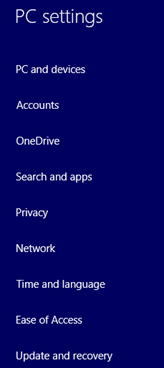

Windows 8.1, user accounts, local account, Microsoft account, difference However, with a valid Microsoft account you only have to go through that process once. After configuring a Windows 8.1 computer or device that is linked to your Microsoft account, you can log in to any Windows 8.1 computer or device that's connected to the Internet and your settings will be migrated automatically and synced between them. So much for needing to make the same choices multiple times!
You can even sync passwords for websites, apps and networks between devices, but you'll have to trust your PC first.


Windows 8.1, user accounts, local account, Microsoft account, difference -
Download Windows 8.1 apps from the Windows Store - You may be wondering why you need a fancy extra account to download apps onto a computer or device. After all, there are plenty of free programs available to anyone online. While this is true, there is an important difference between Windows 8.1 apps, which are a new feature of this operating system and traditional Desktop applications which are what you have been using before Windows 8 first hit the market.
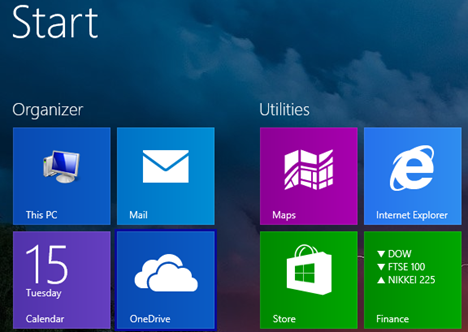

Windows 8.1, user accounts, local account, Microsoft account, difference Windows 8.1 apps are small programs that are just like anything you've ever downloaded from Apple's App Store or Google's Play Store. An important aspect of these apps is that you cannot download an installation kit for them and transfer them to another computer or device. However, most of them are small, so they take up minimal resources and they run in full-screen mode. They can take a bit of time to figure out and get used to, but they can be a lot of fun and really useful.
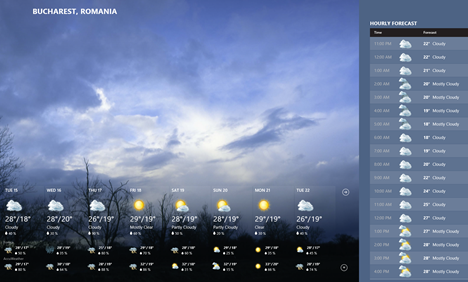

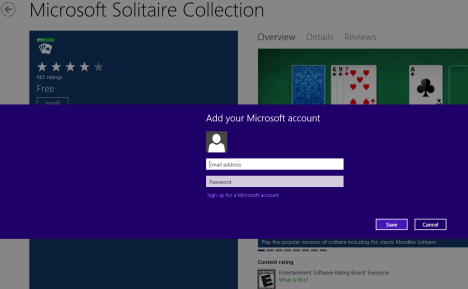
Windows 8.1, user accounts, local account, Microsoft account, difference You can browse the Windows Store with a local account, but if you want to download and install something, you'll need to upgrade.

Windows 8.1, user accounts, local account, Microsoft account, difference -
Full access to bundled Windows 8.1 apps, features and services - While we've already discussed that you'll need a Microsoft account to download new Windows 8.1 apps from the Store, you'll also be interested to know that even some of the apps that come bundled with the operating system won't work unless you are using a Microsoft account.
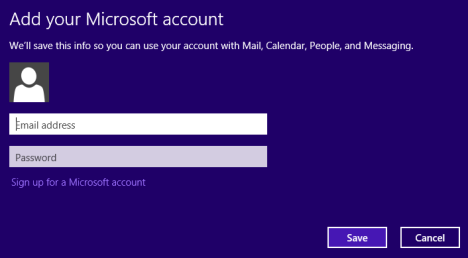

Windows 8.1, user accounts, local account, Microsoft account, difference Many useful apps like Calendar, Mail, and People will require you to enter Microsoft account information before you can begin to use them. Even Music has more to offer Microsoft account users.


Windows 8.1, user accounts, local account, Microsoft account, difference While you do need an account for these apps to function fully, it does bear mentioning that you can simply enter your account information into the apps and still log in with a local account.
While the three previously mentioned features are great for all users, parents may also be interested in the enhanced Family Safety features that you can access with a Microsoft account. With a local account you can still utilize many of the local features for parental controls, but with a Microsoft account you can take it to the next level. You can remotely manage your parental control settings as well as receive reports about your children's usage in your inbox. - Access to unified apps and games for Windows, Windows Phone & Xbox - If you have other Microsoft devices like Windows Phone and Xbox One, then it makes even more sense to use a Microsoft account. With Windows 8.1 and Windows Phone 8.1, Microsoft has introduced the concept of unified apps. This means that one app can be made available on all Microsoft's platforms. You as a user purchase it once, from any Microsoft device and you pay only one license cost. The app is then available on all the Microsoft devices you are using. Also, your settings and data will be synchronized across devices, as we mentioned earlier. This way you will save a lot of money when purchasing apps, as you won't have to buy the same app twice: once for Windows 8.1 and once for Windows Phone 8.1.
Who Would Want a Local Account?
Now that you've seen what a Microsoft account can do for you, you may wonder why Microsoft even includes an option to use a local account. Who, when given the option, would choose limited functionality over cross-platform integration? The answer is likely a lot of people.
Many users only have or want a single computer. For them, the exciting synchronization feature will be useless. Some users may even like the idea of having separate accounts on separate computers. If the laptop is for work and the desktop is for play, syncing settings won't be that useful.
Windows 8.1 apps are a feature that take some time getting used to. On a desktop computer their functions aren't as intuitive and they may not entice all users. To folks not interested in them, the inability to download apps from the Store won't be an issue.
Also, there are a lot of users who won't like Windows 8.1 because it's not what they're used to. For those users, who want this new operating system to work and feel as much as possible like Windows 7 and earlier, a local account will work just fine.
Conclusion
While the Microsoft account may not be for everyone, it is something that should at least be considered. The ability to sync passwords, settings and even wallpapers between computers and devices is extremely useful and a great time saver. Though the Windows Store may not yet have anything near the quality and quantity of offerings that Apple or Google have in their app stores, there are plenty of great apps available now that will keep you interested as developers create new ones.
How do you feel about logging in with a Microsoft account? Do you find the new features to be useful or more trouble than they're worth? Drop your comments or questions below and we'll gladly reply!
Discussion (49)
Updated my windows 10 machine to a Microsoft live account. Haven’t been able to login since. Talked to tech support for hours. Was told to reinstall OS from recovery disks I got with the computer. Created another admin account instead but still have no access to the account and support offers no help what so ever.
I can’t believe some of the totally ignorant rants in these comments on this article. I didn’t realize there were so many people who have no clue what they’re doing on a Windows computer.
You absolutely *CAN* login to your Windows PC without a connection to the Internet! All your data isn’t being stolen by Microsoft just because you’re using a MS login. No, your Onedrive is not the problem, YOU are the problem because you simply don’t know what your doing on a computer. There is absolutely no need to do a complete reinstall and lose your hotmail email address. That’s just utter stupidity.
I mean, really people. Instead of raging and making stupid comments about things you don’t know about, how about you listen to the people trying to provide some *valid* answers to your questions.
Just because other people are as clueless as you are about using a Microsoft login doesn’t prove that it doesn’t work when you’re not connected to the Internet. My god.
I’ve done it many, MANY times. There is not an issue with this. Maybe you should take some computer courses or read some books on the subject because you simply don’t know what you’re talking about.
You give all the “benefits” of having a Windows account, but you don’t get down to the real issues…. It is a total invasion of my privacy and my phone by Microsapp. Even Google doesn’t require an intrusive login account to download apps, etc. I don’t want Bill Gates to backup my data. I don’t want your moron geeks to be monitoring my apps. If I had known that this BS was part of owning a Windows phone, I would have taken any other option. The fact that apps themselves are major invasions of my privacy and a takeover of my confidential info is in itself outrageous. Another dumass geek idea. Well, I know y’all won’t lose any sleep over the fact that one phone/computer user won’t play your stupid games, but if I can wake up other users it was worth the time it takes to post this comment.
Having tried to troubleshoot users who ONLY have Microsoft accounts, and thus, no access to administrative rights on their own system…
Let’s just say Microsoft can blow me, and leave it at that.
Is there a way to use a local account to sign in to the PC, but still have all the features of a MS account? Bc my MS account uses my generic password, but i want my PC to have a password only i know
The one thing that I find disturbing is that Microsoft does not openly give a user the option to have a local account vs a Microsoft account. I’m sure most in enterprise will also stick to a local account setup too. But the IT people probably already know about setting up local accounts. The other issue nobody addresses is that the power of the Microsoft account means a community PC say a family desktop means that if you use a Microsoft account every family member should have one. Also, be sure to log out if this is the case ,otherwise other users may be mistakenly saving files and documents to someone else’s OneDrive and using another users mail and so on. The Microsoft account becomes more problematic because it controls more personal settings.
I’m not the most tech savvy – The cable guy sorta helped me get my computer up and going… I ended up setting it up with my hotmail account – I wished I’d ran across this article before we did that… In retrospect, I’m kinda wishing I’d set it up with a local account. Once it’s set up with a Microsoft account – is it possible to switch it back to a Local? – and if so, how?
Jamie I’m in the same situation as you and I dunno how to solve it…
Previously it was perfectly fine to install apps from Windows store with local account. I guess removing this option just proves that Microsoft does not care about the users. I don’t want a MS account, thank you very much. Definitely not as a computer login. Which means I will move to another platform, less hungry for monopoly, a little more flexible. For the heck of it, I guess I could also try if I can install some Google apps on my tablet, while I still have it, as the next one will be anything but a Windows one.
I don’t know if someone else has already said this, but Microsoft accounts are hard to admin and cann’t be used for many services such as TELNET.exe. They all so can’t have there passwords changed via cmd or run. – could be a downside or a good one.
I just bought a new touch screen computer with Windows 8. I want to be able to use my Microsoft account login for the apps once I’m in my computer, but don’t want that to be my login to get into the computer itself. I would rather just have a local password so my husband can easily open it and use the internet without having to put in my crazy email password and remember it. However, I do still want a password because I have kids. Is there any way to use the local password only for the initial computer login but still use my Microsoft account for the apps?
I absolutely LOATHE the sign in feature of Microsoft on Win 8.1. Absolutely and utterly hate it.
I had my newly installed 8.1 os running like a dream for two whole months. Like a charm.
And then something I did without knowing what it was going to affect changed all of that.
ONEDRIVE started up. Something I did activated this sleeping rodent. And now it is always on. I have tried for 9 hours now and cannot figure out how to stop this menace and go back to the way things were before it appeared. And to add insult to injury when I restarted the damned PC a log in screen appears. The first time I have seen this since I installed the OS. What the!! And now I cannot get rid of the whole bundle of crapware.
So now it appears a re-install is going to happen. But, will all of this crap just reappear because it is synced!?
Do I really have to delete my Hotmail account that I have had for nearly 16 years just to get rid of this gross intrusion!?
My god man! Are these people serious!!
I have brought new windows phone. For registering my phone I have made a new account through the phone. But now when I am trying to access that Microsoft account through a web browser the pages says “THE ACCOUNT DOESN’T EXISTS”. The phone is working on that account but I can’t access it externally.! Please help me.!
This is just the beginning. Soon you will be paying for rental software every year. Or every 6 months? It’s always about the money. It will be income streams from your pocket to their pocket, unless you do something about it now!
I got a new laptop in work recently with Win 8.1 installed. For the first few days I was able to log on using my local account. After starting Outlook.com, the login username and password changed to my personal outlook.com email address and password. How can I change back to the local userid/password details?
I had a Dell XPS10 Windows 8RT tablet that got damaged. I got another XPS10 and have been using it. I just got the damaged tablet repaired, and I’d like to give it to my son. How can I prepare that tablet for him to use? If I remove the Microsoft account on the repaired tablet, will it affect my MS account on the tablet I’m using now? Would it be better to just add a new user on the repaired tablet and let him use that?
How do these Microsoft accounts work if you have got an well established network based on local accounts with several users? A network with a NAS and an old HP Mediasmart Server?
Many games and apps (such as solitaire, hearts etc.) will not work with a local account. What possible reason would Microsoft have for not allowing this? With only one computer there is no need for a Microsoft account.
If you have a Microsoft account, what information is stored on Microsoft server? Users have a profile. What is included in that profile and were is it stored? This kind of information we need to know. For example: Documents is part of the user profile. Is Documents stored on Microsoft server?
Merry Christmas everyone!
So now we have MicroApple??
@Chris
With Microsoft Windows 8.1 or new Windows 10, you can share an app across devices as long as that device is logged in as your microsoft account, for example if another user was to log in I don’t think they could use it.
But I would contact Microsoft and ask them
Matthew
Can I share purchased apps across accounts without having to pay for each account? With Apple, as long as I log into the App Store with the same account, I can download a purchased app, say Angry Birds, onto all my devices without having to pay again. This would include all my iDevices: Wife’s iPhone, childrens’ iPads, my iPad and iPhone. I believe there is something in iOS8 that allows similar behavior without the use of a single account. Where’s Microsoft with this? Thanks,
@Jane
Check you haven’t set something up by accident were it auto logs out, check you don’t an PC virus.
Can anyone tell me why I have to log to my Microsoft Windows password (LIVE ID) continuously while trying to use my PC. This is a huge point of frustration. I will be trying to read information on a website and the screen then defaults to the log in screen. The only way to avoid this is if I am either keyboarding or using my mouse and less than a minute of either and I have to log back in. Logging in 100 times a day is hugely frustrating!
@ Ken Sargent
Not getting your question, are you talking about which account should you use on a windows 8.1 laptop, if you are then you should set to use both microsoft account and local. Me personally, I use my microsoft account first and for some reason that I can not get on it I use the local account set up.
If you are asking the question of I can’t log on to my microsoft account through and Internet browser on a Windows Vista or Windows 7 then contact microsoft to get this resolved.
Matthew
I am still using Vista. One of the first things I did with the laptop I was given as a retirement present was to create a Hotmail account. Over the past 5+ years I have made the numerus changes recommended by Microsoft, including creating a Microsoft Account. As I understand, my email is now handled by Outlook.com. Both Outlook.com and its predecessor, Bing.com, are very unstable, slowing to a creep and locking up often. Additionally, I am unable to log onto my account from my wife’s computer (running Windows 7). Should I revert to a local account, rather than use my Microsoft Account? How do I do that? Will it improve performance?
@LRS
I looked on another forum board about this problem as well, I have not given it a go but another forum board said, why would microsoft give you the option to connect to a wifi when you get to the login screen, so to me it means that you need internet just to sign into your laptop.
As I have not tested it yet, I have to accounts local account and microsoft account connected to my laptop
Hey Ciprian:
It may supposed to work that way, but it doesn’t – just had it happen in an airport. No password worked – there are enough examples of this now – you can keep repeating what should happen but it obviously doesn’t consistently at least….
@LRS
I did try to log onto my laptop microsoft account with out the internet and it did work the first time, I have not tried any other times as of yet
the big problem with windows 8.1 is that you hook up your Microsoft account to your laptop, should you ever take your laptop to somewere there is no internet you can not login to the laptop as it needs the internet to connect to the Microsoft servers, Microsoft solution is that you have two accounts on the laptop, a local one for when you need to use your laptop when there is no internet to connect to and your Microsoft account when you can gain access to the internet
I hope on Windows 10, you have a local account so you can log in internet or no internet (ie cached password) and your Microsoft account sits in the background so you can purchase things in the Windows App store.
Windows 8.1 requires an Internet connection only the 1st time you use it to log in with a Microsoft account. Then it caches your credentials and it uses them for subsequent logins. Also, you can set a PIN or a Picture Password for quicker logins.
Hi Ciprian Adrian Rusen
Many thanks, not what Microsoft said though, but I will set it up, and then try to login in we’re there is no internet, using my microsoft details
Thanks
Can I download apps from the window store using a wifi connection and use the app or play the game while not connected to the internet or is this game biased like tablets phones and such thank you #tringtofigureitout
This is a pretty old thread. Here is a few the article fails to mention.
Like autocomplete?
Well auto complete uses bing to send EVERY keystroke you make in Internet Explorer to microsoft to seach for legitimate sites. Whats wrong with that? Microsoft now knows every website you even tried to visit. Funny thats what a few trogans (viruses) used to do and that was very naughty.
Log in to microsoft account anytime from your local and your local account is converted to a login with microsoft and you can’t reverse it.
Easy just make a new local account…….well no all the application data and settings are not available to your local account. They belong to (and are only accessable from) your now microsoft login account. They are not accessable from your new local account.
Remember, when you logged into the microsoft account ALL your settings were sent to microsoft. Microsoft knows what programs you have (whether theirs or not) and all your personal settings. Because it allows for sync, it knows your browser history, all your passwords.
But they are encrypted. Yes by microsoft. Do you really trust Microsoft?
They exist to make money so your usage data is a goldmine for them. Will it hurt you? Well now everything is on microsoft servers. What if (in the future) they decide at windows 9 they no longer support windows 8? Fine but they can delete windows 8 data and effectively cripple you.
With XP when they stopped support, most people didn’t even know. I bet you will when they demand anoth $150 to upgrade to windows 9.
Its called extortion.
Why are there so many virus out there?
Simple, microsoft decided to leave themselves so many different ways for THEM to be able to play withinYOUR windows operating system (they can autoupdate, auto alter settings). It was/is an open invitation to the dark side to do the same.
Log in to microsoft account anytime from your local and your local account is converted to a login with microsoft and you can’t reverse it.
Is this true? I see a lot about options to have separate accounts, but nothing so far that says a local account will be hijacked. Say you have created both local ad Microsoft accounts on your machine. If you continue to use them separately will this somehow occur?
Robert,
You may want to add that if your PC is not connected to the network and if you are not logged in to your PC, you can no longer login to the PC anymore as the Microsoft account needs to authenticate via the internet…. So basically you need a backup “Local account” for such cases..
the classic Microsoft way “Why make life easy when you can make it miserable”
So do you still believe that the Microsoft account is the best option for home laptop users ?
What you are saying is false. You need an internet connection only for the first time you log in with a Microsoft account. Then, your credentials are cached and encrypted so that you can log in even when you do not have an Internet connection available. I’ve logged in with my Microsoft account many times without an Internet connection. Also, to make the log in easier, I suggest defining a PIN or picture password.
Is using a pin not easy to hack everyone is saying at least 8 characters in your password with numbers and capitals is saver. Now you start a password with numbers who is cracked in 1 second.
So I do not understand at all why people shut do that.
My Lenova Tablet would like to differ with you. Did not work as you state today. Login screen said the tablet was offline and could not log in. Does not work as you state all the time. Look at the internet for complaints.
https://social.technet.microsoft.com/Forums/en-US/w8itprosecurity/thread/efe1d931-a1ad-4e57-b53e-f8afb7571e9a/
https://www.eightforums.com/general-support/4696-your-machine-offline-please-try-sign-last-password.html
https://www.justanswer.com/computer/7dirm-computer-windows-professional-offline-cannot.html
https://superuser.com/questions/489811/your-machine-is-offline-please-try-to-sign-in-with-the-last-password-used-on-thi
https://superuser.com/questions/515426/windows-8-cannot-sign-in-without-an-internet-connection
Just a sampling. I would not have posted if what you said is correct. So no, you can’t always log into Windows 8, using a Hotmail account, without an active internet connection. Maybe the Hotmail account is the key but from my understanding that is a Microsoft Account (Live ID).
Then, create a PIN or a Picture Password. Such data is always stored locally and you won’t have trouble logging it without an active Internet connection. They work 100% guaranteed.
I found this page because I just discovered today that you cannot log back into a tablet if you have logged into it with a Live ID, put it to sleep, take it somewhere where you have no internet connection and you will not be able to log back into it from the same session.
Not sure if this was because of a Windows update since the time of your post.
My recommendation, if you use a Live account also set up a local account just in case.
You can always log in to Windows 8, using a Microsoft account (Live ID), without an active Internet connection. You just can’t set up a Microsoft account and log in for the first time without an active Internet connection. All the other times, it works just fine.
I was using a Windows Live ID to log in with and then later when I was not connected to the internet I was unable to log in. It wanted me to use a Local Account, but I had not previously set one up, I had been using the Windows Live ID. Not being able to log in was quite annoying! How can you link a local account with a Windows Live ID? What is the best way to get over this issue?
You cannot “link them”. You use one or the other, or both in parallel. Each will have its own settings and customizations. They won’t be “synced”.
With a Microsoft account/Windows Live ID you can log in to Windows 8 even if the Internet connection is not available. But, you must have an Internet connection when you set it up for the first time.
Good Morning,
I have a few tips that might help. First, as your password is dictated by your Microsoft account, it is possible to change it while no where near your computer. You’ll have to make sure that you’re signing in using the correct password. If you change your password while working on another device and your computer is not connected to the Internet, you’ll need to sign-in using the last password you used on the computer. Once you go online, your new password will sync. If neither of those help, you can visit account.live.com/password/reset to change your password. Once you get logged in, consider configuring alternate ways to sign in; You can use a picture password or a PIN along with your current password. This way, if you have trouble again, you can just switch to your PIN or picture password to get in and fix things. Check out this article for more info:
https://www.digitalcitizen.life/introducing-windows-8-how-switch-between-sign-options/
Hope this helped. Have a great one.
Bob
When trying to sign-in to my SkyDrive account, I made the mistake of allowing it to convert my local sign-on to a microsoft account. I don’t want to use my microsoft account, which is personal–this is a work computer! How do I convert it back?
You can’t use SkyDrive without a Microsoft account and you can’t use apps from the Windows Store, etc.
However, you can switch back to a local account.
I’m the paranoid type, so I prefer to use a local account. But as you say, there are advantages to an Online account, like downloading Metro apps.
How difficult is it to switch a user between the types? Is the only option to create separate user profiles for the online and local accounts?
When you install a real (local) app you have the option of installing for just the current user or all users. Does that apply to Metro Apps too?
Windows 8 Apps (they are no longer called Metro apps) are installed ONLY for the Current User.
Desktop applications can be installed both for All Users and the Current User.
You can create as many user accounts as you need, both local and Microsoft account. Switching between users is very easy.