




Finding out which Fitbit you own helps you pick the right charger, bands, and troubleshooting steps. Many Fitbit devices share similar shapes, so quick checks save time and prevent incorrect accessories. This guide gives you straightforward ways to identify your exact model using physical clues, the Fitbit app, and charger details.
1) Quick ways to identify your Fitbit model
You can identify your Fitbit in seconds with the right cues. These methods work for new, used, and refurbished units.
Check the back of the device for the model number
Most Fitbit models include a small printed FB code on the back. Look for labels like FB417, FB512, or FB410. These codes map to specific families such as Charge, Versa, or Inspire. Clean the surface gently if the code looks faint.

Use the Fitbit app if the device is already paired
The Fitbit app lists your exact model in the Account section. This method works even when the device appears worn or the printing has faded. It also helps confirm the exact generation when names look similar.
Identify by overall shape and display style
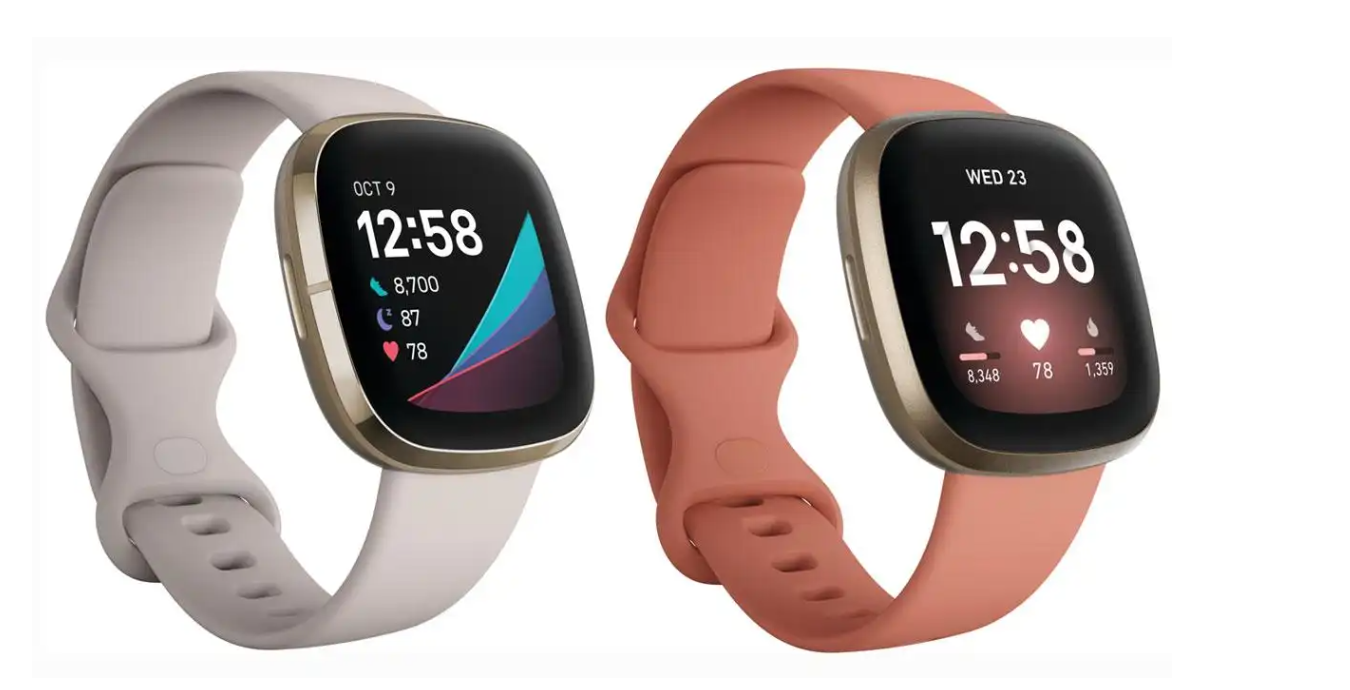
Fitbit families have signature shapes. Charge models use long vertical displays, Versa and Sense resemble smartwatches, and Inspire bands stay slim and minimal. A quick look at screen shape often narrows it down to a single series.
Check the charger type as a clue
Chargers differ between models even when the devices look alike. Count the pins, check if the connector uses a clip, or see whether the charger attaches magnetically. Charger style often points to the exact series.
2) Fitbit model identification by series
Use these simple cues to recognize the most common Fitbit model families.
Charge series
Charge models include a narrow vertical display and a slim fitness-tracker design. Most versions use one button on the side and FB41x model codes. Charging clips and three-pin connectors remain common in this series.

Versa and Sense series
Versa and Sense devices look like small smartwatches. They feature square touchscreens, interchangeable wristbands, and cradle-style chargers. Model codes often start with FB50x or FB51x.
Inspire series
Inspire devices feature lightweight, narrow designs with simple touch navigation. Many versions support magnetic chargers and removable side clips. Model codes commonly include FB41x and FB42x ranges.

Luxe, Ace, and legacy models
Luxe devices use jewelry-style bands with curved displays. Ace models are child-focused trackers with colorful straps and simple screens. Legacy units like the Fitbit One or Flex use older charger styles and small clip-on bodies.

3) When the model number is worn off
Compare your device to official images
Match your Fitbit’s button layout, band shape, and display type to photos of known models. This method works well for older or discontinued units.
Use Bluetooth device info as a last resort
If the device still powers on, your phone displays its Bluetooth name while pairing. Entries such as Versa 2 or Charge 4 confirm your exact model.
4) Accessory and charger compatibility by model
Choosing compatible chargers and bands prevents wear and poor battery contact. After identifying your model, check for series-specific accessories designed for the same charger type. This avoids confusion when series look nearly identical.
FAQs
Where do I find the model number on a Fitbit? Most models include a small FB code engraved on the back or printed near the charging pins. Clean the surface to reveal faint markings.
What if the app shows only a general name? Some older devices list generic names. Pairing the device again or checking Bluetooth info usually reveals the specific model.
How do I identify discontinued Fitbit models? Match design traits like screen shape, band type, and charger layout. Older models use unique clip-style chargers that help narrow them down.
How can I avoid buying the wrong charger or band? Confirm your exact model and check for matching charger style. Verify whether you need a clip, cradle, or magnetic dock to ensure safe charging.
Summary
- Look for the FB model code printed on the back.
- Use the Fitbit app to confirm paired devices.
- Compare screen style and device shape to known families.
- Check the charger type to narrow down the right series.
- Use Bluetooth info if markings are worn off.
- Match accessories only after confirming the exact model.
Conclusion
Identifying your Fitbit model takes only a few quick checks. You can confirm the device through its back label, the Fitbit app, or simple shape comparisons. Once you know the model, you know everything about your Fitbit, and you can choose the correct chargers, bands, and support steps with confidence.

Discussion (0)
Be the first to comment.