




Despite the sanctions imposed on it, HUAWEI doesn’t surrender and continues to create and sell Android devices that can be attractive to users. The company invested a lot of effort into creating a new app ecosystem to challenge Google’s and Apple’s app stores. Furthermore, the Android smartphones it makes are some of the best in the world when it comes to cameras while also featuring a beautiful design and good hardware. For the last seven days, I tested the latest version of their nova smartphone, namely the HUAWEI nova 10. With an interesting design and a lot of promises, is it a good choice for you? Let me tell you more about the HUAWEI nova 10, its strengths, and its drawbacks in this review:
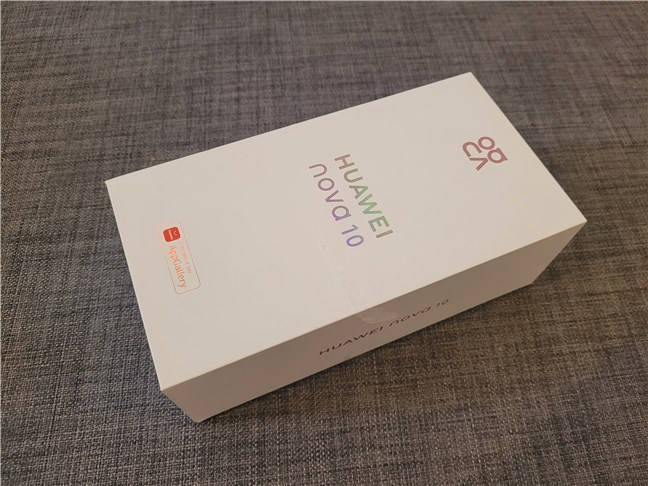
 The box of the HUAWEI nova 10
Inside the box, you’ll find the HUAWEI nova 10, a fast 66W charger, a USB Type-A to Type-C cable, a soft transparent case, an eject tool for the SIM tray, the quick start guide, and the warranty documents. Oh, and the phone’s screen comes with a protective film already applied.
The box of the HUAWEI nova 10
Inside the box, you’ll find the HUAWEI nova 10, a fast 66W charger, a USB Type-A to Type-C cable, a soft transparent case, an eject tool for the SIM tray, the quick start guide, and the warranty documents. Oh, and the phone’s screen comes with a protective film already applied.
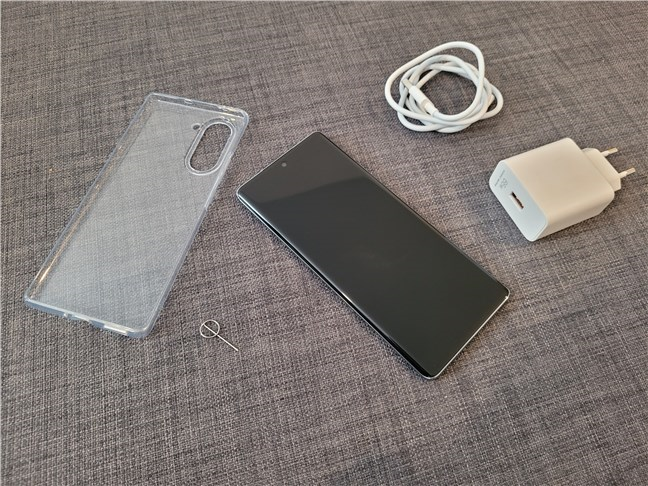 Unboxing the HUAWEI nova 10
 is a pleasant experience, and I appreciate the fact that the company bundles a (very) fast charger in the box.
Unboxing the HUAWEI nova 10
Unboxing the HUAWEI nova 10 is a pleasant experience, and I appreciate the fact that the company bundles a (very) fast charger in the box.
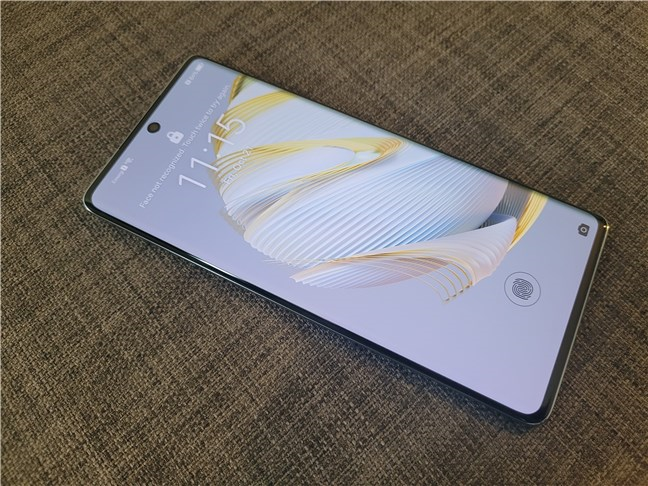 The HUAWEI nova 10 smartphone
The HUAWEI nova 10 is available in three different color versions: Starry Silver, Provence, and Starry Black. The sample I received in testing was the Starry Silver one. I can say that it looks nice, though it’s clearly designed to attract younger audiences.
The HUAWEI nova 10 smartphone
The HUAWEI nova 10 is available in three different color versions: Starry Silver, Provence, and Starry Black. The sample I received in testing was the Starry Silver one. I can say that it looks nice, though it’s clearly designed to attract younger audiences.
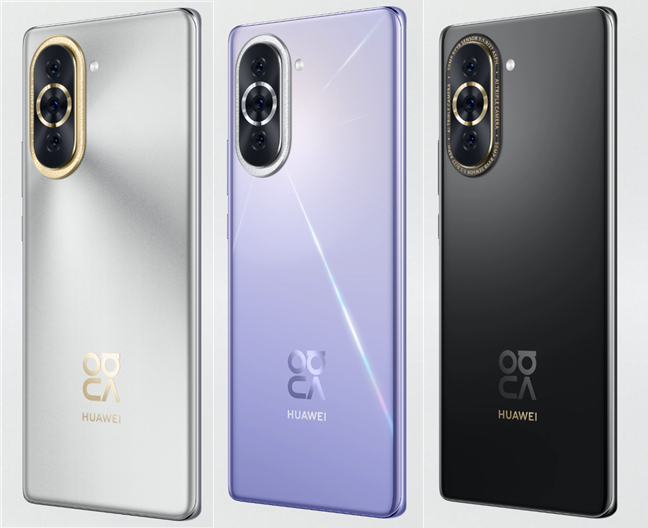
 Color editions available for the HUAWEI nova 10
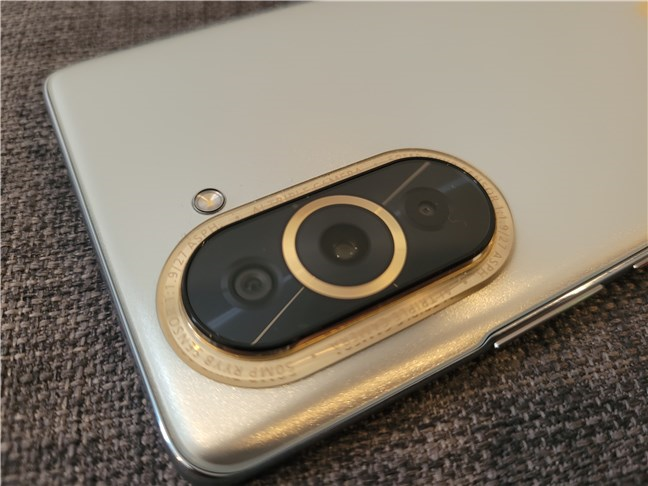
Why designed for younger audiences? Well, the cameras on the back of the smartphone are what I’d call flamboyant, looking extravagant and somehow “bling.” 🙂 While the rear cover is made of plastic, the camera setup is surrounded by a glossy golden border and yet another golden ring around the main camera. And there’s also some writing there on the outer ring, all in capital letters, telling you that the smartphone is equipped with an AI Triple camera and a 50 MP sensor.
Color editions available for the HUAWEI nova 10
Why designed for younger audiences? Well, the cameras on the back of the smartphone are what I’d call flamboyant, looking extravagant and somehow “bling.” 🙂 While the rear cover is made of plastic, the camera setup is surrounded by a glossy golden border and yet another golden ring around the main camera. And there’s also some writing there on the outer ring, all in capital letters, telling you that the smartphone is equipped with an AI Triple camera and a 50 MP sensor.
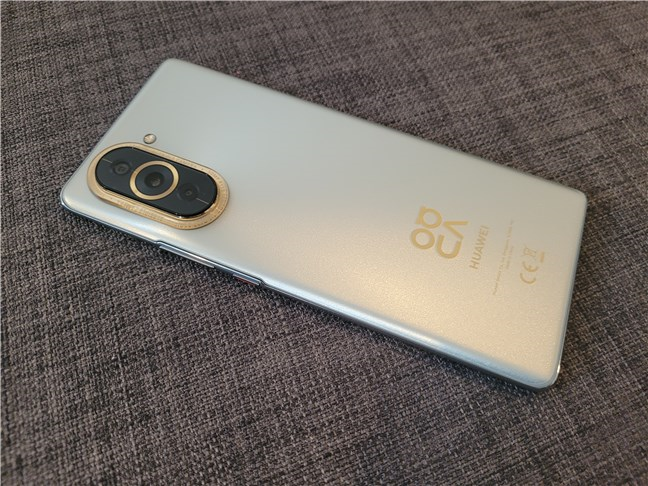 The back of the HUAWEI nova 10
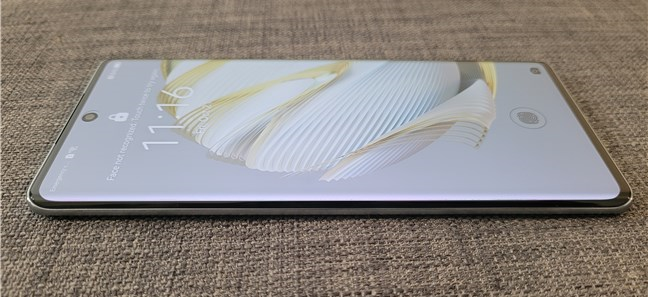
On the front, the screen is slightly curved towards the left and right edges, ending in a very thin plastic frame. That’s different from the top and bottom edges, where the screen doesn’t curve. There, the frame is wider and only a tiny bit curved.
The back of the HUAWEI nova 10
On the front, the screen is slightly curved towards the left and right edges, ending in a very thin plastic frame. That’s different from the top and bottom edges, where the screen doesn’t curve. There, the frame is wider and only a tiny bit curved.
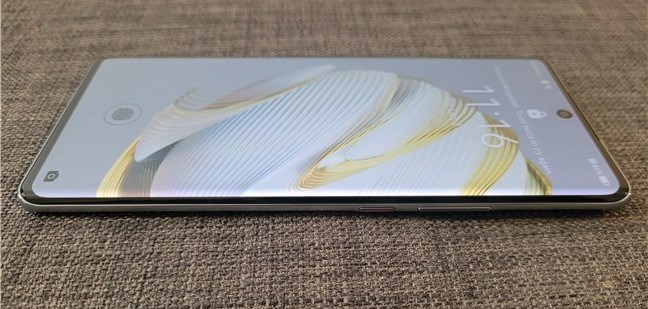
 The screen of the HUAWEI nova 10
The selfie camera sits inside a small hole in the screen, found at the top-center.
The screen of the HUAWEI nova 10
The selfie camera sits inside a small hole in the screen, found at the top-center.
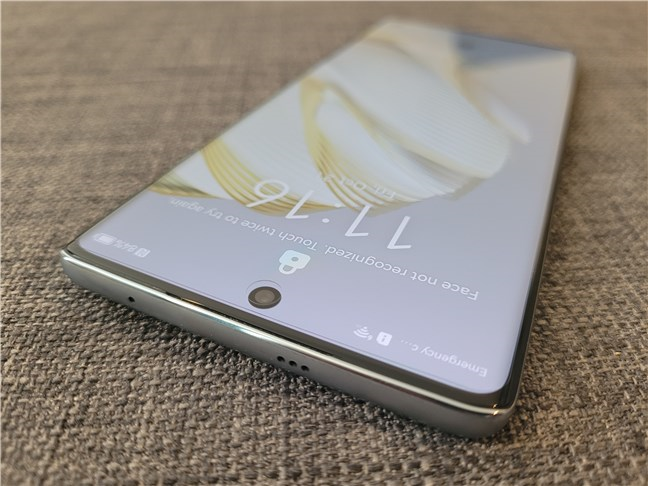 The selfie camera is found inside a small punch-hole on the screen
The bottom of the smartphone houses the SIM tray, a microphone, the USB-C port, and the loudspeaker.
The selfie camera is found inside a small punch-hole on the screen
The bottom of the smartphone houses the SIM tray, a microphone, the USB-C port, and the loudspeaker.
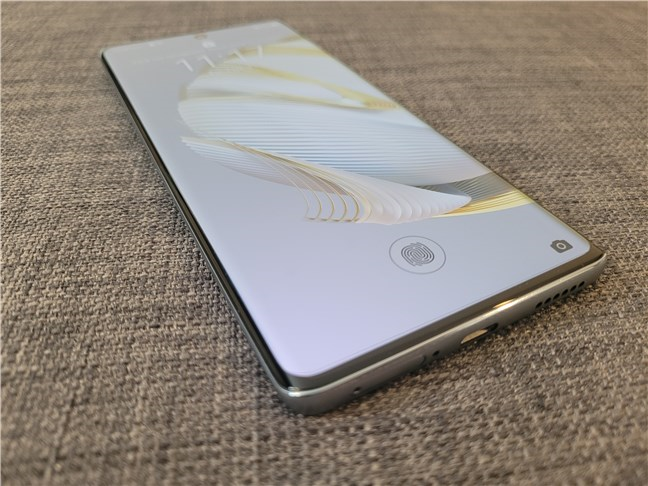 The bottom edge houses the USB port, a microphone, speaker, and the SIM tray
Both the power button and the volume rocker are positioned on the right edge of the nova 10. While thin and not very protruding, they’re quite easy to identify, and their tactile feedback is pleasant.
The bottom edge houses the USB port, a microphone, speaker, and the SIM tray
Both the power button and the volume rocker are positioned on the right edge of the nova 10. While thin and not very protruding, they’re quite easy to identify, and their tactile feedback is pleasant.
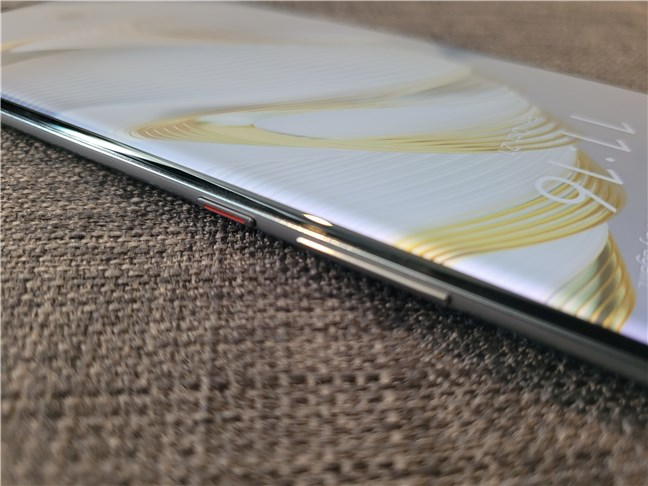 The Power button and Volume rocker are on the right
On the top edge, you’ll only find the secondary microphone and three small holes. The latter, I believe, are connected to the ear speaker that gives its main output via a thin cutout between the screen and the top frame.
The Power button and Volume rocker are on the right
On the top edge, you’ll only find the secondary microphone and three small holes. The latter, I believe, are connected to the ear speaker that gives its main output via a thin cutout between the screen and the top frame.
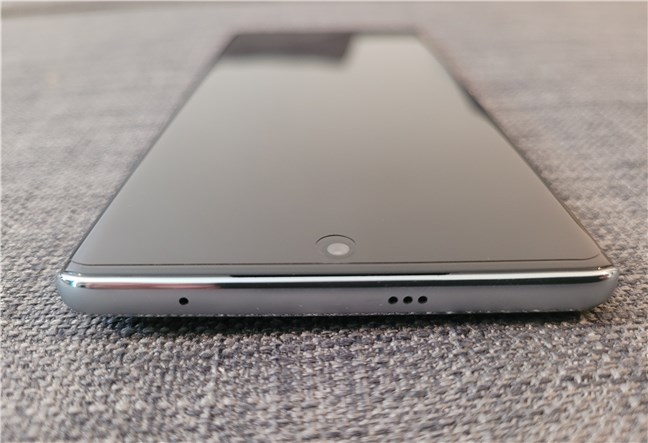
 The top edge of the HUAWEI nova 10
Unfortunately, I couldn’t find any mention of any ingress protection. That means that the HUAWEI nova 10 is not protected against dust or water, an omission I didn’t expect.
The HUAWEI nova 10 is a smartphone that looks good and feels well-made. I like its front side and color options, and although the bling style of the rear cameras is not my thing, it is something that younger audiences will appreciate.
The top edge of the HUAWEI nova 10
Unfortunately, I couldn’t find any mention of any ingress protection. That means that the HUAWEI nova 10 is not protected against dust or water, an omission I didn’t expect.
The HUAWEI nova 10 is a smartphone that looks good and feels well-made. I like its front side and color options, and although the bling style of the rear cameras is not my thing, it is something that younger audiences will appreciate.
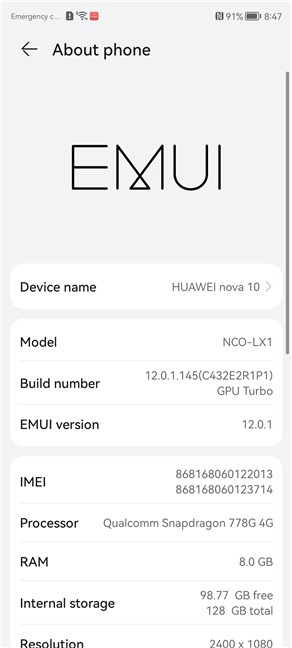
 HUAWEI nova 10: About phone
Regarding memory and storage, the HUAWEI nova 10 is equipped with 8 GB of RAM and can have 256 or 128 GB of internal flash storage space. Unfortunately, there is no microSD card slot on the phone to extend the storage, so choose the storage capacity carefully when you buy it.
HUAWEI nova 10: About phone
Regarding memory and storage, the HUAWEI nova 10 is equipped with 8 GB of RAM and can have 256 or 128 GB of internal flash storage space. Unfortunately, there is no microSD card slot on the phone to extend the storage, so choose the storage capacity carefully when you buy it.
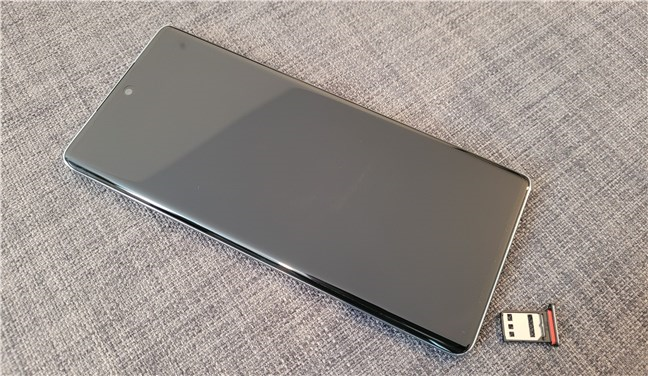
 HUAWEI nova 10: the SIM card tray
The display is based on an OLED panel that can display over one billion colors at a maximum refresh rate of 120 Hz. It has a resolution of 1080 x 2400 pixels, a diagonal length of 6.67 inches, and a pixel density of about 395 Pixels Per Inch (ppi). Furthermore, it also supports HDR10.
HUAWEI nova 10: the SIM card tray
The display is based on an OLED panel that can display over one billion colors at a maximum refresh rate of 120 Hz. It has a resolution of 1080 x 2400 pixels, a diagonal length of 6.67 inches, and a pixel density of about 395 Pixels Per Inch (ppi). Furthermore, it also supports HDR10.
 OLED display and 120 Hz refresh rate
The cameras on the HUAWEI nova 10 are noteworthy. On the back, it features a triple-camera system with excellent specs: 50 MP wide camera (f/1.9 aperture, PDAF), 8 MP ultrawide (f/2.2 aperture, 112˚ angle), 2 MP depth camera (f/2.4 aperture). On the front, the selfie camera uses a 60 MP sensor (f2/4 aperture, 112˚ angle). The smartphone supports EIS (Electronic Image Stabilization) and HDR, and it can record video in up to 4K on both the rear and front cameras.
OLED display and 120 Hz refresh rate
The cameras on the HUAWEI nova 10 are noteworthy. On the back, it features a triple-camera system with excellent specs: 50 MP wide camera (f/1.9 aperture, PDAF), 8 MP ultrawide (f/2.2 aperture, 112˚ angle), 2 MP depth camera (f/2.4 aperture). On the front, the selfie camera uses a 60 MP sensor (f2/4 aperture, 112˚ angle). The smartphone supports EIS (Electronic Image Stabilization) and HDR, and it can record video in up to 4K on both the rear and front cameras.
 The rear camera setup on the HUAWEI nova 10
The HUAWEI nova 10 supports Wi-Fi 6, 4G LTE, Bluetooth 5.2, and A-GPS. Unfortunately, although the chipset is 5G-capable, HUAWEI is banned from using 5G technology on their devices, so we don’t get it on the nova 10 either. To continue, the smartphone also has NFC and all the essential sensors you’d expect: an optical fingerprint (under the display), an accelerometer, gyros, and a compass. The USB Type-C port on the HUAWEI nova 10 is a 2.0 one, and there’s no 3.5mm audio jack on the phone.
For autonomy, the HUAWEI nova 10 uses a non-removable Li-Po 4000 mAh battery that supports fast charging but no wireless charging. As you know, the box of the HUAWEI nova 10 includes a fast 66 Watts charger.
For all the official specifications of this smartphone, visit this webpage: HUAWEI nova 10 Specifications.
If you want to know more about the experience offered by the HUAWEI nova 10, the software on it, as well as how fast it proved to be in the benchmarks we ran, read the second page of this review.
The rear camera setup on the HUAWEI nova 10
The HUAWEI nova 10 supports Wi-Fi 6, 4G LTE, Bluetooth 5.2, and A-GPS. Unfortunately, although the chipset is 5G-capable, HUAWEI is banned from using 5G technology on their devices, so we don’t get it on the nova 10 either. To continue, the smartphone also has NFC and all the essential sensors you’d expect: an optical fingerprint (under the display), an accelerometer, gyros, and a compass. The USB Type-C port on the HUAWEI nova 10 is a 2.0 one, and there’s no 3.5mm audio jack on the phone.
For autonomy, the HUAWEI nova 10 uses a non-removable Li-Po 4000 mAh battery that supports fast charging but no wireless charging. As you know, the box of the HUAWEI nova 10 includes a fast 66 Watts charger.
For all the official specifications of this smartphone, visit this webpage: HUAWEI nova 10 Specifications.
If you want to know more about the experience offered by the HUAWEI nova 10, the software on it, as well as how fast it proved to be in the benchmarks we ran, read the second page of this review.
 Watching a movie on the HUAWEI nova 10
Phone calls were of high quality too, and even if the radio coverage of my mobile operator isn’t great in my area, I didn’t get any dropped calls. The audio is clear and can reach a high volume (if you want), and the people I’ve talked to and I could understand each other easily. Even the loudspeaker(s) quality is good: no sound distortions and plenty of volume, although it noticeably lacks bass (lower sound frequencies).
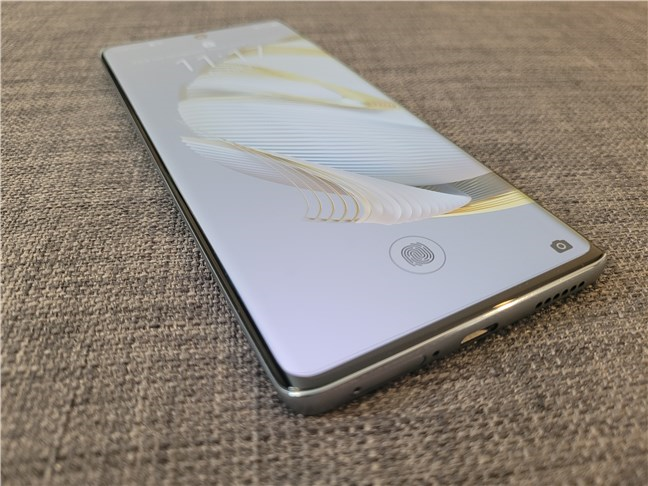
The fingerprint sensor found under the screen of the HUAWEI nova 10 is fast and reliable. It managed to identify my fingerprint correctly 99% of the time.
Watching a movie on the HUAWEI nova 10
Phone calls were of high quality too, and even if the radio coverage of my mobile operator isn’t great in my area, I didn’t get any dropped calls. The audio is clear and can reach a high volume (if you want), and the people I’ve talked to and I could understand each other easily. Even the loudspeaker(s) quality is good: no sound distortions and plenty of volume, although it noticeably lacks bass (lower sound frequencies).
The fingerprint sensor found under the screen of the HUAWEI nova 10 is fast and reliable. It managed to identify my fingerprint correctly 99% of the time.
 HUAWEI nova 10: The fingerprint reader is under the display
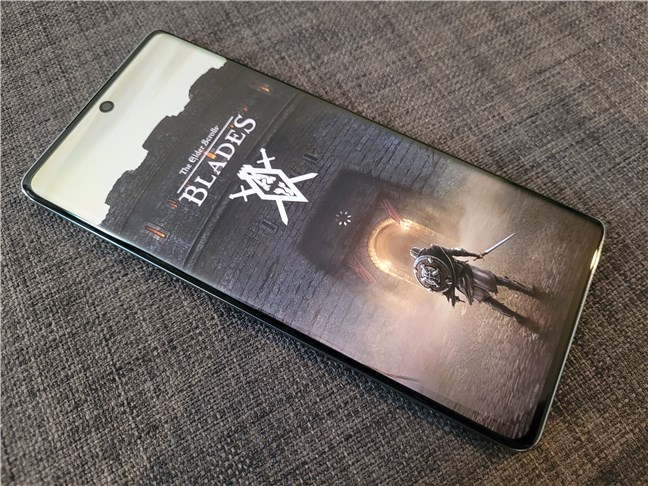
In terms of gaming, the smartphone’s chipset is powerful enough for any of today’s mobile games. I’ve played Elder Scrolls Blades on the HUAWEI nova 10, and the game ran smoothly, with no stuttering of any kind. The only thing that you should keep in mind about gaming is that some games, like Diablo Immortal, for example, aren’t available in HUAWEI’s AppGallery store, and you can’t install them using APK files either (at least, I didn’t find a way for this one).
HUAWEI nova 10: The fingerprint reader is under the display
In terms of gaming, the smartphone’s chipset is powerful enough for any of today’s mobile games. I’ve played Elder Scrolls Blades on the HUAWEI nova 10, and the game ran smoothly, with no stuttering of any kind. The only thing that you should keep in mind about gaming is that some games, like Diablo Immortal, for example, aren’t available in HUAWEI’s AppGallery store, and you can’t install them using APK files either (at least, I didn’t find a way for this one).
 Playing a game on the HUAWEI nova 10
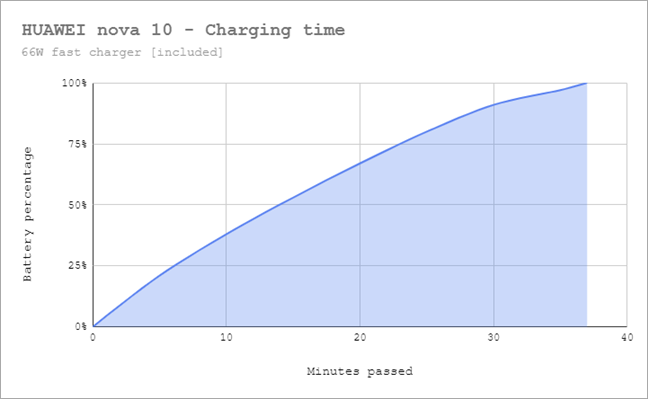
Regarding the battery life, in my experience, the HUAWEI nova 10 can easily last you for a day or even more in a light or moderate usage scenario. However, if you’re playing games for hours or watching movies, the battery will need to be charged by the end of the day. The good news is that the smartphone can charge very fast: using the bundled charger in the box, it took only 37 minutes to get the battery from 0 to 100%!
Playing a game on the HUAWEI nova 10
Regarding the battery life, in my experience, the HUAWEI nova 10 can easily last you for a day or even more in a light or moderate usage scenario. However, if you’re playing games for hours or watching movies, the battery will need to be charged by the end of the day. The good news is that the smartphone can charge very fast: using the bundled charger in the box, it took only 37 minutes to get the battery from 0 to 100%!
 HUAWEI nova 10 - Charging time
Using the HUAWEI nova 10 smartphone is a pleasant experience. It feels fast, the display looks great, and the user interface is well-designed. Even if the battery could’ve been more generous, the very fast charging compensates for this downside.
HUAWEI nova 10 - Charging time
Using the HUAWEI nova 10 smartphone is a pleasant experience. It feels fast, the display looks great, and the user interface is well-designed. Even if the battery could’ve been more generous, the very fast charging compensates for this downside.

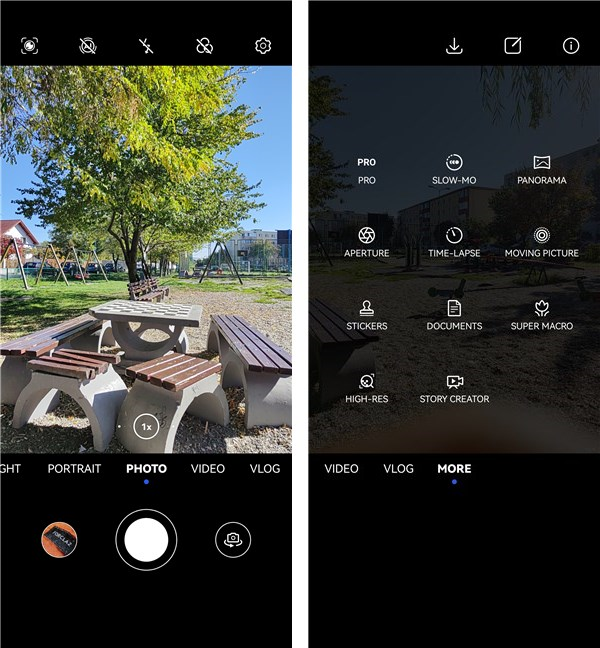
 Huawei’s Camera app is well-designed and because it’s also well-organized, easy to use. The main modes can be selected on the bottom of the screen or by swiping on it. On each photo or video mode, you can then quickly adjust their common settings on the other side of the viewfinder towards the top of the screen.
 The Camera app from the HUAWEI nova 10
Regarding the quality of the photos that the HUAWEI nova 10 shoots, I can say it’s good. In daylight, all the photos I’ve taken came out with vivid yet realistic colors, excellent contrast, no noise, and good dynamic range. The main camera can also zoom up to 2x: although we’re not talking about telephoto lenses, the 2x zooming is lossless thanks to the large sensor. Zoomed photos are almost just as good as the 1x ones, with just a bit more softness.
The Camera app from the HUAWEI nova 10
Regarding the quality of the photos that the HUAWEI nova 10 shoots, I can say it’s good. In daylight, all the photos I’ve taken came out with vivid yet realistic colors, excellent contrast, no noise, and good dynamic range. The main camera can also zoom up to 2x: although we’re not talking about telephoto lenses, the 2x zooming is lossless thanks to the large sensor. Zoomed photos are almost just as good as the 1x ones, with just a bit more softness.
 HUAWEI nova 10: A photograph shot with the main camera
The ultrawide camera manages to take excellent photos as well. The colors are just as vivid as on the main camera, there’s no noise, and the dynamic range is good. Furthermore, the ultrawide camera comes with autofocus, and it can also be used as a macro camera. The closeups I took from about 3 centimeters look really nice, and the detail is very good.
HUAWEI nova 10: A photograph shot with the main camera
The ultrawide camera manages to take excellent photos as well. The colors are just as vivid as on the main camera, there’s no noise, and the dynamic range is good. Furthermore, the ultrawide camera comes with autofocus, and it can also be used as a macro camera. The closeups I took from about 3 centimeters look really nice, and the detail is very good.
 HUAWEI nova 10: A closeup shot with the ultrawide camera
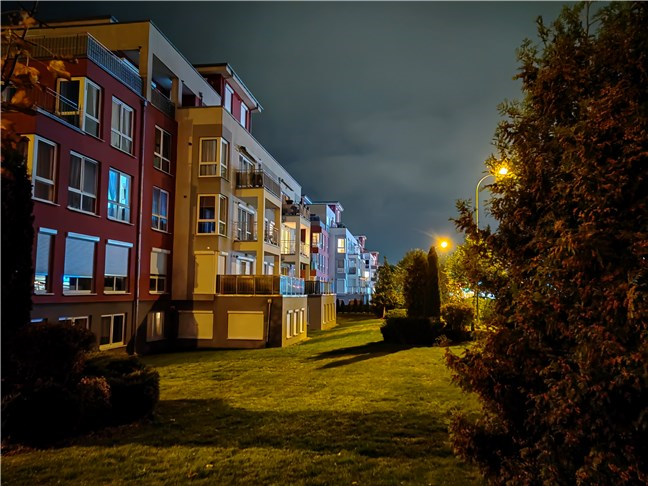
Low-light photography is mostly good: contrast is high enough, there are lots of details even in the darkest areas, and noise is very low. HUAWEI still makes some of the best smartphones for night photography, it seems. 🙂 And, as far as I’ve seen, it’s not even worth using the night mode, as it tends to overprocess photos a bit, while the standard Photo mode doesn’t and still delivers top-notch results.
HUAWEI nova 10: A closeup shot with the ultrawide camera
Low-light photography is mostly good: contrast is high enough, there are lots of details even in the darkest areas, and noise is very low. HUAWEI still makes some of the best smartphones for night photography, it seems. 🙂 And, as far as I’ve seen, it’s not even worth using the night mode, as it tends to overprocess photos a bit, while the standard Photo mode doesn’t and still delivers top-notch results.
 Low-light photographs are really good
The front camera is great too, managing to capture selfies and portraits that are true to life, with excellent definition and realistic skin tones, even in low light.
Low-light photographs are really good
The front camera is great too, managing to capture selfies and portraits that are true to life, with excellent definition and realistic skin tones, even in low light.

 Selfies taken with the HUAWEI nova 10
The smartphone can record videos in up to 4K resolution at 30fps and up to 1080p at 60fps. This statement is true for all the cameras on the nova 10: the main wide camera, ultrawide camera, and selfie camera! There’s no switch for turning off or on the EIS (Electronic Stabilization System), which is always enabled and on all cameras. The video quality is good and certainly above average, but I wouldn’t say that it’s amazing: contrast is excellent, colors are vivid, there’s plenty of detail, but the images look a bit soft. Here’s a relatively static video I took in 4K at 30 fps:
And here’s a sample of a video with more movement, that I recorded while walking, in 1080p at 60 frames per second:
The HUAWEI nova 10 offers an excellent set of cameras. Both the photos and the videos you take with this smartphone are of great quality, both in good lighting conditions and in low-light environments.
Selfies taken with the HUAWEI nova 10
The smartphone can record videos in up to 4K resolution at 30fps and up to 1080p at 60fps. This statement is true for all the cameras on the nova 10: the main wide camera, ultrawide camera, and selfie camera! There’s no switch for turning off or on the EIS (Electronic Stabilization System), which is always enabled and on all cameras. The video quality is good and certainly above average, but I wouldn’t say that it’s amazing: contrast is excellent, colors are vivid, there’s plenty of detail, but the images look a bit soft. Here’s a relatively static video I took in 4K at 30 fps:
And here’s a sample of a video with more movement, that I recorded while walking, in 1080p at 60 frames per second:
The HUAWEI nova 10 offers an excellent set of cameras. Both the photos and the videos you take with this smartphone are of great quality, both in good lighting conditions and in low-light environments.
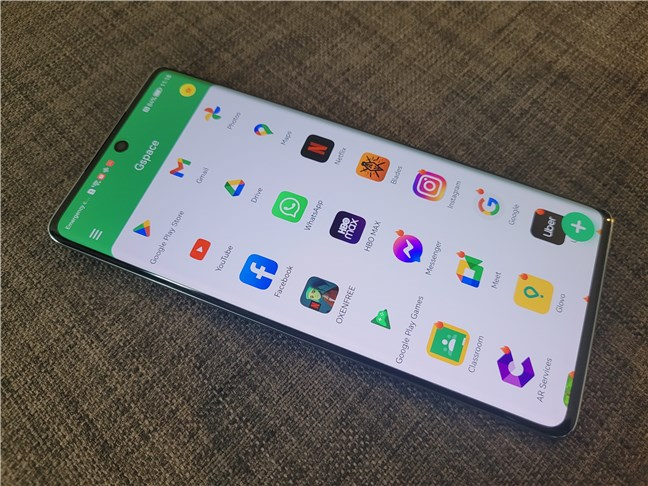 Using the Gspace app on the HUAWEI nova 10
However, it’s not ideal either, as Gspace works by creating a sort of virtualized Android space on top of the main EMUI 12/Android 11 that’s running on the smartphone. While it does allow you to install and run banned Google services and unavailable apps, this implementation will require additional processing, so those services and apps won’t run as fast as they would on a regular device with the same hardware.
Using the Gspace app on the HUAWEI nova 10
However, it’s not ideal either, as Gspace works by creating a sort of virtualized Android space on top of the main EMUI 12/Android 11 that’s running on the smartphone. While it does allow you to install and run banned Google services and unavailable apps, this implementation will require additional processing, so those services and apps won’t run as fast as they would on a regular device with the same hardware.
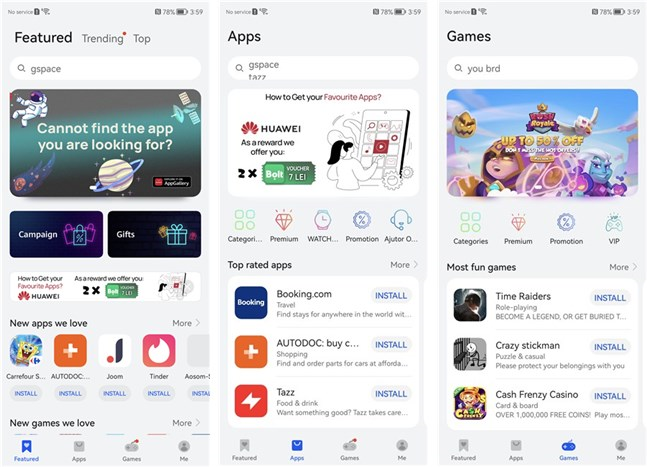
 The HUAWEI AppGallery
There are over 5.75 million developers worldwide, and they’ve managed to integrate over 216,000 apps with HUAWEI Mobile Services (in 2021, the number of apps that supported HMS during 2021 was up by 147% year-on-year). Hopefully, the apps you like using and the ones you need are already available in the HUAWEI AppGallery. Actually, before you get a HUAWEI device, you might want to check whether you’ll find all those apps in AppGallery or if you’ll need to download them from third parties. Here’s the direct link to the HUAWEI AppGallery.
The HUAWEI AppGallery
There are over 5.75 million developers worldwide, and they’ve managed to integrate over 216,000 apps with HUAWEI Mobile Services (in 2021, the number of apps that supported HMS during 2021 was up by 147% year-on-year). Hopefully, the apps you like using and the ones you need are already available in the HUAWEI AppGallery. Actually, before you get a HUAWEI device, you might want to check whether you’ll find all those apps in AppGallery or if you’ll need to download them from third parties. Here’s the direct link to the HUAWEI AppGallery.
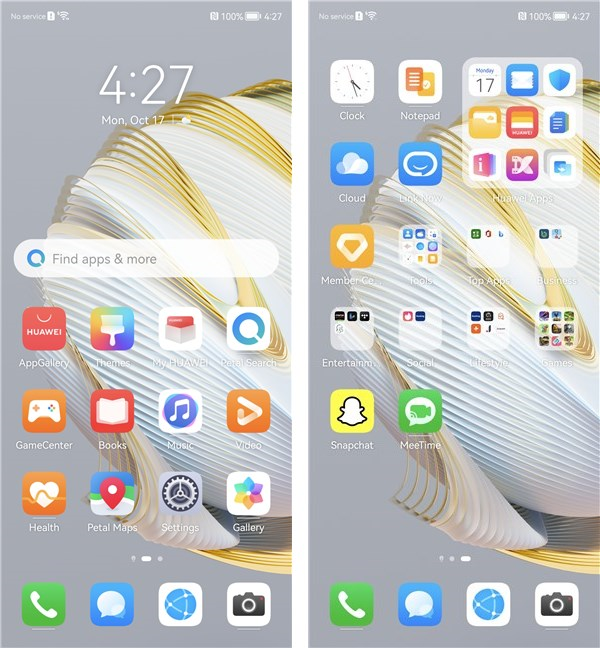 The apps bundled with the HUAWEI nova 10
Additionally, there are also other app icons and app folders with shortcuts to apps and games that are not installed but are recommended by HUAWEI for your smartphone depending on where you live or what HUAWEI wants to push to its users probably. For example, on the nova 10 I had, there were icons for apps such as BestJobs (a local job-searching app), George Romania (a popular local banking app), Tinder (the famous online dating app).
The EMUI 12 user interface on the HUAWEI nova 10 looks good and runs well. Unfortunately, even if there are workarounds to using Google’s services, I still don’t think switching to HUAWEI’s ecosystem is for everyone. If you’re a technical person, yes, you can do it. Otherwise, I believe you shouldn’t. Also, the bundled apps are too many for my taste - HUAWEI shouldn’t install so much bloatware on its devices.
The apps bundled with the HUAWEI nova 10
Additionally, there are also other app icons and app folders with shortcuts to apps and games that are not installed but are recommended by HUAWEI for your smartphone depending on where you live or what HUAWEI wants to push to its users probably. For example, on the nova 10 I had, there were icons for apps such as BestJobs (a local job-searching app), George Romania (a popular local banking app), Tinder (the famous online dating app).
The EMUI 12 user interface on the HUAWEI nova 10 looks good and runs well. Unfortunately, even if there are workarounds to using Google’s services, I still don’t think switching to HUAWEI’s ecosystem is for everyone. If you’re a technical person, yes, you can do it. Otherwise, I believe you shouldn’t. Also, the bundled apps are too many for my taste - HUAWEI shouldn’t install so much bloatware on its devices.
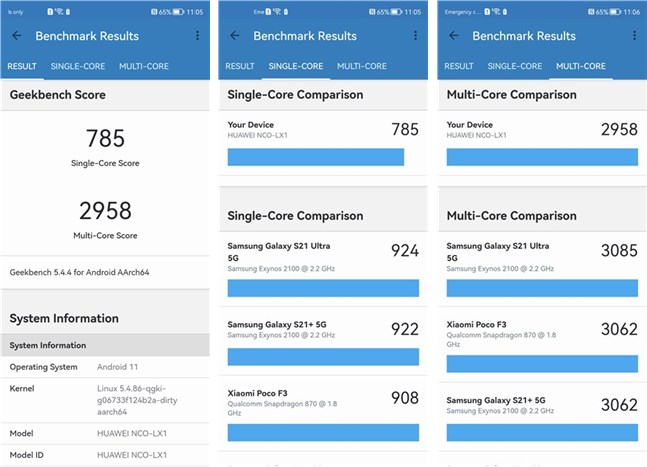 Benchmark results in Geekbench 5
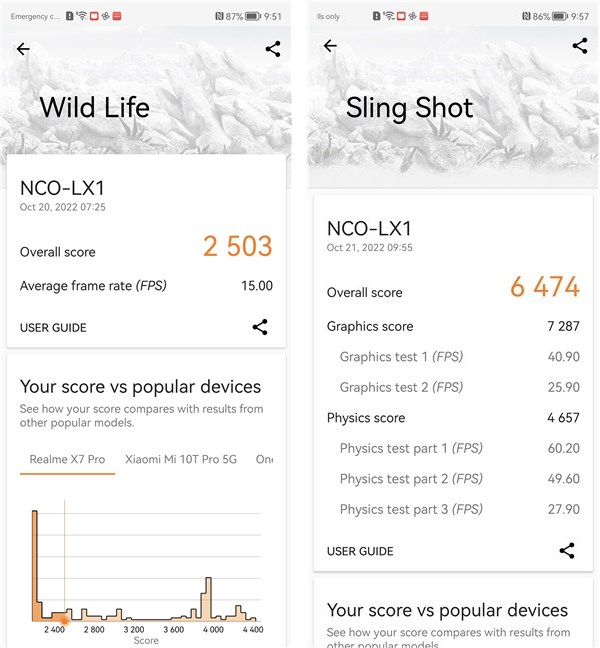
Next, I ran 3DMark’s Wild Life and Sling Shot tests to see what the HUAWEI nova 10 can do in gaming. In Wild Life, it scored 2503 points, while in Sling Shot, it managed a score of 6474 points. These are decent results, similar to what you’d get from a Samsung Galaxy A73 5G or a Samsung Galaxy A52s 5G. It’s also almost identical to what the previous HUAWEI nova 9 could do.
Benchmark results in Geekbench 5
Next, I ran 3DMark’s Wild Life and Sling Shot tests to see what the HUAWEI nova 10 can do in gaming. In Wild Life, it scored 2503 points, while in Sling Shot, it managed a score of 6474 points. These are decent results, similar to what you’d get from a Samsung Galaxy A73 5G or a Samsung Galaxy A52s 5G. It’s also almost identical to what the previous HUAWEI nova 9 could do.
 Benchmark results in 3DMark for Android
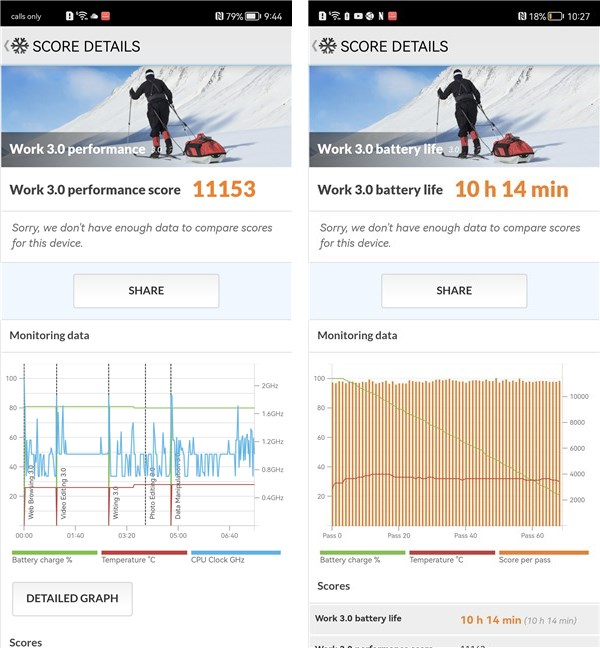
Next, I moved on to PCMark for Android, an app that evaluates the performance and battery life in real-world situations. That means it tests the smartphone in scenarios that involve browsing the web, working with Office apps, and so on. The HUAWEI nova 10 scored 11153 points in the Work 3.0 performance test and managed to keep on going in the Work 3.0 battery life tests for 10 hours and 14 minutes. These are good results but nothing amazing here.
Benchmark results in 3DMark for Android
Next, I moved on to PCMark for Android, an app that evaluates the performance and battery life in real-world situations. That means it tests the smartphone in scenarios that involve browsing the web, working with Office apps, and so on. The HUAWEI nova 10 scored 11153 points in the Work 3.0 performance test and managed to keep on going in the Work 3.0 battery life tests for 10 hours and 14 minutes. These are good results but nothing amazing here.
 Benchmark results in PCMark for Android
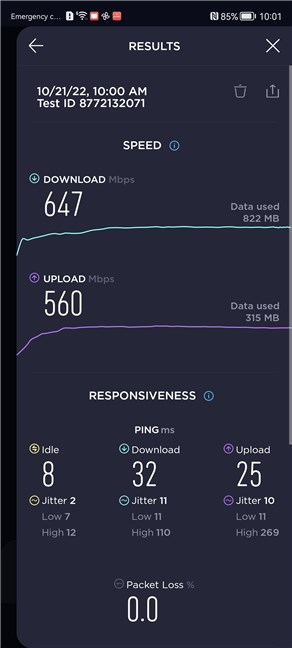
Last but not least, I checked how fast the HUAWEI nova 10 is at transferring data over Wi-Fi. I have a 1 Gbps internet connection, but it only gets to about 750 Mbps in reality, both on Wi-Fi 6 and on Ethernet. I’ve tested the HUAWEI nova 10 using Ookla’s Speedtest, and the result was a 647 Mbps download speed and a 560 Mbps upload speed. These are excellent results!
Benchmark results in PCMark for Android
Last but not least, I checked how fast the HUAWEI nova 10 is at transferring data over Wi-Fi. I have a 1 Gbps internet connection, but it only gets to about 750 Mbps in reality, both on Wi-Fi 6 and on Ethernet. I’ve tested the HUAWEI nova 10 using Ookla’s Speedtest, and the result was a 647 Mbps download speed and a 560 Mbps upload speed. These are excellent results!
 Internet speed results on the HUAWEI nova 10
The HUAWEI nova 10 looks like a decent mid-ranger smartphone in terms of hardware performance. It doesn’t impress, but it doesn’t disappoint, either. While it can deliver enough speed for most people to be OK with it, I can’t help asking myself why you would get it when last year’s HUAWEI nova 9 offers similar performance at a lower price.
Internet speed results on the HUAWEI nova 10
The HUAWEI nova 10 looks like a decent mid-ranger smartphone in terms of hardware performance. It doesn’t impress, but it doesn’t disappoint, either. While it can deliver enough speed for most people to be OK with it, I can’t help asking myself why you would get it when last year’s HUAWEI nova 9 offers similar performance at a lower price.
HUAWEI nova 10: Who is it good for?
The HUAWEI nova 10 is a good choice for:- Young people who like its design
- Anyone looking for a mid-range smartphone with top-notch cameras
- People with technical inclinations, able to use workarounds in order to get all the apps they need
Pros and cons
We have many good things to say about the HUAWEI nova 10:- Interesting design and colors, attractive for younger audiences
- Beautiful OLED display with a high refresh rate
- Good hardware that can run any app or game
- Reliable cameras in any lighting conditions
- Support for the Wi-Fi 6 networking standard
- Very fast charging
- Direct access to Google apps remains restricted and available only through workarounds and third parties
- No ingress protection against water or dust
- No 5G connectivity (although the chipset is capable, HUAWEI is banned from using 5G)
- It doesn’t represent a meaningful upgrade from the previous HUAWEI nova 9
Verdict
The HUAWEI nova 10 is a good mid-range Android smartphone. Its design is attractive for younger audiences, its cameras are excellent, and it comes with very fast charging. All in all, I believe it’s a good choice for those who like sassy design and are technically inclined, as the lack of Google services is still a problem. Sure, there are workarounds for getting access to apps that can’t be found in HUAWEI’s AppGallery, but they’re not for everyone. The main competition for the HUAWEI nova 10 is the previous nova 9, which is priced even more affordably and has almost identical hardware. Except for the obvious design differences between the two, the nova 10 has slightly better cameras. The biggest improvement is the new 60 Megapixel ultrawide camera, while the nova 9 has a 32 Megapixel wide selfie cam. How much these differences weigh in the final purchase decision will vary from person to person.Unboxing the HUAWEI nova 10
The HUAWEI nova 10 is a mid-range Android smartphone, but its packaging is similar to that of a premium device. The box it arrives in is large, good-looking, and made of high-quality cardboard. On the top cover, you get to see the name of the smartphone and a small invitation to HUAWEI’s AppGallery store. The other sides are mostly void of any details, but there is a sticker on a smaller lateral that tells you the main specs of the smartphone you bought.Design and build quality
Measuring 162.2 mm (6.39 inches) in length, 73.9 mm (2.91 inches) in width, and 6.9 mm (0.27 inches) in thickness, and weighing just 168 grams (5.93 oz), the HUAWEI nova 10 is a slim and lightweight smartphone with an average size. With a screen and a body that’s a bit larger than its predecessor’s, the nova 9, it manages to weigh less and be thinner at the same time.Hardware specifications
The hardware of the HUAWEI nova 10 classifies it as a mid-ranger. Under the hood, the smartphone relies on a Qualcomm SM7325 Snapdragon 778G 4G (6 nm) chipset with an octa-core (4x2.4 GHz Kryo 670 & 4x1.8 GHz Kryo 670) processor and an Adreno 642L graphics processing unit.The smartphone experience on the HUAWEI nova 10
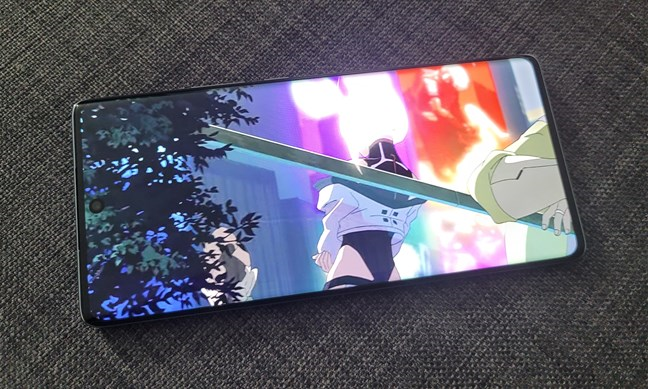
Although I only had the HUAWEI nova 10 in testing for a couple of days, it was enough to get a good enough idea of what it’s like using it daily. HUAWEI’s EMUI interface is fast, and the increased refresh rate of the display (120 Hz) makes the smartphone feel snappy. The performance offered by the chipset is good, and apps launch and run flawlessly. I didn’t notice lags or any bit of sluggishness. The display is a treat, offering vivid colors, excellent contrast, and high levels of brightness, managing to be usable even in bright daylight.The camera experience on the HUAWEI nova 10
NOTE: For optimization purposes, the pictures in this review are resized. If you want to see the full-sized original photos and videos I shot with the HUAWEI nova 10, open this gallery:
Huawei’s Camera app is well-designed and because it’s also well-organized, easy to use. The main modes can be selected on the bottom of the screen or by swiping on it. On each photo or video mode, you can then quickly adjust their common settings on the other side of the viewfinder towards the top of the screen.
EMUI 12, AppGallery, and bundled apps
The HUAWEI nova 10 runs on a modified version of Android 11 with no Google services. On top of it, there’s the EMUI 12 user interface. Just like on all the other HUAWEI smartphones I’ve seen and tested during the last few years, EMUI is a fast interface with a lot of personalization options that include themes, widgets, fonts, icons, etc. The launcher doesn’t seem to lag and it didn’t crash. All in all, it’s a good interface, but the lack of Google services is still annoying for me personally and probably for many of our readers. There is some good news, though: the AppGallery (HUAWEI’s alternative app store) lets you install a special app called Gspace that can bypass some Google usage restrictions. Using this app, you can download and use many of Google’s apps and even others from different developers that are not found in the AppGallery.HUAWEI AppGallery
Unless you need Google’s apps, for all the others you have the AppGallery, the official app distribution platform made by HUAWEI for their devices. Launched in April 2018, it has since grown to become the world’s 3rd largest app store after Apple’s App Store and Google’s Play Store. AppGallery now has over 580 million active monthly users around the world, with about 43 million only in Europe.Bundled apps
The HUAWEI nova 10 comes with many bundled apps. Here’s the list:- AppGallery - HUAWEI’s app store; to use it, you’ll need to have a HUAWEI account.
- Bing - an app from Microsoft that lets you run searches on the internet using Microsoft’s Bing search engine.
- Books - a bookstore app that lets you buy and read books as well as listen to audiobooks.
- Clock - an app that shows you the time and also gives you access to a stopwatch and a timer.
- Calculator - a simple and easy-to-use calculator.
- Calendar - lets you manage your time and schedule events.
- Cloud - gives you access to your HUAWEI cloud storage. 5 GB are free, but there are also upgrade options to 50 GB, 200 GB, or 2048 GB.
- Compass - a simple compass app that tells you the cardinal points.
- Docs - an app made by HUAWEI that lets you create and edit documents stored in your HUAWEI cloud.
- Email - an email app that lets you connect email accounts from Gmail, Outlook, Yahoo, Exchange, Petal Mail, and other similar services.
- Files - a file manager for Android that’s easy to use.
- Find Device - helps you locate your HUAWEI devices and erase data remotely on them if lost.
- Gallery - useful for browsing through your photos, as well as editing them. This is HUAWEI’s reinterpretation of the Google Photos app.
- Game Center - a game hub from where you can download and play games.
- Health - provides information about health activities such as the steps you have taken or the calories you have burned.
- Link Now - a service similar to Microsoft Teams or Zoom, which you can use to message people, create teams, participate in video meetings, etc.
- Member Center - a HUAWEI app that you can use to claim rewards and offers from HUAWEI, as well as read the latest news from the company.
- MeeTime - an app similar to Apple’s FaceTime or Google’s Meet that lets you make high-quality voice and video calls.
- Mirror - while a mirror is not always at hand, your smartphone is, and you can use it to see how awesome you are.
- Music - a music player that lets you listen to your music, as well as stream music from HUAWEI.
- My Huawei - lets you buy devices from the HUAWEI local store, as well as access assistance services.
- Notepad - a simple note-taking app.
- Office - Microsoft’s Office app for Android, which combines Word, Excel, and PowerPoint. It is a useful and well-made app that we recommend to everyone.
- Optimizer - cleans your smartphone of junk files, cache, malware, etc. The antivirus part is powered by Avast.
- Petal Clip - an app that lets you create and edit videos.
- Petal Maps - HUAWEI’s alternative to Google Maps.
- Petal Search - an alternative to the Google search engine that also finds local results.
- Phone Clone - lets you move data, such as contacts, call logs, messages, calendar events, Wi-Fi, multimedia files, app data, browser, and content owned by you, from an old device to your new smartphone, via Wi-Fi.
- Snapchat - the popular instant messaging app and service.
- Recorder - a basic voice recorder that can be useful when you need this type of app.
- Themes - a portal for discovering and installing themes, wallpapers, and text styles. Some of them are free, some of them are paid.
- Tips - shows you tips on how to get the most out of your new smartphone.
- Translator - is an app developed by Microsoft that lets you translate voice and text in real-time.
- Video - a movie player that lets you watch the video clips stored on your smartphone, as well as rent movies that you want to stream.
- Wallet - with it, you can store credit or debit card details and use them to buy stuff via NFC.
- Weather - gives you the weather forecast for your area or for the places you specify.
Performance in benchmarks
The hardware specifications of the HUAWEI nova 10 smartphone tell us that this is a good mid-ranger. But what do benchmarks have to say about it? Let’s find out: The first one I ran was Geekbench, a benchmark that measures the processor's performance both on single-core and multi-core. The HUAWEI nova 10 got excellent results: the Single-Core score was 785 points, while the Multi-Core one was 2958 points. It seems that it offers a similar level of performance as a Samsung Galaxy S20 FE 5G (released in 2020, the Snapdragon 856 version).

Discussion (0)
Comments are closed.