




Downloading songs on Pandora gives you reliable offline playback when you travel or lose signal. Pandora supports downloads only on paid plans. Offline listening uses encrypted files that stay inside the app and refresh when you reconnect.
In this guide, we will show you every method you can use to download songs on Pandora, explain device restrictions, and how to fix common download problems.
1) Download Songs on the Mobile App
Pandora’s mobile apps give you the fastest way to save music. You can download individual tracks or full collections on iPhone and Android.
Download Individual Songs
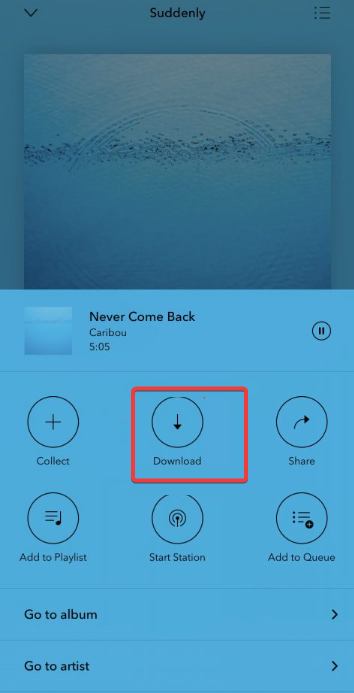
Open the Pandora app and play the song you want. Next, tap the Download icon under the track and wait for the checkmark to confirm the saved file.
Download Playlists, Stations, and Albums
Open the playlist, station, or album and tap Download next to the title. Then, look for the green checkmark when the download finishes.

Use Offline Mode
Tap Profile, then select Settings > Offline Mode. Confirm the toggle to activate offline playback.

2) Download Pandora Music on a Computer
Pandora handles desktop downloads differently from mobile. You get offline access only inside the Pandora Windows or Mac app.
Install the Pandora desktop app and sign in with your account. Next, play music normally and let the app store your recent content for offline use.
Note that Pandora’s website does not allow offline playback. You can stream music in a browser, but you cannot download anything for offline listening.
3) Manage Audio Quality and Storage
Offline files take up space on your device. Adjusting quality helps you balance storage and audio needs.
Set Download Quality
Open Settings in the Pandora app and select Audio Quality. Now, pick your preferred option.
Clear Old Downloads
Open your Downloads section. and tap Remove Download on albums or playlists you no longer need. Finally, restart the app to refresh storage.
4) Understand Pandora Offline File Behavior
Pandora protects downloaded music with encryption. The app keeps these files internal to prevent copying.
Why Files Can’t Be Exported
You cannot move downloads to an MP3 player or drag them into local folders. Pandora’s licenses require encrypted storage.
When Downloads Expire
Pandora requires periodic online checks. Downloads stop working if you log out or stay offline too long.
5) Legal Notes on Third-Party Downloaders
Third-party converters or recorders violate Pandora’s terms and may compromise your account. Pandora can disable access if you use unauthorized tools.
6) Troubleshoot Pandora downloads not working
- Confirm your subscription: Open Profile > Subscription and verify that your Premium or Plus status remains active.
- Update the app: Open the App Store or Google Play and search for Pandora. Now, tap Update.
- Check permissions and network: Enable Background Data, allow Storage Permissions, and switch to a stronger Wi-Fi network.
- Clear App Cache (Android): Open Settings on your phone and go to Apps > Pandora. Next, tap Storage and select Clear Cache.
FAQs
Can I download songs with Pandora Free? No. Downloads require Pandora Plus or Premium.
Do downloads use my mobile data? Yes, unless you download over Wi-Fi or block cellular data in your settings.
Can I move downloads to another app? No. Pandora stores encrypted files that only work inside the app.
Why did my downloads vanish? This happens when you log out, reinstall the app, or lose Premium access.
Summary
- Pandora requires a paid plan for downloads.
- Premium gives you full control over song, album, and playlist downloads.
- Mobile apps provide the easiest offline experience.
- Desktop downloads work only inside the Pandora app.
- You can fix most download issues by checking subscriptions, updating the app, or clearing cache.
- Pandora encrypts files, so you cannot export them.
Conclusion
Pandora offers reliable offline listening when you use the right subscription and understand how the app handles downloads. Mobile users get the widest set of options, while desktop users rely on in-app caching.
Most download issues clear up quickly when you refresh permissions, update the app, or verify your account status. If your goal involves fast offline playback with minimal errors, Pandora Premium gives you the best experience.


Discussion (0)
Be the first to comment.