



IGG Games has become a prominent name for gamers seeking a vast library of downloadable titles. This platform offers an extensive collection of games across various genres, but many users have questions about the download process and safety. This comprehensive guide will walk you through how to download IGG games safely and effectively, while also addressing important considerations about the platform.
What is IGG Games?
IGG Games is a website known for its extensive collection of free downloadable PC games. The platform provides access to thousands of titles, from indie creations to major studio releases, all available without direct cost to the user. The website features a user-friendly interface with robust search and categorization systems, allowing visitors to easily find games by genre, release date, or popularity.
One distinguishing feature of IGG Games is its support for multiple download methods, including both direct downloads and torrent options. The site regularly updates its library with new releases and provides detailed information for each game, including system requirements, screenshots, and user feedback to help with selection.
Understanding the Legal and Safety Considerations
Before learning how to download IGG games, it's crucial to understand the legal landscape. IGG Games primarily distributes copyrighted games without authorization from rights holders, which places the platform in a legally questionable position in most jurisdictions.
From a security perspective, users should exercise caution. Security analyses and community discussions frequently identify potential risks associated with files from IGG Games, including malware concerns. When accessing the website, verify you're using the correct URL to avoid imposter sites that may contain more dangerous content.
For those concerned with both legality and security, official platforms like Steam, Epic Games Store, and GOG provide legal alternatives with guaranteed safety and developer support.
What You'll Need Before You Download IGG Games
Proper preparation ensures a smoother experience when you download IGG games. Essential requirements include:
- File Extraction Software: WinRAR or 7-Zip for handling compressed files
- Virtual Drive Software: Daemon Tools for mounting ISO files
- Sufficient Storage Space: Modern games often require 10-100GB of free space
- Stable Internet Connection: Essential for downloading large game files
- Antivirus Protection: Crucial for scanning downloaded files before installation
How to Download IGG Games: Complete Step-by-Step Guide
Step 1: Access the IGG Games Website
Begin by navigating to the IGG Games website using your preferred web browser. Exercise caution to ensure you're visiting the legitimate site, as imposter sites may contain malicious software. Once accessed, familiarize yourself with the interface, which typically displays featured games, categories, and search functionality.

Step 2: Locate Your Desired Game
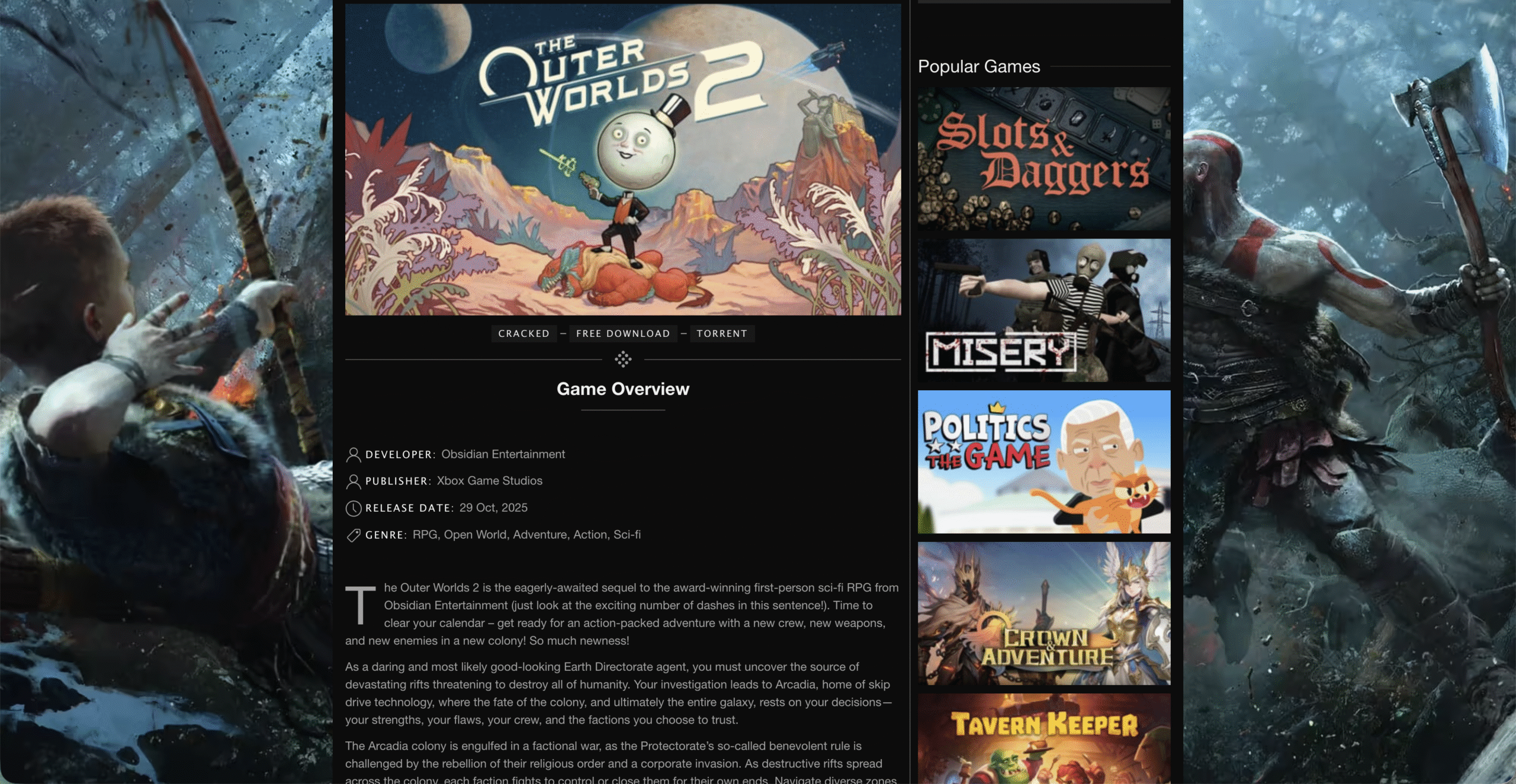
Use the search function or browse through categories to find the game you want to download. The IGG Games library includes extensive filtering options to help narrow your search by genre, platform, or release date. Before proceeding with any IGG Games download, carefully review the game page for system requirements to ensure compatibility with your computer.
Step 3: Select Download Method
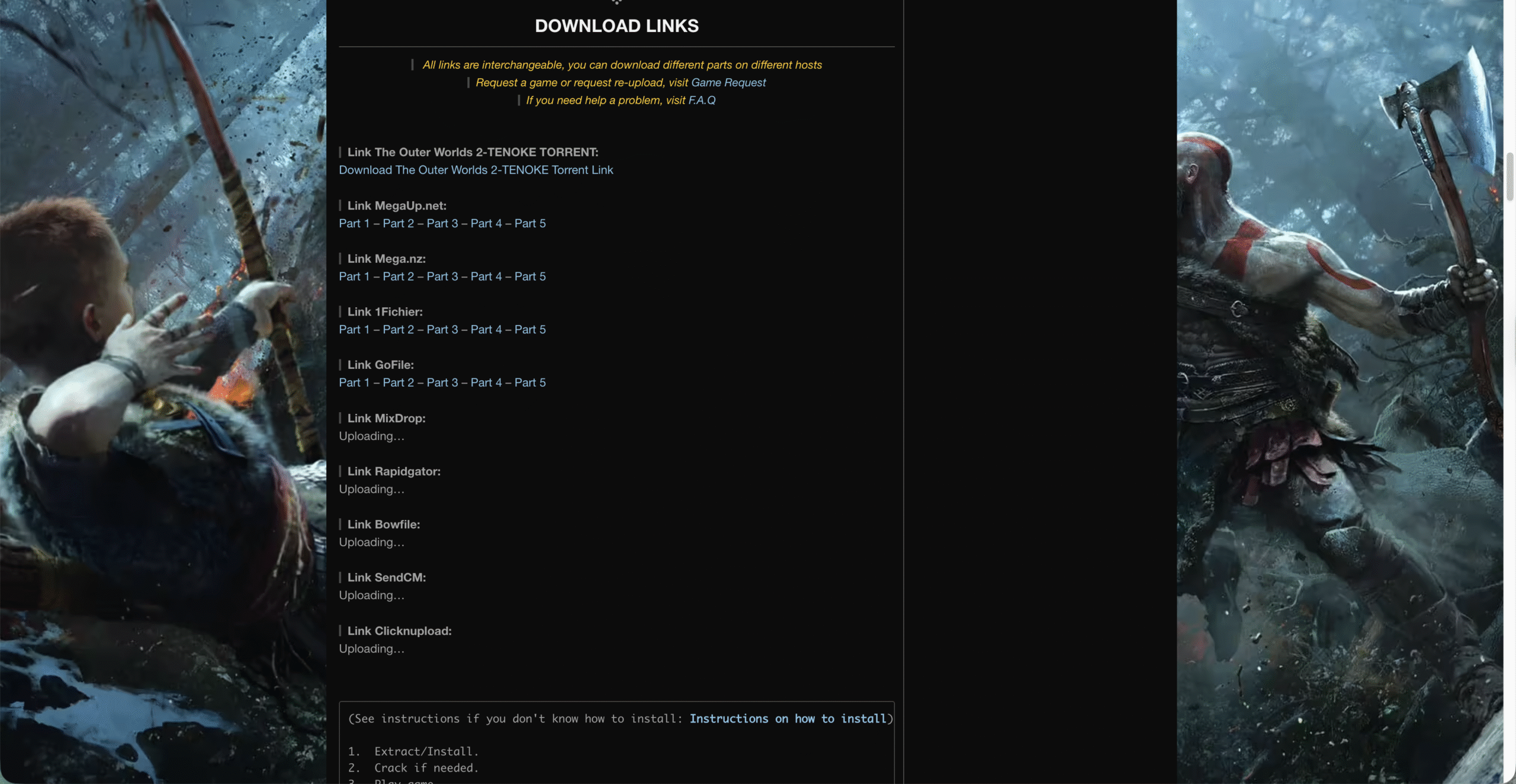
IGG Games typically offers multiple download options. You'll generally choose between direct download links or torrent files. Direct downloads may be split into multiple parts for larger games, requiring all parts to be downloaded before installation. The torrent method requires a torrent client but often provides more reliable downloads for large files.
Step 4: Download Game Files
After selecting your preferred download method, initiate the IGG Games download process. Download times will vary significantly based on file size and your internet connection speed. For multi-part downloads, ensure all parts are completely downloaded before proceeding to the next step. It's advisable to create a dedicated folder for your IGG Games downloads to keep your files organized.
Step 5: Extract and Prepare Files
Most IGG Games downloads come in compressed formats to reduce download sizes. Use your file extraction software (WinRAR or 7-Zip) to decompress the files. For multi-part downloads, simply right-click the first part and select "Extract Here" - the software will automatically combine all parts. Place all extracted files in a single folder before proceeding with installation.
Step 6: Install the Game
The installation process varies depending on the game format. For ISO files, mount the image using Daemon Tools, then run the setup executable. For already extracted files, locate the setup or installer application. Follow the installation prompts, selecting your preferred directory and any additional components. During this IGG Games installation process, your antivirus may flag certain files - exercise caution and consider scanning with multiple security tools.
Step 7: Apply Crack if Necessary
Many games from IGG Games require additional files to bypass digital rights management. These are typically found in a separate folder within the downloaded files, often labeled "Crack" or "PLAZA." Copy these files to your game installation directory, replacing the original files when prompted. This step completes the process to download IGG games successfully.
Step 8: Launch and Play
Once installation is complete, you can launch the game through the created desktop shortcut or by directly accessing the game executable in the installation folder. Some games may require additional configuration on first launch, such as graphics settings or control options.
Troubleshooting Common IGG Games Download Issues
Even with careful execution, you may encounter challenges when you download IGG games. Common issues include missing files, installation errors, or performance problems. For multi-part downloads, verify that all parts are completely downloaded and from the same source. If you experience crashes or performance issues, check that your system meets the game's requirements and update your graphics drivers.
Windows Defender and other security software may quarantine or delete key files, requiring you to add exceptions to your security settings. If a game fails to launch, ensure you've properly applied any necessary crack files and that all required software (like DirectX or Visual C++) is updated.
Security Best Practices for IGG Games Downloads
When you choose to download IGG games, implementing security measures is essential. Always use comprehensive antivirus software and scan all downloaded files before extraction or installation. Consider running games in a sandboxed environment initially to monitor behavior. Create system restore points before installation so you can revert changes if problems occur.
Be particularly cautious of games with unusually small file sizes for their purported content, as these may be incomplete or contain malicious software. Regular users of IGG Games recommend researching specific games in community forums to identify any reported issues before downloading.
Legal Alternatives to IGG Games
For those concerned about the legal and security implications of IGG Games, numerous legitimate alternatives exist. Official platforms like Steam, Epic Games Store, GOG, and Origin frequently offer free games and significant discounts during seasonal sales. Subscription services like Xbox Game Pass for PC provide access to extensive game libraries for a monthly fee.
Free-to-play games like Fortnite, Apex Legends, and Warframe offer premium experiences without cost, supported by microtransactions rather than upfront purchases. These legal options provide safe access to games while supporting developers.
Conclusion
Understanding how to download IGG games involves navigating both technical steps and important considerations about legality and security. While the platform provides access to numerous games without direct payment, users should carefully weigh the risks and benefits. By following this guide's steps for how to download IGG games safely and being mindful of potential issues, you can make more informed decisions about game acquisition. Regardless of your choice, prioritizing system security and supporting developers when possible helps maintain a healthy gaming ecosystem.

Discussion (0)
Be the first to comment.