




If you don’t want others to see when you’re online, you can appear invisible on Steam. This lets you use Steam normally while your friends see you as offline.
It is useful when you want privacy, avoid interruptions, or just play games without being noticed.
What Does Invisible Mode Do on Steam?
When you set your status to Invisible:
- You appear offline to friends
- You can still browse, chat, and play games
- Others won’t see your activity
It is different from Offline mode because you can still interact with Steam normally.
How to Appear Invisible on Steam (Desktop)
Follow these steps on the Steam app.
Step 1: Open Steam
Launch the Steam client on your PC.
Step 2: Open Friends List
- Click Friends & Chat at the bottom right
Step 3: Change Your Status
- Click your username
- Select Invisible
Your status will instantly change.
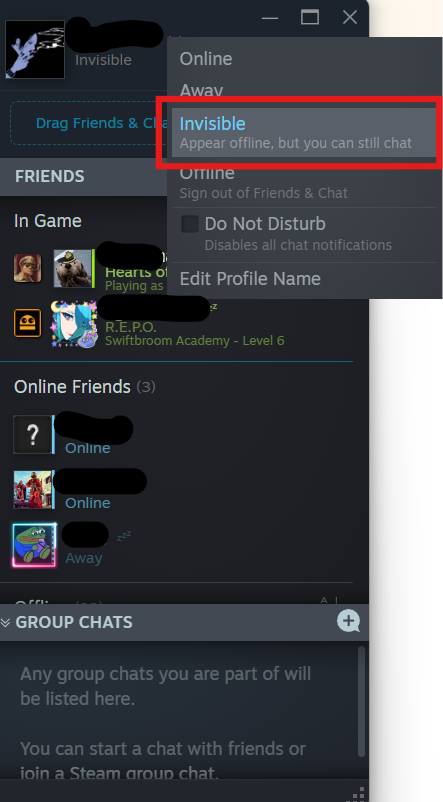
How to Appear Invisible on Steam (Top Menu Method)
You can also do this from the main menu.
Steps:
- Click Friends in the top menu
- Select Invisible
This will apply the same setting.
Invisible vs Offline on Steam
Many users confuse these two options.
| Status | What It Does |
|---|---|
| Invisible | Appears offline but you can still chat and play |
| Offline | Fully disconnected, no chat or interaction |
Invisible mode is better if you still want to use Steam normally.
Can Friends See What You’re Playing?
When you are invisible:
- Friends cannot see your online status
- Your current game activity is hidden
However, some activity may still appear if your profile settings are public.
Additional Privacy Settings
For more privacy, you can adjust your profile settings.
Steps:
- Go to your Steam profile
- Click Edit Profile
- Go to Privacy Settings
- Set Game details to Private
This hides your game activity completely.
When Should You Use Invisible Mode?
Invisible mode is useful when:
- You want to play without interruptions
- You do not want to respond to messages
- You prefer privacy while gaming
- You are testing or working quietly
It gives you full control over your visibility.
Common Issues and Fixes
If invisible mode is not working:
- Restart Steam
- Check your internet connection
- Make sure you selected Invisible, not Offline
These steps usually fix the issue.
Final Thoughts
Learning how to appear invisible on Steam is a simple way to maintain privacy while still enjoying your games. It allows you to stay active on Steam without letting others know you are online.
It is a small setting, but very useful for controlling your gaming experience.
FAQs
How do I appear offline on Steam?
Set your status to Invisible from the Friends list.
Can I still chat in invisible mode?
Yes. You can chat normally.
Will friends know I’m playing a game?
No, your activity is hidden when invisible.
Is invisible mode permanent?
No. You can switch back to online anytime.


Discussion (0)
Be the first to comment.