One of the good things about Microsoft's services is that they offer a quick way to report when you have issues. Also, Microsoft provides complete service status history so that you can find out what issues have happened in the past and when they were fixed. If any Microsoft service is not working for you (OneDrive, Outlook.com, Family Safety, etc), here's how to report your problem in just a couple of seconds:
Step 1: Go to Microsoft's Service Status Website
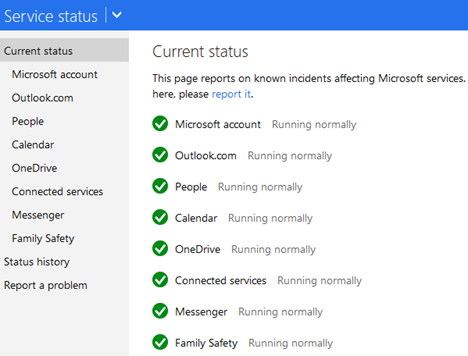
Microsoft provides a very useful website with the official status of their services and complete issue history. Go to Microsoft Service Status and you will see the current status for Microsoft's main online services. You won't have to log in with your Microsoft account. This is useful because your Microsoft account may be the service that you want to report a problem with.
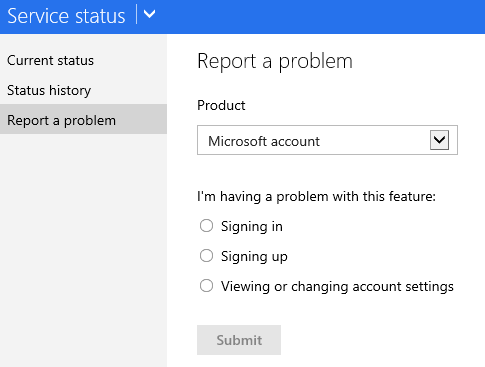
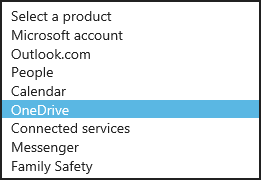
In the Product drop down, select the service or product that is not working for you. To give you an example, we selected OneDrive because this service was not working for us when writing this article. If you have issues with Office Online, you should also select OneDrive because the two services are tightly integrated.
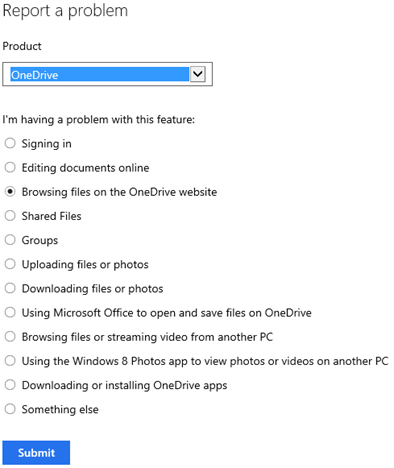
The list of problems is dynamically updated depending on the service you select. You will notice that the types of issues that can be reported are different from service to service.
When writing this article, we were not able to browse OneDrive files on the OneDrive website, even if we tried multiple browsers. Therefore we selected "Browsing files on the OneDrive website" and pressed Submit.
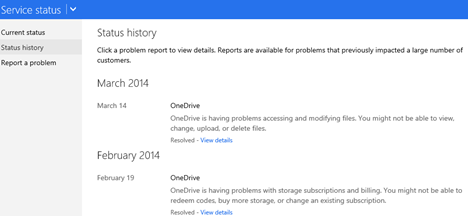
Another useful section on the Microsoft Service Status website is the Status history. Click or tap Status history on the column on the left side of the screen.
You will see a complete list with the issues that were identified and fixed in the last few months. You can learn which service was affected, when the problem was identified and when it was fixed.
Does Microsoft Monitor The Issues You Are Reporting?
Yes, they do. They have an automatic system that reports to their engineers when issues are reported, so that they take a look at what's wrong and solve your issues.
What If I Want a Reply from Microsoft?
If you want someone at Microsoft to speak with you about your issue, then your best chance is to use Twitter. Interact with their Microsoft Support Twitter account which is available in English, 24 hours a day - 7 days a week.
Conclusion
Have you had any recent issues with Microsoft's online services? If you did, did you report them? How happy were you with Microsoft's handling of the situation?
I recently bought a copy of Home and Student Office 365 from Best Buy for $138.11 including tax. The salesman I bought it from did not mention that it did not include Outlook which is one of my main needs. I did not install it and I didn’t scrape off the area on the card which hid the pin number. I tried to return it for a refund but was refused because Microsoft wouldn’t let them. I would appreciate if you could provide me with a refund or authorize Best Buy to do it.
BRIAN MCWEENEY ·
CAN’T SIGN INTO ONEDRIVE SINCE 12PM CALIFORNIA TIME
Daniel ·
Idk if Microsoft people read this but I HOPE THEY DO because I updated my computer today and my mouse hotkeys f’d up. Also my Microsoft ergonomic keyboards numpad is not working properly. I hope this wont take long. I am PISSED!
Grant Symonds ·
I am unable to use the above email address because of the Microsoft pop up message “Microsoft apps would like to Read, compose, send and permanently delete” continues to deny me the use of my email. This is costing me $$$$$$
Please rectify as a matter of high importance. Press Deny key or Accept key makes no difference.
Grant Symonds ·
The following pop up is preventing me from sending/receiving gmail on my outlook account:-
“Microsoft apps & services would like to Read, compose………”
If I press Deny or Accept the message continues to pop up which essentially renders my email, which I use for my employment, USELESS
Please advise the solution as soon as possible
Charles Koch ·
Mocrosoft’s Networking sucks literally. They did away with Home groups and attempting to “give access to” another computer on your network does not show any computers other than the local computer you are working on. Of course I believe this is by design. Microsoft wants and needs to make money on Onedrive. Remember what goes on the internet stays on the internet. No ability to exchange files between computers on your own personal network. Perhaps the professional edition supports this. If so it’s just another attempt to bring in more money by Microsoft.
d3x0r ·
status.live.com doesn’t exist anymore.
Anonymous ·
We will update the guide in the following weeks. Thanks for sharing this issue.
Dr Craig Murray ·
Where is the Microsoft’s Services website? The link takes me no place; it does not work.
Anonymous ·
The guide is a bit old. We need to update it. Will do so in the coming weeks. Thanks for highlighting this problem.
Anoynomous User ·
I was writing a really important assignment word decided to stop working and crash. I had to write it again because of software failure. I will never use this software again for my important work, as it is not the first time that it happened.
Please fix or tell me how to fix my email acct. This is my real estate acct and I can’t work without. (Your connection is not private) is all I get. PLEASE repair ASAP, Thank U, God Bless, L B
marcia ·
just happenned today
Chris Littlejohns ·
This no longer is correct, the microsoft service status now does not give you any where to tell them that no, things are not working properly and they live in a never never land.













Discussion (14)
I recently bought a copy of Home and Student Office 365 from Best Buy for $138.11 including tax. The salesman I bought it from did not mention that it did not include Outlook which is one of my main needs. I did not install it and I didn’t scrape off the area on the card which hid the pin number. I tried to return it for a refund but was refused because Microsoft wouldn’t let them. I would appreciate if you could provide me with a refund or authorize Best Buy to do it.
CAN’T SIGN INTO ONEDRIVE SINCE 12PM CALIFORNIA TIME
Idk if Microsoft people read this but I HOPE THEY DO because I updated my computer today and my mouse hotkeys f’d up. Also my Microsoft ergonomic keyboards numpad is not working properly. I hope this wont take long. I am PISSED!
I am unable to use the above email address because of the Microsoft pop up message “Microsoft apps would like to Read, compose, send and permanently delete” continues to deny me the use of my email. This is costing me $$$$$$
Please rectify as a matter of high importance. Press Deny key or Accept key makes no difference.
The following pop up is preventing me from sending/receiving gmail on my outlook account:-
“Microsoft apps & services would like to Read, compose………”
If I press Deny or Accept the message continues to pop up which essentially renders my email, which I use for my employment, USELESS
Please advise the solution as soon as possible
Mocrosoft’s Networking sucks literally. They did away with Home groups and attempting to “give access to” another computer on your network does not show any computers other than the local computer you are working on. Of course I believe this is by design. Microsoft wants and needs to make money on Onedrive. Remember what goes on the internet stays on the internet. No ability to exchange files between computers on your own personal network. Perhaps the professional edition supports this. If so it’s just another attempt to bring in more money by Microsoft.
status.live.com doesn’t exist anymore.
We will update the guide in the following weeks. Thanks for sharing this issue.
Where is the Microsoft’s Services website? The link takes me no place; it does not work.
The guide is a bit old. We need to update it. Will do so in the coming weeks. Thanks for highlighting this problem.
I was writing a really important assignment word decided to stop working and crash. I had to write it again because of software failure. I will never use this software again for my important work, as it is not the first time that it happened.
Please fix or tell me how to fix my email acct. This is my real estate acct and I can’t work without. (Your connection is not private) is all I get. PLEASE repair ASAP, Thank U, God Bless, L B
just happenned today
This no longer is correct, the microsoft service status now does not give you any where to tell them that no, things are not working properly and they live in a never never land.