




Searches for “finding where to get your Fitbit repaired” keep rising as more trackers age, crack, or stop holding a charge. Many owners expect an official Fitbit repair center, only to discover that the process usually involves warranty replacement, third-party repair shops, or simple at-home fixes.
This updated guide walks you through today’s real-world Fitbit repair options. You will see when Google’s Fitbit Support can help, when a specialist repair service makes sense, and which quick fixes you can safely try at home before you pay for a replacement.
Fitbit fix: finding where to get your Fitbit repaired today
One of the most confusing parts of any Fitbit repair is figuring out who actually works on the device. At the time of writing, Fitbit (now owned by Google) does not run walk-in service centers or traditional repair shops. Instead, support focuses on warranty claims and discounted replacements when your device still falls under coverage.
For cracked screens, dead batteries, or water damage outside the warranty, you usually choose between a trusted third-party repair service, a local electronics shop, or replacing the tracker entirely. Understanding those choices helps you decide the most cost-effective path for your own Fitbit fix.
Common Fitbit problems you might need to fix
Before you look for where to get your Fitbit repaired, it helps to pin down what actually went wrong. Some issues respond well to simple troubleshooting, while others almost always require hardware work or a replacement.
- Cracked or black screen: impacts, drops, or pressure damage that make the display unreadable.
- Dead or swollen battery: the Fitbit will not hold a charge, shuts off quickly, or shows battery errors.
- Charging issues: the device only charges at certain angles or does not recognize the charger.
- Sync and Bluetooth problems: the tracker stops syncing correctly with the Fitbit app.
- Stuck or ghost touch screen: taps do not register, or the screen moves on its own.
- Broken band or latch: the tracker still works, but the strap wears out or breaks.
Hardware damage like cracked screens or water intrusion usually needs professional help. Software glitches, syncing issues, or minor charging problems often respond to a quick home fix.
Does Fitbit repair or replace devices?
A key question behind every Fitbit fix is simple: Does the company repair the device, or just replace it? According to Fitbit community threads and Google’s official warranty documentation, Fitbit does not operate traditional repair centers for out-of-warranty damage, such as cracked screens or worn batteries.
Instead, when you contact Fitbit Support, they usually offer:
- Warranty replacement when the problem looks like a manufacturing defect within the warranty window.
- Discounted replacement offers if your device is just outside warranty or shows issues they recognize as common failures.
- Troubleshooting steps for sync, update, or charging problems that may not be hardware-related.
How to use Fitbit warranty and support
If your tracker still falls under warranty, always start with Fitbit Support. That gives you the best chance at a free or discounted replacement instead of paying full price for a new device or risky third-party work.
Steps to start a Fitbit warranty claim
- Pick up your Fitbit original packaging.
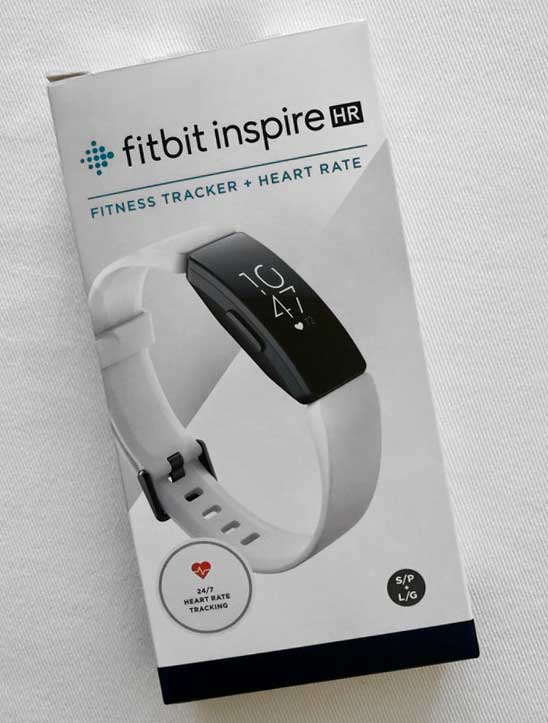
- Locate your proof of purchase, serial number, and model name in the original packaging or the Fitbit app.
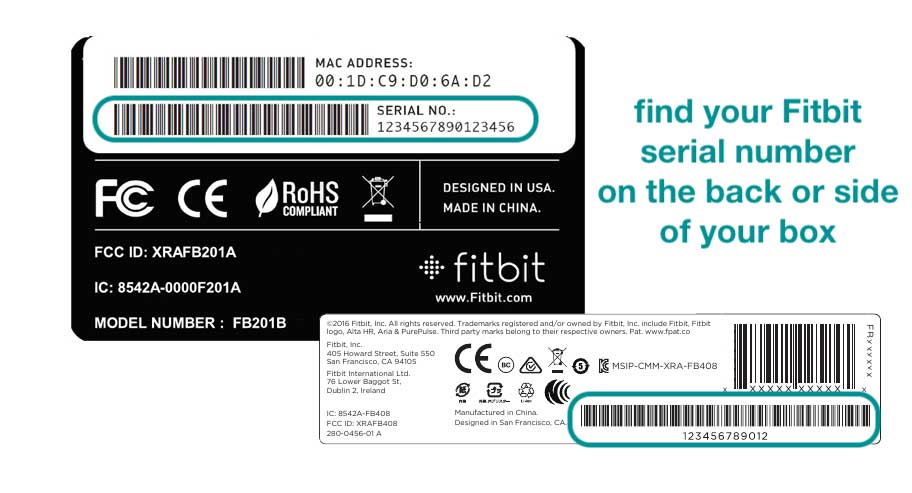
- Visit the official Fitbit or Google support page and sign in with your account.

- Open a support ticket or start chat support for your specific device model.
- Describe the issue clearly, including when it started and any troubleshooting steps already tried.
- Follow their instructions to submit photos, error messages, or additional information when requested.
- Review any replacement or discount offer they provide and decide whether the cost makes sense for you.
Warranty coverage typically applies only to manufacturing defects, not accidental damage or normal wear and tear. Still, many users report receiving goodwill discounts on new devices even when their broken Fitbit falls slightly outside strict warranty rules.
Third-party Fitbit repair options
When warranty support is unavailable, third-party technicians are the primary option for getting your Fitbit repaired. These companies specialize in smartwatch and tracker repairs, often focusing on screen and battery work that the manufacturer does not offer.
Common third-party Fitbit repair options include:
- Online mail-in services that replace cracked screens, damaged housings, and worn batteries for popular models.
- Local phone and electronics repair shops that treat Fitbit trackers similar to small smartwatches.
- Specialist Fitbit refurbishers that repair, clean, and resell older models, sometimes offering repair for your own device as well.
When you contact any third-party Fitbit repair service, ask about the quality of parts, the warranty on their work, and whether they have experience with your exact model. That helps avoid poor-quality display replacements or water seals that no longer hold up to sweat or rain.
Should you repair or replace your Fitbit?
Because many trackers cost less than high-end smartwatches, a key part of any Fitbit fix is checking whether repair costs come close to the price of a new device. Community discussions often note that older Fitbits last about two years under heavy daily use, especially when batteries start to fade.
Questions to ask before paying for Fitbit repair
- How old is the device, and does it still meet your tracking needs?
- What does the repair cost compared with a current replacement model on sale?
- Does the repair include any warranty on parts and labor?
- Are you fixing a single issue, or are several components already aging?
If a screen or battery repair approaches the price of a modern tracker with better sensors, a replacement often gives you more value than patching an older device.
DIY Fitbit fix tips you can safely try
Not every problem requires professional Fitbit repair. For minor issues, you can often restore normal behavior with a quick at-home Fitbit fix that carries little risk.
Easy fixes before you pay for repair
- Restart or reset the tracker: use the official restart steps for your model to clear software glitches or frozen screens.
- Clean charging contacts: gently wipe the charging pins on the device and the cable with a soft, dry cloth or cotton swab.
- Check the charging cable and USB port: test with another outlet, adapter, or cable to rule out simple hardware issues.
- Reinstall or relink the Fitbit app: remove the device from your account, reinstall the app, and pair again to fix sync problems.
- Replace worn bands: if only the strap is damaged, swap it for a new band instead of replacing the entire tracker.
For screen or battery replacements, opening the case usually breaks water resistance and can void warranty coverage. Those jobs fit better under professional Fitbit repair options unless you already have strong electronics repair experience and accept the risks.
How to find trusted Fitbit repair shops
Once you decide to pay for service, the next step in finding where to get your Fitbit repaired is choosing a shop you can trust with a small, sealed device.
What to look for in a Fitbit repair service
- Clear pricing for screen, battery, and board-level repairs before you mail in or drop off the device.
- Experience and reviews specifically mentioning Fitbit models, not just phones or tablets.
- Written warranty for the repair, even if only 60–90 days on parts and labor.
- Use of quality or genuine parts and realistic claims about waterproof or sweat resistance after repair.
- Responsive customer support by email, phone, or chat if something goes wrong after the fix.
For some buyers, a retailer protection plan from a store like Best Buy can be an easier path than independent Fitbit repair options, since those plans sometimes cover accidental damage with fast replacement.
How to prevent future Fitbit damage
A good Fitbit fix ends with a few habits that make the next repair less likely. Simple accessories and care choices often extend the life of your tracker far beyond the original band and battery.
- Use screen protectors or bumper cases if you work in rough environments.
- Rinse and dry the device after intense workouts to protect sensors and seals.
- Avoid charging in very hot or very cold locations to reduce battery stress.
- Replace worn bands before they break completely and drop the device.
- Keep your Fitbit firmware and app updated for bug fixes and performance improvements.
Conclusion
Fitbit itself focuses on warranty and replacement support, while real repairs usually come from third-party shops or careful DIY work.
Start by checking warranty options through Fitbit Support, then weigh the cost of third-party Fitbit repair against the price and benefits of a new tracker. For minor problems, safe at-home fixes and basic maintenance can often keep your device going longer without any paid service at all.
With the right mix of troubleshooting, warranty checks, and repair research, you can decide whether to fix or replace your Fitbit and stay on track with your health and activity goals.

Discussion (0)
Be the first to comment.