ASUS has a thing for gamers. That's not new, as their Republic of Gamers brand is famous worldwide. A new trend is for the company to develop wireless routers for gaming, that are packed with many friendly features for online gamers. The latest addition to their lineup of gaming routers is the new ASUS ROG Rapture GT-AC2900, which also features some spectacular RGB lighting. If you want to know what this router has to offer, in terms of real-world performance, read this review:
ASUS ROG Rapture GT-AC2900: Who is it good for?
ASUS ROG Rapture GT-AC2900 is an excellent choice for the following types of users:
Gamers who want the best possible tools for online gaming and an impressive RGB lighting system
Users who want the best security for their smart home devices and have many diverse devices in their network
People who want task automation services from their wireless router, through IFTT (If This, Then That)
Users who want to control their home network using the Alexa voice assistant
Users who want advanced firmware that offers complete control
People who desire an advanced mobile app from which they can personalize the router
Pros and cons
Here are the things we like about ASUS ROG Rapture GT-AC2900:
Fast WiFi on both bands: 2.4 GHz and 5 GHz
Many features for gamers who play multiplayer games online
Excellent security features that secure your smart home
Powerful hardware that can handle many clients and simultaneous connections
Fast USB 3.0 port
RGB lighting that looks great
Advanced smartphone app for administering your wireless router
Great multilingual support and easily accessible Help documentation
As downsides:
The skin used for the firmware and the ASUS Router app may not be to everyone's tastes
The mobile app cannot be used to configure the gaming oriented features of the router
Product rating5/5
Verdict
ASUS ROG Rapture GT-AC2900 is the gamer-friendly evolution of a wireless router that we liked a lot: ASUS RT-AC86U. The hardware is the same as that of its predecessor. The looks have improved, the firmware is now packed with an extensive number of tools and features, including many that are interesting to gamers. Also, the RGB lighting that has been added to the new model is beautiful. If you are a gamer, ASUS ROG Rapture GT-AC2900 is one of the best wireless routers that you can buy.
Unboxing the ASUS ROG Rapture GT-AC2900 wireless router
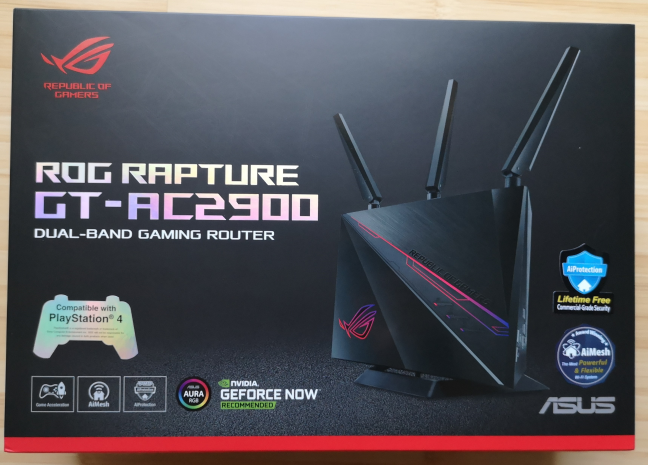
It is clear that ASUS ROG Rapture GT-AC2900 is a wireless router designed for gamers just by looking at its packaging. The Republic of Gamers logo is hard to miss, as well as the different logos for features and technologies that gamers are familiar with: the GeForce NOW game streaming service, Aura Sync, and PlayStation 4. A nice touch are the reflective letters used to communicate the name of the router. They color differently, depending on how the light reflects on them, and the angle in which you look at the packaging.
The packaging of the ASUS ROG Rapture GT-AC2900 wireless router
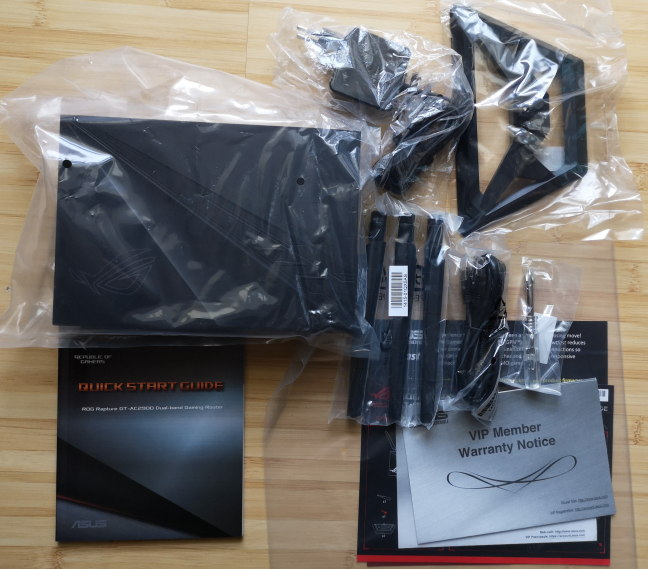
On the sides of the packaging, you get many details about the hardware configuration of this router and its many features that are designed for gamers. Inside the box, you find the following elements: the router itself, a stand for the router, three external antennas, the power adapter, an Ethernet cable, the quick setup guide, leaflets with information about the gaming features bundled on this router, and the warranty.
ASUS ROG Rapture GT-AC2900: what is inside the box
The packaging of the ASUS ROG Rapture GT-AC2900 looks stunning, worthy of a premium device. Inside the box, you find everything you need to get started, and all the information required to use the many features of this router.
Hardware specifications and design
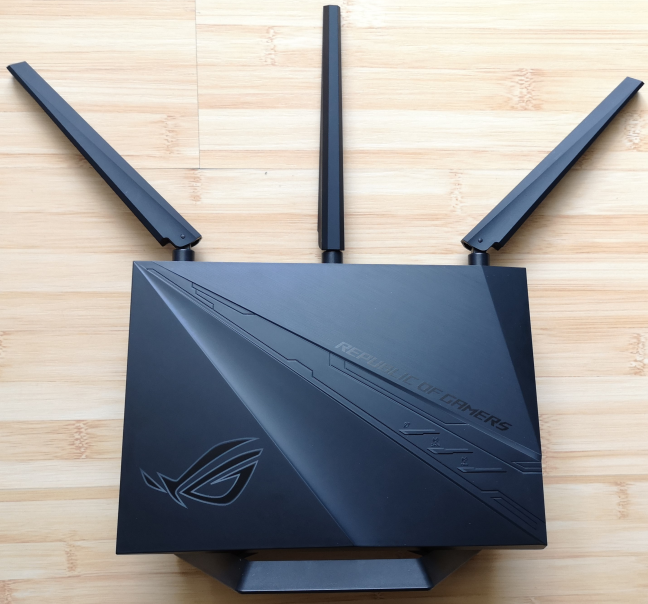
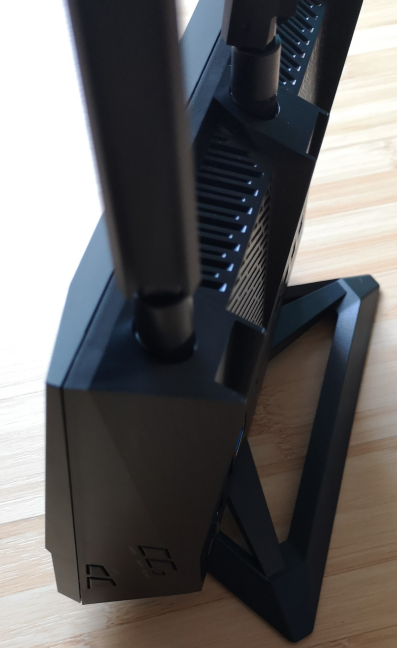
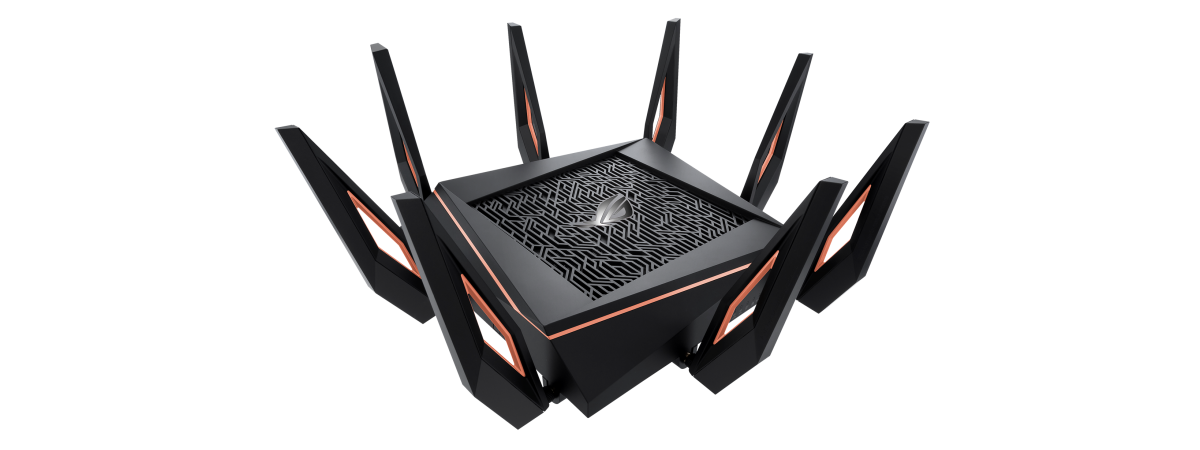
ASUS ROG Rapture GT-AC2900 has a dual-core Broadcom BCM4906 running at 1.8 GHz, just like its brother, ASUS RT-AC86U. It also has 256 MB of storage space for the firmware, and 512 MB of RAM. The design of ASUS GT-AC2900 is an evolution of the older model, and we like it more. The RoG branding looks beautiful, and the detachable stand is more flexible than that of the previous model, which could not be removed.
The ASUS ROG Rapture GT-AC2900 wireless router
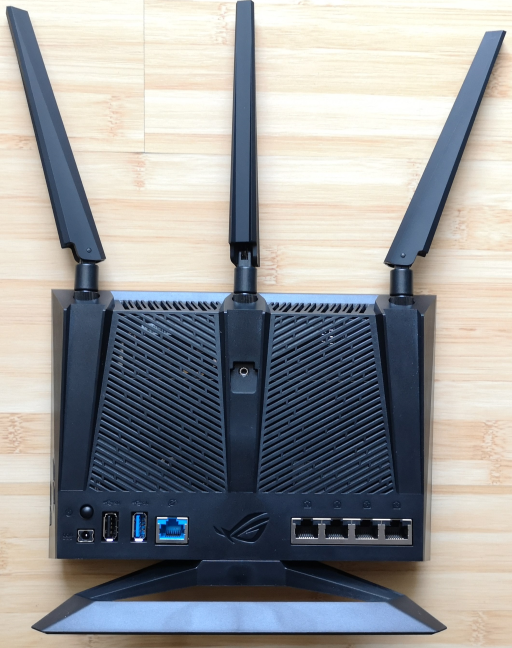
ASUS ROG Rapture GT-AC2900 is a dual-band wireless router, with a total theoretical maximum bandwidth split as follows: 750 Mbps for the 2.4 GHz wireless frequency, and 2167 Mbps for the 5 GHz frequency. It has support for the Wi-Fi 5 (802.11ac Wave 2) wireless standard, 4x4 MU-MIMO transfers on the 5 GHz band, and 3x3 MU-MIMO transfers on the 2.4 GHz band. The router has three detachable external antennas and one internal antenna. On the back of the router, we have the four Ethernet ports at 1 Gbps, two of which offer Link Aggregation. There is also one Internet port, one USB 3.0 port, one USB 2.0 port, the power jack, and the Power button.
The ports on the ASUS ROG Rapture GT-AC2900
On one of the sides, there are the following buttons: a button with the RoG logo (named Boost Key) which can be customized to perform specific actions when pressed, the button for controlling the LED on the front, the WPS button, the WiFi button, and the Reset one.
The buttons on the side of the ASUS ROG Rapture GT-AC2900
The size of the router is 8.7 x 6.65 x 4.37 inches or 221 x 169 x 111 mm in width, height, and depth. It also weighs 1.72 lb or 780 grams, without the stand.
If you would like to learn more about the official specifications of this wireless router, go to this page: ASUS ROG Rapture GT-AC2900 Specifications.
Setting up and using the ASUS ROG Rapture GT-AC2900 wireless router
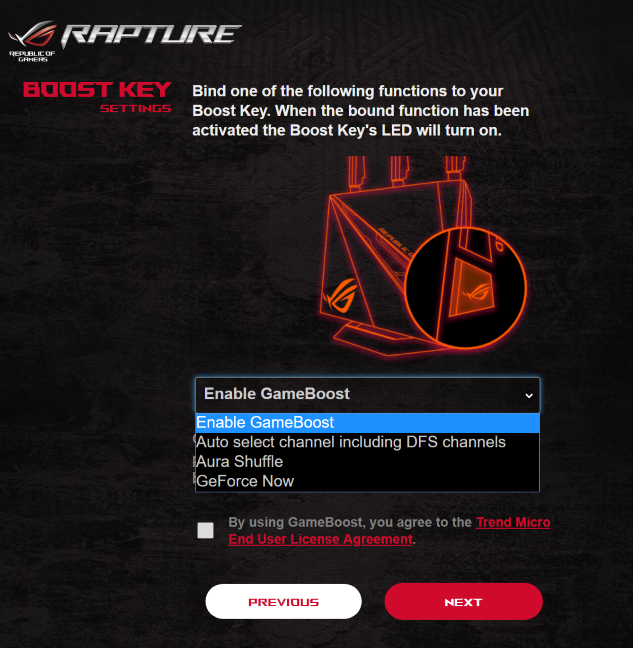
Setting up the ASUS ROG Rapture GT-AC2900 involves turning it on, connecting it to the internet, and using a web browser to load the quick setup wizard. At first, provide the details of your internet connection. Then, set up the names and passwords for the two wireless bands. Then, you get to personalize the Boost Key - a button on the side of the router, with the RoG logo, that can perform one of several actions when pressed. Choose what you want this button to do. Most users will want to use it to control the RGB lighting.
Setting the Boost Key
For the last step, you set the login name and password for administering the router. After you provide all the details, the router connects to the internet and checks for firmware updates. This is a proactive approach, and you should let the router update its firmware so that you can benefit from performance and security improvements. At the end of the quick setup wizard, you are shown a summary of your settings.
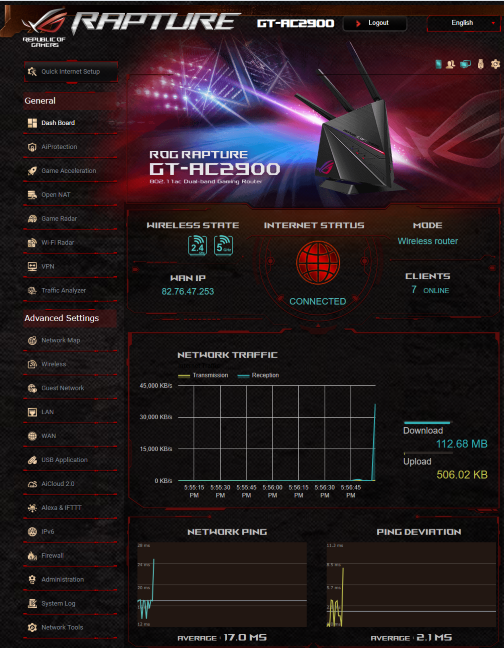
Then, you can access the administration user interface. It is organized the same as on other ASUS routers, meaning that it is split into logical sections and finding your way is easy. However, it has a different skin, aimed at gamers who are fans of the Republic of Gamers brand, which may not be to everyone's liking.
The firmware on the ASUS ROG Rapture GT-AC2900
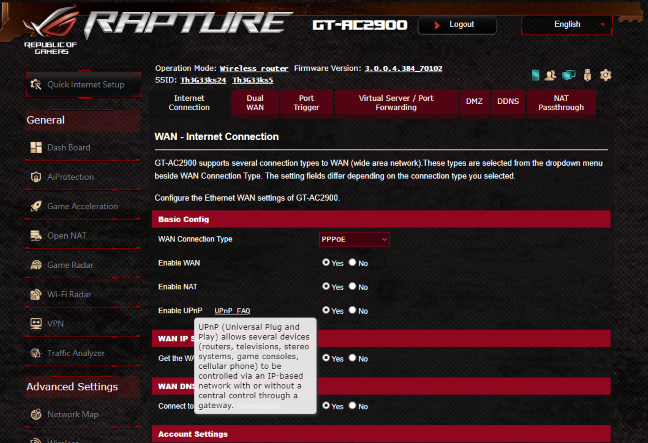
You can configure everything that matters in detail, and advanced users are going to appreciate this fact. The firmware is available in 21 languages, and the user documentation is accessible and well built. One neat trick is to move the mouse cursor over a setting that you do not understand, and a question mark is shown. Click on the question mark, and you see information explaining that setting.
The Help documentation offered by ASUS ROG Rapture GT-AC2900
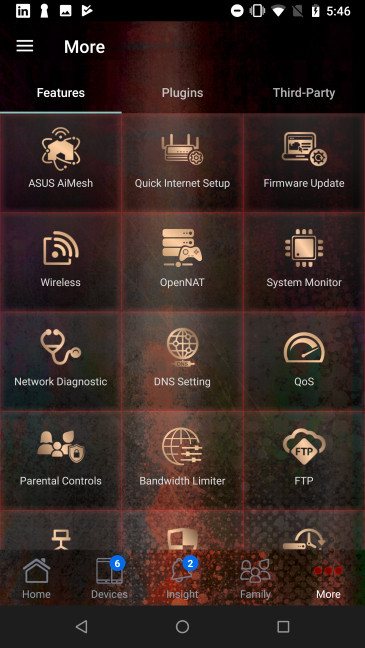
If you want to control your wireless network from your smartphone or tablet, including when you are not at home, you can use the ASUS router app. The app also uses a skin specific to the Republic of Gamers brand. It offers some advanced customization options, including the ability to check on your children' devices, and set up rules for parental controls. The remote network diagnostics can be useful too when your family has problems with their WiFi, and you are not home to help. However, most gaming-related features can be personalized only from the router itself, not from the app.
The ASUS router mobile app for Android
One eye-catching feature is the RGB lighting. We have tested other routers with RGB, but none of them look this good. The way it is implemented on the ASUS ROG Rapture GT-AC2900 is beautiful. The router looks great, and you can even program the lighting to adjust itself based on the events that take place with your router or internet connection. If you want to see how the lighting looks, we switched between the standard lighting effects, in the video below.
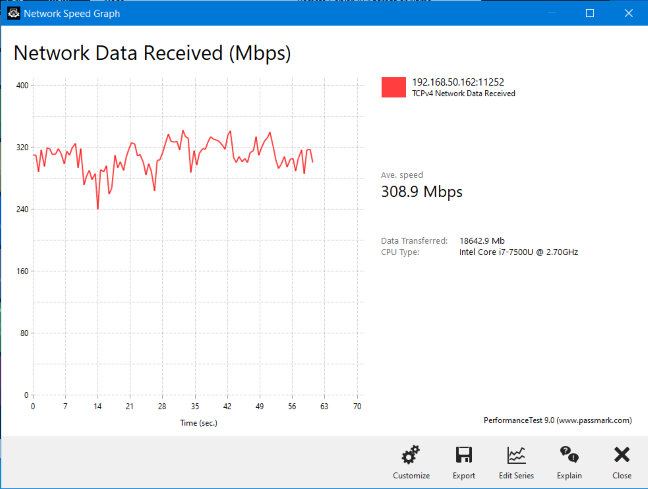
We connected about twenty devices to the network managed by Rapture GT-AC2900, including two desktop PCs, laptops, tablets, several smartphones, one wireless printer, two smart plugs, one smart bulb, an intelligent robot vacuum cleaner, and an Xbox One console. One issue we noticed is that, from time to time, some network clients would get randomly disconnected from the WiFi, for brief periods of time. We communicated this firmware bug to ASUS, and they are going to investigate it in order to fix it through future firmware updates. Initially, we also noticed a bit of instability when making data uploads. However, two days after we started testing the router, ASUS released a new firmware update that fixed the problem. After that, we enjoyed fast network transfers. You don't have to take our word for it. Just look at the diagram below, showing how data was downloaded from one computer to another, through WiFi, in a room separated from the router by one wall, with no direct line of sight to it.
A wireless network transfer made while using ASUS ROG Rapture GT-AC2900
If you want to see the details about the wireless performance of this router, and all the features that it has to offer, including those aimed at gamers, go to the next page of this review.
Wireless network performance
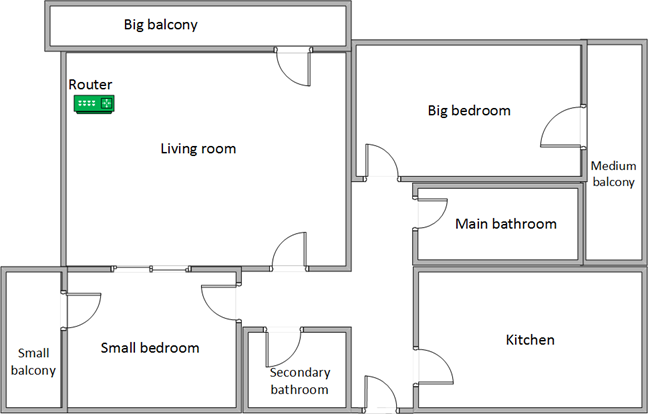
Let's look at the apartment that was used in our testing and how it is set up. You can see that the router is placed in the living room. With most wireless routers, the signal strength is not that high in places like the Kitchen and the Medium balcony.
The apartment in which we tested the ASUS ROG Rapture GT-AC2900
Our testing was done using a fast 1 Gigabit Internet connection that is capable of uploads on the internet of up to 500 Mbps. We used an HP Spectre 13 laptop for all our measurements and several software tools.
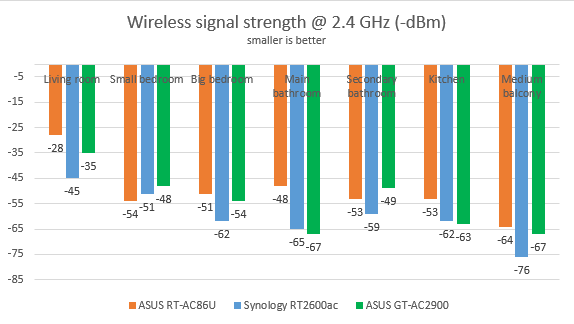
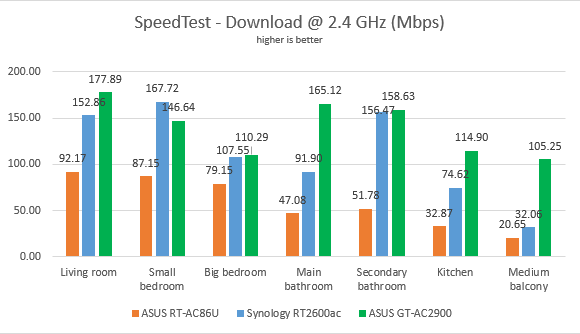
To get a better idea of the performance offered by ASUS ROG Rapture GT-AC2900, we compared it with Synology RT2600ac and ASUS RT-AC86U. We analyzed the 2.4 GHz band first and measured the signal strength with NetSpot. The signal strength offered by ASUS Rapture GT-AC2900 was generally weaker than that of its brother.
ASUS ROG Rapture GT-AC2900 - The signal strength on the 2.4 GHz band
Next, we used SpeedTest to measure how fast the internet connection offered by this router is when using 2.4 GHz wireless network. ASUS ROG Rapture GT-AC2900 offered the fastest download speed in most rooms.
ASUS GT-AC2900 - The download in SpeedTest, on the 2.4 GHz band
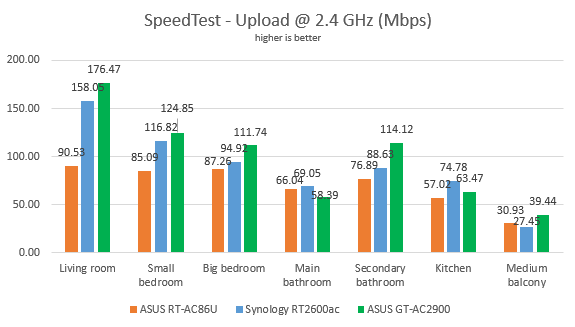
The same was true when measuring the upload speed with SpeedTest.
ASUS GT-AC2900 - The upload in SpeedTest, on the 2.4 GHz band
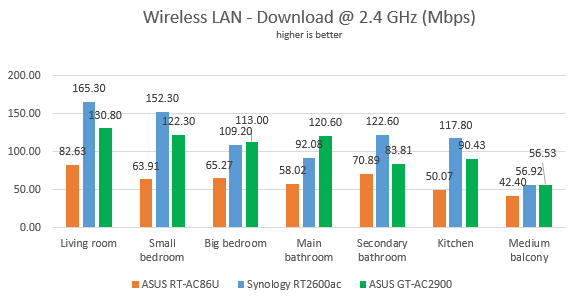
Continuing our measurements on the 2.4 GHz wireless network, we used the PassMark Performance test to transfer data between two computers connected to the network. When measuring the download speed, ASUS ROG Rapture GT-AC2900 was no longer the fastest router, being outperformed by Synology RT2600ac in many rooms.
ASUS ROG Rapture GT-AC2900 - Download speed on the 2.4 GHz band
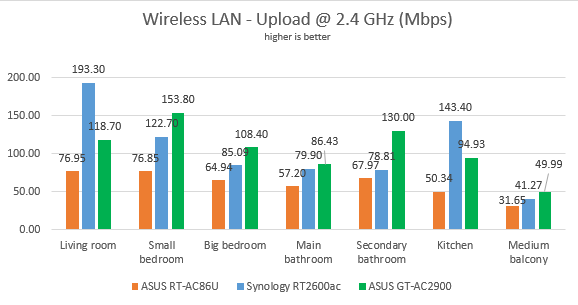
When we measured the upload speed, things were not clear-cut. ASUS ROG Rapture GT-AC2900 performed well. In some rooms, it was the fastest in our comparison, while in others it was outperformed.
ASUS ROG Rapture GT-AC2900 - Upload speed on the 2.4 GHz band
ASUS ROG Rapture GT-AC2900 is a fast router when using the 2.4 GHz wireless band.
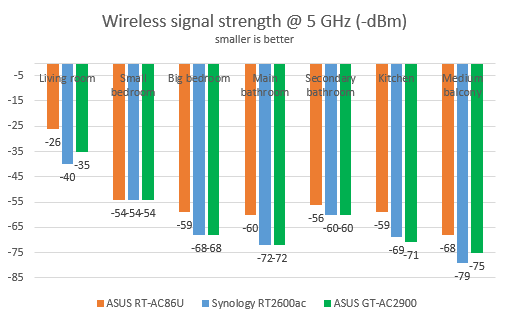
We then analyzed the performance of the 5GHz wireless band. We looked at the evolution of the signal strength, from room to room. This time too, its predecessor tended to offer better signal strength than ASUS ROG Rapture GT-AC2900.
ASUS ROG Rapture GT-AC2900 - The signal strength on the 5 GHz band
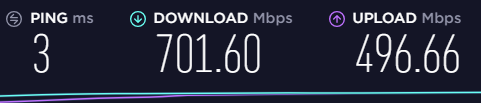
To see how fast the internet connection is when using the 5GHz band, we used SpeedTest. To view the maximum potential of this router, we used the world's only PCI-Express network card with support for 4x4 MU-MIMO. When we used this network card, we obtained a maximum speed of 701.60 Mbps for the download and 496.66 Mbps for the upload. Impressive speeds!
ASUS ROG Rapture GT-AC2900 - Maximum speeds on WiFi
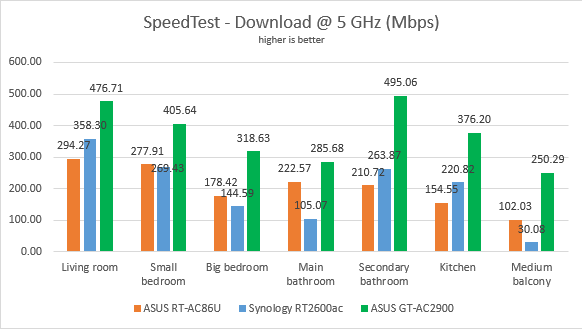
To get back to earth, and everyday devices people use, we took our laptops and measured the download speed with SpeedTest, in every room of our test apartment. In this test, ASUS ROG Rapture GT-AC2900 delivered the fastest downloads in our comparison, in all rooms, confirming the previous result.
ASUS GT-AC2900 - The download in SpeedTest, on the 5 GHz band
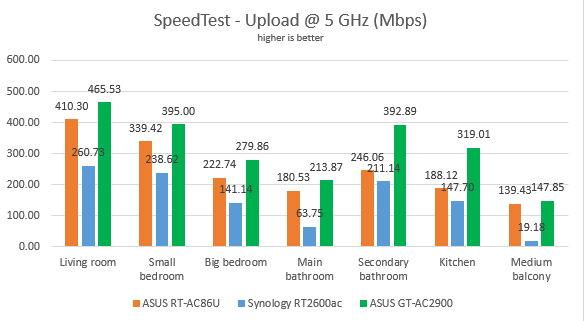
When measuring the upload speed, we enjoyed excellent speeds, one more time.
ASUS GT-AC2900 - The upload in SpeedTest, on the 5 GHz band
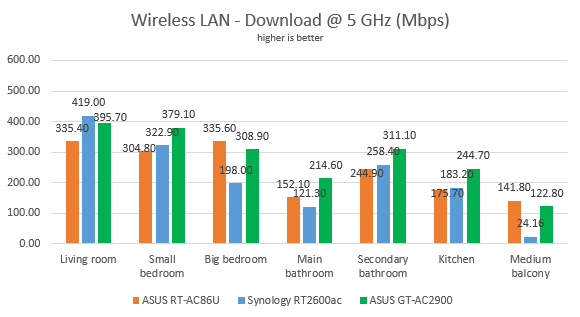
For the last measurements on the 5GHz wireless network, we used the PassMark Performance test to transfer data between two computers connected to the network. In this test, the competition was tight. However, ASUS ROG Rapture GT-AC2900 managed to be the top performer in most rooms.
ASUS ROG Rapture GT-AC2900 - Download speed on the 5 GHz band
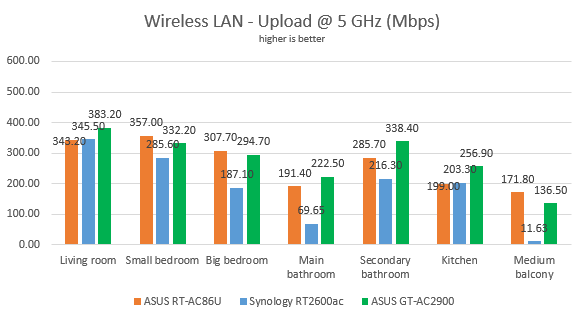
When measuring the upload speed, there was no clear winner in our comparison.
ASUS ROG Rapture GT-AC2900 - Upload speed on the 5 GHz band
ASUS ROG Rapture GT-AC2900 is a fast router on the 5 GHz wireless band too.
Wired network performance
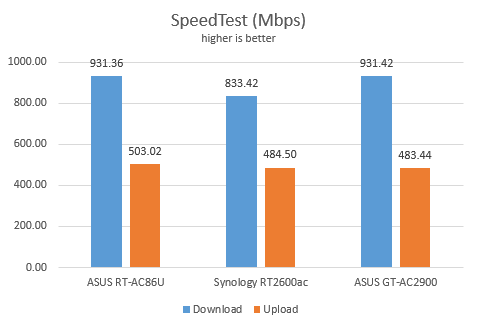
To test the quality of the wired Ethernet connection, we used a desktop PC, equipped with a Ryzen 5 processor and a speedy Samsung 850 Pro 512GB SSD, and a Lenovo IdeaCentre 610s mini PC. We measured the speed of the internet connection when using a 1 Gbps Ethernet cable, using SpeedTest. ASUS ROG Rapture GT-AC2900 managed to achieve the maximum potential of our internet connection, without any problems.
ASUS ROG Rapture GT-AC2900 - SpeedTest on Ethernet connections
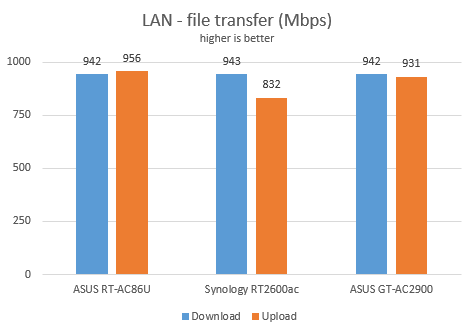
Then, we ran a network transfer between the two computers, using the PassMark Performance test. ASUS ROG Rapture GT-AC2900 delivered the speeds we expected of it.
ASUS ROG Rapture GT-AC2900 - Ethernet network transfers
ASUS ROG Rapture GT-AC2900 has no problems in offering speeds of 1 Gbps when using Ethernet connections.
USB performance
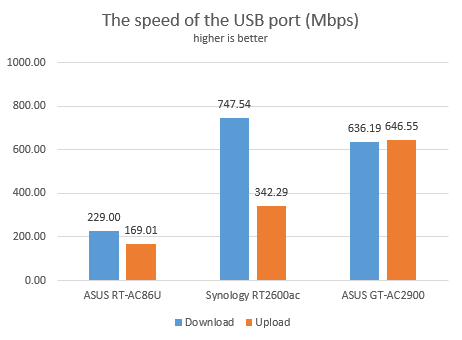
We connected a portable SSD to the USB 3.0 port of the ASUS ROG Rapture GT-AC2900 wireless router. Then we ran a few transfers from a desktop computer to this drive and back. We measured a speed of 636.19 Mbps for the download and 646.55 Mbps for the upload. ASUS ROG Rapture GT-AC2900 was much faster than its predecessor.
ASUS ROG Rapture GT-AC2900 - The speed on USB 3.0
The USB 3.0 port on the ASUS ROG Rapture GT-AC2900 is fast and suitable for working with external storage devices.
RGB lighting, online gaming, antivirus protection, and other features
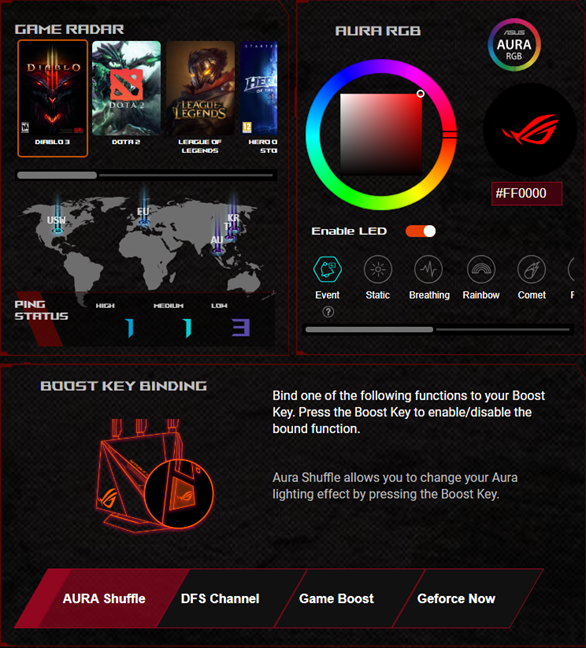
ASUS ROG Rapture GT-AC2900 bundles many advanced features that are not found on routers from other brands, even on those designed for gamers. First of all, we have RGB lighting through Aura Sync, which looks beautiful. There are other ASUS ROG routers with RGB lighting, but none look this good when it comes to this feature. ASUS GT-AC2900 has the best RGB implementation that we have seen so far. The downside is that the lighting can be configured only from the firmware. However, ASUS is working on an app that allows users to personalize the lighting of this wireless router, and integrate it with other AURA Sync accessories.
AURA RGB settings on ASUS ROG Rapture GT-AC2900
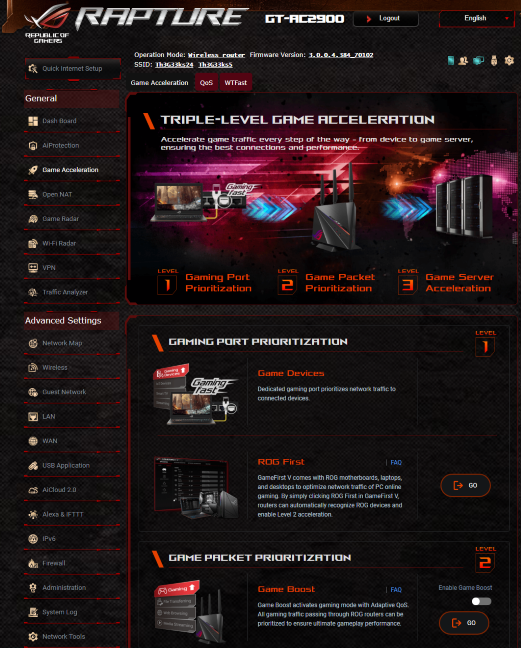
In the Game Acceleration section of the firmware, you find many useful tools for online gaming.
GameFirst V - it is bundled with ASUS ROG motherboards, laptops, and desktops to optimize network traffic of PC online gaming. By clicking ROG First in GameFirst V, the router can automatically recognize ROG devices and give them priority in the network, through an adaptive QoS (Quality of Service) feature.
Game Boost - enabled the adaptive QoS (Quality of Service) feature to prioritize online gaming over other types of activities. This feature is also compatible with GeForce NOW - the upcoming game streaming service from NVIDIA.
WTFast GPN - you get the option to create a WTFast account, for optimized online gaming through a unique VPN service. You get access to some free features, but, for the full service, you need to pay extra to WTFast.
Game Acceleration features on the ASUS ROG Rapture GT-AC2900
Open NAT - is a Network Address Translation service that makes it easy to enable port forwarding rules for popular online games, so that you get optimized routing of packages when playing online. This feature works in conjunction with Game Profile - a tool that allows gamers to set power forwarding rules for their favorite games quickly. The router offers the best settings for games like FIFA, Fortnite, Call of Duty, Left 4 Dead, Overwatch, CS Go, League of Legends, and more.
ASUS ROG Rapture GT-AC2900 - Open NAT and Game Profile settings
Through the Game Radar feature, the router automatically verifies the availability and the ping reply to all the servers of popular online games like DOTA 2, League of Legends, Overwatch, World of Tanks, and more. As a result, you can see which server works best, without having to open your favorite game.
ASUS ROG Rapture GT-AC2900 - Game radar
Security tools are a significant portion of the firmware of this router. The AiProtection module is the one that manages them:
A comprehensive Router Security Assessment tool which verifies whether your router's settings are secure. When it finds problems, it proactively informs you and takes you where you need to be to fix things.
Malicious Sites Blocking - an efficient cloud-based module that blocks malicious websites on all the devices connected to your network.
Two-Way IPS - a two-way intrusion prevention system that protects all your network from spam, DDoS attacks, network attacks, and more. Additionally, it also scans the packets that are sent from your network to the internet.
Infected Device Prevention and Blocking - if your network devices get infected, and they become zombies in malware networks, they are automatically blocked by your router, and you are informed about this problem so that you can fix things.
Parental Controls - useful, cloud-based parental controls that parents can use to set rules about internet access for their children's devices.
AiProtection on ASUS ROG Rapture GT-AC2900
It doesn't end here. There's more:
Wi-Fi Radar - a set of unique tools that can be used to discover nearby wireless access points, gather statistics about the wireless radio signals in your area, troubleshoot problems, and improve the settings of your wireless network.
Integration with Amazon's Alexa voice assistant and IFTT (If This, Then That) - you can automate tasks that might otherwise be repetitive or unable to "talk to each other." With the help of these services, you can do things like saying "Alexa, ask ASUS ROUTER to upgrade the firmware" or getting an email when your child gets home and connects his or her smartphone to the home WiFi.
Guest Network - you can enable up to three wireless networks for each band, with individual security and access settings.
Traffic Analyzer - offers visual traffic statistics which give you a clear picture of how your network is used and by which devices.
USB Applications - apps that are designed to work with all kinds of devices that you can connect to the router using USB: external hard disks, printers, and 3G or 4G dongles or modems. You also have a Download Manager that you can use to set your router to download stuff from the internet, to an external hard disk that's connected to it.
AiCloud 2.0 - a mobile app that keeps you connected to your data wherever and whenever you have an Internet connection. With it, you can access the folders shared in your home network from your Android or iOS smartphone or via a personalized URL
IPv6 - support for IPv6 addresses that are going to replace IPv4.
VPN - you can set the router to work as a VPN server, and you can also use it to turn your network-connected devices into VPN-enabled clients, without additional VPN software required.
Network Tools - for analyzing the network and identifying what's wrong. They are useful when you need to troubleshoot problems.
Dual WAN - excellent for both small businesses and professionals who require always-on internet connections. You can also use a dual WAN to improve the quality of your internet connection and get the best possible performance.
DDNS - a service that allows you to connect to the router from the internet, even if your internet provider gives you a dynamic public IP address.
The ASUS ROG Rapture GT-AC2900 wireless router packs tons of features and tools that are going to be useful to its users.
What is your opinion about ASUS ROG Rapture GT-AC2900 wireless router?
Now you know our opinion about this wireless router, what we liked and did not like about it. Before closing this review, tell us what you think about ASUS ROG Rapture GT-AC2900. If you already have this router, how has your experience been so far? Comment below and let's discuss.
I own a GT-AC2900, but the performance difference from 86U doesn’t really make sense based on all i’ve gathered from the internet. Did you test on the same channels etc? Your 86u might be broken considering they get updated with the EXACT same firmware build (other than the rog stuff) on the same day lol
Anonymous ·
Those two routers were not tested at the same time with the same router. We get a model for review, we test it, log all the measurements, return it, get the next one, and so on.






































Discussion (2)
I own a GT-AC2900, but the performance difference from 86U doesn’t really make sense based on all i’ve gathered from the internet. Did you test on the same channels etc? Your 86u might be broken considering they get updated with the EXACT same firmware build (other than the rog stuff) on the same day lol
Those two routers were not tested at the same time with the same router. We get a model for review, we test it, log all the measurements, return it, get the next one, and so on.