




Adobe is expanding AI assistants across its Creative Cloud software to help creators handle repetitive production work in Photoshop, Premiere Pro, Illustrator, InDesign, and Frame.io. The new tools are designed to complete multi-step tasks such as sorting footage, renaming clips, managing layers, resizing designs, checking files for print problems, and preparing rough edits.
The goal is not to replace creative decisions. Adobe says the AI assistants are meant to reduce the time spent on setup work, file organisation, and routine production tasks so creators can focus more on editing, design, storytelling, and final approval.
The AI Assistant is available in public beta across several major Adobe apps, while After Effects support remains in private testing.
Premiere Pro can organise footage and build rough edits
Premiere Pro is receiving one of the biggest AI workflow updates. Video editors often spend a large part of a project preparing media before they can begin the real edit.
The new assistant can organise clips into bins, rename files in bulk, identify interview questions, add timeline markers, and create a rough opening sequence. This could be useful for editors working with large amounts of footage from interviews, events, tutorials, podcasts, or multi-camera shoots.
The assistant is not expected to produce a final professional edit on its own. Instead, it can create a starting point that editors can review, change, and improve.
Photoshop AI tools move beyond simple image generation
Photoshop has already added AI image tools, including Generative Fill, but the new assistant focuses more on full project workflows.
It can handle tasks such as replacing a background, rearranging layers, preparing a composition, and resizing an image for different social media platforms. The results remain editable, which is important for designers who need control over every part of a file.
This could save time for creators making the same campaign artwork for Instagram, YouTube, TikTok, Facebook, websites, and advertisements.
| Adobe app | New AI assistant tasks |
|---|---|
| Premiere Pro | Organise clips, rename media, add markers, create rough cuts |
| Photoshop | Replace backgrounds, manage layers, resize assets |
| Illustrator | Create multiple versions, check fonts and colour settings |
| InDesign | Update templates with new copy and brand styling |
| Frame.io | AI workflow tools in public beta |
| After Effects | Private beta testing |
Illustrator and InDesign target production teams
Illustrator’s AI assistant is aimed at design production work that can become repetitive when teams need many versions of the same file.
Adobe says the tool can generate up to 50 versioned files from spreadsheet data. That could help with large campaigns that require different names, locations, languages, prices, product details, or promotional messages.
Illustrator can also inspect a document for issues such as missing fonts or incorrect colour modes before it is sent for printing. These checks can be useful for agencies, marketing teams, packaging designers, and print focused studios.
InDesign is receiving similar workflow support. The AI tool can take information from a new brand document and apply updated text and styling to an existing template. This may make it easier to refresh brochures, reports, catalogues, presentations, and marketing materials after a company changes its visual identity.
Firefly is becoming a larger creative AI workspace
Adobe is also expanding Firefly beyond basic image generation. The company is positioning Firefly as a broader AI studio for creating consistent visual projects.
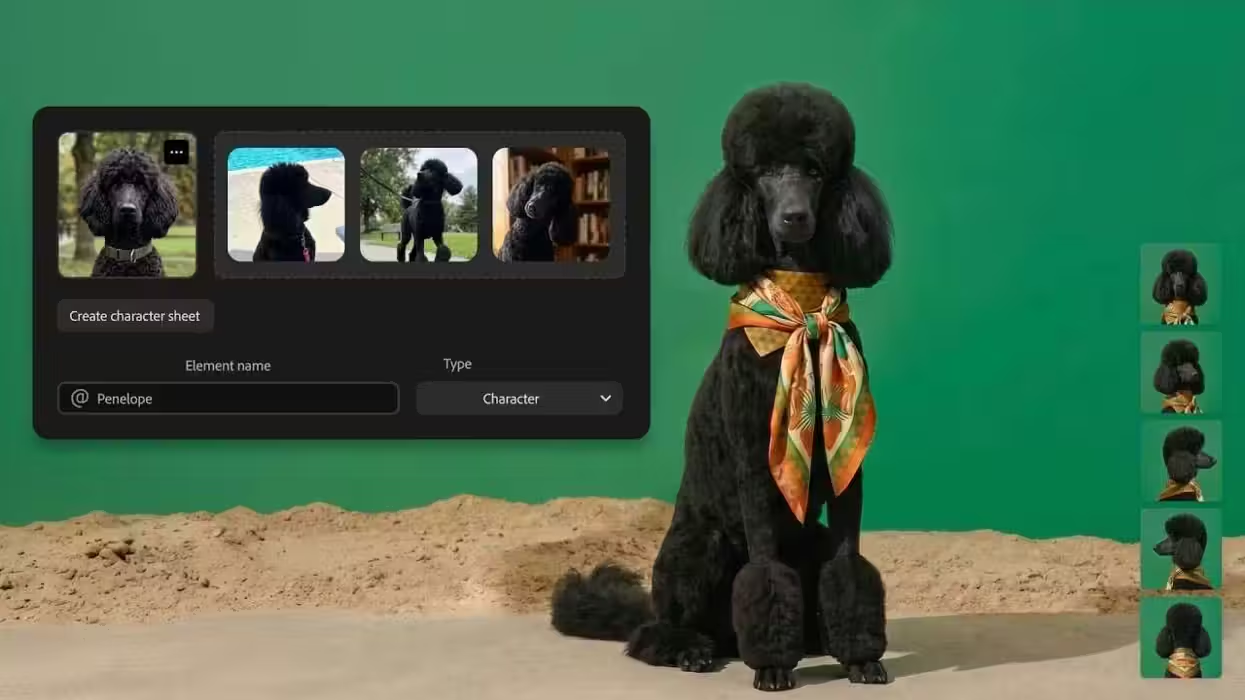
One upcoming feature, called Elements, will allow creators to save characters, objects, and locations for reuse in later generations. This could help keep visual consistency across a project instead of creating unrelated images each time.
Adobe is also adding tools for building brand kits from a company name, style description, and colour palette. Other planned features include turning product images into short cinematic videos and creating storyboards that can become the base for a finished video project.
Adobe connects its AI tools to other platforms
Adobe is extending its AI tools beyond Creative Cloud. Its generation and workflow features are now linked with ChatGPT, Claude, and Microsoft 365 Copilot. Google Gemini and Slack integrations are also planned.
This could make Adobe’s tools easier to use inside existing work environments, especially for teams that already rely on AI chat assistants for planning, writing, research, and project management.
The new AI assistants are still developing, but Adobe’s direction is clear. The company wants AI to manage the repetitive work around creative projects while keeping people responsible for the final creative result.



Discussion (0)
Be the first to comment.