




If your internet feels sluggish or unreliable, your DNS might be to blame. Switching to a public DNS server can make your browsing faster, safer, and more private. The right DNS can also improve gaming latency and block malicious or unwanted sites.
What Is a DNS Server and Why It Matters
DNS stands for Domain Name System. It translates the website names you type (like google.com) into IP addresses that computers understand. Your Internet Service Provider (ISP) automatically assigns a DNS, but it’s often slower or less secure than public options.
By switching to a faster public DNS, you can shorten page load times, improve connection reliability, and even bypass region-based restrictions.
How We Ranked the Best Public DNS Servers
We compared DNS services based on speed, privacy policies, security features, and global uptime. Each DNS listed below is free, public, and suitable for home or office networks.
12 Best Public DNS Servers for Faster Internet Speed
1. Cloudflare DNS (1.1.1.1)
Primary: 1.1.1.1 | Secondary: 1.0.0.1
Cloudflare remains the fastest DNS server, according to DNSPerf. It’s built with privacy in mind—no IP logging and daily log deletion. Families can also use 1.1.1.2/1.0.0.2 (malware blocking) or 1.1.1.3/1.0.0.3 (adult content filtering).
2. Google Public DNS (8.8.8.8)
Primary: 8.8.8.8 | Secondary: 8.8.4.4
Google’s DNS is one of the most reliable globally, with high uptime and excellent caching speeds. It’s great for everyday browsing, video streaming, and gaming with low-latency connections.
3. Quad9 DNS (9.9.9.9)
Primary: 9.9.9.9 | Secondary: 149.112.112.112
Quad9 prioritizes security and privacy. It blocks malicious domains and phishing threats using data from multiple global threat intelligence providers. It doesn’t log your IP address or browsing activity.
4. OpenDNS (208.67.222.222)
Primary: 208.67.222.222 | Secondary: 208.67.220.220
Owned by Cisco, OpenDNS offers customizable web filtering, phishing protection, and 100% uptime. It’s a great pick for families and schools thanks to its parental control options.
5. AdGuard DNS (94.140.14.14)
Primary: 94.140.14.14 | Secondary: 94.140.15.15
AdGuard DNS automatically blocks ads, trackers, and malicious domains. It’s ideal for users who want a faster, cleaner, and privacy-focused browsing experience.
6. CleanBrowsing DNS (185.228.168.9)
Primary: 185.228.168.9 | Secondary: 185.228.169.9
CleanBrowsing offers separate filters for Security, Adult, and Family modes. It blocks adult sites, malware, and unsafe content, making it perfect for shared or family computers.
7. Verisign DNS (64.6.64.6)
Primary: 64.6.64.6 | Secondary: 64.6.65.6
Verisign focuses on stability and reliability. It doesn’t sell user data and provides consistently high uptime, making it a trusted choice for professionals.
8. Comodo Secure DNS (8.26.56.26)
Primary: 8.26.56.26 | Secondary: 8.20.247.20
Comodo Secure DNS provides real-time protection from phishing, spyware, and malicious domains. It’s designed for users who prioritize safety while browsing unknown websites.
9. DNS.Watch (84.200.69.80)
Primary: 84.200.69.80 | Secondary: 84.200.70.40
Based in Germany, DNS.Watch promotes neutrality and privacy. It doesn’t track or log data and offers fast speeds for European users.
10. Alternate DNS (76.76.19.19)
Primary: 76.76.19.19 | Secondary: 76.223.122.150
This lightweight, ad-blocking DNS helps clean up your browsing experience by removing banner ads and pop-ups before they load.
11. G-Core DNS
Primary: Varies by region
G-Core DNS is known for low latency across its global network. It’s popular among gamers and business users who want consistent performance worldwide.
12. Lumiun DNS
Lumiun DNS provides AI-driven filtering and phishing protection, suitable for small businesses and home networks that need extra control.
Comparison Table: Speed, Privacy, and Features
| DNS Provider | Primary IP | Best For | Privacy Policy |
|---|---|---|---|
| Cloudflare | 1.1.1.1 | Speed & Gaming | No logging, audited |
| 8.8.8.8 | Reliability | Minimal temporary logs | |
| Quad9 | 9.9.9.9 | Security | No personal data retention |
| OpenDNS | 208.67.222.222 | Parental Controls | Optional account data |
| AdGuard | 94.140.14.14 | Ad Blocking | No personal data storage |
| CleanBrowsing | 185.228.168.9 | Family Safety | Privacy-first filtering |
| Verisign | 64.6.64.6 | Stability | No tracking |
| Comodo | 8.26.56.26 | Phishing Protection | Uses security telemetry |
| DNS.Watch | 84.200.69.80 | Neutral DNS | No data logs |
| Alternate DNS | 76.76.19.19 | Ad Blocking | No personal data logs |
| G-Core | Region-specific | Low Latency | Anonymous usage data |
| Lumiun | Region-specific | Business Security | Private filtering data |
How to Change Your DNS Settings
Windows 10 and 11
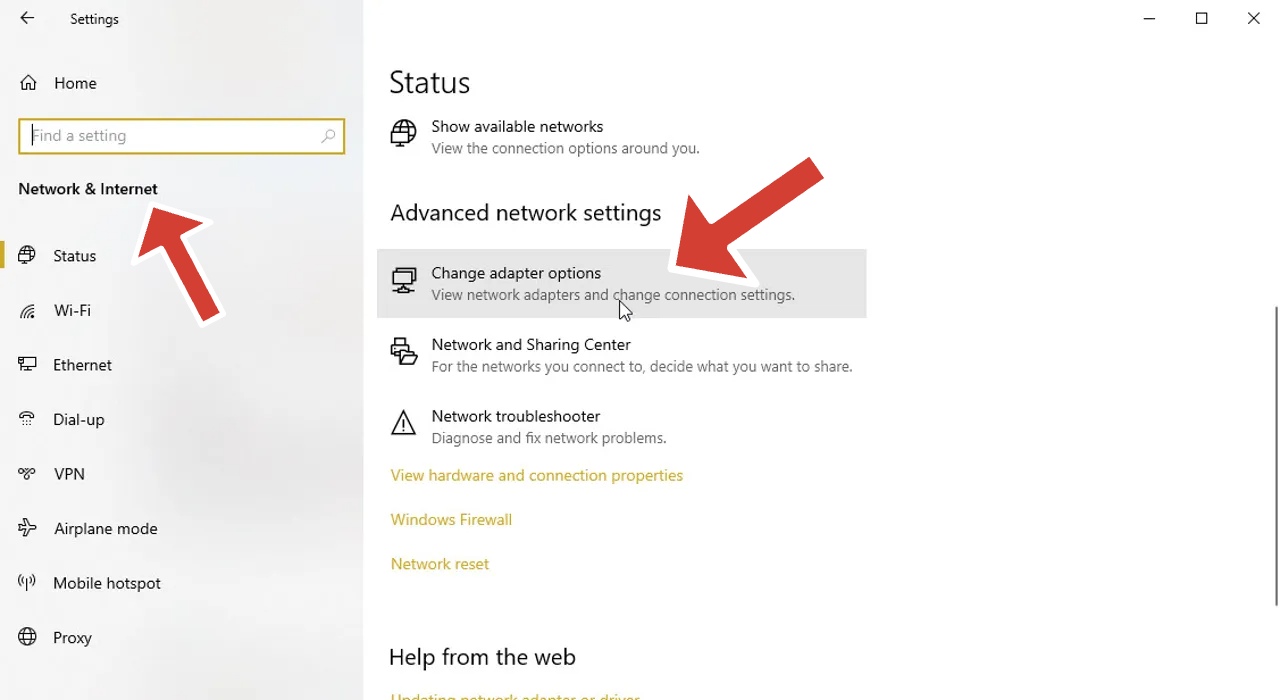
- 1. Open Settings → Network & Internet → Change adapter options.
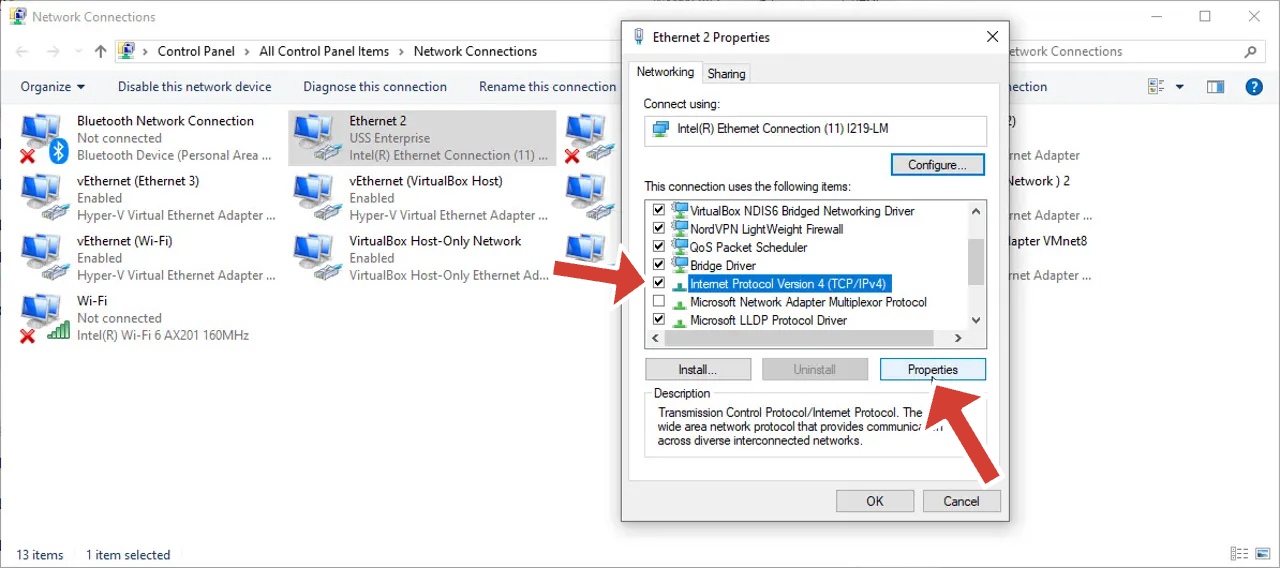
- 2. Right-click your connection → Properties.
- 3. Select Internet Protocol Version 4 (TCP/IPv4) → Properties.
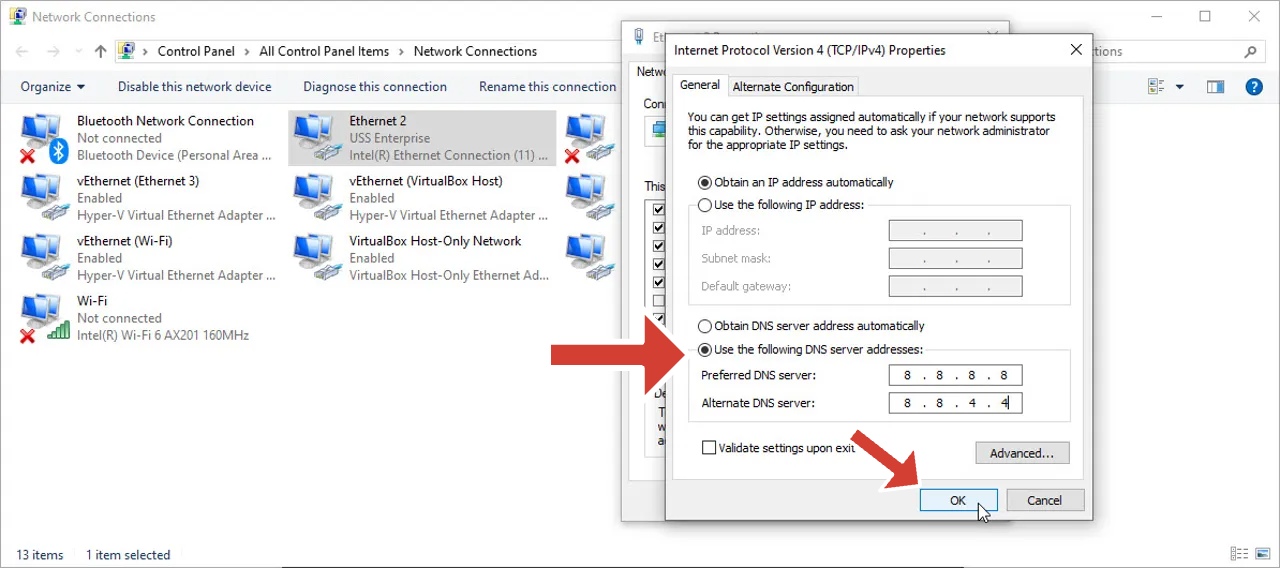
- 4. Choose Use the following DNS server addresses and enter your preferred DNS.
- 5. Click OK to save.
macOS
1. Go to System Settings → Network.
2. Select your active connection → Advanced.
3. Open the DNS tab and click the + button.
4. Add your chosen DNS server addresses, then click OK.
Android or iPhone
1. Open Wi-Fi Settings.
2. Tap your network → Advanced Settings.
3. Choose Private DNS or manually set DNS addresses.
4. Save and reconnect to apply.
Best DNS Servers for Gaming and Streaming
For the lowest latency and fastest response times, Cloudflare (1.1.1.1) and Google DNS (8.8.8.8) are the top choices. Both deliver minimal lag and high uptime, ideal for online gaming and HD streaming.
Which DNS Is Best for Privacy and Security?
If you value privacy, Quad9, AdGuard, and CleanBrowsing are your best options. They don’t store personal data and block malicious or adult domains by default.
FAQs
- Which public DNS is the fastest in?
Cloudflare (1.1.1.1) is currently the fastest worldwide, according to DNSPerf benchmarks. - Is Google DNS good for gaming?
Yes. It offers excellent reliability and low ping for most regions. - Does changing DNS increase download speed?
It won’t change your actual bandwidth, but it can improve site load times and responsiveness. - How can I test my DNS speed?
Use DNSPerf or Namebench to compare query times in your region.
Final Thoughts
Switching to a faster DNS is one of the simplest ways to improve your internet experience. Whether you prioritize speed, privacy, or safety, one of these 12 DNS providers will fit your needs. Try Cloudflare for speed, Quad9 for security, or CleanBrowsing for family protection and enjoy a smoother, safer web.


Discussion (0)
Be the first to comment.