




If you are exploring privacy-focused browsers, you might be wondering what Ulaa by Zoho is. Ulaa is a web browser developed by Zoho that focuses on privacy, security, and productivity while browsing.
Unlike traditional browsers, Ulaa is designed to reduce tracking, block unwanted content, and provide a safer browsing experience without relying heavily on third-party extensions.
What Is Ulaa by Zoho?
Ulaa is a Chromium-based web browser created by Zoho. It is built to offer a secure and privacy-focused browsing experience while still supporting modern websites and extensions.
Because it is based on Chromium, it works similarly to Google Chrome but includes additional privacy and control features.
With Ulaa, users can:
- Browse securely with built-in protections
- Block trackers and ads
- Manage multiple browsing modes
- Use Chrome extensions
- Keep data more private
It combines familiar browsing with added control.
Key Features of Ulaa Browser
Ulaa includes several features designed to improve privacy and usability.
Some important features include:
- Built-in ad and tracker blocking
- Different browsing modes for different use cases
- Enhanced privacy controls
- Support for Chrome extensions
- Minimal data tracking
These features make it suitable for users who want more control over their browsing.
What Makes Ulaa Different from Chrome
Although Ulaa is based on Chromium, it focuses more on privacy.
Here is how it differs:
Ulaa:
- Blocks trackers by default
- Offers multiple browsing modes
- Focuses on privacy-first browsing
Chrome:
- Collects more usage data
- Relies on extensions for blocking
- Focuses on integration with Google services
Ulaa aims to give users more control over their data.
Unique Modes in Ulaa
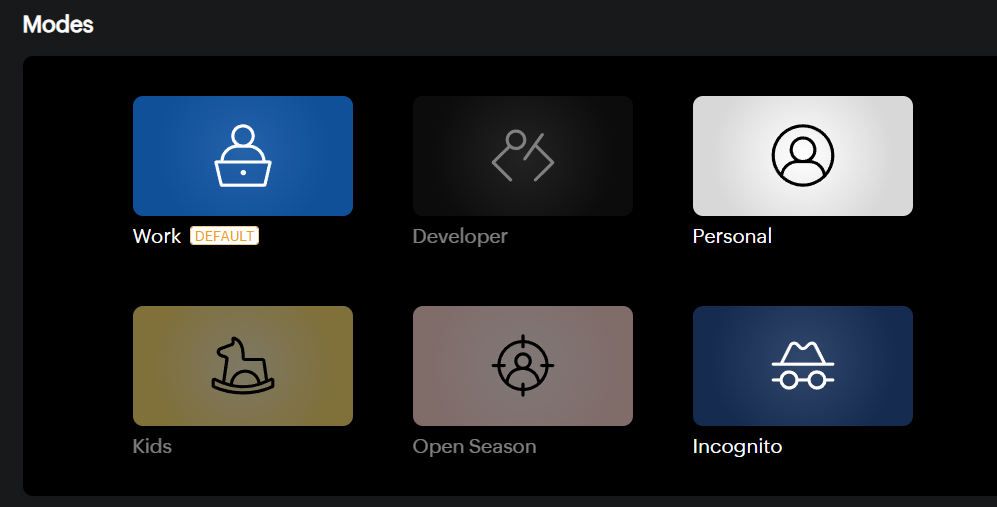
One of the standout features of Ulaa is its different browsing modes.
These modes allow you to separate activities like:
- Work browsing
- Personal browsing
- Developer mode
- Kids mode
Each mode can have different settings and restrictions.
Use Cases of Ulaa by Zoho
There are many practical Ulaa use cases.
Privacy-Focused Browsing
Users who want to reduce tracking and ads can benefit from Ulaa’s built-in protections.
Work and Personal Separation
Different modes allow users to separate work and personal activities in one browser.
Safer Browsing for Families
Parental controls and restricted modes can help create a safer browsing environment.
Productivity
Built-in features reduce the need for extra extensions, making browsing simpler.
Advantages of Using Ulaa
Ulaa offers several benefits:
- Better privacy out of the box
- Fewer extensions needed
- Clean and simple interface
- Chromium compatibility
- Flexible browsing modes
It is designed to be both secure and easy to use.
Limitations of Ulaa
Like any browser, Ulaa has some limitations:
- Smaller ecosystem compared to Chrome
- Less widely adopted
- Some features may still evolve over time
However, it continues to improve with updates.
How to Install Ulaa on Windows
You can install Ulaa easily on Windows.
Steps:
- Go to the Zoho Ulaa official website
- Download the browser
- Run the installer
- Launch Ulaa and start browsing
The setup process is quick and simple.
Final Thoughts
Understanding what Ulaa by Zoho is helps you decide if it fits your browsing needs. It is a privacy-focused browser that offers built-in protection, flexible browsing modes, and a familiar interface.
If you want more control over your data without relying heavily on extensions, Ulaa is worth trying.
FAQs
What is Ulaa by Zoho?
Ulaa is a privacy-focused web browser developed by Zoho.
Is Ulaa based on Chromium?
Yes. It is built on Chromium, similar to Google Chrome.
Does Ulaa block ads?
Yes. It includes built-in ad and tracker blocking.
Can I use Chrome extensions in Ulaa?
Yes. Ulaa supports Chrome extensions.

Discussion (0)
Be the first to comment.