



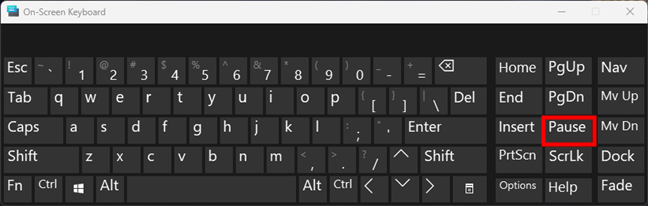
The Pause key, sometimes labeled as Pause/Break, is a rarely used key found on many traditional keyboards. While modern users may not use it often, it still serves specific technical purposes in Windows and command-line environments.
If you are wondering what the Pause key does and when it is used, this guide explains everything clearly.
Where Is the Pause Key Located
On most full-sized keyboards, the Pause key is located:
- In the top-right section
- Near the Print Screen and Scroll Lock keys
- Often labeled as Pause/Break
Some modern laptops may not include a dedicated Pause key.
What Does the Pause Key Do
The Pause key has different functions depending on the context.
1. Pausing Command Prompt Output
In Command Prompt:
- Pressing the Pause key stops scrolling output
- Pressing any key resumes the process
This is useful when reviewing long command outputs.
2. Breaking Running Processes (Legacy Use)
The Break function historically allowed users to interrupt certain DOS programs.
For example:
- Ctrl + Pause could stop a running command
This is less commonly used in modern Windows versions.
3. Opening System Properties (Windows Shortcut)
In Windows 10:
- Press Windows + Pause
This opens the System Properties window.
In Windows 11:
- The shortcut opens the Settings page related to system information
This is one of the most practical uses today.
Does the Pause Key Still Matter
For most everyday users, the Pause key is rarely needed. However, it remains useful for:
- IT professionals
- Developers
- System administrators
- Users working with command-line tools
It can help control terminal output and access system information quickly.
What If Your Keyboard Doesn’t Have a Pause Key
Many compact keyboards and laptops do not include the Pause key. You can try these alternatives:
- Fn + another key (check manufacturer documentation)
- Use On-Screen Keyboard
- Use software key remapping tools
Some keyboards map Pause as a secondary function.
How to Use Pause in Command Prompt
- Open Command Prompt
- Run a command that generates long output
- Press the Pause key
- Output stops temporarily
- Press any key to continue
This helps you read data without it scrolling too fast.
Difference Between Pause and Break
Originally:
- Pause stopped display output
- Break interrupted program execution
Modern keyboards often combine them into one key.
Is the Pause Key Removed in Modern PCs
Some modern keyboards remove it due to low usage. In such cases, alternative key combinations or software tools can replace its function.
Windows itself still recognizes the Pause function if triggered.
Final Thoughts
The Pause key may look outdated, but it still serves useful purposes, especially in command-line environments and system diagnostics. While most users rarely press it, IT professionals and advanced users may still find it helpful.
Even if your keyboard does not include it, Windows still supports its functionality through alternative methods.
FAQs
What does the Pause key do in Windows
It pauses command-line output and opens system information with Windows + Pause.
Is the Pause key still useful today
Mostly for advanced users and IT tasks.
How do I press Pause on a laptop without the key
Use Fn combinations or On-Screen Keyboard.
Does Windows 11 support Windows + Pause shortcut
Yes, but it opens system settings instead of the old Control Panel page.
Is Pause the same as Break
They are often combined but originally had slightly different functions.


Discussion (0)
Be the first to comment.